

What Is Atticus? A 2026 Review: Software, Pricing, and Formatting
In the spring of 2024, a leadership coach in Denver finished her manuscript after eight months of early mornings. She had 44,000 words on building psychological safety in management teams. The content was good. She knew it. Her early readers said so.
Then she tried to turn it into a book.
She spent three weeks wrestling Microsoft Word into something that looked like a published book. Page numbers vanished. Her section headings kept shifting. The PDF she uploaded to Amazon KDP came back rejected twice. On the third attempt she got it through, but the print proof looked nothing like the preview on her screen. The interior margins were too tight. The chapter titles were in the wrong font. She shelved the project.
Six months later a colleague mentioned Atticus. She bought it for $147, imported her Word file, picked a theme, spent two afternoons adjusting settings, and had a KDP-ready PDF and EPUB that matched what she saw on screen. Her book published in the first week of November.
That gap between a finished manuscript and a published book is where most coaches stop. Atticus was built specifically to close it.
What Atticus Is (and Is Not)
Atticus is a web-based writing and book formatting application for self-publishing authors. It runs in your browser and as a downloadable progressive web app (PWA), which means it works on Windows, Mac, Linux, and Chromebook devices without needing to install platform-specific software.
The product has two main jobs:
A writing environment. Atticus gives you a clean word processor organized around chapters, scenes, front matter, and back matter. You can write your entire book inside Atticus, or you can import a finished manuscript from Microsoft Word. The writing side is intentionally minimal: it is a place to draft and organize text, not a research tool or an outliner.
A formatting engine. This is the job most coaches hire Atticus for. Once your manuscript is inside the app, the formatting engine converts it into print-ready PDF and EPUB files that meet the technical requirements for Amazon KDP, IngramSpark, and Draft2Digital. You choose a theme, configure your trim size and margins, adjust chapter headings, and export files that are ready to upload.
What Atticus is not: an AI writing tool. Atticus has no content generation, no autocomplete, no outline assistant, and no intelligent suggestions. It is a production tool. It assumes you have written your book and need to turn it into something a reader can hold or buy on a device.
This distinction matters because coaches often search "what is Atticus" expecting to find a writing assistant. The name appears on lists of writing software, it sits in the same budget bracket as AI tools, and it includes a word processor. But Atticus does not help you generate your first draft. If you are still at the "I need to write the book" stage, Atticus is not your next step. If you have a draft and need to format it professionally for under $200, Atticus is one of the best options currently available.
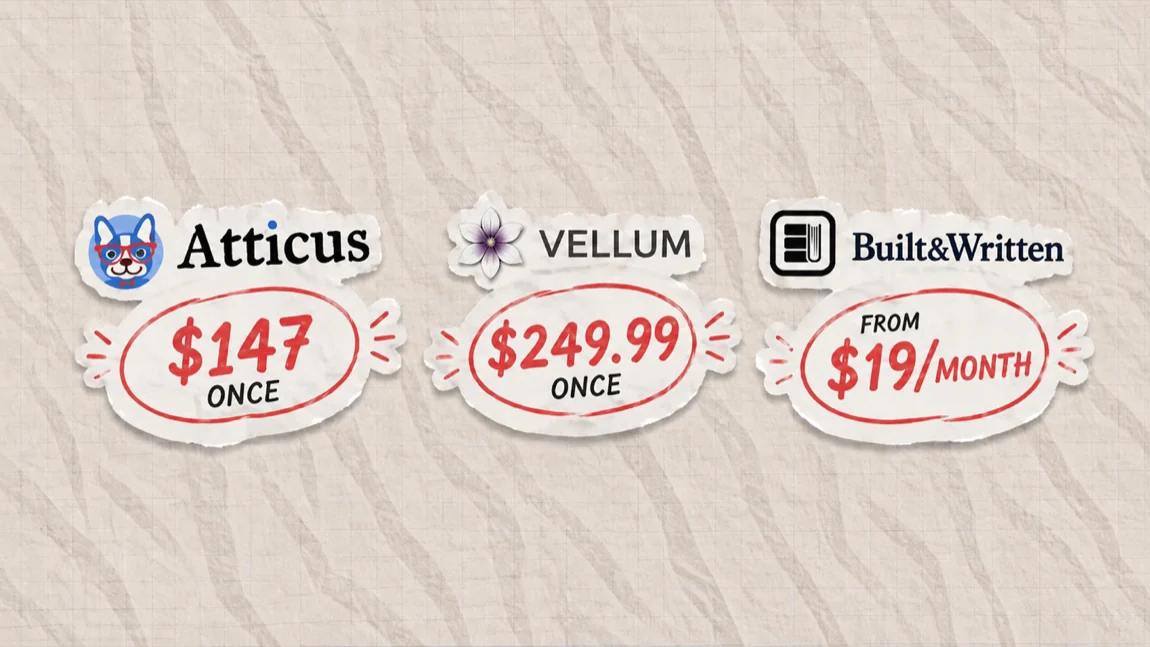
The product is also not subscription-based. You pay $147 once and own it. Future updates are included. There are no per-book fees and no annual renewals. For coaches who publish one book every year or two, this matters.
The Origins of Atticus: Why Dave Chesson Built It
Dave Chesson is the founder of Kindlepreneur, a site and community for self-publishing authors, and the creator of Publisher Rocket, a research tool authors use to find keywords and categories for Amazon listings. He sits in the center of the indie publishing world and has spent years watching the same problem repeat itself.
Authors finish their manuscripts and then lose months to formatting.
The dominant formatting tool when Chesson started building Atticus was Vellum, which costs $249.99 and runs exclusively on Mac. Windows authors had no direct equivalent. Scrivener had formatting capabilities but a compilation process that new authors found confusing. Adobe InDesign was professional-grade but required design expertise and a monthly subscription. Microsoft Word was free but produced unreliable output for print book specifications.
The gap was a cross-platform, reasonably priced formatter that worked like consumer software: import your text, pick a style, export clean files. Atticus launched to fill that gap.
The result is a tool shaped by Chesson's familiarity with the pain points of self-publishing authors who are not designers or technical users. The interface prioritizes a short time-to-output over deep customization. The price targets authors who are doing this themselves, not authors with a production budget for professional typesetting. The cross-platform design targets the Windows majority that Vellum had locked out.
For coaches, Chesson's orientation toward nonfiction authors is particularly relevant. Atticus includes heading levels H2 through H6, callout boxes, footnotes and endnotes, and image insert fields with captions. These are the structural elements a coaching or business book uses heavily. They were added because nonfiction authors need them. Vellum's fiction-first design makes these elements awkward by comparison.
The Three-Layer Author Stack
Understanding where Atticus fits requires understanding the full publication process. Most coaches who publish a business or coaching book move through three distinct layers.
Layer 1: Write. Getting structured ideas out of your head and into a complete manuscript. This is the stage where most coaches spend the most time and face the most resistance. The output is a rough or polished draft, typically in Markdown, Word, or Google Docs format. AI writing platforms, voice-to-text tools, and structured note apps all live at this layer.
Layer 2: Format. Taking that raw manuscript and giving it the visual structure of a published book. This includes the interior layout (font choices, margins, headings, callout boxes, page numbers, running headers), the file types required by distributors, and the technical specifications each platform demands. Atticus is a Layer 2 tool.
Layer 3: Distribute. Uploading the finished files to Amazon KDP, IngramSpark, Draft2Digital, or another distributor. This is primarily a form-filling exercise that takes about 20 minutes once you have clean, correctly formatted files. The distributing platform also handles pricing, royalty setup, and metadata.
Coaches most often skip Layer 2 or try to fold it into Layer 1 using Word. The result is a manuscript that looks like a manuscript rather than a book. The interior design signals to readers whether a book is self-published or professionally produced. Readers cannot always articulate what feels off, but they feel it.
Atticus plugs the Layer 2 gap for coaches who do not want to hire a book designer for interior layout or learn Adobe InDesign. The $147 purchase puts professional-quality formatting within reach without a design education.
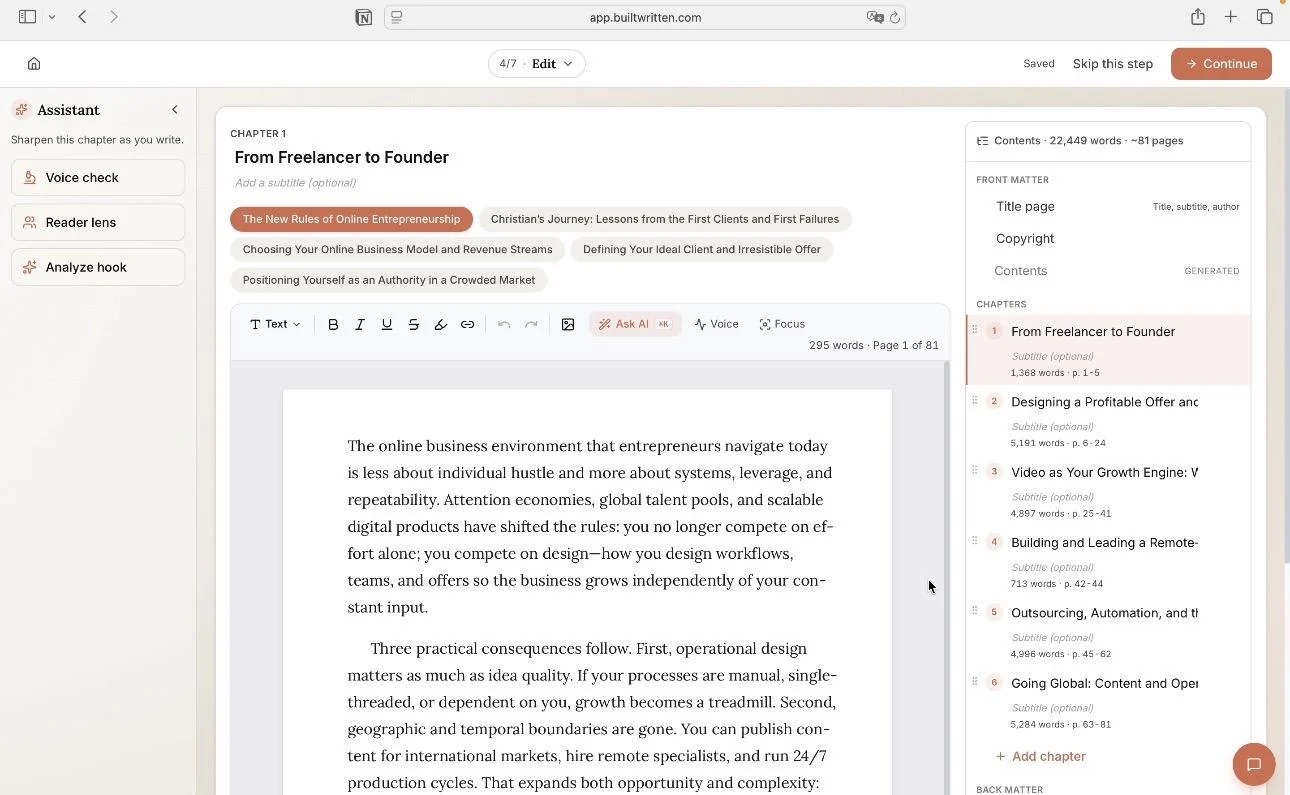
Where AI platforms fit in this stack. Built&Written is designed for Layer 1: guiding coaches through structuring their expertise, developing each chapter, and producing a complete first draft. The output is clean, exportable text that transfers into Atticus for Layer 2 work. The two tools are not competitors. They handle adjacent parts of the same process.
A coach who uses Built&Written to draft and Atticus to format moves through the three layers in a controlled, sequential way instead of trying to collapse all three into Word. That distinction is practical: it is faster, produces a better result, and eliminates the most common points of friction.
Inside the Writing Environment
Atticus organizes your book in a left-hand sidebar that shows your project structure: front matter, chapters, and back matter. Each section is a separate document within the project. You can drag and drop to reorder chapters, label sections as chapters or scenes, and add private notes to any section that are visible only to you and not included in exports.
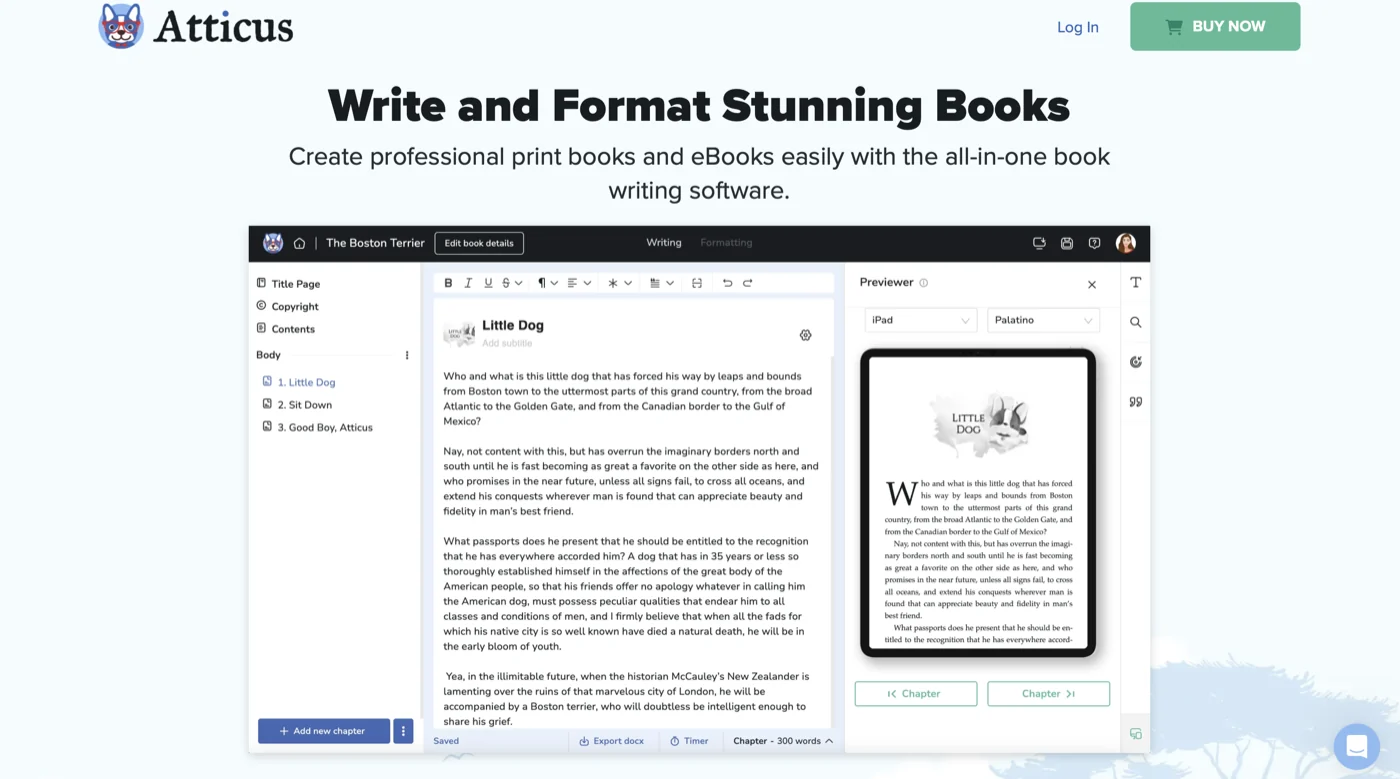
The writing surface itself is deliberately plain. You get a full-width drafting area, a basic formatting toolbar (bold, italic, headers, lists, block quotes), and a running word count. Atticus does not try to be a research hub, an outliner, or a writing coach. Its writing environment exists so that authors can draft and organize their content without switching between applications.
Chapter organization. The chapter-by-chapter structure is more useful for coaching books than it might appear. When you write your full manuscript in a single Word document, your structural judgment is partly visual: you scroll through the document to assess flow and proportion. In Atticus, each chapter is a discrete unit in the sidebar. You see immediately whether Chapter 3 is half the length of Chapter 2. You can move chapters to test a different order without cutting and pasting. This structural awareness is useful when you are writing a nonfiction book that needs to build logically from one section to the next.
Goal tracking and writing streaks. Atticus includes a daily word count goal system. You set a target, and the app tracks your progress and writing streak across sessions. A 14-day streak has real behavioral pull: coaches who see that number displayed tend not to break it. This is a small feature, but the habit-forming effect is documented across writing and productivity tools. Authors who write consistently produce drafts faster than authors who write in irregular bursts.
Sprint timer. Atticus includes a sprint timer for timed writing sessions. You set a duration (15 minutes, 25 minutes, or a custom length), the app counts down, and you write against the clock. This Pomodoro-style structure is useful for coaches who do their writing in the margins of a full day and need a container to make those sessions productive.
Collaboration. You can share your Atticus project with an editor by generating a share link with read or comment access. The editor can leave comments on specific passages without having edit access to your content. For coaches working with a developmental editor, copyeditor, or writing partner before final formatting, this feature means the collaboration happens inside the tool rather than requiring file exports and tracked-changes conversations in Word.
Cloud storage. Projects save automatically to Atticus's cloud. You can open your book from any device where you are logged in, which means you can draft on your laptop, review on a tablet, and pick up on a different machine without managing file versions manually. An offline mode lets you write without internet access and syncs when you reconnect.
ProWritingAid integration. Atticus integrates with ProWritingAid, a grammar and style checking tool, for authors who want editorial assistance within the app. This is not AI writing; it is rule-based style review (passive voice flagging, overused words, sentence length variation). Authors who use ProWritingAid as part of their editing workflow can run it inside Atticus without exporting to a separate tool.
Inside the Formatting Engine
The formatting engine is the reason most coaches buy Atticus. It converts your manuscript into print and ebook files without requiring you to understand typographic specifications or distributor technical requirements.
Themes. Atticus ships with 17-plus professionally designed themes. Each theme is a complete visual treatment: body font, heading font, font sizes, line spacing, paragraph indentation or spacing, chapter heading design, drop caps (optional), and decorative elements (chapter number styles, section break ornaments). The themes range from clean and minimal (suitable for business and coaching books) to decorative (more appropriate for fiction).
You can apply a theme to your entire book in one click. You can then modify any individual element within the theme without starting over. Once you have customized a theme, you can save it as a named style and apply it to future books. For coaches who publish multiple books in a series, this means visual consistency across your library without repeating the design work each time.
Custom theme builder. If none of the 17-plus built-in themes matches your brand, the custom theme builder gives you direct control over the same variables: fonts from a library of 1,500-plus options, sizes, spacing, heading hierarchy, and decorative details. The learning curve here is real. Coaches who want a specific visual treatment tied to their brand (a particular typeface, a color accent on chapter headers, a custom ornament) will spend time in the theme builder before getting what they want. This is worth acknowledging: the built-in themes are good enough for most coaching books, but achieving a truly custom look requires patience with the interface.
Heading levels. Atticus supports H2 through H6 heading levels within chapters. This is a specific nonfiction advantage. Business and coaching books organize content into chapters with multiple levels of subheadings: main sections, subsections, and callout headings. Atticus formats all of these correctly in both the print PDF and the EPUB. Vellum's nonfiction heading support is more limited, which is one reason coaching authors on Mac still often choose Atticus.
Callout boxes. Atticus supports callout box formatting: a visually distinct block that sets off a key idea, client exercise, framework summary, or important caution from the surrounding body text. Callout boxes are a standard element in coaching and business books because they make content scannable and help readers identify the actionable material. In Atticus, you add a callout box through the formatting toolbar, choose a style (the exact styles available depend on your theme), and type your callout text. The box is handled automatically in both print and ebook outputs.
Trim sizes. Atticus supports the most common self-publishing print trim sizes: 6x9 (the standard for business and professional nonfiction), 5x8, 5.5x8.5, and several others. You can also enter custom dimensions. Margin and gutter settings are configurable: you adjust the inside (gutter) margin to account for book binding, set your outside margins for readability, and configure header and footer space for running headers and page numbers. These settings directly affect the feel of the physical book in a reader's hands.
Image inserts. Atticus supports inline images with caption fields. This matters for coaching books that include diagrams, frameworks, process illustrations, or case-study callouts. You upload your images, set their alignment and size within the layout, and add captions. The images appear in both the print PDF and EPUB outputs. Image quality in the print PDF depends on the resolution of your uploaded files; KDP requires 300 DPI for print images, and Atticus does not resize your images upward.
Front and back matter. Atticus includes templates for standard front and back matter: title page, copyright page, dedication, table of contents, foreword, and acknowledgments on the front end; about the author, other books, and reader resources on the back end. The table of contents generates automatically from your chapter structure. Back matter is where coaches typically add their speaking and consulting information, links to their website, and an invitation for readers to reach out.
Export. When you export from Atticus, you choose your output format: Print PDF (formatted for your chosen trim size and ready for KDP or IngramSpark upload), EPUB (for KDP ebook distribution and other platforms), or both. The export process runs a pre-export check on your manuscript for common technical issues. The resulting files are ready to upload without additional processing in most cases.
This matters practically because file rejections from KDP slow your launch. A print PDF rejected for margin errors, bleed settings, or embedded font issues can cost you two to four days on resubmission cycles. Atticus's pre-export check catches the most common issues before you upload.
Atticus vs the Field
Coaches evaluating Atticus almost always compare it to three other tools: Vellum, Scrivener, and Microsoft Word. Each comparison reveals something different about where Atticus fits.
Atticus vs Vellum
Vellum is the established standard for book formatting quality. The output is refined. The themes are carefully curated. The preview is fast. It is also Mac-only and costs $249.99 for the full version that handles both ebooks and print books.
Atticus advantages:
Cross-platform availability is the decisive factor for many coaches. If you are on Windows, Vellum does not run on your machine. The conversation ends there. Atticus runs on Windows, Mac, Linux, and Chromebook.
On price, Atticus is $102 cheaper at $147 versus $249.99. For a coach publishing their first book, that gap matters.
For nonfiction specifically, Atticus has stronger structural support. H2-H6 heading hierarchy, callout boxes built into the theme system, and footnotes are all native in Atticus. Vellum's nonfiction heading hierarchy is flatter, and callout box styling requires theme hacks that not all users manage successfully.
Atticus also includes cloud storage and collaboration out of the box. Vellum projects live locally on your Mac.
Vellum advantages:
Vellum has been available since 2014. Its themes have had a decade of refinement. The typographic quality out of the box is excellent. For fiction authors on Mac who prioritize aesthetic detail and already own the software, Vellum remains competitive.
Vellum is also faster for experienced users who know its workflow. The interface has been refined over years of iteration. Atticus, launched in 2022, is still adding features and fixing edge cases.
Bottom line: For coaches on Windows, Atticus is the clear choice because Vellum does not exist on their platform. For coaches on Mac writing nonfiction, Atticus's structural features make it the practical recommendation. For Mac-based fiction authors with strong typographic preferences and existing Vellum experience, Vellum remains defensible.
Atticus vs Scrivener
Scrivener is a writing-focused tool with formatting and export capabilities built in. Its organizational depth appeals to complex long-form projects: you can organize research, maintain character notes, use a corkboard for scene planning, and manage a manuscript of 200,000 words without losing structure.
Atticus advantages:
The learning curve difference is significant. Scrivener is powerful but complex. Its Compile function, which converts your project into a formatted output, is the step new users most often get wrong. Getting a clean, professional print PDF out of Scrivener typically requires learning Compile settings in detail. Atticus's formatting workflow is more direct.
For coaches who want to write and publish a single coaching book without investing weeks in learning the tool, Atticus's shallower curve is a meaningful advantage.
Scrivener advantages:
At $59 one-time for Windows or $79 for Mac (and around $20 for iOS), Scrivener is less expensive than Atticus if your primary need is a writing environment and you are willing to learn the Compile process for formatting.
For authors who have used Scrivener for years and know it well, the organizational depth is genuine. The tool handles research folders, multiple drafts, and scene-level metadata in ways Atticus does not try to match.
Bottom line: Coaches who want an integrated writing and formatting tool with a manageable learning curve should choose Atticus. Coaches who already own and know Scrivener may reasonably continue using it for writing and add Atticus for formatting if they are not happy with Scrivener's output quality.
Atticus vs Microsoft Word
Word is the default for coaches because they already have it and already know how to use it. The writing experience in Word is adequate for drafting. The formatting problem emerges at the export stage.
Word's PDF export produces inconsistent results for print book specifications. Margin settings in Word do not always translate correctly to KDP's print PDF requirements. Word's EPUB export is frequently rejected by KDP's file validator. The workarounds require technical knowledge most coaches do not have: Calibre for EPUB conversion, specific PDF export settings for print margins, manual header and footer adjustments.
A coach who spends six hours troubleshooting Word's print output is not writing. That is the core argument for Atticus: $147 buys back your time and your certainty about the output quality.
The practical comparison also works in the other direction. Coaches who draft in Word can import their .docx file into Atticus directly. Most formatting transfers cleanly. You typically clean up some heading levels and spacing, but the bulk of the import is automated. You are not abandoning your Word draft; you are using it as the input for a better formatting process.
Where Atticus Works Best (and Where It Falls Short) for Coaches
Atticus is well-matched to a specific type of coaching author.
Best fit:
A coach with a complete or near-complete manuscript who needs a professional print and ebook output without hiring a book designer for interior layout. Atticus delivers this reliably for $147.
A coach on Windows who has been told "use Vellum" and discovered that Vellum does not run on their machine.
A coach who publishes more than one book and wants a consistent interior style applied without repeating design decisions each time. The custom theme system handles this.
A coach who prefers one-time purchases over subscriptions and wants to own their tool outright.
Limitations to name directly:
Atticus has no AI writing assistance. In 2026, when AI-assisted drafting has become common in the author community, this is a real gap for coaches who want help getting their content onto the page. Atticus does not fill that gap and is not trying to. If your primary challenge is writing the book, Atticus is not the tool you need next.
Atticus does not connect directly to KDP, IngramSpark, or other distributors. You export your files from Atticus, then log into each platform's dashboard separately to upload. This is a two-step process that takes about 20 minutes with clean files. It is not a burden, but it is a workflow reality.
The custom theme builder has a real learning curve for coaches who want a highly specific visual treatment. Getting from "close to what I want" to "exactly what I want" in the theme builder takes time. Coaches with a strong brand identity and specific font requirements may find it easier to provide an Atticus-formatted interior to a book designer for final polish rather than doing full customization themselves.
Atticus is also primarily a formatting tool, not a complete author business platform. It does not help you with Amazon keyword research (Publisher Rocket handles that), price tracking, email list building from your book (BookFunnel handles that), or post-publication marketing. Coaches building a complete self-publishing operation use Atticus alongside other specialized tools.
How Coaches Use Atticus in Practice
The workflow that produces the fastest, cleanest results for coaching books combines an AI-assisted writing platform for drafting with Atticus for formatting.
The typical sequence looks like this:
A coach uses Built&Written to move from outline to complete draft. Built&Written is designed for coaches who want to write their book without getting stuck: it guides the chapter-by-chapter development process with AI assistance, helps coaches shape their expertise into structured content, and produces a clean exportable draft. The output is Markdown or Word format.
The coach imports that draft into Atticus. Import typically takes a few minutes. Heading levels adjust, front and back matter sections get populated, and the chapter structure appears in the sidebar.
The coach applies a theme, configures trim size and margins, adds any callout boxes or images not in the original draft, and runs the pre-export check. This formatting work typically takes one to two full sessions for a 40,000-word coaching book.
The coach exports a print PDF and EPUB, reviews them in KDP's digital proof system, and uploads.
What Built&Written does and does not do: Built&Written guides the writing process and produces the draft. It does not generate QR codes for print books, does not have a native LinkedIn integration for post-publication content distribution, and does not ingest podcast transcripts for direct conversion into chapters. If you want to incorporate podcast content into your book or add QR codes to your print edition, those tasks require separate tools or manual work.
What Atticus does and does not do: Atticus handles the interior layout and file export. It does not connect to your KDP account to upload your files directly. It does not track your book's sales rank, manage your Amazon listing, or generate marketing copy for your book description. The tool begins and ends at the formatted file.
Used together, the two tools handle the two hardest parts of the self-publishing process for coaches: writing the book and making it look like a book. Everything else (cover design, keyword research, pricing, distribution setup) is handled by specialized tools in the wider author ecosystem.
Your First Two Days with Atticus: A Step-by-Step for Coaches
The fastest way to understand what Atticus does is to walk through a realistic first-use scenario. Here is the sequence a coach typically follows when bringing a completed manuscript into Atticus for the first time.
Before you start: Gather your manuscript (in .docx or Markdown format), any images or diagrams you plan to include, and your front and back matter text (copyright page, dedication, author bio, acknowledgments). You do not need to have all of this ready before you start, but having it on hand speeds up the process.
Step 1: Create a project and import your manuscript (30-60 minutes)
Open Atticus at atticus.io, log in, and click "New Book." Name your project and select whether it is fiction or nonfiction. Nonfiction unlocks the H2-H6 heading hierarchy and callout box options you need for a coaching book.
Import your manuscript using the Word import function. Atticus reads your .docx file and converts it into the chapter structure. Headings in your Word document become chapters or sections in Atticus depending on their heading level. If your Word document used consistent H1 headings for chapter titles and H2 headings for subheadings, the import is typically clean. If your Word formatting was inconsistent, you will spend time in this step adjusting the structure in the sidebar.
After import, scroll through each chapter in the sidebar and verify that the structure looks correct. Fix any headings that imported at the wrong level. This step takes anywhere from 15 minutes (for a cleanly formatted Word document) to a few hours (for a document with inconsistent heading use).
Step 2: Select and customize your theme (1-2 hours)
Click into the book formatting panel and browse the built-in themes. For a coaching or business book, look at the clean, minimal themes first: they tend to project the professional, content-first aesthetic that works well in the genre. Preview your actual manuscript in each theme before committing.
Once you select a theme, adjust the specific details: body font (Times New Roman and Garamond are the standard for business nonfiction in print), heading font (you can use the same family or contrast with a sans-serif), font size for body text (10.5pt to 11pt is common for 6x9 trim), and line spacing.
For coaching books, pay particular attention to the callout box style. Open a chapter with a key framework or client exercise, add a callout box, and see how it renders in the theme preview. This is one of the most visible design elements in your book, and different themes style callout boxes differently.
Step 3: Configure trim size and margins (30 minutes)
Set your trim size in the book settings. For most coaching and business books, 6x9 inches is the standard. It is the expected format for the genre, and it feels authoritative in a reader's hands. If you intend to price your book under $10 on KDP, check whether your page count at 6x9 requires a higher printing cost than the royalty you will earn at your target price. Some short coaching books (under 200 pages at 6x9) perform better financially at 5.5x8.5 because the page count goes up and the production cost stays within range of profitable royalties.
Set your margins. Atticus recommends standard margin settings for each trim size, and you can accept these defaults. If you have strong preferences (for example, a wider outside margin for reader note-taking), you can adjust. The gutter (inside margin) needs to be slightly wider than the outside margin to account for the binding. Atticus handles this calculation automatically when you set the gutter value.
Step 4: Add images and callout boxes (1-3 hours)
If your coaching book includes diagrams, frameworks, or visual models, this is where you add them. Upload images at 300 DPI or higher for print quality. Place them inline in the relevant chapter, set alignment (centered is most common for framework diagrams), and add captions if needed.
Add callout boxes for any key frameworks, client exercises, or summary statements that need visual separation from the body text. In a coaching book, these elements do the heavy lifting for skimmable readers. Most coaches who engage with business books skim on first read, then return to specific sections when they are ready to apply the content. Callout boxes are how your frameworks survive the skim.
Step 5: Populate front and back matter (30-60 minutes)
Fill in the front matter templates: title page, copyright page (include the year, your name, and the standard rights statement), dedication (optional), and table of contents (Atticus generates this automatically from your chapter structure). Add a foreword or preface if you have one.
Back matter for a coaching book typically includes: a brief "About the Author" page, an invitation to connect (your website, email, or speaking inquiry link), and a "Work With Me" or "Next Steps" section. This is where coaches capture the commercial value of the book: readers who finish and want to go deeper should have a clear path to your services.
Step 6: Run the pre-export check and export (30 minutes)
When your book looks correct in the preview, click Export. Atticus runs a pre-export check that flags common issues: images below recommended resolution, heading structure problems, and technical specification mismatches for your chosen trim size. Review any flags and correct them before proceeding.
Export your print PDF and EPUB. Review the PDF in a PDF viewer zoomed to the actual page size. Check margins, heading appearance, callout box styling, and image placement. Check the EPUB in a reader app or KDP's previewer. When you are satisfied, upload both files to your KDP (or IngramSpark) dashboard.
Total time for a 40,000-word coaching book, first-time Atticus user: eight to twelve hours across two or three days. Authors using a saved custom theme on their second book typically complete the same process in four to six hours.
A Brief Note on Atticus Finch
Searching "what is Atticus" produces results about both the writing software and Atticus Finch, the fictional lawyer in Harper Lee's "To Kill a Mockingbird." Atticus Finch is the father of Scout and Jem Finch, a widower, and the moral center of one of the most widely read American novels of the 20th century. He is not affiliated with the writing software.
The writing software borrowed the name for its connotations of principled, careful work. If you searched here looking for the character, the short answer is that Atticus Finch is a fictional defense attorney from a 1960 novel, widely regarded as one of literature's most enduring portraits of moral courage.
If you searched here for the writing tool, everything above applies.
Key Takeaway: Atticus is a $147 one-time purchase that converts a finished manuscript into professional print and ebook files ready for Amazon KDP and other distributors. It works on Windows, Mac, Linux, and Chromebook. It has no AI writing features. It is a formatting tool, not a writing assistant. For coaches with a completed draft who want a clean, professional book interior without hiring a designer or learning a complex tool, Atticus is among the best options at its price point.
Frequently Asked Questions
What is Atticus the writing software?
Atticus is a browser-based application for writing and formatting books for self-publishing. Most authors use it primarily for the formatting side: taking a completed manuscript and producing KDP-ready PDF and EPUB files. It was built by Dave Chesson, the founder of Kindlepreneur, and launched in 2022.
How much does Atticus cost?
Atticus costs $147 as a one-time purchase. There are no monthly fees and no per-book charges. The purchase includes lifetime updates to the software and access across all your devices.
Is Atticus better than Vellum for coaches?
For coaches on Windows, yes by default: Vellum runs only on Mac. For coaches on Mac writing nonfiction, Atticus is usually the better fit because it has stronger support for multi-level headings (H2-H6) and callout boxes, which are standard elements in coaching books. Vellum's themes are more typographically refined for fiction, and it has a longer track record, but for nonfiction structure Atticus has the functional advantage.
Does Atticus have AI writing features?
No. Atticus is a word processor and formatting tool, not a content generation platform. If you want AI assistance writing your coaching book, you need a separate tool. Atticus takes over once you have a draft.
Does Atticus work on Windows?
Yes. Atticus runs on Windows, Mac, Linux, and Chromebook via browser or as a downloaded progressive web app. This cross-platform availability is one of its primary advantages over Vellum, which is Mac-only.
Can I import a Word document into Atticus?
Yes. Atticus imports .docx files directly. Most formatting transfers correctly; you typically adjust heading levels and some paragraph spacing, but the majority of the import is automated. You do not need to retype or reformat your content manually.
Does Atticus produce files that Amazon KDP will accept?
Yes. The PDF and EPUB files Atticus produces meet KDP's technical requirements. The export process includes a pre-export check that flags common issues before you upload. KDP rejection rates are substantially lower with Atticus output than with Word PDF exports.
Is Atticus good for nonfiction coaching books?
Yes. The formatting engine specifically supports the structural elements nonfiction coaching books use: multi-level headings (H2 through H6), callout boxes for key frameworks and exercises, block quotes, footnotes and endnotes, and inline images with captions. These elements are available natively without requiring workarounds.
What does the Atticus theme builder do?
The theme builder lets you customize or create from scratch the visual treatment applied to your book: font family and size for body text and headings, line spacing, paragraph indentation or block spacing, chapter heading design, and decorative elements like section break ornaments. You can save custom themes and apply them to future books. The library includes 1,500-plus fonts.
Can Atticus format for IngramSpark and Draft2Digital?
Yes. Atticus exports standard PDF and EPUB formats that are accepted by IngramSpark, Draft2Digital, and other major self-publishing distributors, not only Amazon KDP.
Is there a free trial for Atticus?
Atticus does not currently offer a free tier or trial period. The purchase includes a 30-day money-back guarantee, so you can request a refund if the software does not meet your needs within that window.
How long does it take to format a coaching book in Atticus?
For a 40,000-word coaching book, most authors who are new to Atticus spend four to eight hours on the formatting process across two or three sessions. This includes theme selection and customization, adjusting any heading hierarchy issues from import, adding images and callout boxes, and reviewing the print preview before export. Authors who reuse a saved theme on their second or third book complete formatting in half that time.
Sources
- Kindlepreneur Atticus Review: pricing, features, and Vellum comparison data
- Self-Publishing School Atticus Review: Dave Chesson background and feature overview
- The Write Practice Atticus Review: nonfiction formatting features and use-case analysis
- Atticus.io official site: product description and feature list
Sources & References
- https://kindlepreneur.com/atticus-review/
- https://selfpublishing.com/atticus-review/
- https://thewritepractice.com/book-writing-software-atticus-review/
- https://www.atticus.io/
About the author

Mykhailo Druz
More in tools
Ready to write your book?
Turn your expertise into a professional book with Built&Written.