

Squibler AI Review 2026: What Changed, and What Still Doesn't Work
Quick answer: Squibler AI is a web-based writing platform that generates outlines, chapter drafts, and full manuscripts using AI. Its AI Book Writer can produce a complete chapter-organized draft from a single brief in minutes. Paid plans start at $15.83 per month billed annually. The tool was designed primarily for fiction writing, which creates real gaps for coaches writing non-fiction books for Amazon KDP. Run the four-gate check in this guide (structure, voice, accuracy, formatting) before you pay.
KEY TAKEAWAY: Squibler is a fiction-first drafting tool with a useful free tier. It breaks blank-page paralysis for coaches who cannot start, and its AI Book Writer produces a full draft faster than any alternative at this price. It does not preserve your voice, keep the internal logic of your proprietary framework intact, produce KDP-ready exports, or handle non-fiction structure reliably. For most coaches writing a business book, the gaps cost more in editing time than the subscription saves in writing time. The writing work begins when Squibler stops.
In early 2025, a leadership coach had been sitting on the same book idea for fourteen months. She had the content: five years of client notes, a LinkedIn archive, a framework she used in every session. What she didn't have was a starting point. A colleague recommended Squibler. She signed up for the free tier on a Tuesday afternoon, typed her book concept into the Smart Writer, and had a 30,000-word draft by Thursday.
The momentum felt real. Then she tried to publish on Amazon KDP. The exported Word document didn't match KDP's interior formatting requirements. Chapter headings were inconsistent. The prose read like a motivational brochure, not like her. She spent four weeks rewriting what the AI had written in forty-eight hours.
That is the Squibler experience for most coaches in 2026: fast at the start, expensive in the middle. This walkthrough covers exactly what you're getting before you sign up, how the Smart Writer and the full AI Book Writer actually generate a manuscript, where the tool falls apart for non-fiction, and a four-gate check for deciding whether it belongs in your book-writing stack.
What Is Squibler AI and What Does It Actually Do?
Squibler launched in 2018 as a productivity and drafting environment for long-form writers. The company added an AI writing assistant, called the Smart Writer, in November 2023. As of 2026, the platform reports more than 20,000 active writers and positions itself as a book and screenplay drafting tool.
The core claim is simple: you describe your project, and Squibler generates a structured draft you refine from there. The "AI Book Writer" refers to the full-book end of that capability: rather than generating one paragraph or section at a time, the tool can produce a complete chapter-organized manuscript from a single detailed brief. You describe the book's topic, audience, and intended structure. Squibler generates an outline, then fills the outline into chapter drafts with a beginning, middle, and end.
That claim holds up for fiction. Squibler's templates and AI training cover novels, romance, mystery, thriller, comedy, horror, and screenplays. The underlying model generates narrative prose: story arcs, scene transitions, character beats, dialogue with internal logic. Those strengths transfer poorly to what most coaches are actually trying to write: a practical non-fiction guide built around a proprietary framework, intended for clients, meant to sit on a prospect's nightstand and sell coaching sessions.
The gap is not a polish issue. It's structural. A narrative arc and a business framework are different shapes. An AI trained on narrative forms will produce something that looks like a chapter but reads like a novel excerpt when applied to a how-to coaching book. The editing required to fix that is not a round of revisions. It's a rewrite.
Here is what Squibler offers as of 2026:
- AI manuscript generation from a concept, genre, and parameter set
- Full-book generation: a chapter-organized draft of 20,000 to 50,000 words from a single brief, depending on the brief and your plan's credit limit
- Chapter organization with drag-and-drop management and word count tracking
- A story elements system for tracking characters, locations, objects, and events
- A planning board with Kanban-style project management
- A Guided Book Proposal Workflow (added in 2026) with premise, audience, and chapter summary fields
- A mini chat assistant called "Ask Squibler" embedded in the writing dashboard
- Export to PDF, TXT, DOCX, and Kindle formats
- Multi-language support across 80+ languages
Here is what Squibler does not offer:
- Citation or footnote support
- KDP-specific interior formatting
- Cover design tools
- A mobile app (web-only platform)
- Voice conditioning from writing samples
That last point matters more than any feature list. Voice conditioning is the difference between AI that produces your book and AI that produces a book. Squibler produces the latter.
Understanding what it is and isn't up front prevents the forty-eight-hour draft and four-week rewrite cycle.
How Does Squibler Generate a Book? The Full Workflow
Squibler's AI works in two modes. The Smart Writer generates one section at a time from individual prompts. The full-book generation flow produces a complete manuscript from a project brief. Both run through the same web interface, and the workflow below covers the complete path from brief to export as it runs in 2026.
Step 1: Set up the project and write the brief.
You create a new project and select "Book" as the project type. Squibler asks for a working title, the book's genre (fiction or non-fiction, with subcategories), a target audience description, the book's core concept in one to three sentences, and an optional chapter count.
This brief is the most important step in the entire workflow. A vague brief produces generic output. A specific brief produces output that's closer to what you actually need.
A coach who entered "A coaching book for managers" received a draft that covered communication, feedback, delegation, and goal setting in four chapters. Another coach who entered "A coaching book for mid-level managers at technology companies who feel overlooked for promotion despite strong performance, organized around five conversations they need to have with their leaders" received output that at least addressed the right problem, even if the execution needed significant work.
The difference between those two briefs is twenty seconds of additional typing. The difference in usable output is roughly three weeks of editing.
Step 2: Set parameters.
Tone options include conversational, professional, inspirational, and literary. Point-of-view options cover first, second, and third person. A creativity slider runs from 1 (tight, logical, low variance) to 10 (loose, inventive, high variance).
For non-fiction, keep the slider at 2 or 3. Higher settings produce creative departures that read well but introduce material that sounds plausible without being accurate. For a novel, invented detail is fine. For a coaching book making claims about research findings, client outcomes, or methodology, invented detail is a professional liability.
Step 3: Generate and edit the outline.
Squibler generates a chapter outline before producing the full draft. You can review and edit this outline before proceeding to full generation. This is the most controllable step in the workflow, and editing it matters more than any other intervention you make.
The AI generates chapter content from the chapter outline. If the outline matches your framework's actual structure, the draft will at least cover the right territory. If the outline diverges from your framework, the draft will need structural reconstruction, which is the most time-consuming kind of editing.
Review the outline against your real framework chapter by chapter. Delete chapters that don't belong. Add the chapters that are missing. Rename chapters to match your terminology. This takes thirty to sixty minutes for most coaching books and saves multiple revision cycles downstream.
Step 4: Generate the draft.
With the outline confirmed, you click Generate. On the Plus plan, a 200-to-300-page book generates in a matter of minutes. The full draft appears faster than most coaches expect.
Generation draws on your credit balance. On the Plus plan's 10,000 monthly credits, a full-length coaching book of 40,000 to 50,000 words uses roughly 4,000 to 7,000 credits, so most coaches can generate one complete book per billing cycle. The free tier's 1,000 credits are enough for one or two chapter drafts.
Step 5: Refine inline with Ask Squibler.
The 2026 version added "Ask Squibler," a mini chat assistant embedded inside the writing dashboard. You highlight a passage and ask for a rewrite, a summary, or an expansion without switching tools. This is the most useful 2026 improvement: it kills the copy-paste cycle that made earlier versions feel fragmented.
Useful inline revision prompts for coaches:
- "Rewrite this section to be more direct and remove the inspirational phrasing"
- "Shorten this paragraph to three sentences"
- "Rewrite the opening of this chapter with a concrete scenario rather than a question"
- "Make the tone less motivational and more practical"
Step 6: Organize chapters.
A sidebar lists your chapters. You drag them into order, rename them, set word count goals, and attach notes using the story elements system. The List View shows each chapter with completion status and current word count against your target.
Step 7: Export.
When you're ready, you export to DOCX, PDF, TXT, or a Kindle-format file. DOCX is the standard choice for coaches who will format the interior elsewhere; it includes chapter headings and basic formatting but does not match KDP's specifications for trim sizes, fonts, margins, or front matter. Treat it as a formatted text document, not a publishing-ready file. The PDF export is useful for sharing drafts with beta readers or editors. The Kindle-format export works for personal reading but not for KDP submission.
One more thing to understand before starting: the Smart Writer does not learn your voice. It generates from the prompt and parameters at that moment. If you write in short, punchy sentences with a dry wit register, the Smart Writer will produce long, even sentences with an inspirational cadence unless you paste explicit style instructions into every single prompt. That friction compounds across a 40,000-word manuscript. Keeping a style instruction block ready to prepend to each prompt helps, but it's a workaround, not a solution.
What Planning Tools Does Squibler Include Beyond the AI?
Outside the Smart Writer, Squibler provides organizational tools designed for long-form project management. These tools are more useful for coaches than the AI generation features, because they address a real problem: knowing what to write, in what order, before you write it.
Story Planning Board. A Kanban-style board lets you move chapter cards from "Ideas" to "Drafting" to "Done." For coaches who think visually about book structure, this is genuinely useful in the outlining phase. It doesn't auto-populate based on AI suggestions; you build it manually. The manual process is actually an advantage for non-fiction, because it forces deliberate decisions about which chapter comes before which.
Chapter Manager. The chapter list view shows each chapter with its word count, completion status, and any notes you've attached. You can set a total manuscript word count target, a daily word goal, and a deadline. Squibler tracks progress against all three. A coach we spoke with found the daily goal tracker more useful than any of the AI features: it kept the project alive across a three-week sprint when motivation was low.
Elements System. This is Squibler's story bible function. You create entries for characters, organizations, objects, events, and locations, each with a description and tags. For fiction, this prevents continuity errors. For non-fiction, coaches have repurposed it to track client personas, framework components, case study subjects, and key terms. It's a workaround rather than a purpose-built feature, but it works for short books.
Templates Library. Squibler ships with templates for different writing genres. As of 2026, those templates are fiction-oriented: hero's journey, three-act screenplay, romance beat sheet, mystery structure. There is no business book template, no framework book template, no how-to guide template. Coaches either adapt the hero's journey structure (which maps poorly to a business methodology) or start from a blank project (which defeats the template purpose entirely).
Guided Book Proposal Workflow. This 2026 addition lets you build a structured book proposal with fields for premise, target audience, competitive titles, chapter summaries, and author credentials. It's the most non-fiction-useful feature Squibler has added. The output is a proposal document rather than a manuscript scaffold, but using it before starting the manuscript produces more focused prompts for the Smart Writer. It's worth running through even if you never submit the proposal anywhere.
One performance note that affects planning at scale: users with manuscripts above 50,000 words report navigation lag. Switching between chapters can take two to four seconds per click. On a fast connection with good hardware, this is a minor annoyance. Across a long editing session spanning multiple chapters, it interrupts flow. A typical coaching book runs 30,000 to 60,000 words. The upper range pushes into this performance zone.
How Much Does Squibler Cost in 2026? Free, Plus, and Pro Explained
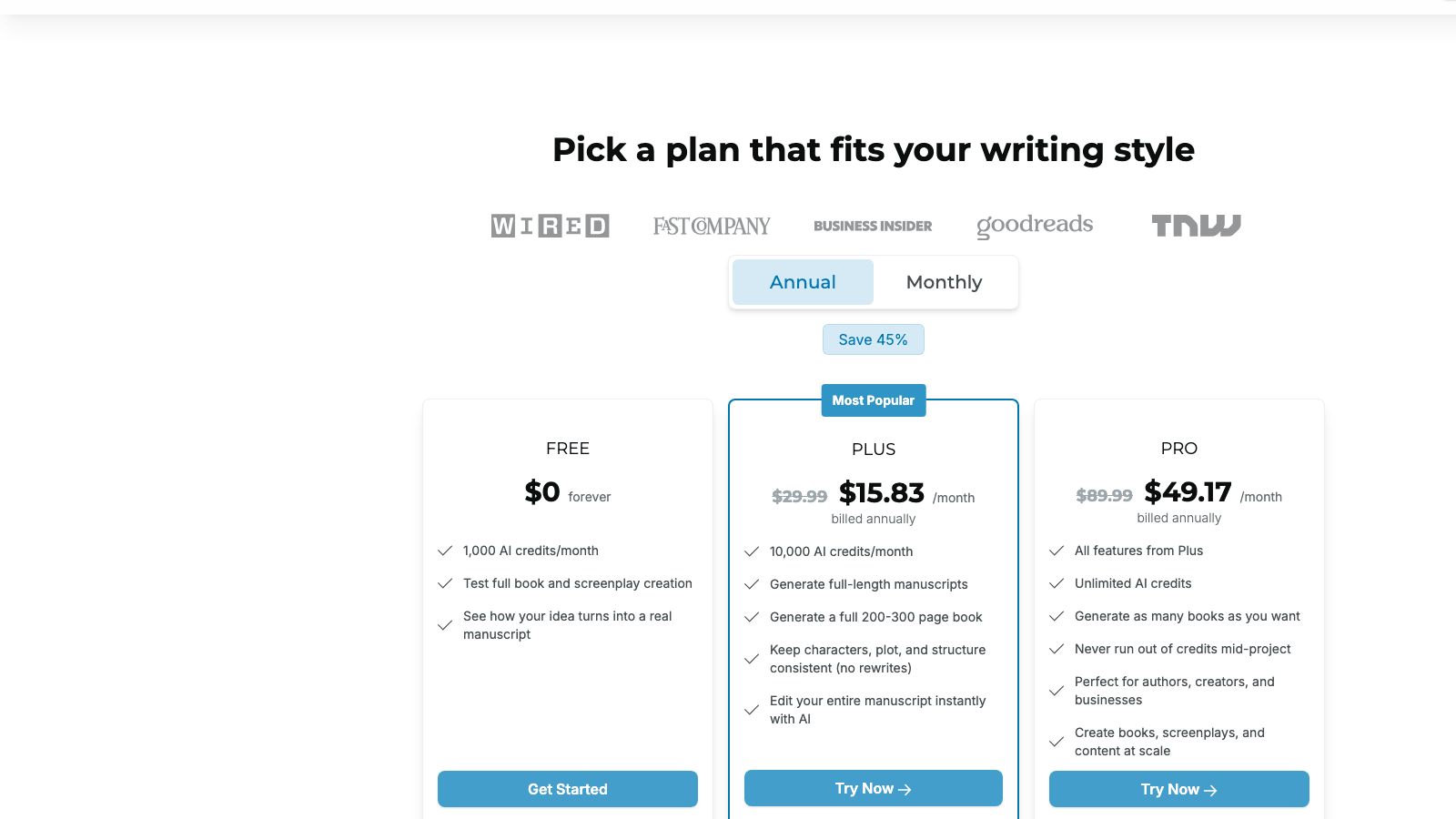
Squibler uses a credit-based pricing model. AI credits control how much text the AI generates per month. Here are the current tiers, sourced directly from the Squibler pricing page:
Free Tier: $0 per month. Includes 1,000 AI credits per month. This is enough to test the Smart Writer with one or two chapter prompts and evaluate whether the output quality fits your project. It is not enough to draft a full manuscript. There is no time limit on the free tier; you can use it indefinitely within the monthly credit ceiling.
Plus: $15.83 per month billed annually ($190 per year). The same plan billed month-to-month costs $29.99. Plus includes 10,000 AI credits per month, which Squibler describes as enough to generate a full 200-to-300-page book in a single billing period. The Plus plan also includes full chapter organization, the elements system, the planning board, the Guided Book Proposal Workflow, and access to all templates.
Pro: $49.17 per month billed annually ($590 per year). The same plan billed month-to-month costs $89.99. Pro removes the credit ceiling entirely, offering unlimited AI generation. The Pro plan is intended for authors running multiple simultaneous book projects or content creators producing books at commercial scale.
The Plus plan is the practical entry point for a coach working on a single book. At $15.83 per month, 10,000 credits is enough to draft, revise, and redraft one full manuscript in a billing cycle, with credits remaining for section-level regeneration. If you need unlimited generation passes (because you're generating large blocks and discarding most of them), the credit ceiling on Plus becomes a real constraint and the Pro plan makes more sense.
Here is how Squibler's pricing sits relative to tools a coach is likely to evaluate alongside it:
| Tool | Entry price | Model | Production scope |
|---|---|---|---|
| Squibler Plus | $15.83/month (annual) | Subscription | Drafting and chapter org |
| Squibler Pro | $49.17/month (annual) | Subscription | Unlimited AI, all Plus features |
| Built&Written | $15/month (annual) | Subscription | AI writing, cover design, KDP export |
| Atticus | One-time fee | License | Writing and formatting, no AI |
| Vellum | One-time fee (Mac only) | License | Formatting only |
The pricing comparison is closest between Squibler Plus and Built&Written: both are in the $15-to-16 per month annual range. The difference is scope. Squibler Plus covers drafting. Built&Written covers the full production pipeline from AI-assisted drafting through cover design, interior formatting, and KDP-ready export. For a coach who needs one tool that takes raw notes to a published listing, that scope difference is the decision.
For a detailed head-to-head comparison across all three common options for coaches, the article Built&Written vs Sudowrite vs Squibler for coaches scores each tool across writing quality, KDP readiness, and speed to finished book.
Where Does Squibler Fall Short for Non-Fiction and Coaching Books?
The limitations here are structural, not cosmetic. Squibler was designed for fiction. Adapting it to non-fiction coaching books requires workarounds at every stage of production, and some gaps have no workaround at all.
Voice does not carry through.
Squibler generates from the current prompt with the current parameters. It has no memory of how you've written elsewhere, no model of your sentence rhythms, and no concept of your brand voice. A coach whose readers recognize them by direct, evidence-first phrasing will get motivational-poster cadences unless they paste detailed style instructions into every prompt.
This is not a minor issue. For a coaching book, voice is not a style preference. It's the conversion mechanism. When a reader picks up your book and it sounds like it could have been written by anyone, it doesn't sell sessions or build credibility. It reads like a template. The editing required to fix AI-generated text that doesn't match your voice is not a revision pass. It's a rewrite.
Your framework's internal logic does not survive generation.
Squibler's AI has no knowledge of your specific coaching framework. When you describe a framework in your brief, the AI generates something that resembles your description at the surface level but fills the details with whatever general coaching content fits the topic.
A leadership coach whose framework uses four specific conversations between a leader and their team will receive a draft about four generic communication strategies. The names may match if she used her terminology in the brief. The reasoning behind each step, the sequence logic, the diagnostic tools, and the client-facing language she has refined over years of practice will not be there. They have to be written in, section by section, by her.
This is not a fixable limitation. The AI cannot know what makes your framework yours. What it can do is give you a structural shell you fill with your thinking. Some coaches find that shell useful. Others find it faster to write into a blank document with a clear outline.
Specific claims in the output need verification.
Research citations, statistics, and named case studies in a Squibler draft should be treated as placeholders until verified. The AI generates text that sounds authoritative, including specific numbers and attributions. Some of these will be accurate; others will not be. There is no reliable way to know which is which without checking each one independently.
In a coaching book, that carries professional risk. The audience often includes clients who have heard the same statistics repeated across books in the field and who notice when numbers conflict with sources they've read. The practical approach: search every specific claim in the draft before treating it as finalized. Either verify it against a real source you can document, or replace it with a verified general statement.
Non-fiction structure is unsupported.
There is no template for a business framework book, a how-to guide, or a methodology book. The standard non-fiction arc for a coaching book runs from problem identification through diagnostic, framework introduction, case study, implementation steps, objection handling, and call to action. None of Squibler's templates map to that structure. Coaches who start in Squibler spend significant setup time building a structure the platform was not designed to support.
The 2026 Guided Book Proposal Workflow gets closer, but it produces a proposal document, not a chapter-by-chapter scaffold. You still have to translate the proposal into chapter structure manually before the Smart Writer can work with it.
There is no citation or footnote support.
Squibler has no footnote system, no citation manager, and no bibliography tools. For a business or coaching book that makes claims grounded in research, this requires managing citations in a separate document and inserting them manually during formatting. For a brief, accessible coaching guide with minimal academic references, this gap matters less. For a coaching book that draws on research to support its methodology, it adds real time to the editing and formatting stages.
Exports are not KDP-ready.
Squibler's DOCX export is a raw word processor document. Amazon KDP has specific interior formatting requirements: consistent heading styles, approved font choices, correct trim-size margins, proper chapter breaks, no tracked changes. A Squibler DOCX export will not meet those requirements without manual reformatting in a dedicated tool such as Atticus or Vellum.
That adds a tool and a step to your production stack. If you're budgeting for a complete book-publishing workflow, Squibler covers the drafting phase and stops. The formatting, cover, and export work is additional.
For a full breakdown of KDP formatting requirements and the tools that handle them, the guide on self-publishing a coaching book on Amazon KDP covers the complete checklist coaches need before uploading.
Cover design is out of scope.
Squibler does not include cover design. Publishing on KDP requires a cover file that meets trim-size specifications, uses genre-appropriate visual conventions, and reads clearly at the thumbnail size Amazon displays in search results. After completing a manuscript in Squibler, the cover work is entirely separate.
AI output quality is inconsistent in non-fiction contexts.
Independent assessments of Squibler consistently note that the AI output trends toward generic phrasing and requires substantial editing. Reedsy's 2026 review gave Squibler 2.5 out of 5 stars, citing AI output that is "generic or over-the-top" and requires significant rewriting. The coaching book comparison article on this site scores Squibler at 2.5 out of 5 for non-fiction writing quality and 1.5 out of 5 for KDP-ready output.
For fiction, a writer's own revision can override generic AI prose at the editing stage. For non-fiction, generic phrasing undercuts the specific authority a coaching book is supposed to project. A chapter on difficult conversations in the workplace needs to sound like an expert who has sat in those rooms. Generic AI output sounds like someone who has read about them.
Performance degrades at manuscript length.
Below 20,000 words, Squibler is responsive. Above 50,000 words, users consistently report navigation lag and occasional chapter-loading errors. The typical coaching book runs 30,000 to 60,000 words. The upper range sits in the performance zone that users find disruptive. If you're writing a longer book and doing substantial editing within the platform, plan for this.
How Does Squibler Compare to Atticus, Vellum, and Built&Written?
For a coach evaluating tools, here is how Squibler sits relative to the most common alternatives in 2026:
| Feature | Squibler | Atticus | Vellum | Built&Written |
|---|---|---|---|---|
| AI writing | Yes | No | No | Yes |
| Voice matching | No | No | No | Yes |
| Non-fiction templates | No | Limited | No | Yes |
| KDP-ready export | No | Yes | Yes (Mac only) | Yes |
| Cover design | No | No | No | Yes |
| Interior formatting | Basic | Strong | Strong | Built-in |
| Free tier | Yes | No | No | Free trial |
| Entry price | $15.83/month | One-time | One-time | from $19/month |
| Platform | Web | Mac + Windows | Mac only | Web |
Squibler is the only tool in this group with a free tier. That makes it a low-risk starting point for coaches who want to test AI-assisted drafting before committing to a paid workflow. The free tier's 1,000 monthly credits are enough for a meaningful test.
The structural gap is what happens after drafting. Squibler stops at the draft. Getting a coaching book from draft to a published KDP listing requires formatting, cover design, and platform-specific export work that Squibler doesn't handle. Every other tool in this table either covers that work directly or is used alongside tools that do.
Atticus deserves a note for coaches who want strong formatting and don't need AI. It's a one-time purchase, runs on Mac and Windows, and produces polished KDP-ready interiors with a dedicated book-writing environment. No AI writing. No cover design. For a coach who writes naturally and just needs formatting help, Atticus is often the right answer. Many coaches use both: Squibler for the draft, Atticus for the formatting. The comparison between Atticus and Built&Written for coaches is worth reading if you're in this camp.
Vellum is for Mac users who want exceptional print and ebook output. It produces arguably the cleanest ebook formatting available to indie authors. It has no AI writing component and is not available on Windows. The Vellum review for 2026 covers its strengths and the workflow it fits.
For coaches who want to see all the AI tools evaluated in one place, the article on tested AI book writing tools for KDP in 2026 benchmarks multiple platforms on real output quality, not just feature lists.
Should You Use Squibler for Your Coaching Book? The Four-Gate Check
Most coaches asking about Squibler are asking one question: does it fit my situation? Two things decide that. First, whether your project matches what Squibler generates well. Second, whether the draft it produces is worth editing or worth replacing.
Start with fit. Squibler fits if you're writing a narrative coaching memoir, a novel based on your client work, or a screenplay; the AI writes scene-based openings, chronological structure, and character-driven framing better than it writes methodology. It also fits if you have no starting material and genuinely cannot start; if the choice is Squibler's imperfect draft or no draft, Squibler's draft wins every time. And it fits if you need a draft, and only a draft, because you already have a formatter, a designer, and an editor engaged.
Squibler does not fit if you have a content archive. If you have LinkedIn posts, webinar transcripts, workshop recordings, course slides, or client-facing materials, you don't have a blank page. You have a disorganized book. Squibler doesn't read your existing material, doesn't ingest it, and doesn't use it to generate content. It also does not fit if your book is credibility-critical and headed for high-profile clients or speaking proposals, if your production timeline is fixed, or if you need a finished KDP-ready book from a single workflow. Budget for the formatting, cover, and editing costs Squibler doesn't cover before you decide it's affordable.
If the fit is there and you generate a draft, run it through four gates before committing to an editing plan. Each gate asks a specific question. The answers determine the editing cost.
Gate 1: Structure. Does the chapter structure match my real framework?
Review the AI-generated outline against your actual methodology. For each chapter: does it cover the right concept, does it appear in the right sequence relative to what comes before and after, and does the chapter title reflect how you'd describe this concept to a client?
If the structure matches closely, the editing cost stays at the content and voice level. If the structure diverges, you face structural reconstruction: moving chapters, splitting some into two, merging others, and adding entirely new sections. Structural reconstruction on a 40,000-word draft takes more time than writing the manuscript from an outline you built yourself.
Gate 2: Voice. Does the prose sound like me?
Read three random passages from the draft aloud. If you can imagine delivering these paragraphs in your keynote, in a client session, or in an email to your list, the voice is close enough to edit from. If you find yourself thinking "I would never say it this way," count how often that reaction appears in the first chapter.
If you reject more than 30 percent of the sentences in the first chapter on voice grounds alone, editing the full draft costs more time than writing from scratch with the AI's outline as your guide. In that case, use the AI's outline as a scaffold and write your own draft into it.
Gate 3: Accuracy. Are the specific claims in the draft ones I can verify?
Do a ten-minute spot check across three chapters. Take every specific statistic, named research finding, and attributed claim you find. Search for its source. If the claims you check are accurate, the draft's factual layer is probably usable with verification. If two or more claims fail the check, assume the rest require verification and plan dedicated time to do it. A number that doesn't match any real source gets noticed, and it damages the author's credibility in their professional community.
Gate 4: Formatting. Do I have a formatting step planned after Squibler?
A Squibler draft does not go directly to KDP. Confirm before starting that you have a formatting tool or professional formatter in the pipeline after the draft phase. The cost ranges from free (using Atticus or a comparable tool yourself, roughly two to four hours for a first-timer) to $300 to $800 for a professional formatter. Factor this into your project budget before you pay for Squibler's subscription.
Run your draft through all four gates before committing to an editing plan. Coaches who skip this review often reach the end of editing and discover a structural problem that requires starting over. The gates surface that problem at the beginning, when the cost of fixing it is still manageable.
For coaches who want a single workflow covering the full path from raw content to published book, the coach's guide to AI book writing and publishing in 2026 lays out the complete options and where each tool fits in the production stack.
What Does Good Squibler Use Look Like for Coaches?
Three specific patterns actually work for coaches using Squibler. All three treat it as a starting tool rather than a finishing tool.
Pattern 1: The Outline First.
Use Squibler's book brief or the Guided Book Proposal Workflow to generate a chapter-by-chapter outline, not a full manuscript. The outline quality from Squibler is noticeably higher than the prose quality, because structure is more rule-based and the AI handles rule-based tasks better than voice-based ones. An outline is also a cheap object to change: thirty minutes of outline editing prevents five hours of structural editing on a full draft.
Within the outline review, pay particular attention to:
- Chapter titles that use your terminology rather than generic coaching language
- The sequence of chapters matching the sequence your clients move through your methodology
- The presence of all your framework's core components
- The absence of topics the AI added that don't belong in your book
A coach we spoke with used Squibler to generate six different outlines for the same book concept, each with a different thematic emphasis. He compared them, selected the structure that matched his thinking, and wrote the full manuscript in a different environment. Total time in Squibler: ninety minutes. The structural work that would have taken him a week of agonizing was done in a coffee shop session.
Pattern 2: The Chapter Starter.
Use the free tier or a Plus subscription for targeted, section-by-section generation. You know your framework. You know what each chapter should say. You need a few hundred words to break through the blank screen. Type a detailed, specific chapter prompt into the Smart Writer, generate, delete what doesn't fit, and write from there.
For each chapter:
- Write a prompt that includes the chapter's specific purpose in your methodology
- Include the key concept, the client problem it addresses, and the outcome a reader should have after finishing the chapter
- Set the creativity slider to 2 or 3 and the tone to conversational
- Generate 1,000 to 2,000 words
- Edit immediately while the context is fresh
The key is a specific prompt. Vague prompts produce generic text that's harder to work from. A prompt like "Write the opening of a chapter explaining why high performers avoid asking for help, using the psychological concept of learned self-sufficiency, in a direct, evidence-first tone" produces more useful starting material than "Write a chapter about vulnerability in leadership."
A coach who used this section-by-section approach on a nine-chapter book told us the editing time per chapter was roughly equal to her writing time per chapter in previous projects. The AI handled sentence construction and transitions. She handled the concepts, the case studies, and the voice. Slower than a full-book generation pass, but the output sits much closer to your actual framework.
Pattern 3: The Feedback Loop.
A third pattern works well for coaches who already have a rough chapter drafted and want to stress-test it. Paste your chapter into Squibler, then use "Ask Squibler" to request a competing version: "Rewrite this chapter opening with a stronger hook and a shorter first paragraph." Compare the AI's version to yours. You won't use the AI version wholesale, but the comparison almost always reveals something: a pace problem, a section that buries its point, a tangent that doesn't earn its space.
This pattern treats Squibler as a critical reader rather than a ghostwriter. It costs very little in credits (a few hundred per session) and costs nothing in voice integrity, because you're reading the AI output for diagnostic feedback rather than incorporating it. A coach we interviewed described this as her favorite use of the free tier: "I paste my draft, I ask Squibler to rewrite it, and I immediately see what I was glossing over."
All three patterns extract Squibler's real value (fast structure and draft generation) while avoiding the costly mistake (treating that output as publishable without extensive reconstruction). The mistake costs coaches weeks of editing time that typically exceeds the hours they'd have spent writing from scratch.
For a broader view of how AI tools fit into a coach's book production workflow, the guide on the best AI book writing tools for coaches in 2026 covers the full landscape with specific recommendations by project type.
Sources & References
Frequently asked questions
Squibler can generate a business book draft, but the output requires substantial editing. The AI is tuned for narrative fiction prose, not for the specific voice, structure, and authoritative register that business coaching books require. Most coaches who use Squibler for a full business book manuscript spend as much time editing the AI's draft as they would have spent writing from scratch. Squibler works better as an outline tool or chapter-starter than as a full manuscript generator for non-fiction.
The book writer generates a chapter-organized manuscript from a brief that describes the topic, target audience, and intended structure. Output typically runs from 20,000 to 50,000 words depending on the chapter count and credit usage. The text is readable and logically organized but requires significant editing for voice, accuracy, and framework specificity before it's suitable for coaching book publication.
The generation step itself takes minutes. The outline appears almost immediately. The full draft appears in under ten minutes for most coaching book lengths. Editing the draft to a publishable standard takes substantially longer: most coaches working from a Squibler draft spend two to six weeks in editing, depending on how closely the AI output matches their voice and framework.
The Plus plan costs $15.83 per month billed annually ($190 per year) or $29.99 per month on a monthly plan. The Pro plan costs $49.17 per month billed annually ($590 per year) or $89.99 per month on a monthly plan. The free tier provides 1,000 AI credits per month with no time limit and no credit card required to sign up.
A 40,000-to-50,000-word coaching book draft uses roughly 4,000 to 7,000 credits on a full-book generation pass. The Plus plan's 10,000 monthly credits support one complete book generation per billing cycle with credits remaining for section-level regeneration and editing passes. Coaches who generate heavily and discard large portions may exhaust the Plus credit limit; upgrading to Pro removes the ceiling entirely.
Not directly. Squibler exports to PDF, TXT, DOCX, and a Kindle-format file, but these exports do not meet KDP's specific interior formatting requirements without additional work. For a coaching book ready to upload to KDP, you'll need a dedicated formatting tool (Atticus, Vellum, or an equivalent) to prepare the interior file. Cover design is also outside Squibler's scope.
No. Each generation session starts from the current prompt and parameter settings. There is no system for feeding Squibler writing samples so it matches your voice across a project. The tone selector offers broad options (conversational, professional, inspirational, literary) but these are genre categories, not voice profiles. For coaches whose personal brand depends on a distinctive writing style, this is a meaningful limitation.
You can describe your framework in the book brief and in individual chapter prompts. The AI will reference the description you provide. It will not reproduce the specific logic, sequence, or client-facing language of your methodology without you writing those elements in during editing. Treat your framework as content you add to the AI's structure, not as something the AI can replicate from a brief alone.
Full-book generation produces a complete outline and manuscript in a single pass from a detailed brief. The Smart Writer generates one section at a time from individual prompts. Full-book generation is faster but produces less targeted output per section. Section-by-section generation takes longer but allows more precise prompting for each chapter, which typically reduces editing time per section.
Yes, within its limits. The free tier's 1,000 monthly credits is enough to generate one or two chapter drafts, test the Smart Writer's output quality, and decide whether the tool fits your project. It's a genuine free trial, not a stripped-down demo. Most coaches can make a real decision about whether Squibler belongs in their workflow within two or three sessions on the free tier.
Plus provides 10,000 AI credits per month, which Squibler says is sufficient to generate a 200-to-300-page book. Pro removes the credit ceiling with unlimited AI generation. For a coach writing one book at a time, Plus is almost always sufficient. The Pro plan makes sense for coaches producing multiple books simultaneously, running agencies, or doing heavy draft generation and discarding large portions of the output.
On the Plus plan, hitting the 10,000-credit ceiling for the month pauses AI generation until the next billing cycle. You can still write manually, organize chapters, and use the planning tools. If hitting the ceiling mid-project is a concern, either upgrade to Pro before starting or time your generation sessions to stay within the monthly limit. Most coaches writing a single book stay well within the Plus ceiling if they use Squibler for targeted generation rather than bulk output.
Squibler focuses on draft generation and chapter organization. Built&Written covers the full production pipeline: AI writing with voice conditioning from your writing samples, cover design, professional interior formatting, and KDP-ready export in one subscription. Both plans start near $15 to $16 per month billed annually. If you have a blank page, Squibler's free tier generates a starting draft faster than any alternative. If you have existing content (course materials, workshop transcripts, LinkedIn posts) and need one workflow from that material to a finished published book, Built&Written's architecture is a better fit because it's built around ingesting what you already have. The article Built&Written vs Sudowrite vs Squibler for coaches scores them head-to-head.
No. Squibler is a web-only platform as of 2026. There is no iOS or Android app. All book generation and editing in Squibler happens through a desktop or laptop browser. Coaches who want to write on a phone or tablet need a different tool for mobile sessions.
Squibler offers one advantage over raw ChatGPT: it keeps chapters organized and tracks word count goals inside the same environment. ChatGPT has no concept of your book as a project; every session starts fresh. That said, ChatGPT's generation quality is broadly comparable to Squibler's Smart Writer output, and neither produces coaching-book-ready prose without heavy editing. Coaches who like a structured environment find Squibler easier for managing a complete book project. Coaches who already work comfortably in ChatGPT and have their own organizational system rarely find Squibler worth the subscription cost for its AI writing alone.
Sources & References
About the author

Mykhailo Druz
More in AI Book Tools
Ready to write your book?
Turn your expertise into a professional book with Built&Written.