

What Goes on the Back Cover of a Book, Element by Element
A book's front cover gets attention. The back cover gives readers a reason to buy it.
For a business or nonfiction book, that means more than a summary. The back cover needs to explain what readers will gain, establish the author's credibility, and make the book feel worth their time. And if you're self-publishing through Amazon KDP, it also needs to leave room for a barcode.
Here's what belongs on a book's back cover, which elements are optional, and how to arrange everything without overcrowding the design.
What goes on the back cover of a book?
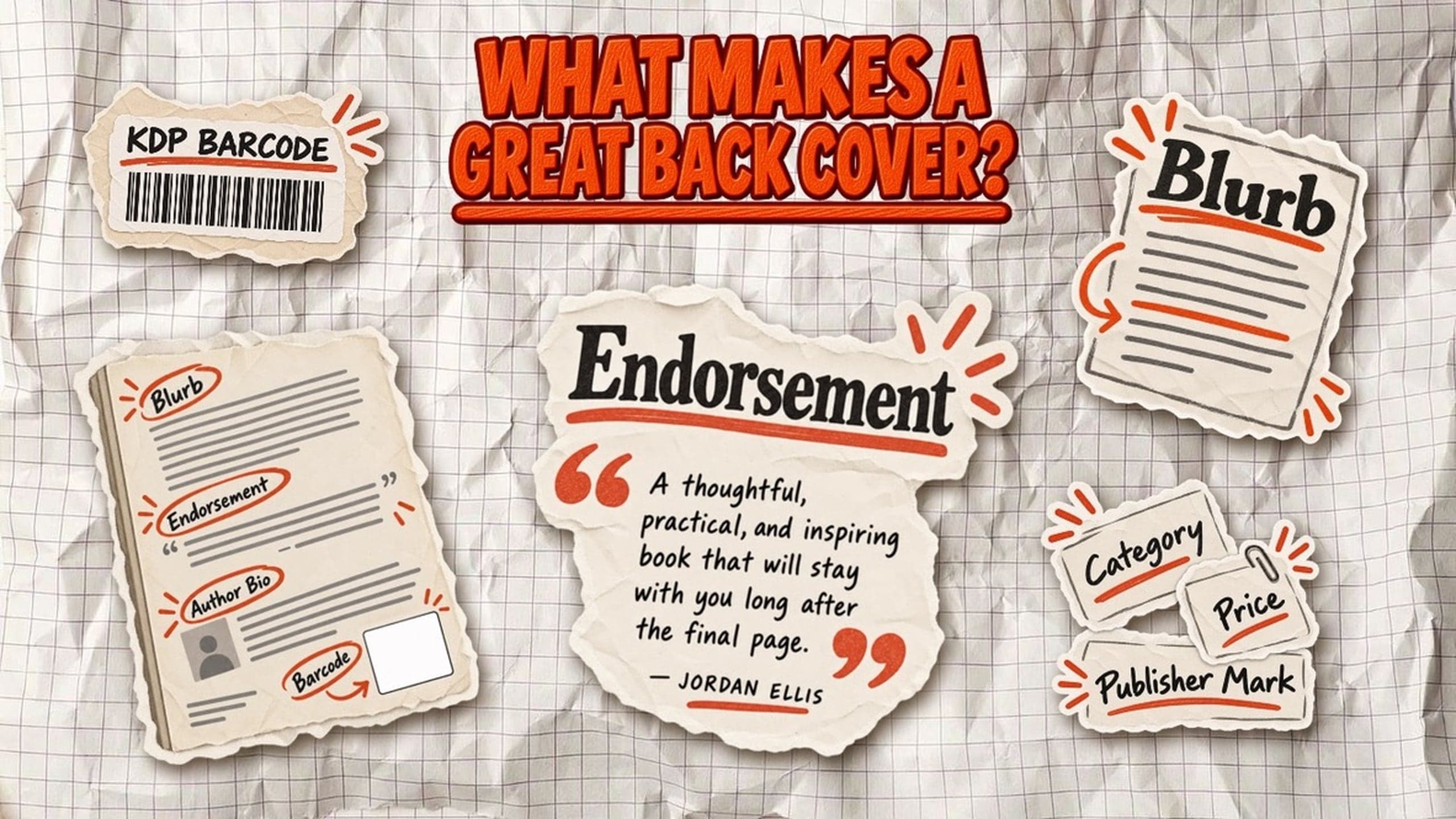
The back cover of a nonfiction book usually combines a short sales pitch, proof of credibility, and a few publishing details. Not every book needs every element. The goal is to give potential readers enough information to decide whether the book is right for them.
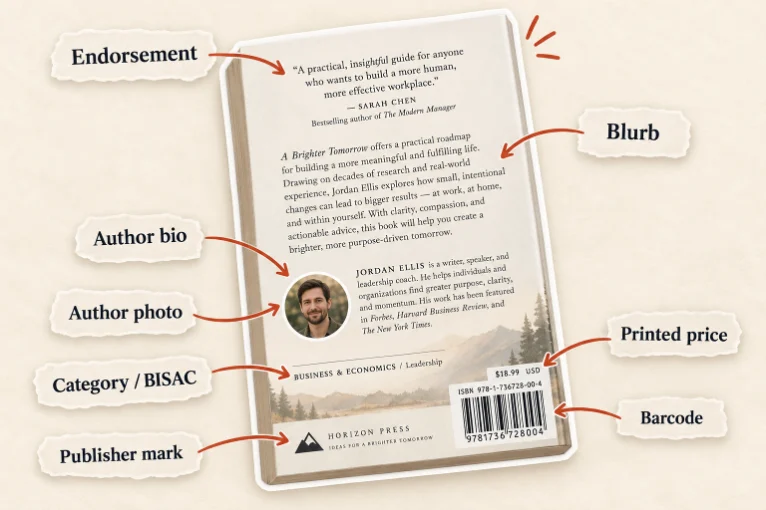
Here's a breakdown of the eight most common book back cover elements:
| Element | Purpose | Typical placement | Required? |
|---|---|---|---|
| Book blurb (description) | Explains the book's subject and benefits | Upper or center section | Strongly recommended |
| Endorsement quotes | Adds credibility through praise from others | Top or below the blurb | Optional |
| Author bio | Establishes the author's expertise | Lower section | Optional |
| Author photo (headshot) | Helps readers recognize the author | Beside the bio | Optional |
| Category / BISAC label | Identifies the book's subject or genre | Lower-left corner | Optional |
| ISBN barcode | Identifies the print edition for retail scanning | Lower-right corner | Required for KDP print production; KDP can add it |
| Printed price | Displays the retail price | Near or above the barcode | Optional |
| Publisher mark (imprint logo) | Identifies the publishing brand | Bottom edge | Optional |
The book blurb deserves the most space. For a business book, readers should quickly understand the problem it addresses, what they'll learn, and why the author's perspective matters.
Endorsements and an author bio support that promise, but they shouldn't compete with it. If space is limited, one strong endorsement is more useful than five generic quotes. The same applies to an author photo: include it if it contributes to credibility, not simply because other books have one.
A category label, such as BUSINESS & ECONOMICS / Leadership, can help identify the subject. The Book Industry Study Group recommends using the readable BISAC category name rather than printing the nine-character code.
The barcode is different from the other elements because it has technical requirements. For Amazon KDP paperbacks and hardcovers, you can supply a compliant barcode or have Amazon add one automatically. If KDP adds it, the designated area must remain clear of text and important graphics.
The simplest rule is to prioritize the blurb, add supporting details only when they earn their space, and reserve the barcode area before finalizing the design.
How to write a back cover blurb that sells the book
A back cover blurb is a short description designed to convince someone to read your book. Unlike a chapter summary, it shouldn't explain everything inside. It should make the reader recognize a problem and want the solution.
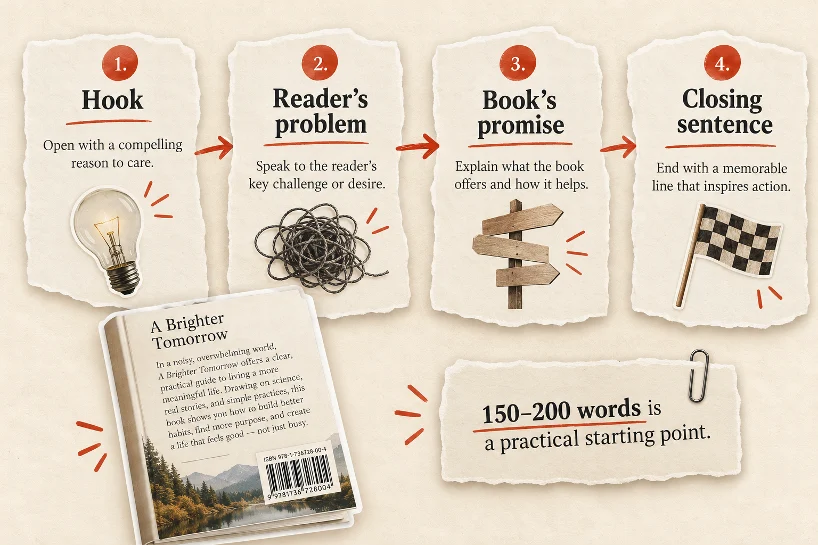
For a nonfiction or business book, 150-200 words is a useful starting point, not a publishing requirement. Shorter blurbs can work for books with strong titles or recognizable authors. The real constraint is how much text fits comfortably on the printed cover.
A strong back cover description usually follows four steps:
- The hook: Open with a question, surprising observation, or statement that speaks directly to your audience.
- The reader's problem: Identify the challenge, frustration, or missed opportunity the book addresses.
- The book's promise: Explain what readers will learn or be able to do differently. Focus on specific outcomes rather than vague claims.
- The closing sentence: End with a clear reason to read, whether that's a practical benefit, a new perspective, or an achievable transformation.
Example of a business book back cover blurb
Imagine a fictional book called The Founder’s Focus: How to Build a Business That Doesn't Depend on You:
Your business is growing. So why are you working more than ever?
You started a company to create something valuable, not to become the person every decision depends on. Yet between client calls, team questions, and daily emergencies, there's barely enough time to think about what comes next.
The Founder's Focus offers a practical approach to getting out of the day-to-day without losing control of your business.
Inside, you'll learn how to identify the decisions only you should make, build systems your team can actually use, and create space for the work that moves your company forward.
Growth shouldn't mean becoming the bottleneck. This book shows you how to build a business that can thrive without your constant involvement.
Notice what the blurb leaves out: a chapter-by-chapter breakdown, a long author biography, and generic promises about guaranteed success. It concentrates on one reader, one recognizable problem, and a specific benefit.
About Built&Written: Once you've written the blurb, paste it into Built&Written's free Book Description Scorer. It evaluates seven copywriting criteria, including the opening hook, length, readability, paragraph structure, reader focus, and call to action. You'll receive a score from 0 to 100, along with suggestions for improvement.
Endorsements, author bio, and the smaller details
The blurb explains what readers will gain. The remaining back cover elements establish credibility and provide publishing details. For business nonfiction, every element should earn its space.
Endorsement quotes
Use one or two short endorsements from credible professionals, authors, or industry experts. Choose quotes that highlight the book's value rather than generic praise.
Include the person's name and relevant credentials, and always get permission before publishing their endorsement.
Author bio and photo
A back cover author bio should explain why the author is qualified to write the book. Two or three sentences highlighting relevant experience and achievements are usually enough.
An author photo is optional. It can help consultants, coaches, and speakers build recognition, but shouldn't crowd out the blurb.
Category, price, and publisher mark
These secondary details usually appear near the bottom of the cover:
- Category/BISAC label: Identifies the book's subject, such as BUSINESS & ECONOMICS / Leadership.
- Printed price: Optional, typically placed near the barcode.
- Publisher mark: A small logo representing the publisher or independent imprint.
KDP doesn't require category labels, printed prices, or publisher logos on the back cover. Include them only when they improve the presentation.
The simplest approach is to prioritize the blurb, add credibility through endorsements or an author bio, and leave enough space for the barcode.
Real business-book back cover examples
Successful business books use different back cover layouts depending on what they want to emphasize: practical benefits, endorsements, or the author's expertise. These three published examples show how the elements work together.
1. Atomic Habits by James Clear

The back cover opens with a promise about improving through small daily changes. It then explains the book's approach, mentioning practical techniques such as Habit Stacking and the Two Minute Rule.
Below the description are three endorsements from Mark Manson, Adam Grant, and Ryan Holiday. The publisher information, price, and barcode sit at the bottom.
What works: The description communicates specific benefits, while recognizable endorsements establish credibility without requiring a long author bio.
2. The E-Myth Revisited by Michael E. Gerber

This back cover starts by defining the entrepreneurial myth, followed by a credibility statement about the book's recognition among business leaders.
The main description explains why small businesses struggle and how Gerber's approach helps. A short endorsement from Fortune follows. Near the bottom, an author photo and biography establish his experience, with the barcode and publisher information underneath.
What works: The layout combines a clear business problem with evidence of the author's authority, making it particularly relevant to consultants writing expertise-driven books.
3. Company of One by Paul Jarvis

This back cover places endorsements from Cal Newport and Chris Guillebeau at the top, before the main description. The blurb challenges the assumption that every business needs to grow bigger and introduces a different approach to entrepreneurship.
Another endorsement appears beneath the description, followed by a short author bio and headshot. The publisher mark, price, and barcode occupy the bottom.
What works: The endorsements introduce the book's unconventional message, while the author's professional background supports its credibility.
What these back covers have in common
All three prioritize a clear promise to the reader, supported by carefully selected credibility signals. None needs every possible back cover element.
For your own business book, use the approach that best supports your message: specific benefits for a practical guide, endorsements for a distinctive argument, or author credentials for an expertise-led book.
Amazon KDP barcode rules and placement
Every standard print book published through Amazon KDP needs a barcode, but you don't have to create one yourself. KDP can add it automatically, or you can include your own in the cover file.
Where does the barcode go on a KDP back cover?
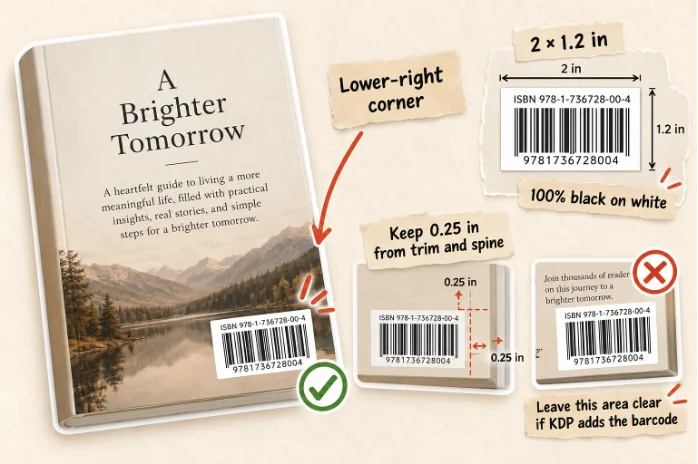
If KDP adds the barcode, it uses a white box measuring 2 × 1.2 inches (50.8 × 30.5 mm) in the lower-right corner of the back cover.
If you supply your own barcode, KDP's general requirements include:
- Size: Recommended 2 × 1.2 inches; minimum 1.4 × 0.8 inches.
- Placement: At least 0.25 inches (6.3 mm) from the spine and trim edges.
- Quality: Sharp, 100% black barcode on a solid white background; vector preferred or 300 PPI raster.
- Orientation: Upright, square to the cover, and not flattened into the main artwork.
Hardcovers have additional placement requirements, so use the template for your specific format.
ISBN, barcode, and printed price: what's the difference?
The ISBN identifies the book edition, while the barcode encodes identifying information for retail scanning. A standard KDP paperback or hardcover needs its own ISBN, either purchased independently or assigned free by KDP.
A printed retail price is optional. You set your actual selling price in KDP, and Amazon can display a different customer-facing price depending on the marketplace and applicable taxes.
Common KDP barcode mistakes
The most common problems are placing text or important graphics inside the barcode area, using a blurry barcode, or positioning it too close to the trim.
The safest option for first-time self-publishers: Let KDP generate the barcode and leave the designated area clear. Use KDP's cover template to confirm its location before exporting your print-ready PDF.
How to check your back cover before publishing
Before uploading your book cover to Amazon KDP, check both the design and technical specifications. A professional-looking cover can still fail KDP's print requirements.
Use this quick checklist:
- Layout: Make sure the blurb, endorsements, and author bio follow a clear visual hierarchy without looking crowded.
- Readability: Check that text is legible at actual print size, with sufficient contrast against the background.
- Safe zones: Keep important text at least 0.25 inches (6.4 mm) from the outside trim edges, following KDP's template.
- Barcode area: Leave the lower-right barcode zone clear if KDP will add the barcode.
- PDF dimensions: Export the front cover, spine, and back cover as one continuous PDF, accounting for spine width and 0.125-inch bleed on paperback covers.
About Built&Written: Before uploading to Amazon, use Built&Written's free KDP Cover Validator to check your paperback PDF. The tool checks technical properties such as file format, dimensions, resolution, color space, and file size. It runs directly in your browser without uploading the file to a server.
What happens to the back cover on an ebook?
Ebooks don't have a physical back cover. Reflowable Kindle books adapt to different screen sizes, so there's no fixed back-cover layout or barcode area to design.
However, the information that normally appears on a printed back cover still matters. It simply moves elsewhere:
- Book blurb: Goes in the Amazon product description, where shoppers learn what the book offers.
- Author bio and photo: Belong on your Amazon Author Central page and can also appear inside the ebook.
- Endorsements: Can appear in the product description or on a praise page in the ebook's front matter.
- ISBN and barcode: Kindle ebooks don't need barcodes, and KDP doesn't require an ISBN for an ebook.
For business nonfiction, focus on writing a compelling Amazon description rather than recreating the paperback's back cover inside the ebook.
Amazon requires a front-cover image for Kindle ebooks, without the spine, back cover, or barcode. The book description appears separately on the product page.
Frequently asked questions
It's simply called the back cover. The promotional description printed on it is known as the back cover blurb or book blurb. The term back cover copy can refer to all the marketing text on the back.
A nonfiction book's back cover typically includes a blurb, endorsement quotes, and a short author bio. Optional elements include an author photo, category label, printed price, and publisher logo. Print editions also need a barcode.
150-200 words is a practical starting point for nonfiction books, but there's no official word-count requirement. Keep it short enough to remain readable alongside other back cover elements.
Yes, standard KDP paperback and hardcover editions need a barcode. You can supply your own compliant barcode or let Amazon KDP add one automatically at no additional charge.
An author photo is optional. It's particularly useful for consultants, coaches, speakers, and other professionals building a personal brand. Include one if it adds credibility without overcrowding the cover.
Most KDP paperbacks and hardcovers require an ISBN, but you don't need to print it separately on the back cover. It can appear in the barcode. KDP also offers free ISBNs for eligible print books, while certain low-content books can be published without one.
Sources & References
About the author

Polina Karlashchuk
More in Book Design
Ready to write your book?
Turn your expertise into a professional book with Built&Written.