


KDP Categories and Keywords: Get Your Book Found in 2026
The short answer: on Amazon KDP you get up to 3 browse categories per format and 7 backend keyword fields of 50 characters each. Categories decide which shelves your book sits on and whether you can win a bestseller badge. Keywords decide which searches your book matches. Pick deep, winnable niche categories, fill every keyword field with real reader phrases, and Amazon does half the selling for you.
In 2016, Mark Manson published The Subtle Art of Not Giving a F*ck. The blog post the book grew out of had already been read by millions. The audience existed. The argument existed. And yet the book did not become a phenomenon because Manson had a big platform. It became a phenomenon because Amazon's machinery decided, search by search, browse by browse, to put it in front of people who were looking for exactly that kind of book. The platform did half the selling. Manson built a listing the platform could understand, and the platform did the rest.
Every coach, consultant, and founder reading this in 2026 is sitting on the other side of that machinery, often without knowing it exists. You wrote the book. You published it. You checked the Amazon page on launch day, refreshed it a few times, told a few clients, and then watched the sales rank settle into the low hundred-thousands and stay there. The book is real. The problem is that Amazon has no idea who it is for, because you never told it in the language Amazon actually reads: categories and keywords.
This is the part of self-publishing almost nobody plans for. You can write a genuinely good coaching book, format it cleanly, give it a sharp cover, and still have it vanish, because the two metadata fields that decide whether Amazon shows your book to a human being were filled in carelessly during the last five minutes of the upload flow. Those two fields are not an afterthought. They are the engine.
Key takeaway: On Amazon KDP in 2026, your book gets found through four mechanisms working together: the up to 3 browse categories you choose, the 7 backend keyword fields (50 characters each), the keywords you place in your title and subtitle, and the bestseller-badge path through winnable niche categories. We call this the KDP Discoverability Stack. Built&Written's KDP Launch Co-pilot drafts the categories and keywords for you, so the engine starts loaded.
This guide is the complete version of that engine. We will define the KDP Discoverability Stack, walk through each of its four parts with the actual current Amazon rules, show you how to research categories and keywords the way authors who rank do it, and answer the question almost everyone gets wrong: whether categories or keywords actually drive discovery (the answer is "both, but not in the way you think"). We have verified every platform rule against Amazon's own KDP help pages, because the internet is full of confidently wrong advice about a system Amazon quietly changed in 2023.
TL;DR: KDP categories and keywords at a glance
| Browse categories | Backend keywords | Title/subtitle keywords | |
|---|---|---|---|
| What it is | The shelves Amazon files your book on | Hidden search terms Amazon indexes | Keywords readers see in your listing |
| The limit | Up to 3 per format | 7 fields, 50 characters each | Subtitle is the workhorse |
| Who sees it | Shoppers browsing categories | Nobody (indexing only) | Every shopper who lands on your page |
| Main job | Win a bestseller badge in a niche | Match the searches readers type | Convert the click into a buy |
| Can you edit it later | Yes, anytime, no re-review | Yes, anytime | Yes, but it changes your cover plan |
| Where most coaches fail | Picking categories too broad to rank | Repeating words already in the title | Vanity titles with zero search terms |
Methodology: We pulled every platform rule in this guide directly from Amazon's official KDP help pages (Categories and Keywords) in June 2026, then cross-checked the research workflow against Kindlepreneur and Publisher Rocket, the two most-used author tools for this exact job. Where a claim is an estimate, a community consensus, or a tool's interpretation rather than an Amazon rule, we say so. We did not invent search volumes or sales numbers. Built&Written is our product, and we flag it whenever it comes up.
Why most coaching books are invisible on Amazon (and it is not the writing)
Here is the pattern we see constantly. A business coach finishes her book. It is good. It carries a method she has used with eighty clients, it reads cleanly, the cover looks professional. She uploads it to Amazon KDP, and in the rush of the final screens she picks two broad categories that sound right ("Business & Money," "Self-Help"), types a few obvious keywords into the boxes, and hits publish. Three months later the book has sold fourteen copies, all to people she knows.
She concludes the book failed. The book did not fail. The listing did. Amazon never had a reason to show the book to a stranger, because the metadata told Amazon almost nothing about who the book was for.
A book Amazon cannot place is a book Amazon cannot sell
Amazon is not a bookstore with a clerk who read your jacket copy. It is a recommendation machine that runs on structured data. When a shopper types "executive coaching for new managers" into the search bar, Amazon does not read your book. It reads your metadata, decides whether your book is relevant to that query, and ranks it against every other book that also claims relevance. If your keywords never mention new managers, your book is not even in the race. It is not ranked low. It is absent.
Browse categories work the same way. When a shopper clicks down into a niche category to see what is there, Amazon shows the books filed under that category, ordered by sales rank. If you filed your book under a category so large that you are competing with Atomic Habits and Dare to Lead, your book is on page nine, which is to say nowhere. A coaching book is a credibility asset, not a volume play. We have written before about why coaches buy a book for authority, not royalties, and that changes the whole discoverability calculation. You do not need to outsell James Clear. You need to be the visible, findable, badge-wearing book in a niche your ideal client actually browses.
The metadata is not marketing fluff. It is the index.
Treat categories and keywords as boring upload-flow paperwork and you have already lost. They are the index Amazon builds your discoverability on. Every other thing you do to market the book (the launch, the reviews, the ads) pours traffic into a listing. If the listing's metadata is wrong, the traffic arrives and bounces, and Amazon learns your book is irrelevant, which buries it further. Conversely, a tightly targeted listing compounds: the right shoppers find it, buy it, review it, and Amazon reads those signals and shows it to more of the right shoppers.
This is why the metadata is the foundation, not the finish. Get it right before you spend a dollar on promotion. We cover the full publishing sequence in our step-by-step guide to publishing a book on Amazon KDP, but the categories-and-keywords step is the one that decides whether everything downstream works.
The KDP Discoverability Stack: the four parts that get your book found
Every book that gets discovered on Amazon is doing four things right at once. Most invisible books are doing one of them, badly. We call the full set the KDP Discoverability Stack, because the parts stack on top of each other: each one feeds the next, and a gap anywhere leaks visibility.
The KDP Discoverability Stack has four components. Browse categories. Backend keyword slots. Title and subtitle keyword placement. And the bestseller-badge path. Here is what each one is and the job it does.
Component 1: Browse categories (the shelves)
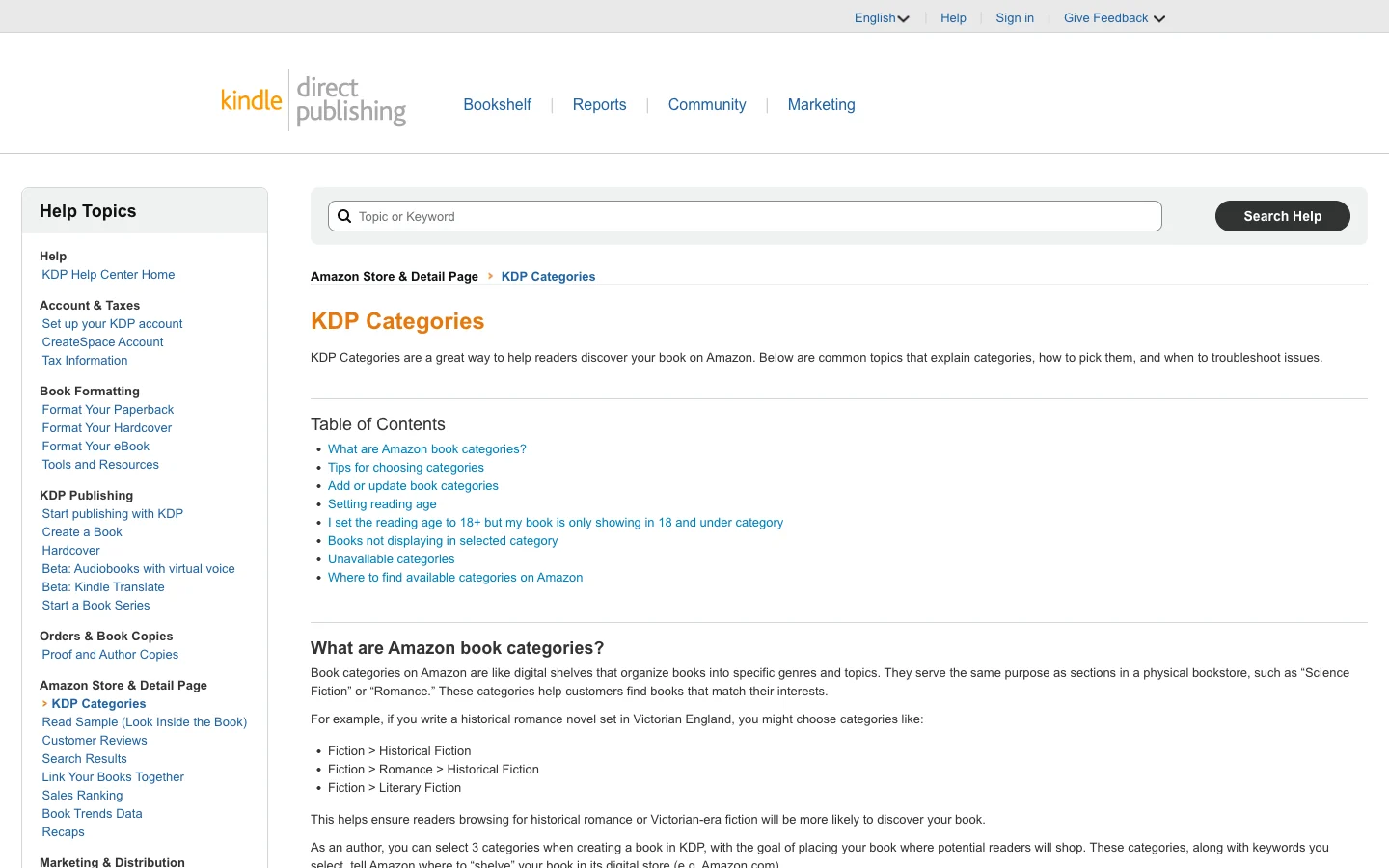
Browse categories are the up to 3 shelves Amazon files your book on. As Amazon's own KDP Categories help page states plainly, "you can select 3 categories when creating a book in KDP, with the goal of placing your book where potential readers will shop." You pick them through a hierarchical selector: you click a broad category, then a subcategory, then a specific placement, drilling down a browse path until you land on a shelf.
This matters more than it sounds, because the limit is genuinely three, and each format (ebook, paperback, hardcover) gets its own three. The whole game with categories is depth: a broad category is a shelf with ten thousand books on it, and a deep niche category is a shelf with two hundred, where your book can actually be seen.
Component 2: Backend keyword slots (the hidden index)
Backend keywords are the 7 fields, each holding up to 50 characters, that Amazon indexes but never shows to shoppers. This is your search-positioning layer. When someone types a phrase into the Amazon search bar, Amazon checks your title, subtitle, categories, and these seven hidden fields to decide if your book is relevant. The fields are invisible to humans and load-bearing for the algorithm.
Amazon's KDP Keywords help page is explicit about what belongs here and what does not. Think like a reader. Use the phrases a shopper would actually type. And do not waste the space repeating words already in your title or categories, because Amazon already indexes those.
Component 3: Title and subtitle keyword placement (the on-listing index)
This is the part most coaches sabotage with a clever title. The words in your title and especially your subtitle are indexed by Amazon and seen by every shopper. A subtitle is the single highest-value piece of keyword real estate you control, because it does two jobs at once: it tells Amazon what the book is about, and it tells the human whether to click. We go deep on this in our guide to writing a business book title that works in 2026, but the short version is that a vague, poetic title with no search terms in it is a discoverability hole you then have to dig out of with backend keywords alone.
Component 4: The bestseller-badge path (the visibility flywheel)
The fourth component is strategic, not a field you fill in. It is the path to that orange "#1 Best Seller" badge, and it runs through your category choices. Amazon assigns every book an Amazon Best Sellers Rank (ABSR) based on recent sales. Within any category, the book with the lowest ABSR (the best-selling one) wears the badge. As Kindlepreneur puts it, "if your book has the LOWEST ABSR of all books that are attached to an Amazon category, then you are the #1 best seller." In a broad category that takes thousands of daily sales. In a well-chosen niche it can take a handful. That badge is a visibility flywheel: it lifts your book in browse listings, it adds social proof that lifts conversion, and the extra sales lower your ABSR further. The badge is won at the category-selection step, weeks before launch.
These four components are the spine of the rest of this guide. The next sections take each one apart with the actual research workflow, and then we settle the categories-versus-keywords question head on.
The KDP Discoverability Stack. Categories decide which shelves you sit on. Keywords decide which searches you match. On-listing words convert the click. The bestseller-badge path compounds the whole thing. A gap in any one of the four leaks visibility.
Categories vs keywords: which actually drives discovery?
This is the question every author eventually asks, usually framed as a versus. Should I obsess over categories or keywords? Which one moves the needle? The framing is wrong, and getting it right is the difference between a discoverable book and an invisible one. Categories and keywords are not competitors. They are two different doors, and Amazon shoppers walk through both.
Categories drive browse traffic. Keywords drive search traffic.
There are two ways a stranger finds a book on Amazon. They search, typing a phrase into the bar at the top. Or they browse, clicking down through category shelves to see what exists in a topic. These are different behaviors by different people in different moods, and your metadata serves them through different doors.
Keywords (in your backend fields, title, and subtitle) govern the search door. When someone types "leadership coaching book for managers," Amazon matches that query against your indexed words. Strong keywords mean you show up; weak keywords mean you do not.
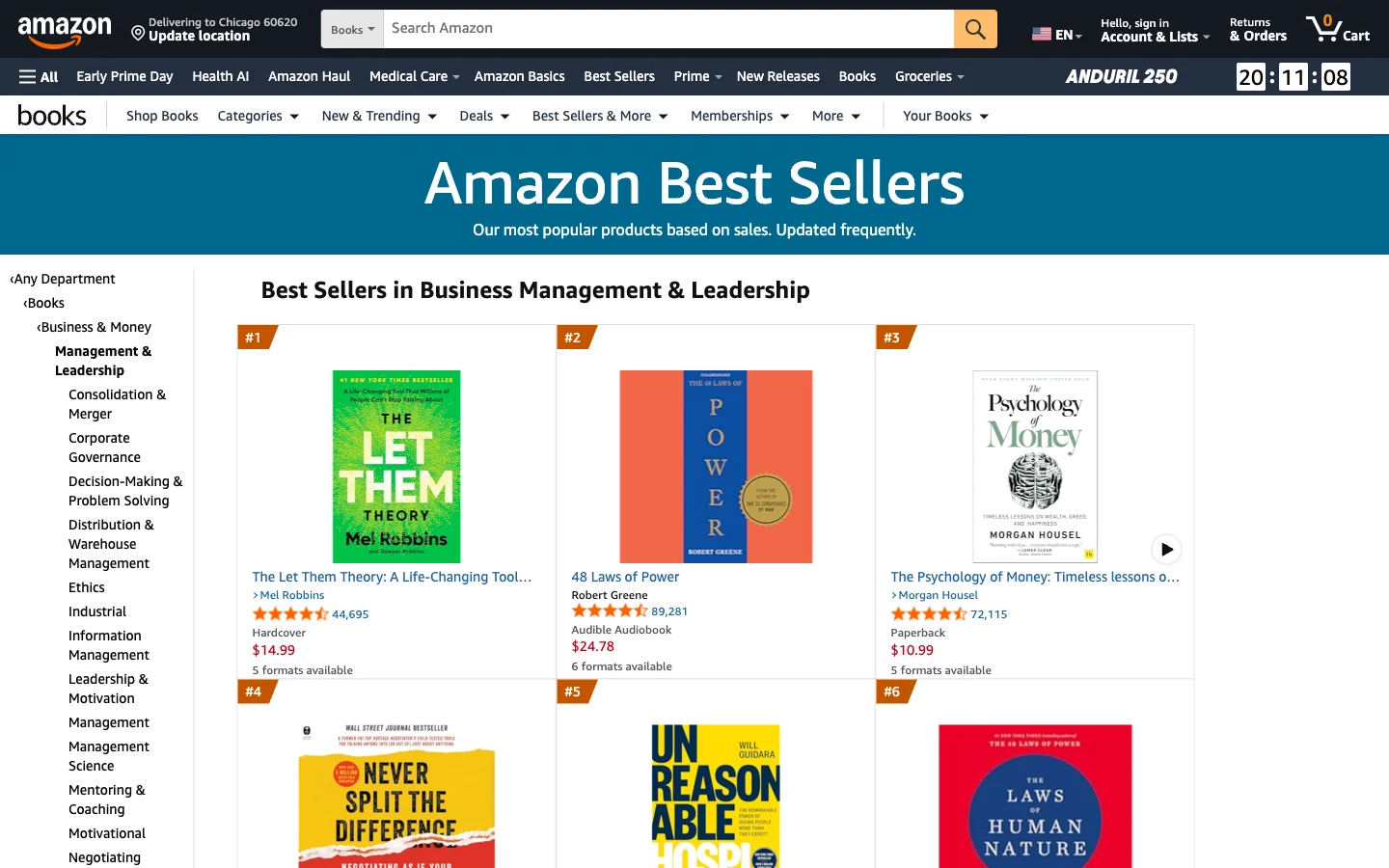
Categories govern the browse door. When someone clicks into "Business & Money > Management & Leadership > Mentoring & Coaching," Amazon shows the books filed there, ranked by sales. Strong category choices mean you appear on a shelf where your reader is already looking, ideally near the top, ideally wearing a badge.
A book that nails keywords but botches categories gets found in search and is invisible in browse. A book that nails categories but botches keywords wins a niche shelf and never shows up when someone searches. You need both doors open.
How Amazon actually decides what to show
Underneath both doors is a ranking decision, and it runs on more than just metadata matching. Amazon's discovery system first uses relevance to decide whether your book even qualifies for a given query or shelf. That is the metadata's job. Then it ranks the qualifying books, and ranking leans heavily on sales velocity and conversion: how many copies are selling recently, and what fraction of people who see the listing actually buy. The author community often calls Amazon's current ranking system the "A10 algorithm," though Amazon itself does not publish that name or its internals, so treat the label as shorthand for "Amazon's recent ranking behavior," not gospel.
The practical takeaway is verified and uncontroversial. Relevance is the gate, and your categories and keywords control it. If the metadata does not match, no amount of sales velocity helps, because you never qualify. Once you qualify, sales and conversion sort the order. This is why a precise listing compounds and a sloppy one stays buried even when you drive traffic to it. We tested this dynamic across tools in our end-to-end test of AI book writing tools for KDP, and the listing layer is consistently where the most-overlooked gains hide.
The verdict on this sub-question
Stop asking which one matters more. Categories win the browse door and the bestseller badge. Keywords win the search door. They cover different traffic, and a coaching book needs both because your ideal client sometimes searches a specific problem and sometimes browses a topic. The right move is to research both deliberately, which is exactly what the next two sections walk through.
How to choose your 3 KDP categories so your book is winnable
Now the workflow. Categories first, because they are the more misunderstood half and the one that wins you a badge. The rule is simple to state and hard to discipline yourself into: pick categories deep enough that your book can actually rank, relevant enough that Amazon will not move it, and aligned with where your ideal reader browses.
Step 1: Understand the current 3-category system
Amazon changed how this works in mid-2023, and most of the advice floating around the internet predates the change. The old system let you choose two BISAC industry codes and email KDP support to request up to ten more categories. That is gone. Today you choose up to 3 categories directly from Amazon's own store-category tree, through the selector in your book's details, with no email and no BISAC codes. Each format gets its own three. This is confirmed on Amazon's KDP Categories help page. If a guide tells you to email KDP for extra categories, the guide is out of date.
One more verified rule worth knowing: Amazon may automatically place your book into additional categories based on your metadata, and it may move you out of a category it judges inaccurate "to provide a positive customer experience." You control your three. Amazon controls the extras, and you cannot force them.
Step 2: Find the niche categories your competitors hide in
The winnable categories are the deep ones, and the fastest way to find them is to study books like yours that already rank. Open the Amazon listing of a successful coaching book in your lane (say, a leadership coaching title that sells well). Scroll to the "Product details" section. There you will see its Best Sellers Rank lines, including the specific sub-categories it ranks in, like "Business Mentoring & Coaching" or "Leadership Training." Those sub-categories are real, browseable shelves, and they are often three or four levels deep in the tree. Collect them from several competitor books and you have a shortlist of niches your reader actually browses.
You can also climb the tree manually. Start in a broad category on Amazon, click into a sub-category, then a sub-sub-category, and watch how the number of competing books shrinks as you go deeper. The goal is a category specific enough that the field is thin, but not so specific that no human ever browses it.
Step 3: Check whether you can actually win the badge
A category is winnable if you can plausibly out-sell its current top books during your launch. Here is the manual check. In a candidate category, look at the book currently ranked #1, and find its Amazon Best Sellers Rank in the product details. A book sitting at ABSR 80,000 is selling a couple of copies a day; a book at ABSR 2,000 is selling dozens. The lower the #1 book's rank, the more sales you would need to dethrone it. As Kindlepreneur's category method describes, some categories need a thousand-plus daily sales for the top spot and some niche categories need only around a dozen. You want the dozen kind.
This is exactly the math Publisher Rocket automates. Dave Chesson's tool (a one-time $199 purchase) shows you, per category, how many sales you would need today to hit #1, and flags "ghost" categories that no longer function. It is the standard tool authors use to skip the manual ABSR-to-sales guesswork. You do not need it (the manual method works), but it removes the spreadsheet labor.
Step 4: Lock your three and stay relevant
Pick your three with this balance: at least one or two deep niche categories you can realistically badge in, and choices that are genuinely relevant to the book. Do not file a coaching book in a category just because it is empty. Amazon notices irrelevant placements and removes them, and an irrelevant category sends the wrong shoppers who bounce, which hurts your conversion signal. Relevance plus depth is the whole formula. For the broader self-publishing context around a coaching title specifically, our guide to self-publishing a coaching book on Amazon KDP puts categories in the full launch sequence, and if KDP itself is still new to you, start with what Amazon KDP is, in plain terms.
How to research your 7 backend keywords (the right way)
Keywords are the search door, and they reward precision. You have 7 fields, 50 characters each, for 350 characters of search positioning. The job is to fill them with the actual phrases your ideal reader types, none of which you should be guessing at.
Step 1: Mine Amazon's search autocomplete
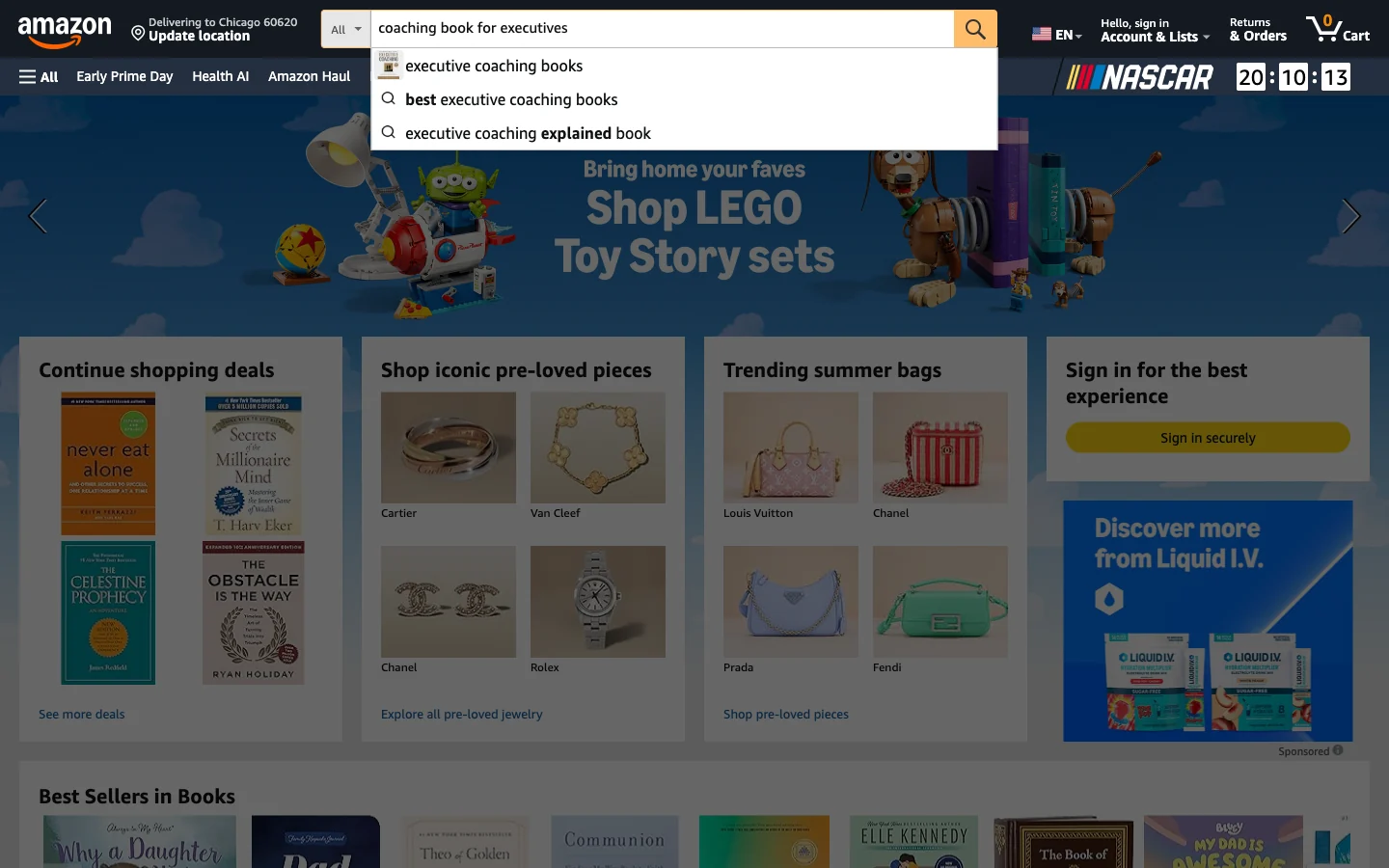
The best free keyword tool is the Amazon search bar itself. Start typing a phrase related to your book, like "coaching book for," and watch what Amazon auto-populates underneath. Those suggestions are ranked by real search demand: Amazon is telling you what shoppers actually look for. Kindlepreneur's keyword method recommends exactly this, including the "alphabet soup" trick: after your seed phrase, add each letter a-z at the end ("coaching book for a," "coaching book for b") to surface a long list of real reader phrases. Spend twenty minutes here and you will have more genuine keyword candidates than you can use.
Step 2: Think in reader phrases, not single words
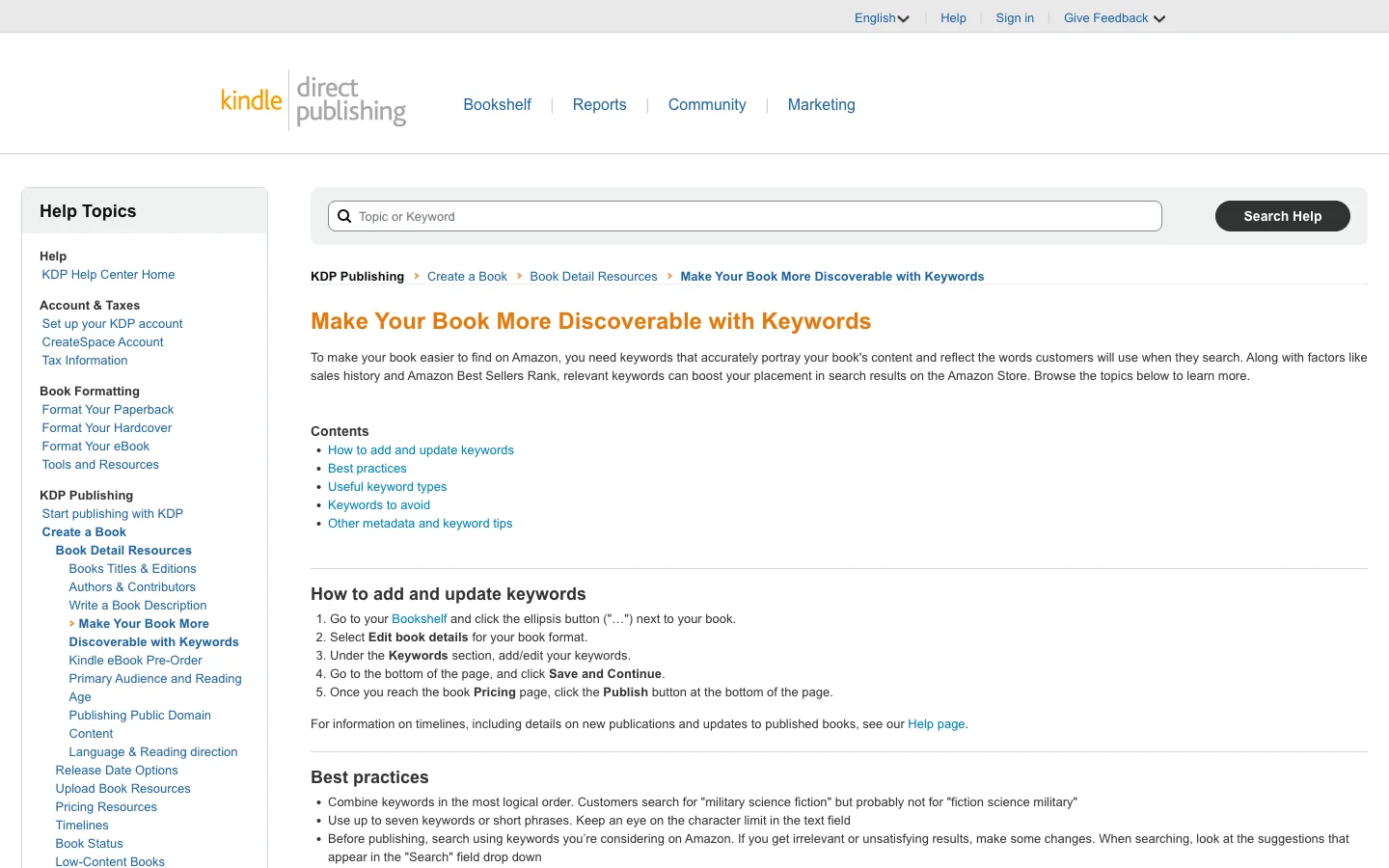
Amazon's own keyword guidance says to combine keywords "in the most logical order" and to think like a customer: "Customers search for 'military science fiction' but probably not for 'fiction science military.'" For a coaching book, that means phrases like "executive coaching for new leaders" or "mindset book for entrepreneurs," not a pile of disconnected single words. Multi-word phrases are more specific, less competitive, and far more likely to match a buyer who is ready to purchase. A reader who searches "leadership coaching for first time managers" knows exactly what they want. A reader who searches "leadership" is browsing a continent.
Step 3: Do not repeat your title, and avoid the banned terms
Two rules straight from Amazon's KDP Keywords help page, and breaking them wastes your limited space. First, do not put words in your backend fields that already appear in your title, subtitle, categories, or author name. Amazon already indexes those, so repeating them burns characters for zero gain. Second, avoid the terms Amazon explicitly disallows: subjective claims ("best book ever"), time-sensitive language ("new," "on sale"), other authors' names or unowned brands, Amazon program names ("Kindle Unlimited," "KDP Select"), quotation marks, and HTML. Amazon also tells you to use spaces, not commas, between terms, because commas waste characters you would rather spend on another search phrase.
Amazon's help page even hands you the categories of useful keywords to brainstorm: setting, character types, character roles, plot themes, and story tone. That framing is fiction-flavored, but it translates cleanly for nonfiction: think reader-type (new managers, solopreneurs), problem (burnout, scaling, hiring), outcome (confidence, clarity, a system), and format (workbook, framework, step-by-step). One reader intent per field, filled close to the 50-character limit.
Step 4: Validate with a tool if you want the data
The manual method is good. A tool makes it faster and adds numbers. Publisher Rocket shows estimated search volume and competition per keyword, drawn from Amazon sales data, so you can rank your candidates by demand instead of intuition. It is the same tool authors use for category research, which is why many treat the category-and-keyword research step as one sitting. Whether you use it or stick to autocomplete, the principle holds: every keyword should be a phrase a real buyer types, and you should have a reason to believe it has demand.
From metadata to badge: a coach's checklist for getting found on Amazon
Here is the whole KDP Discoverability Stack as a sequence you can run before and after you hit publish. Work it in order. Each step feeds the next.
Step 1: Map your reader's search and browse behavior
Before you touch the upload flow, write down two lists. What phrases would your ideal client type into Amazon to find a book like yours? And which category shelves would they browse? These two lists are your keyword and category raw material, and they come from knowing your reader, not from guessing. A coaching book is a positioning asset aimed at a specific buyer, so the more precisely you name that buyer, the better every downstream choice gets.
Step 2: Build the keyword list from autocomplete
Open Amazon, run the autocomplete and alphabet-soup pass, and collect twenty to thirty real reader phrases. Group them by reader intent. Pick the seven strongest, non-overlapping phrases, each a multi-word search a buyer would type, none repeating your title. Fill each of the 7 fields close to 50 characters. Avoid the banned terms. This is your search door, done.
Step 3: Build the category shortlist from competitors
Open five successful books in your lane, read their Best Sellers Rank sub-categories out of the product details, and build a shortlist of deep niche shelves. For each, eyeball the #1 book's ABSR to judge how winnable it is. Choose three: weighted toward winnable niches, all genuinely relevant. This is your browse door and your badge path, done.
Step 4: Load the on-listing keywords into your subtitle
Your title can carry some brand and hook, but your subtitle should be working keyword real estate. Put your single strongest reader phrase there, phrased so it reads naturally to a human and indexes cleanly for Amazon. This closes the gap between the search door and the conversion: the shopper searches a phrase, sees it echoed in your subtitle, and clicks with confidence. A strong subtitle also props up a book description that converts the visit into a sale, which is the next thing the shopper reads.
Step 5: Publish, then watch and adjust
Categories and keywords are not permanent decisions. You can edit both anytime through your KDP Bookshelf, with no re-review, and changes propagate to your Amazon page within roughly 24 to 72 hours. So publish, give it a few weeks, and watch. If you are not ranking in a category, swap it for a deeper niche. If a keyword is not pulling, replace it. The first metadata pass is a hypothesis, not a verdict. Treat the listing as something you tune.
Step 6: Feed the flywheel with reviews and traffic
Relevance gets you into the race; sales and conversion win it. Once the metadata is right, the highest-impact moves are getting early reviews on Amazon (verified-purchase reviews carry the most weight) and driving outside traffic that converts, both of which feed Amazon the signals that lower your ABSR and lift you in browse and search. You can do this on a shoestring; we cover the cheap version in how to market a business book on a tiny budget. The badge, when it comes, comes from this flywheel spinning on top of correct metadata.
How Built&Written drafts your categories and keywords for you
Here is the honest pitch, since this is our product. Everything above is doable by hand, and plenty of authors do it well. The problem is that the metadata step lands at the end of a long, draining project, exactly when most coaches have no energy left to do twenty minutes of autocomplete mining and a competitor-ABSR spreadsheet. So they rush it, and the book goes invisible. The fix is to not start from a blank box.
Built&Written is the AI book platform for coaches, consultants, and founders who want to turn the content they already have (LinkedIn posts, notes, podcast transcripts pasted as text) into a credibility-building book. You paste your material, it proposes a structure, drafts the manuscript while preserving your voice through Voice DNA, and formats it KDP-ready. That part is the book.
The part that matters for this guide is the KDP Launch Co-pilot. When your manuscript is done, it generates a complete Amazon listing: the title, the subtitle, the description, the keywords, and the categories. It reads what your book is actually about and drafts the discoverability metadata so the engine starts loaded instead of empty. You are not staring at seven blank keyword boxes at midnight. You are editing a strong first draft of your categories and keywords, which is a far better place to start. We walk founders through the whole flow in the coach's guide to AI book writing and publishing, and you can see how it stacks against other tools in our tested AI book writing tools for KDP roundup.
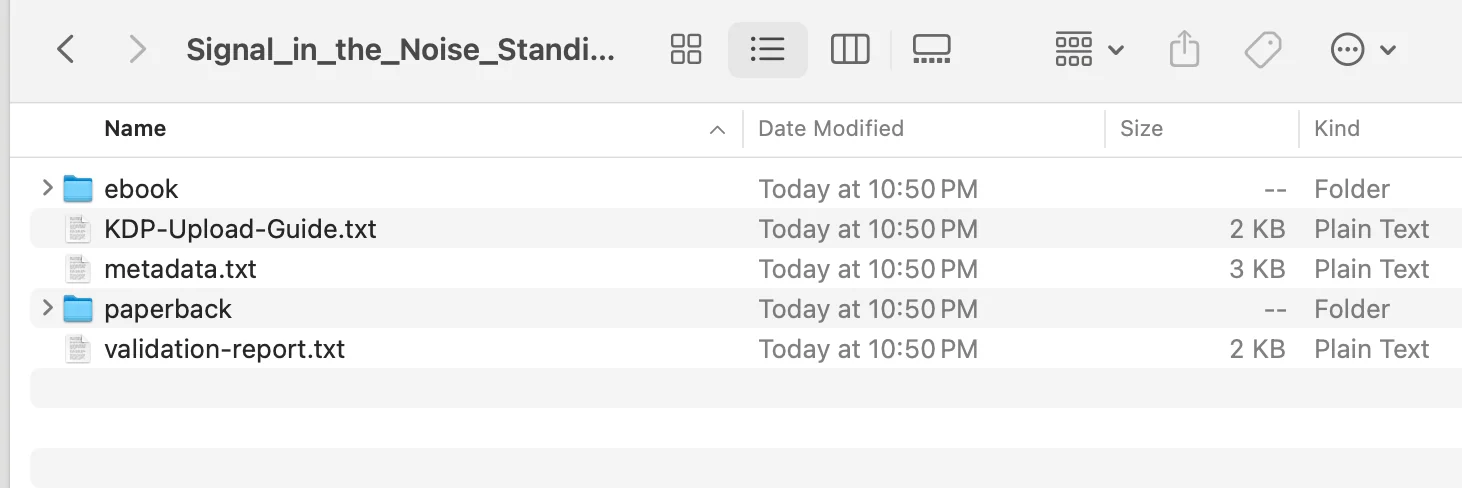
To be precise about what this is: Built&Written drafts the listing and exports a KDP-ready package. You still review the suggested categories and keywords, refine them against your own reader knowledge and the research workflow above, and upload to KDP yourself. The Co-pilot does the cold-start work. You do the final, informed tuning. Built&Written has a free tier plus paid plans, so you can see the drafted listing before deciding anything.
The verdict: categories and keywords are the engine, not the paperwork
If you take one thing from this guide, take this. Your coaching book's discoverability is decided by two metadata fields most authors fill in carelessly, and the cost of carelessness is total: a good book nobody ever sees. The KDP Discoverability Stack is the fix. Categories open the browse door and win the bestseller badge. Backend keywords open the search door. Title and subtitle words convert the click and feed both doors. The badge path compounds the whole thing into a flywheel.
The verified rules are not complicated. You get up to 3 categories per format, chosen through Amazon's selector, editable anytime. You get 7 backend keyword fields at 50 characters each, which should hold real reader phrases and never repeat your title. Amazon ranks on relevance first (your metadata), then sales and conversion. Win the niche, not the ocean. None of this requires talent. It requires twenty minutes of autocomplete research, a competitor-ABSR check, and the discipline to go specific instead of broad.
For a coach, the payoff is asymmetric. The book is a positioning asset that turns cold prospects into warm inbound, and a discoverable book does that work continuously while an invisible one does nothing. The metadata is the difference. Do the research, or let Built&Written's KDP Launch Co-pilot draft it and tune from there. Either way, do not let the last five minutes of the upload flow decide whether the months of writing were worth it.
Key takeaways
- The KDP Discoverability Stack has four parts: browse categories, backend keyword slots, title/subtitle placement, and the bestseller-badge path. A gap in any one leaks visibility.
- You get up to 3 categories per format, chosen through Amazon's hierarchical selector (the post-2023 system, no more BISAC codes or emailing KDP). Pick deep niches you can rank in, kept relevant.
- You get 7 backend keyword fields, 50 characters each. Fill them with real reader phrases from Amazon autocomplete, one intent per field, and never repeat words already in your title or categories.
- Categories and keywords are not rivals. Categories drive browse traffic and the badge; keywords drive search traffic. Your ideal client uses both doors.
- Amazon ranks on relevance first, then sales velocity and conversion. Correct metadata is the gate. Reviews and traffic are the flywheel that lowers your ABSR.
- Everything is editable. Categories and keywords change anytime with no re-review, propagating in 24 to 72 hours. The first pass is a hypothesis to tune.
- Built&Written's KDP Launch Co-pilot drafts your categories and keywords, so you edit a strong first draft instead of facing blank boxes at the end of a long project.
Sources & References
- Amazon KDP: Categories help page
- Amazon KDP: Keywords help page
- Amazon KDP: AI content guidelines
- Amazon Kindle Direct Publishing
- Kindlepreneur: How to choose Kindle keywords
- Kindlepreneur: How to choose the best KDP category
- Publisher Rocket by Dave Chesson
- Amazon Author Central
- International Coaching Federation research
- Built&Written
Frequently asked questions
Up to 3 per format. Amazon's current system (in place since mid-2023) lets you select three categories directly from its store-category tree, through the selector in your book's details. Each format (ebook, paperback, hardcover) gets its own three. The old approach of choosing two BISAC codes and emailing KDP to request up to ten more is retired. Amazon may also auto-place your book in extra categories based on metadata, but you cannot control those.
Both, and they do different jobs. You have 7 separate backend keyword fields (50 characters each) that Amazon indexes but never shows to shoppers; that is your hidden search index. Your title and subtitle are also indexed, and they are visible to every shopper, so they convert the click as well as feed search. The smart move is to put your strongest reader search phrase in your subtitle and reserve the seven backend fields for additional phrases you did not already use on the cover.
Start with Amazon's search autocomplete. Type a seed phrase related to your book into the Amazon search bar and read the suggestions, which are ranked by real search demand. Then run the alphabet-soup pass: add each letter a-z after your seed phrase to surface more real reader queries. For demand data and competition scores, authors use Publisher Rocket, which pulls from Amazon sales data. The principle is the same either way: every keyword should be a phrase a real buyer would type.
Usually one of three reasons. The category is too broad, so you are buried under established bestsellers and never reach a visible page. The category is irrelevant to your book, so Amazon moved or removed your placement. Or your sales velocity is too low to rank within an otherwise reasonable category, since Amazon orders category shelves by recent sales. Fix it by swapping broad categories for deeper, relevant niches, then driving early sales and reviews to lift your rank within them.
Yes, anytime, with no re-publishing review. Go to your KDP Bookshelf, open the book's details, edit the categories, and save. Changes typically propagate to your Amazon product page within 24 to 72 hours, and there is no limit on how often you change them. This is why your first category choices are a hypothesis to test, not a permanent commitment. The same applies to keywords: edit them whenever, and re-tune based on what is ranking.
Seven keyword fields, each holding up to 50 characters including spaces, for 350 characters total. You can use a field as one long phrase or several shorter phrases separated by spaces (not commas, which waste characters). Fill each field close to the limit, because unused characters are unused positioning. Keep one reader intent per field so each field targets a distinct kind of search.
Amazon's keyword guidelines disallow several things: words already in your title, subtitle, categories, or author name (already indexed, so repeating wastes space); subjective claims like best book ever; time-sensitive terms like new or on sale; other authors' names or brands you do not own; Amazon program names like Kindle Unlimited or KDP Select; quotation marks; and HTML tags. Using any of these can get your terms ignored or your book flagged, so stick to genuine reader search phrases.
The free method (Amazon autocomplete for keywords, competitor product-detail pages for categories) genuinely works and costs nothing. Publisher Rocket, a one-time $199 tool from Kindlepreneur's Dave Chesson, adds estimated search volume, per-keyword competition scores, and a category calculator that tells you how many sales you need to hit #1. It mainly saves time and removes guesswork. If you are publishing one book, the free method is fine. If you are building a catalog, the tool pays for itself in hours saved.
No. Metadata is the gate, not the engine of sales. Correct categories and keywords make your book eligible to appear in the right searches and on the right shelves. Whether it then ranks depends on sales velocity and conversion, which come from a strong cover, a sharp title and description, early verified reviews, and traffic. Think of categories and keywords as necessary but not sufficient: they let the book be found, and the rest of your launch decides whether it sells once it is found.
Sources & References
- https://kdp.amazon.com/en_US/help/topic/G200652170
- https://kdp.amazon.com/en_US/help/topic/G201298500
- https://kdp.amazon.com/en_US/help/topic/G200672390
- https://kdp.amazon.com/
- https://kindlepreneur.com/how-to-choose-kindle-keywords/
- https://kindlepreneur.com/how-to-choose-the-best-kindle-ebook-kdp-category/
- https://publisherrocket.com/
- https://author.amazon.com/
- https://coachingfederation.org/research
- https://www.builtwritten.com/
About the author

Mykhailo Druz
More in informational
Ready to write your book?
Turn your expertise into a professional book with Built&Written.