
Can You Use AI Images Inside a Nonfiction Book on KDP?
Key takeaways
- Are AI images allowed? Yes. Amazon's content guidelines name pictures inside the book in the AI rule. You tell Amazon about them during setup.
- Will readers see it? No. Your answer goes to Amazon only.
- Are they big enough to print? Often they are too small. A typical AI image of 1,024 pixels prints sharply at about 3.4 inches wide.
- Does color cost more? Yes. On a $14.99 paperback of 200 pages, you keep $5.59 per copy with black ink and $2.89 with color.
- Where do you put them? In Built&Written, you add pictures right inside each chapter. They stay in your print and ebook files.
- Who owns them? The US Copyright Office does not protect pictures made by AI from a prompt. Your own text stays protected.
Can you use AI images in books on Amazon KDP?
Yes. KDP's content guidelines allow AI content. The one condition is that you tell Amazon about it.
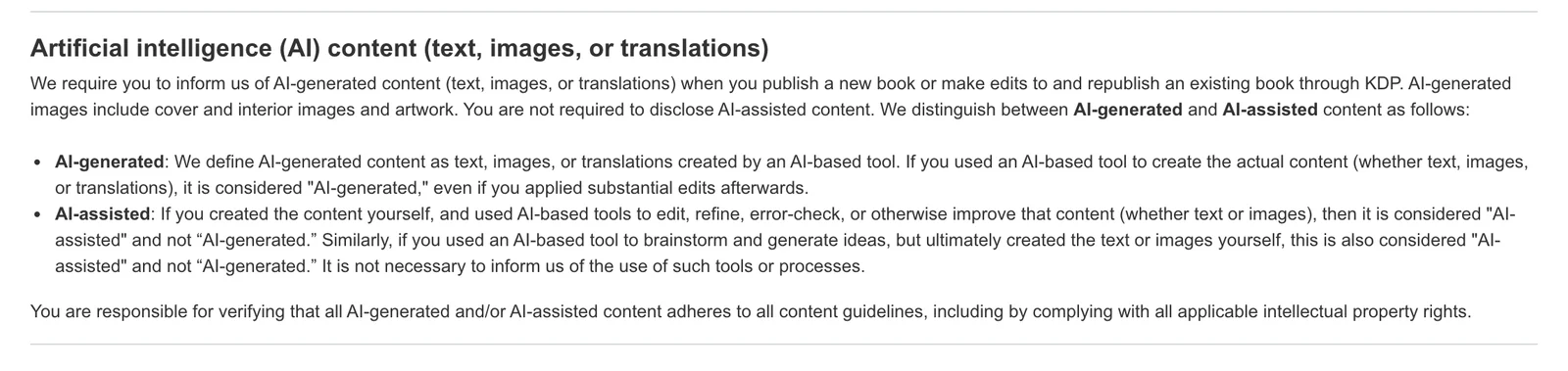
The rule names the cover and the pictures inside the book.
Text in the image:
"We require you to inform us of AI-generated content (text, images, or translations)... AI-generated images include cover and interior images and artwork. You are not required to disclose AI-assisted content." Content made by an AI tool counts as AI-generated "even if you applied substantial edits afterwards".
The same guidelines say Amazon can stop selling a book that disappoints buyers. This matters for nonfiction, as we show further down.
How to add images to your book with Built&Written
About Built&Written
Built&Written is a platform that turns your notes, posts or talks into a finished nonfiction book for Amazon KDP. You can add your own pictures, charts and diagrams to any chapter. They stay in place in the print PDF and in the ebook.
You start from what you already have, and Built&Written writes the chapters in your voice. If your book is already written, you upload it and keep every word.
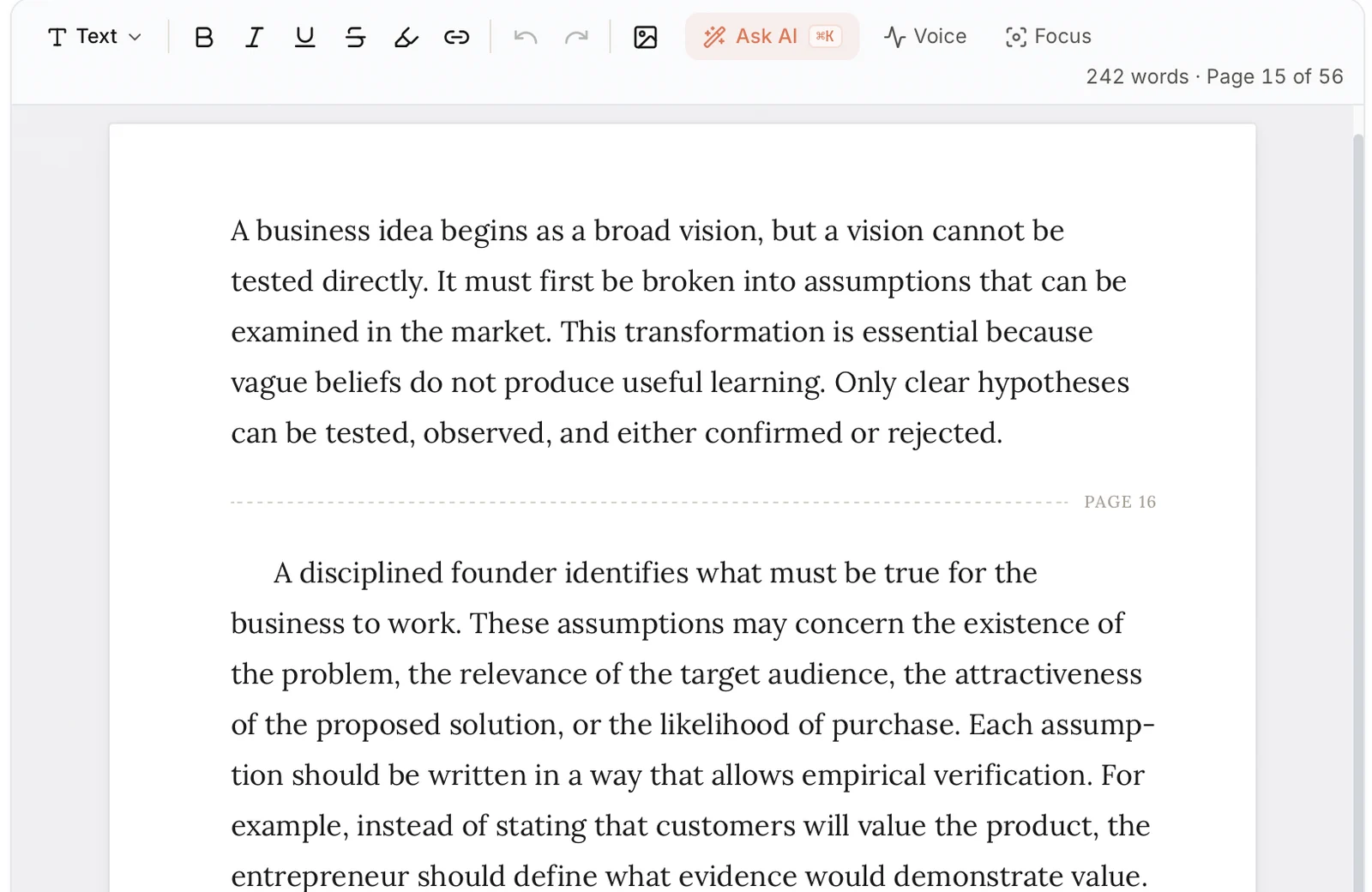
To add a picture, click the image button in the chapter editor and choose a PNG, JPG or WebP file, up to 15 MB. This works on every plan. The picture stays where you put it in the print PDF and in the EPUB, the file for Kindle ebooks. Word and EPUB downloads come with the plans that include them.
Did you write your book in Word, with the pictures already inside? Upload the Word file, and the pictures come in with the text. A PDF works differently: only its text comes in. So keep your picture files at hand in that case.
Text in the image:
Toolbar: formatting buttons, an image button, "Ask AI", "Voice", "Focus".
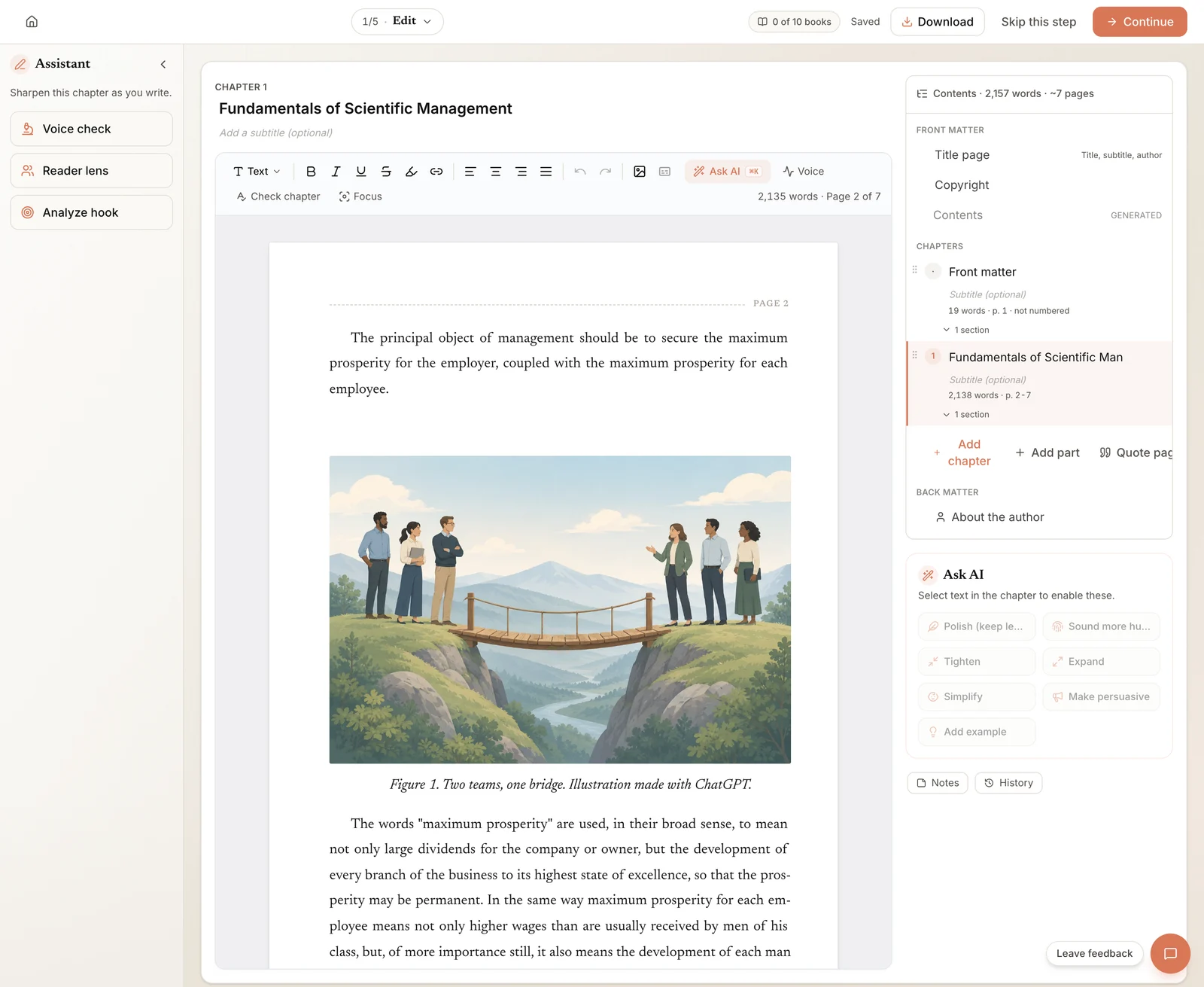
This is how it looks in a real chapter. We placed one of our test pictures after the first paragraph and wrote a caption under it.
Text in the image:
"Figure 1. Two teams, one bridge. Illustration made with ChatGPT."
Books follow a simple rule for captions. Put the caption right under the picture. Start it with a number, such as "Figure 1". Set it in italics and center it. If AI made the picture, say so in the caption.
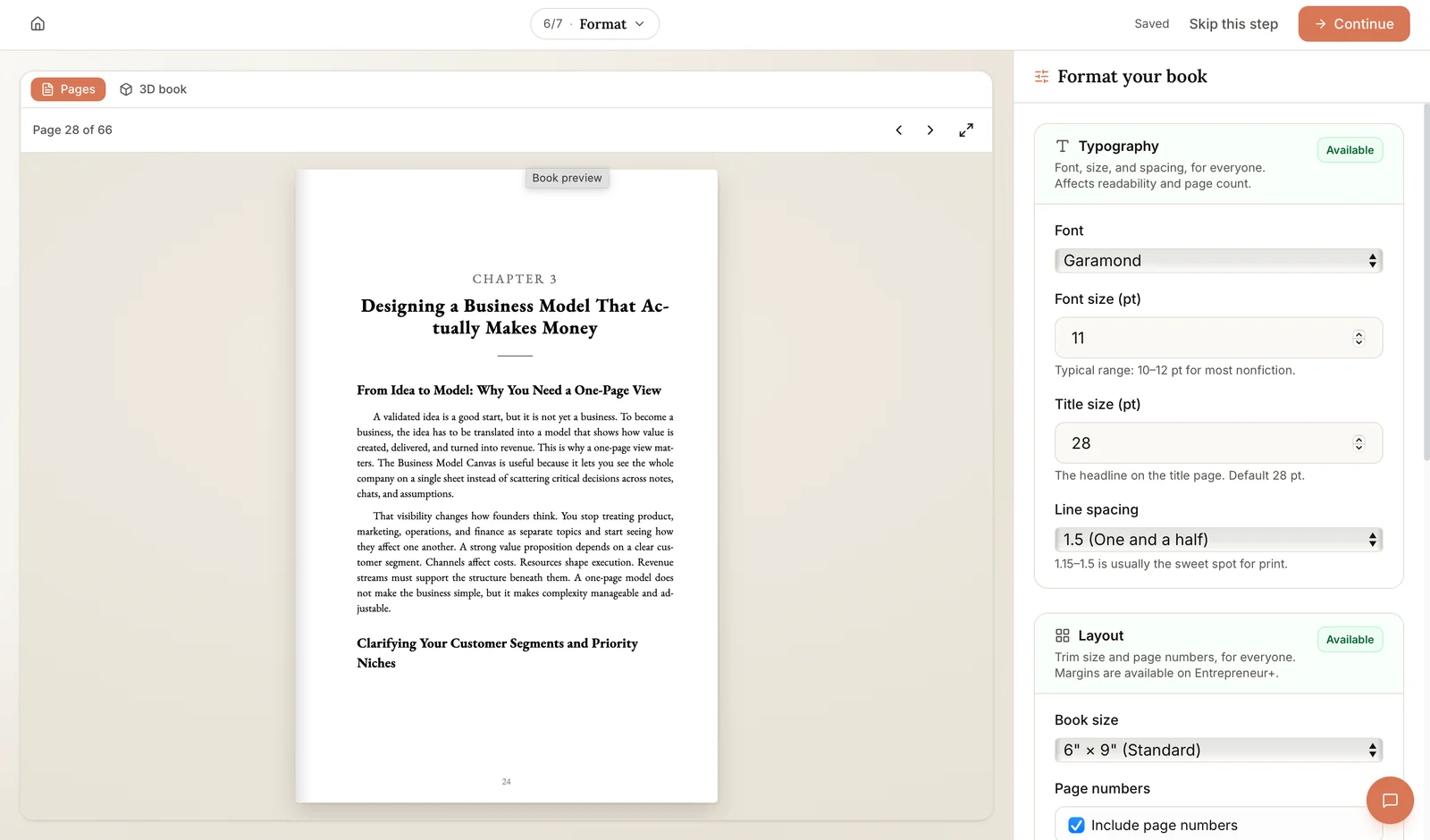
Choose your book size early, so you know how big each picture will print.
Text in the image:
"Format your book": "Font: Garamond", "Font size (pt): 11", "Line spacing: 1.5", "Book size: 6" x 9" (Standard)".
A note about covers. Built&Written makes pictures with AI for one place only: the cover. It can design one for you with an AI image model. By KDP's rule, that cover is an AI-generated image. So answer "yes" for images in KDP. You can also upload your own cover on any plan. In both cases, our free KDP cover validator checks the cover file before you upload it.
Which images count as AI-generated on KDP?
Ask yourself one question: who made the picture?
If an AI tool made it, KDP calls it AI-generated. This stays true even after you edit it a lot. If you made the picture and used AI to clean it up, KDP calls it AI-assisted. You don't need to mention AI-assisted pictures.
| Image in your book | What KDP calls it | Tell Amazon? |
|---|---|---|
| An illustration you made in Midjourney or ChatGPT | AI-generated | Yes |
| The same illustration after heavy edits in Photoshop | AI-generated | Yes |
| A cover made by an AI image tool | AI-generated | Yes |
| Your own photo, with the background removed by AI | AI-assisted | No |
| A chart you built in Google Sheets from your own numbers | Your own work | No |
You give the answer on the content page of your KDP setup. KDP asks there if the book has AI-generated text, images or translations. Our article on whether you have to disclose AI in your book goes through that question step by step.
Are AI images in books good enough to print?
This is where most AI images run into trouble. The problem is size.
A printer needs enough dots of color for every inch of paper. Printers measure this in DPI, which means dots per inch. KDP's page on formatting images asks for at least 300 DPI. It calls anything under 200 DPI low quality. The same page warns that changing the DPI number in a photo app does not add detail.
So the real question is how many pixels your picture has. Midjourney's guide says its images start at 1,024 by 1,024 pixels. Its upscale buttons make them bigger, up to 2,048 by 2,048.
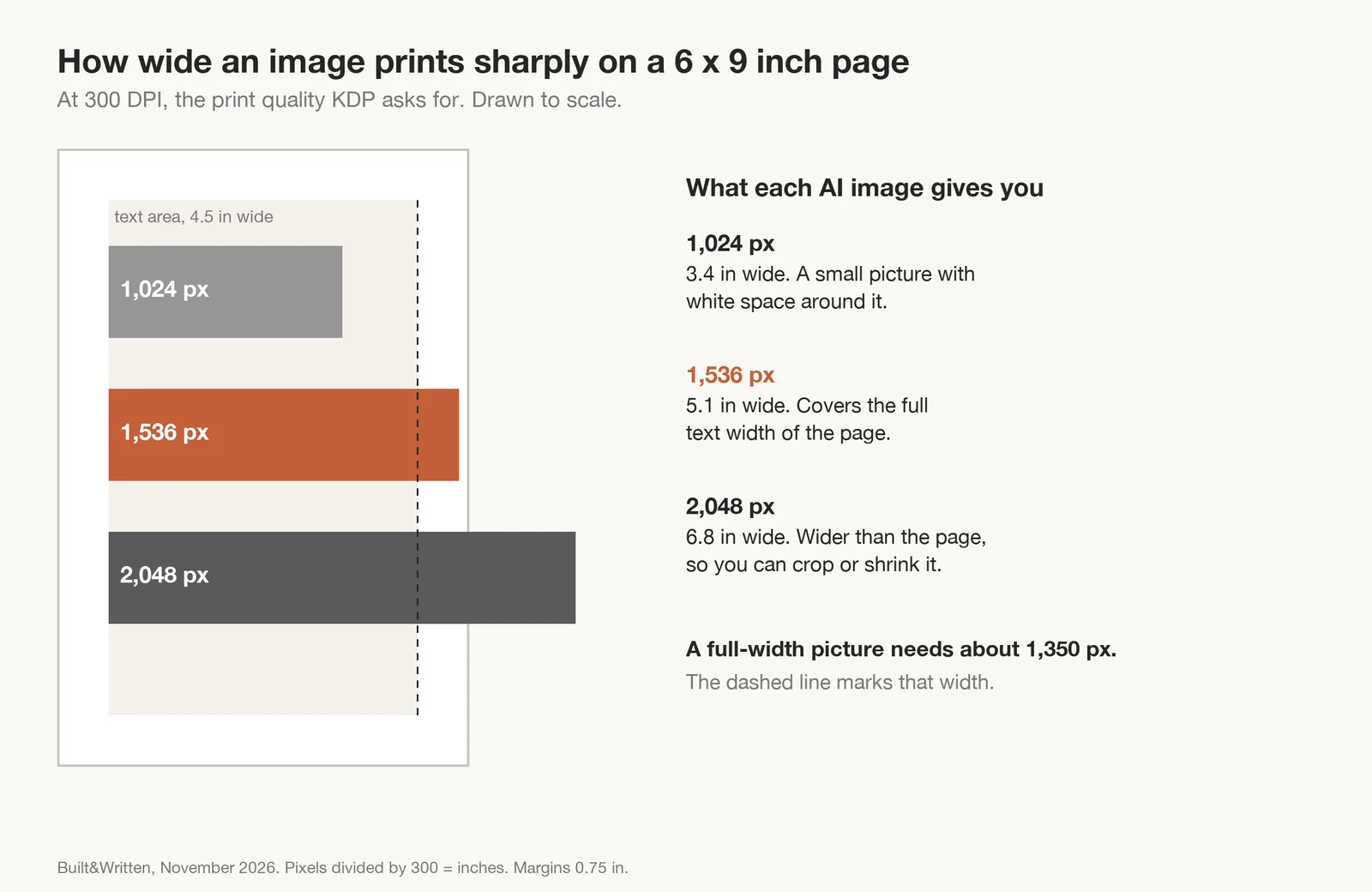
To find how wide a picture prints sharply, divide its width in pixels by 300. We drew the result on a 6 by 9 inch page, the most common size for nonfiction.
Text in the image:
1,024 px prints 3.4 in wide. 1,536 px prints 5.1 in wide. 2,048 px prints 6.8 in wide. A full-width picture needs about 1,350 px.
With normal margins, the text on a 6 by 9 page is about 4.5 inches wide. A picture that fills this width needs about 1,350 pixels. A plain 1,024 pixel AI image is too small for that. You have two choices. Print it smaller, or upscale it first. After you upscale, open the file and check the pixel count before you place it in the book.
Ebooks have the opposite problem. For a Kindle ebook on the 70% royalty plan, Amazon charges $0.15 for every megabyte of the file, on each sale on Amazon.com. Say you add ten pictures of 3 MB each. That is 30 MB, so Amazon takes $4.50 from every sale. Save the same ten pictures as JPEG files of about 300 KB each, and the cost drops to about $0.45.
How much do color AI images add to your print cost?
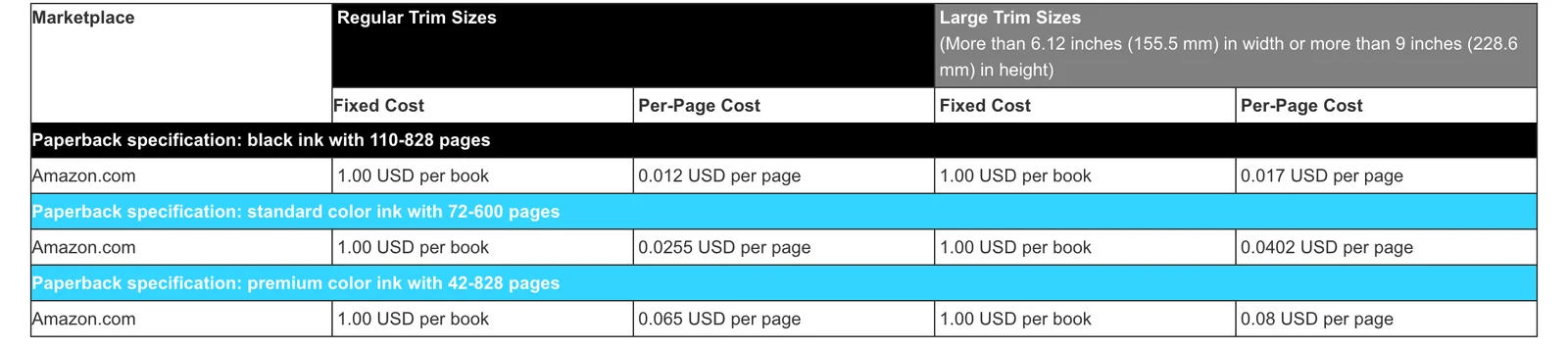
Most AI images come out in color. In a paperback, color only prints if you choose a color ink option. That choice applies to the whole book. One color picture means every page is printed and paid for at the color price.
Text in the image:
Amazon.com, regular trim sizes: black ink 1.00 USD per book plus 0.012 USD per page; standard color 1.00 USD plus 0.0255 USD per page; premium color 1.00 USD plus 0.065 USD per page.
Here is the printing cost for a 200-page paperback, 6 by 9 inches, sold on Amazon.com:
| Ink | Printing cost per copy |
|---|---|
| Black ink | $1.00 + 200 x $0.012 = $3.40 |
| Standard color | $1.00 + 200 x $0.0255 = $6.10 |
| Premium color | $1.00 + 200 x $0.065 = $14.00 |
Now let's see what this does to your earnings. KDP's paperback royalty page says you get 60% of the price when the book costs $9.99 or more. The printing cost comes out of that 60%. We took a common price of $14.99.
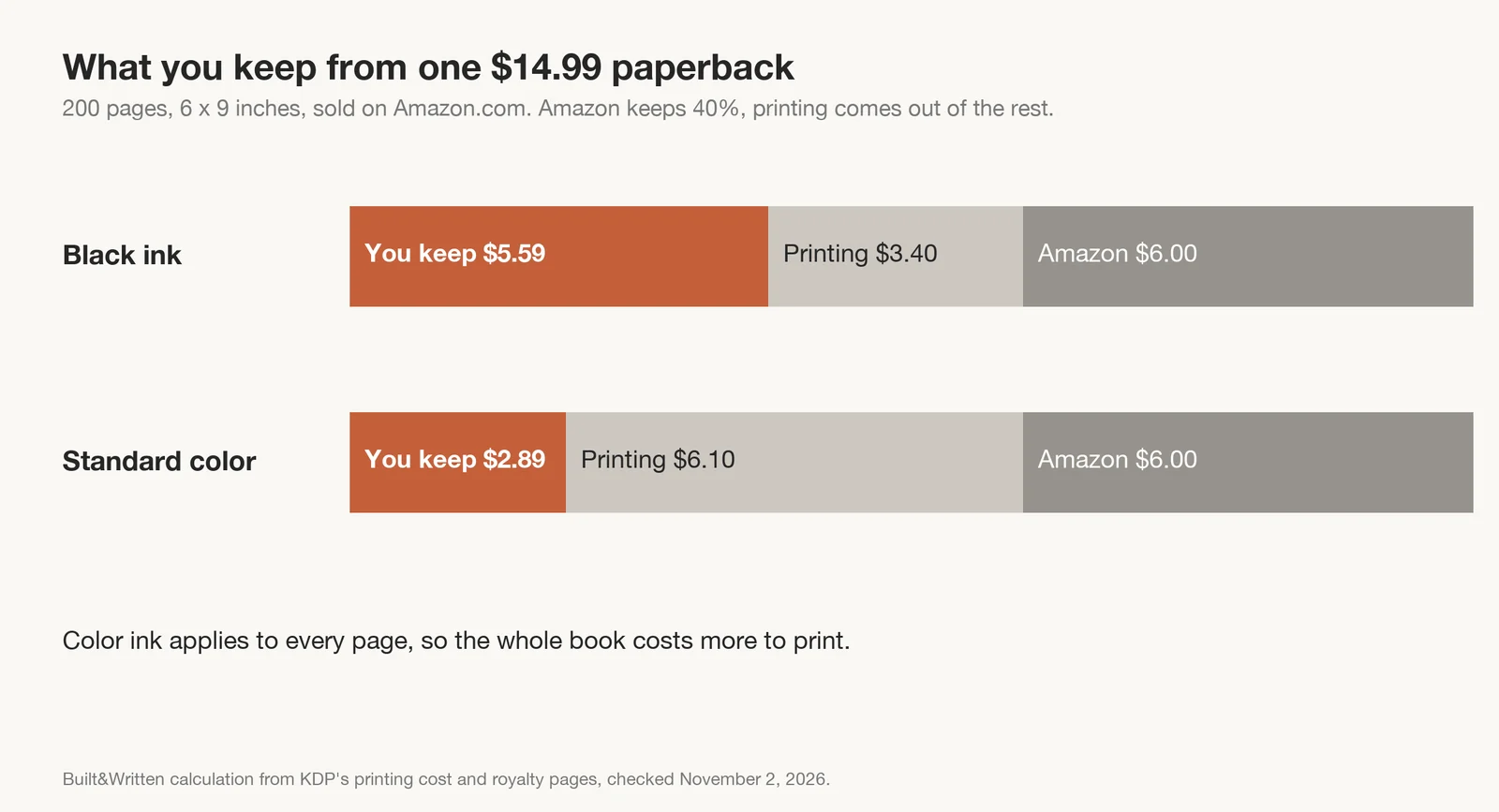
Text in the image:
Black ink: you keep $5.59, printing $3.40, Amazon $6.00. Standard color: you keep $2.89, printing $6.10, Amazon $6.00.
Premium color goes further. Its printing cost of $14.00 is more than your 60% of $14.99. KDP sets a minimum price so that the royalty always covers printing. For this book, that minimum is about $23.34.
Our KDP royalty calculator shows the numbers for your own page count and price.
For most business and how-to books, black ink is the sensible choice. That means your AI pictures will print in shades of grey. Some pictures survive this well. Others lose their meaning. Charts with colored lines are the usual problem, as our own example shows.
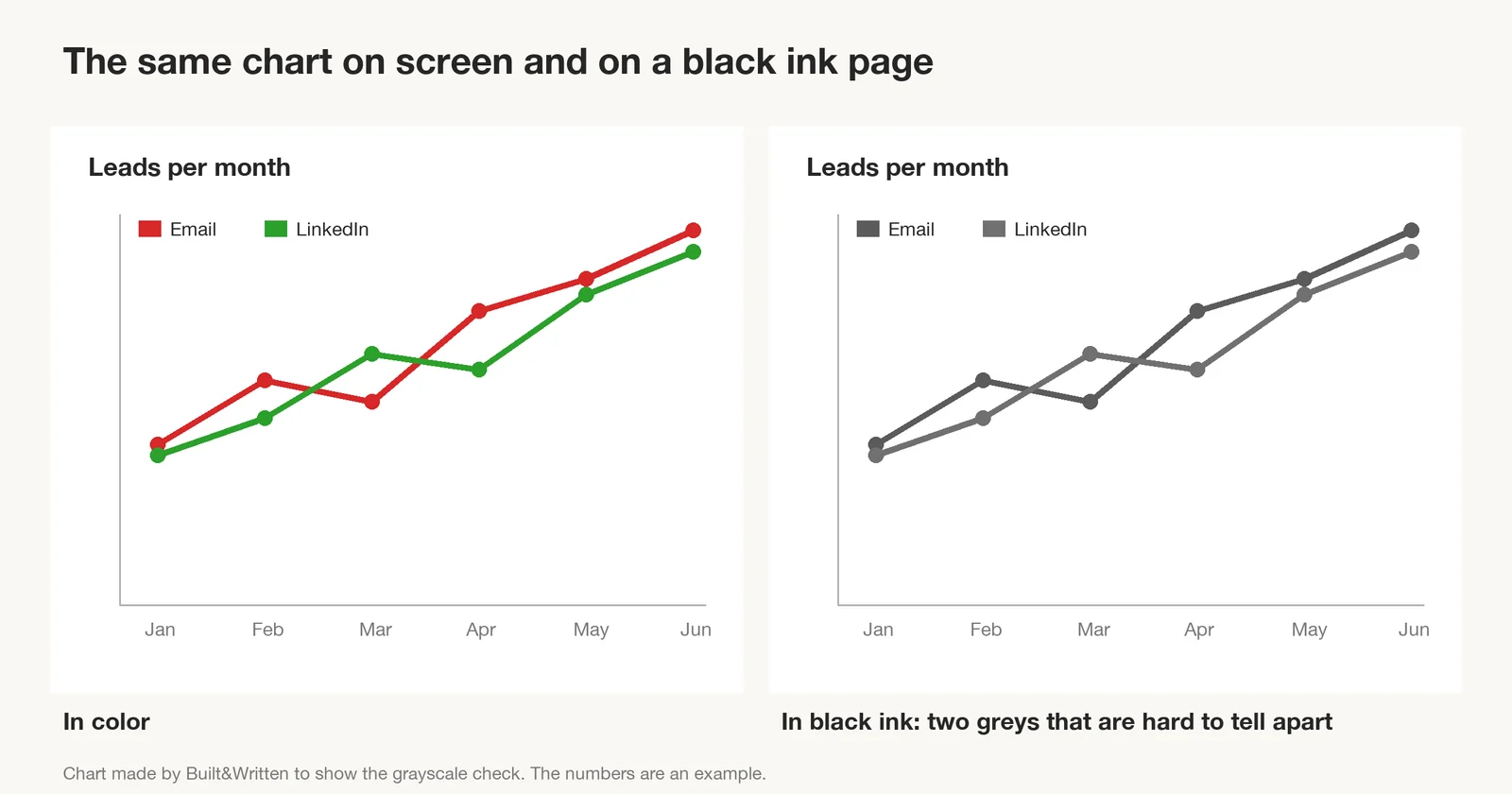
Text in the image:
"Leads per month", in color and in black ink. In black ink, the red and green lines become two greys that are hard to tell apart.
The check takes a minute. Open the picture in any photo app and switch it to black and white. If you can still read it, it will work in the book.
Can you copyright a book that has AI images?
Your text is protected. The AI pictures usually are not.
The US Copyright Office explained this in its January 2025 report. Typing a prompt does not give you enough control over the result. So the picture has no human author, and the law does not protect it.
A known case shows how this works. The comic Zarya of the Dawn had a human author and Midjourney pictures. The Office protected the author's text. It also protected the way the pictures were chosen and arranged. The single Midjourney pictures got no protection. In March 2026, the US Supreme Court declined to hear Thaler v. Perlmutter, a case about art made by a machine alone. So the rule stays.
Here is what this means for your book:
- Your words belong to you. So does the way you put the book together.
- Others may copy the AI pictures. If someone takes one, it is hard to stop them.
- You answer for what is in the picture. KDP makes you responsible for other people's rights. Avoid famous characters, brand logos and the style of a named living artist in your prompts.
This is general information. It is not legal advice. If the pictures are the main product, as in a coloring book, talk to a lawyer.
Which AI images actually help a nonfiction book?
Readers of nonfiction trust the pictures. They read a chart as fact. A chart with a wrong number or a diagram with a misspelled word damages that trust. This is the kind of disappointment KDP's rules warn about. AI image tools still make mistakes with small words, numbers and labels.
So it helps to sort your pictures into two groups:
| AI images work well for | Make these yourself |
|---|---|
| A picture at the start of a chapter | Charts with real numbers |
| A picture of an idea, such as a bridge between two teams | Diagrams with labels |
| A simple scene from a story in the chapter | Screenshots, maps and step-by-step pictures |
| Small pictures between sections | Photos that prove something about a real person, place or product |
The right column is easy to make in Canva or Google Sheets. Pictures you make yourself also need no AI answer in KDP.
Look closely at each AI picture before it goes in. Read every word and every number in it. Look at hands and faces, because AI still draws them wrong at times. And make sure there is no logo you don't own.
What happened when we made two AI images for a book?
On November 2, 2026, we used the free plan of ChatGPT to make two pictures for a business book.
The first was a chapter opener: two small teams on two hills, joined by a wooden bridge. The second was a sales funnel with four stages and a short example under each.
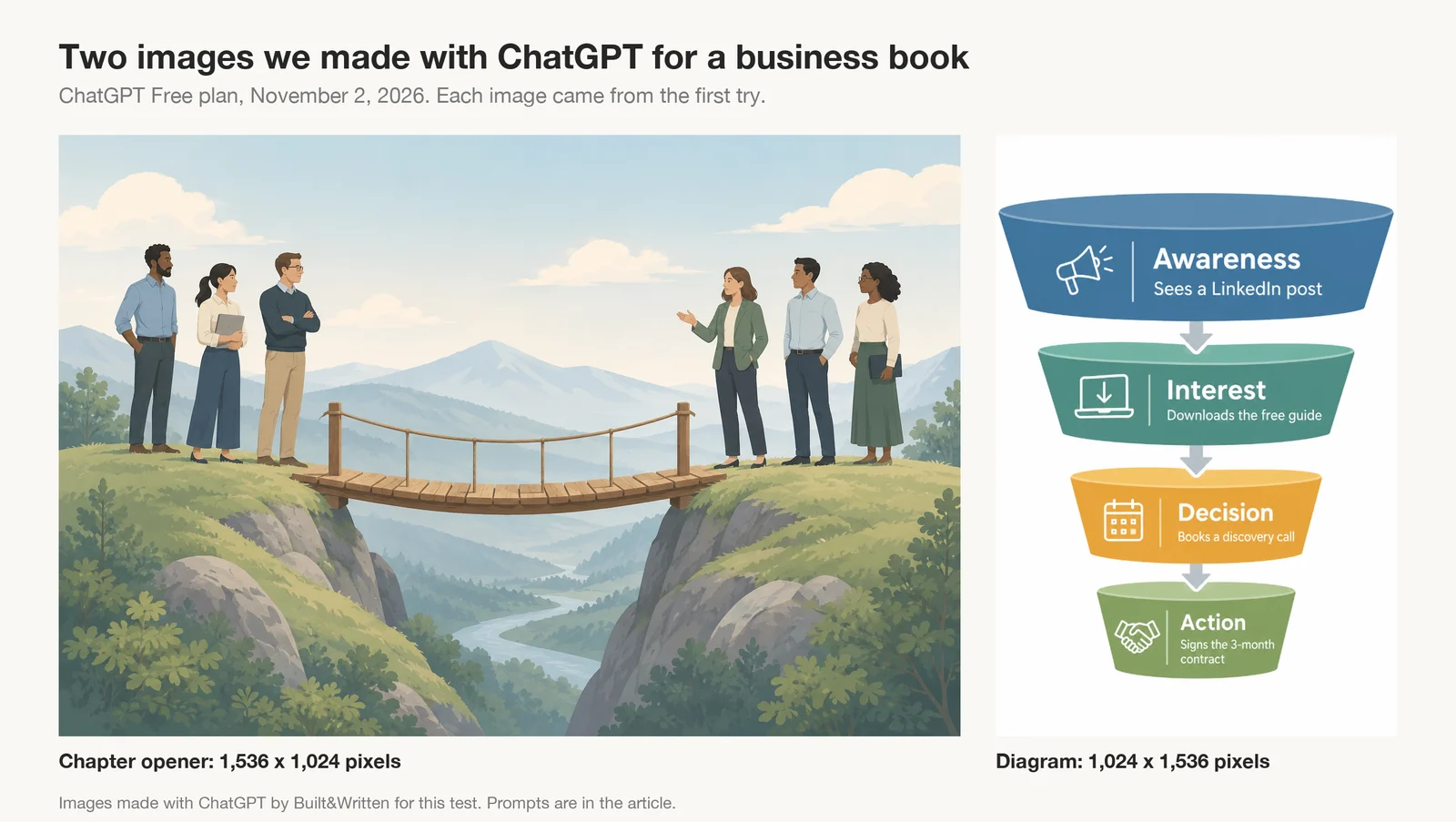
Text in the image:
Awareness: Sees a LinkedIn post. Interest: Downloads the free guide. Decision: Books a discovery call. Action: Signs the 3-month contract.
Both pictures looked good. Every word on the funnel was spelled right. This was one test with short words, so still read each label in your own pictures.
Size was the bigger issue. The wide picture was 1,536 pixels across. It fills the text width of a 6 by 9 page and stays sharp. The tall diagram was only 1,024 pixels across. At 300 DPI it prints 3.4 inches wide. Any wider and it gets blurry.
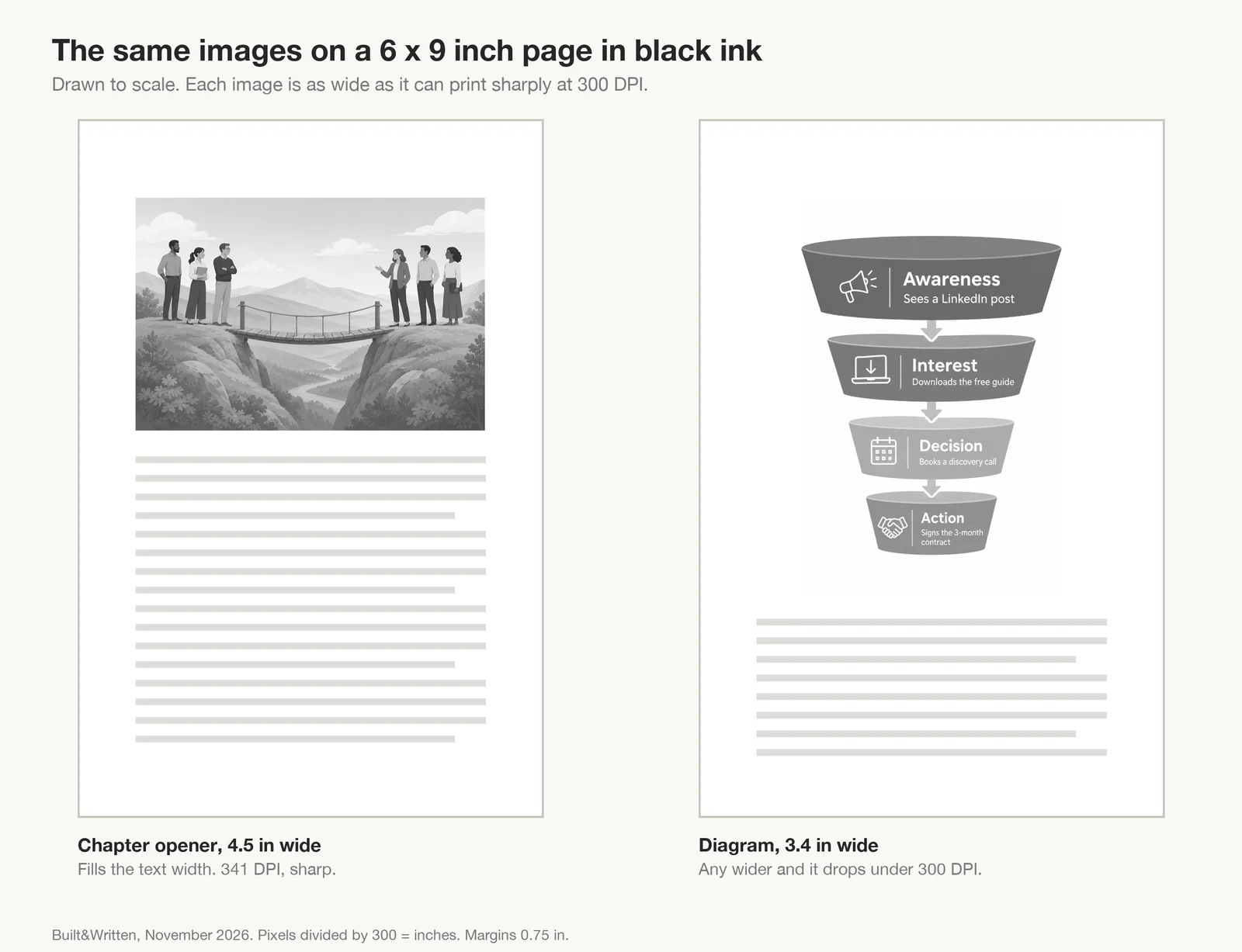
Text in the image:
Chapter opener: 4.5 in wide, sharp. Diagram: 3.4 in wide.
In black ink, the blue and green layers of the funnel became two close greys. The diagram still works, because the words carry the meaning. The files were also heavy, 1.9 MB and 1.1 MB, so save them as JPEG for an ebook.
Final thoughts
You can use AI images in a nonfiction book on KDP. Tell Amazon about them during setup. Check that each picture has enough pixels for its size on the page. Keep the book in black ink if you can, and test each picture in black and white first. Make charts and labelled diagrams yourself, because readers trust them as facts.
Most of the work is the book itself. Built&Written turns the material you already have into a finished book for Amazon:
- Your own material as the start. Notes, posts, transcripts or an old manuscript, up to 50,000 words.
- Chapters in your voice. Built&Written learns how you write from 5 to 50 pages of your own text, a feature called Voice DNA.
- Your pictures stay in place. Charts, diagrams and photos keep their spot in the print PDF and the ebook.
- KDP checks before you download. Title, author, page count, book size, margins and cover are checked. Then you upload the files in your own KDP account. Our KDP guide covers that last step.
See how it works, or compare the plans.
Frequently asked questions
Yes. KDP allows AI images on the cover and inside the book. You must tell Amazon about them on the content page when you publish or republish the book. Your answer is private and does not appear on the book's page.
Yes, if an AI tool made the picture first. KDP says a picture is still AI-generated "even if you applied substantial edits afterwards". If you made the picture yourself and used AI only to clean it up, it counts as AI-assisted. You don't need to mention it.
KDP asks for at least 300 DPI and calls anything under 200 DPI low quality. Divide the picture's width in pixels by 300 to see how many inches it prints sharply. A 1,024 pixel picture prints sharply at about 3.4 inches wide.
Usually not. The US Copyright Office does not protect pictures made by AI from a prompt. It does protect your own text and the way you chose and arranged the book. If the pictures are the main product, ask a lawyer.
About the author
Khrystyna Balushka
More in KDP Publishing
Ready to write your book?
Turn your expertise into a professional book with Built&Written.