

How Teachers Can Use an AI Textbook Generator to Publish on KDP
Teachers can use an AI textbook generator to turn lesson plans, worksheets, lecture notes, and classroom experience into a structured textbook. AI can help organize chapters, draft explanations, and create practice exercises. The teacher still needs to verify the content, test every answer, and decide whether it meets the students' learning needs.
Once the manuscript is ready, Amazon Kindle Direct Publishing (KDP) lets teachers self-publish textbooks as paperbacks, hardcovers, or Kindle ebooks, subject to its publishing requirements.
The process works best for textbooks built around explanations and exercises. Books with complex diagrams, extensive tables, or highly visual layouts often need more specialized formatting.
What is an AI textbook generator?
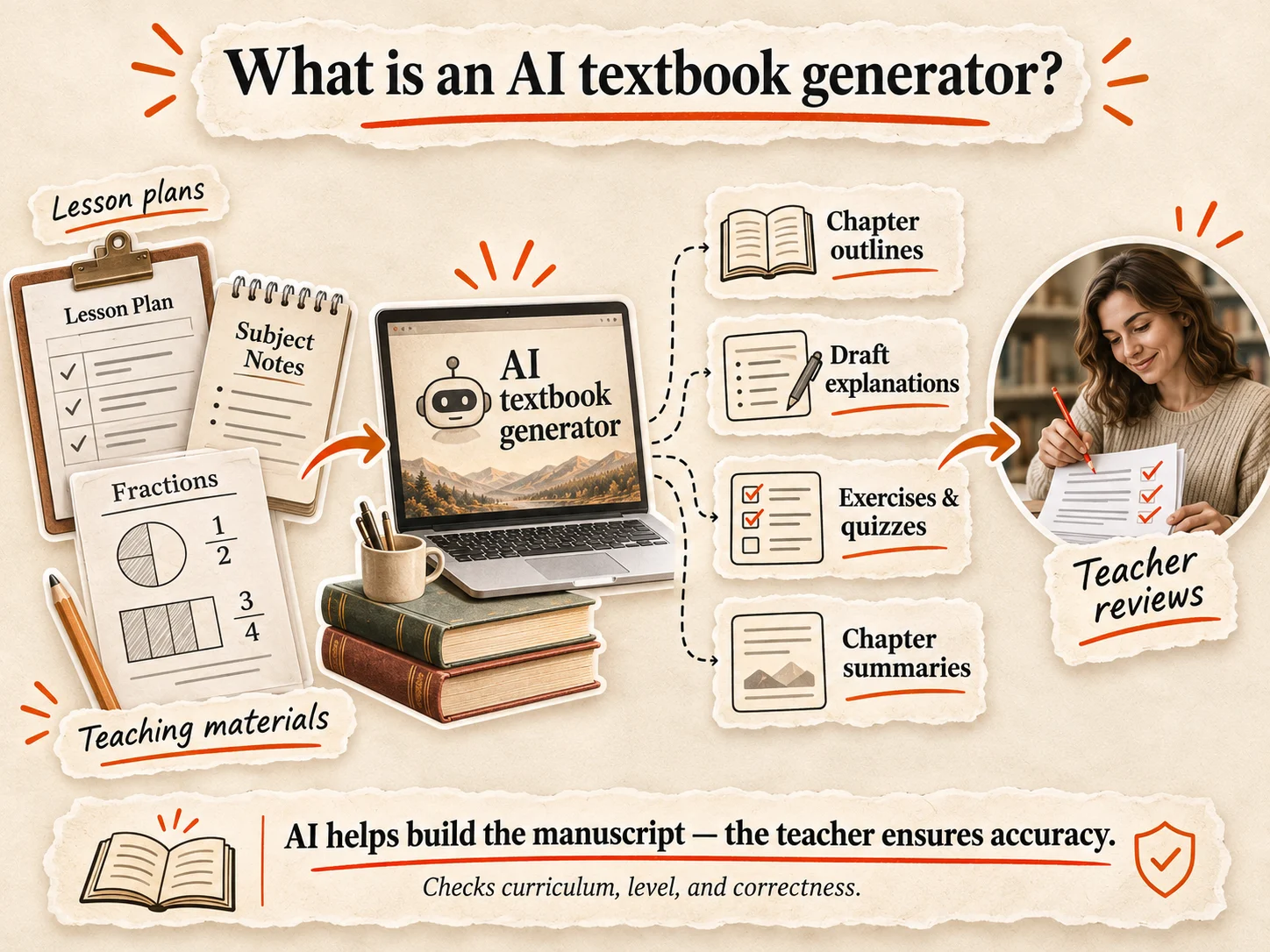
An AI textbook generator is a tool that helps turn subject knowledge, teaching materials, and instructions into structured educational content. Instead of building every chapter from scratch, teachers can use AI to create textbook outlines, draft explanations, develop examples, and produce exercises.
For example, a mathematics teacher could start with a collection of lesson plans on fractions. An AI textbook generator could use those materials to propose a chapter sequence, write draft explanations, and develop practice questions at different difficulty levels. The teacher would then check the mathematics, revise the examples, and make sure each exercise supports the intended learning objectives.
This is the difference between generating educational text and developing a textbook: the chapters need to form a coherent learning sequence, not simply cover related topics.
Unlike a general-purpose chatbot, a dedicated textbook generator focuses on organizing content into a book-length manuscript. It may offer chapter structures, consistent formatting, and tools for managing longer projects. Traditional textbook authoring software, meanwhile, primarily helps users arrange, design, and publish material rather than generate the content itself.
Depending on the tool, AI can help teachers produce:
Chapter outlines organized around learning objectives.
Draft explanations of concepts, processes, and terminology.
Practice exercises and quizzes with suggested answers.
Chapter summaries that reinforce important ideas.
But AI doesn't automatically understand your curriculum or guarantee educational accuracy.
It can invent citations, produce incorrect answers, or explain concepts at the wrong level. It also can't independently determine whether a chapter meets specific learning standards.
That responsibility stays with the teacher. AI can help build the manuscript, but subject expertise and instructional judgment determine whether it becomes a useful textbook.
What kind of textbooks can teachers create with AI?
Teachers can use an AI textbook generator to develop more than traditional classroom textbooks. The best format depends on what students need to learn and how they'll use the material.
Here are several practical options:
Subject-specific textbooks: A high-school biology textbook, an introductory accounting guide, or a statistics textbook designed for university beginners. AI can help organize concepts into chapters that build on previous lessons.
Study and exam-preparation guides: Original practice questions, topic summaries, and revision exercises for professional certification or academic exams.
Workbooks: A statistics workbook with worked examples, practice problems, and answer keys. AI can draft exercises, but teachers must verify every solution.
Professional training manuals: Structured materials for teaching workplace skills, business processes, or technical subjects.
Books based on existing courses: Teachers can develop textbooks from their lesson plans, presentations, and worksheets, provided they have the necessary publishing rights.
| Type of book | How AI helps | Teacher's main responsibility |
|---|---|---|
| Subject textbook | Chapter outlines, explanations, examples | Accuracy and learning progression |
| Exam-preparation guide | Revision summaries and original questions | Syllabus alignment and answer validation |
| Student workbook | Practice problems and answer keys | Independently checking every solution |
| Professional training manual | Modules, procedures, knowledge checks | Keeping instructions accurate and current |
| Course-based textbook | Turning teaching notes into chapters | Permissions and curriculum alignment |
A textbook built around original explanations, examples, and exercises is generally treated differently from a repetitive blank journal or template. Amazon KDP specifically lists textbooks among books not generally considered low-content, although exceptions exist.
One important distinction concerns Amazon KDP's low-content rules.
Amazon generally classifies textbooks as regular books, while journals and repetitive fill-in templates may qualify as low-content books. A substantive workbook with original explanations and varied exercises isn't automatically low-content.
The goal is to publish meaningful educational material, not simply fill pages with AI-generated worksheets.
How to create a textbook with AI, step by step
Creating a textbook with AI works best when you start with material you've already taught. The goal isn't to generate hundreds of pages at once. It's to build a structured manuscript that students can actually learn from.
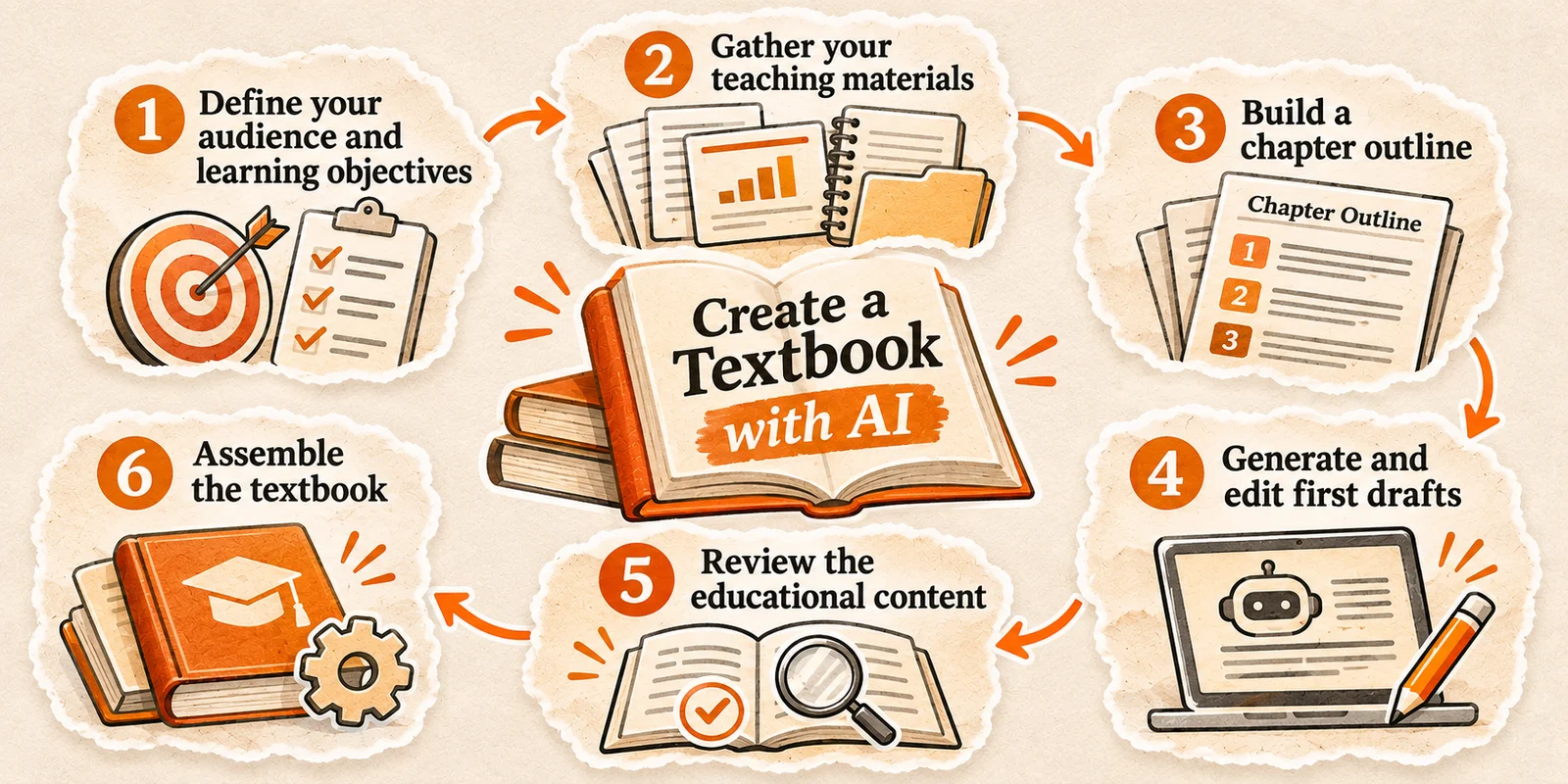
Here's a six-step process:
Define your audience and learning objectives. Choose a subject, identify your students' knowledge level, and establish what they should understand or accomplish after each chapter.
Gather your teaching materials. Collect lesson plans, presentations, worksheets, lecture notes, and reliable references. Make sure you have permission to reuse any third-party material.
Build a chapter outline. Organize topics from foundational concepts to advanced applications. Give each chapter a clear learning objective and avoid repeating material unnecessarily.
Generate and edit the first drafts. Use AI to develop chapter explanations, worked examples, practice questions, and summaries from your teaching materials. For text-heavy educational books, Built&Written lets you paste in source material, review a proposed chapter outline, edit the resulting manuscript, and prepare KDP publishing files. Textbooks with complex tables, equations, or heavily illustrated pages may require dedicated layout software.
Review the educational content. Check explanations against reliable sources, solve every exercise independently, and revise anything that doesn't match your students' abilities.
Assemble the textbook. Standardize headings, terminology, exercise numbering, chapter summaries, and references. Check that the book follows a logical teaching sequence.
Example: Turning a statistics course into a textbook
A teacher has 12 lecture presentations, 30 worksheets, and a collection of worked examples from an introductory statistics course.
They organize the material into six chapters: descriptive statistics, probability, distributions, sampling, hypothesis testing, and interpretation of results. AI helps draft explanations and create additional exercises using the teacher's approved materials.
Before publication, the teacher checks every formula and solution, replaces unclear examples, prepares an answer key, and confirms that the chapters build on one another.
The result is a structured draft based on existing instruction, with the final educational decisions still made by the teacher.
How to fact-check AI-generated textbook content
A factual mistake in a marketing article might confuse a reader. In a textbook, that same mistake could be taught to an entire classroom.
That's why every AI-generated chapter needs a proper review before publication.
The five-check textbook review
Review each chapter against five questions before approving it:
Facts: Are definitions, formulas, dates, and explanations supported by reliable sources?
Sources: Do the cited references exist, and do they support the specific claims?
Answers: Have all exercises, calculations, and answer keys been independently checked?
Learning objectives: Does the chapter teach the skills or knowledge it promises?
Permissions: Do you have the rights to publish any third-party text, diagrams, images, or worksheets?
Keep a simple review record with the chapter name, issue found, source used, correction made, and final approval. This makes later revisions easier and prevents the same errors from reappearing across chapters.
There's also an important Amazon KDP requirement.
Amazon distinguishes between AI-generated content, where AI creates the actual text, images, or translations, and AI-assisted content, where you create the material and use AI for editing or brainstorming.
KDP requires disclosure of AI-generated content, even after substantial human editing. AI-assisted content doesn't require disclosure.
Either way, you're responsible for the textbook's accuracy, quality, and publishing rights.
How to format an AI-generated textbook for Amazon KDP
A finished manuscript isn't automatically ready for Amazon KDP. Textbooks often contain diagrams, tables, and exercises that need careful formatting to remain readable in print and on screen.
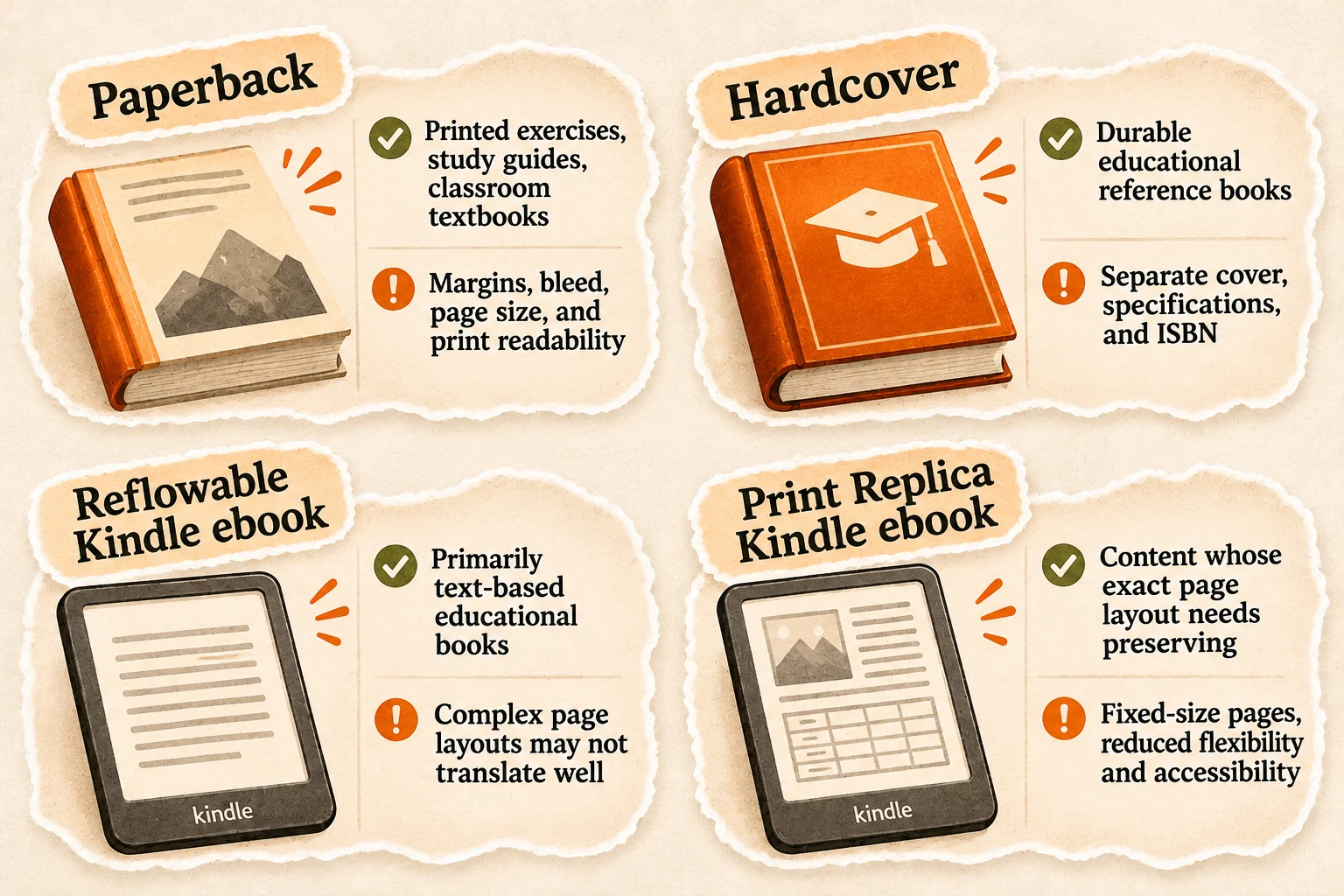
Start by choosing your publishing format:
| Format | Best suited to | Important limitation |
|---|---|---|
| Paperback | Printed exercises, study guides, classroom textbooks | Margins, bleed, page size, and print readability |
| Hardcover | Durable educational reference books | Separate cover, specifications, and ISBN |
| Reflowable Kindle ebook | Primarily text-based educational books | Complex page layouts may not translate well |
| Print Replica Kindle ebook | Content whose exact page layout needs preserving | Fixed-size pages, reduced flexibility and accessibility |
Next, select your trim size. A 6 × 9-inch format works well for text-heavy books, while 8.5 × 11 inches provides more room for exercises and diagrams. Check KDP's supported dimensions for your chosen format.
Set consistent headings, page numbers, and margins. The inside margin, or gutter, must account for binding and page count. Add bleed when illustrations extend to the page edges.
Before uploading, check the manuscript against KDP's file requirements. Print images should have a resolution of at least 300 DPI at their intended size. If any page elements extend to the trimmed edge, the print interior must be submitted as a PDF with the correct bleed dimensions.
Keep the cover as a separate file. Its dimensions depend on the trim size, total page count, and paper selection. After preparing the files, use KDP's Print Previewer to check pagination, diagrams, margins, and missing content.
For text-heavy educational books, Built&Written's book formatter can help prepare a print PDF and ePub for KDP. Its layout tools are not intended to replace specialist typesetting for highly illustrated or technically complex textbooks.
How to publish your textbook on Amazon KDP
Once the textbook has been reviewed and formatted, you can upload it through Amazon Kindle Direct Publishing.
Create or sign in to your KDP account. Open your KDP Bookshelf and choose the type of book you want to publish: Kindle ebook, paperback, or hardcover.
Enter the book details. Add a title, subtitle if needed, author information, description, relevant keywords, and appropriate categories. Make sure these accurately represent the textbook's contents.
Set up the ISBN. Standard print textbooks require an ISBN. You can use an eligible free KDP ISBN or supply your own. Kindle ebooks do not require one.
Upload your files. Submit the manuscript and cover in formats accepted for your chosen edition. If KDP asks about AI-generated content, disclose it accurately.
Preview the textbook. Inspect the interior for broken tables, missing images, incorrect margins, and unreadable exercises. For print editions, consider ordering a physical proof.
Set your pricing and distribution options. Review the available marketplaces, printing costs, and royalty information before submitting your book for publication.
Amazon reviews submitted books for compliance with its publishing requirements. Publication through KDP does not guarantee that a school, college, or institution will adopt the textbook.
For official setup instructions, see Amazon's KDP publishing guide.
Can you sell an AI-generated textbook on Amazon?
Yes, Amazon KDP allows AI-generated textbooks, provided they comply with its content guidelines. Using AI to draft chapters, create exercises, or produce illustrations doesn't automatically disqualify your book from publication.
However, Amazon has specific requirements:
Disclose AI-generated content. KDP requires authors to declare AI-generated text, images, and translations, including material substantially edited afterward.
Understand AI assistance. If you write the content yourself and use AI for brainstorming, editing, or proofreading, disclosure isn't required.
Respect intellectual property rights. You must have the necessary rights to publish textbook content, images, and other materials.
Maintain content quality. Amazon can reject or remove books that violate its guidelines or provide a poor customer experience.
Publishing an AI-generated textbook on Amazon is possible, but publication rights and commercial success are separate questions.
You need the right to publish the materials you include. That applies to third-party images, passages, diagrams, and teaching resources, regardless of whether AI helped assemble the manuscript. Copyright protection for AI-generated material also depends on applicable law and the extent of human authorship.
Selling a textbook on Amazon doesn't mean a school will adopt it. Institutional adoption may depend on curriculum requirements, purchasing policies, accessibility, and approval procedures.
For independent teachers, the more practical starting point may be a focused study guide, a course companion, or a workbook built around an area they already teach well. These formats let the author start with a clearly defined audience and a manageable amount of material.
Frequently asked questions
Yes. AI can draft chapters, explanations, and exercises, but teachers must verify accuracy, instructional quality, and consistency before publishing.
The best choice depends on the textbook's structure. Look for a tool that lets you supply your own teaching materials, review chapter outlines, edit explanations, and export suitable publishing files. For text-heavy educational books, a book-writing platform such as Built&Written may be useful. Textbooks with extensive equations, complex tables, or highly visual pages may require specialized authoring and layout tools.
Yes. Teachers can self-publish educational books through KDP without a traditional publisher, provided they meet Amazon's requirements.
Standard paperback and hardcover textbooks published through Amazon KDP need ISBNs, with separate identifiers for each format. KDP offers free ISBNs for eligible print books, but these cannot be used to publish through other services. Kindle ebooks do not require an ISBN. Low-content books have different rules.
Generally, yes, provided you have the necessary publishing rights and comply with applicable laws and KDP policies.
Yes. KDP requires disclosure of AI-generated text, images, and translations, but not material created with AI assistance alone.
Yes. KDP supports both formats, although each requires appropriate formatting and separate publication setup.
About the author

Polina Karlashchuk
More in KDP Publishing
Ready to write your book?
Turn your expertise into a professional book with Built&Written.