

Turn a Pile of Notes Into a Chapter Plan With an AI Outline Generator
We wanted to see what it really does with your notes. So we gave the same 40 notes to three tools and counted where every note went.
One of the three tools is ours. Built&Written is a platform that turns your own material into a nonfiction book. You add notes, articles, transcripts, an old book or a finished manuscript (the full text of a book). The platform builds a chapter plan you can edit. It helps you write a draft from your material and prepares the files you upload to Amazon KDP, Amazon's self-publishing service. We say so each time it matters.
Key takeaways
- Fast. In our test, all three tools answered in under a minute.
- Complete. All three plans used every note.
- Not clean. Each plan repeated notes or added lines that were not in the notes.
- Sign-up first. All three dedicated generators we tried asked us to sign in before showing any outline.
What does an AI outline generator do with a pile of notes?
It reads your notes, finds the themes and sorts them into chapters. AI outline generators work in two main ways.
- From your notes. You paste or upload what you have, and the plan is built from it.
- From a title. You type a topic, and the tool builds a plan from its own knowledge. Your notes never go in.
Built&Written works the first way. It builds the plan from your own material, not from a topic.
On November 5, 2026, we tried three dedicated book outline generators: HyperWrite, River Editor and Inkfluence AI. HyperWrite has only a box for a title or theme. River Editor and Inkfluence AI take an idea or notes. All three asked us to sign in or create an account before they showed any outline. We do not create accounts for tests, so we left them out.
How we tested three AI outline generators
We needed notes with a known answer. So we used a book that anyone can copy: P. T. Barnum's The Art of Money Getting, from 1880. It has 20 short chapters, each with one rule for making money.
From it we wrote 40 one-line notes, two for each rule. Then we shuffled them. Barnum's own chapters were our answer key.
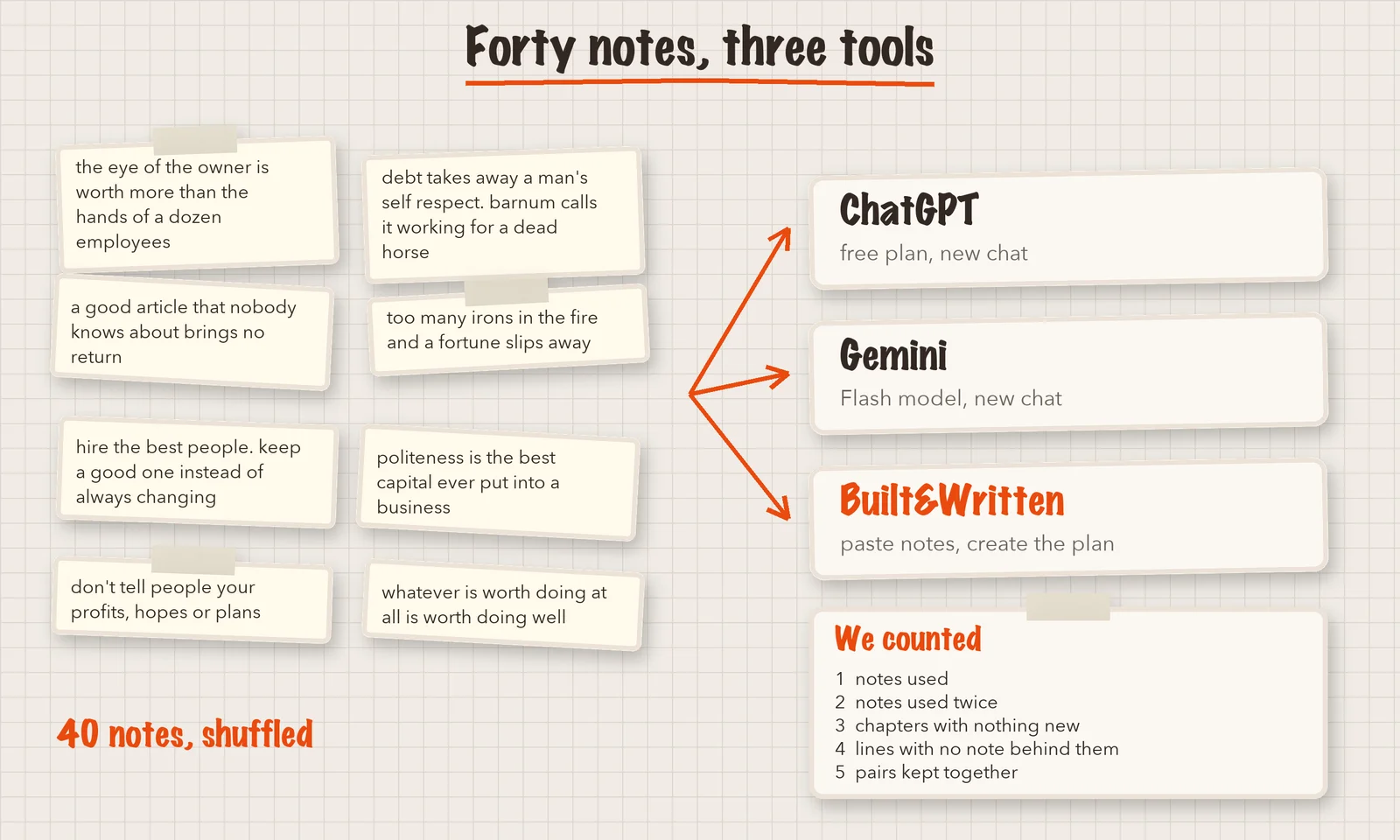
| Tool | How we used it | Date |
|---|---|---|
| Built&Written | Pasted the notes into the start box and created the book to get the plan | November 5, 2026 |
| ChatGPT | Free plan, new chat, notes pasted with the request "Turn them into a chapter plan for the book" | November 5, 2026 |
| Gemini | Flash model, new chat, same request | November 5, 2026 |
We counted five things in each plan:
- How many of the 40 notes appear. A note counts as used if its idea shows up in the plan, even when the tool reworded it or merged it with another note.
- How many notes appear in two chapters.
- How many chapters hold no note that was not already used.
- How many lines have no note behind them.
- How many of Barnum's 20 note pairs sit in the same chapter.
The fifth count checks whether the tool grouped notes like the author did. It is a fair test, but not the only right answer. A good plan can group notes differently.
What did the three plans look like?
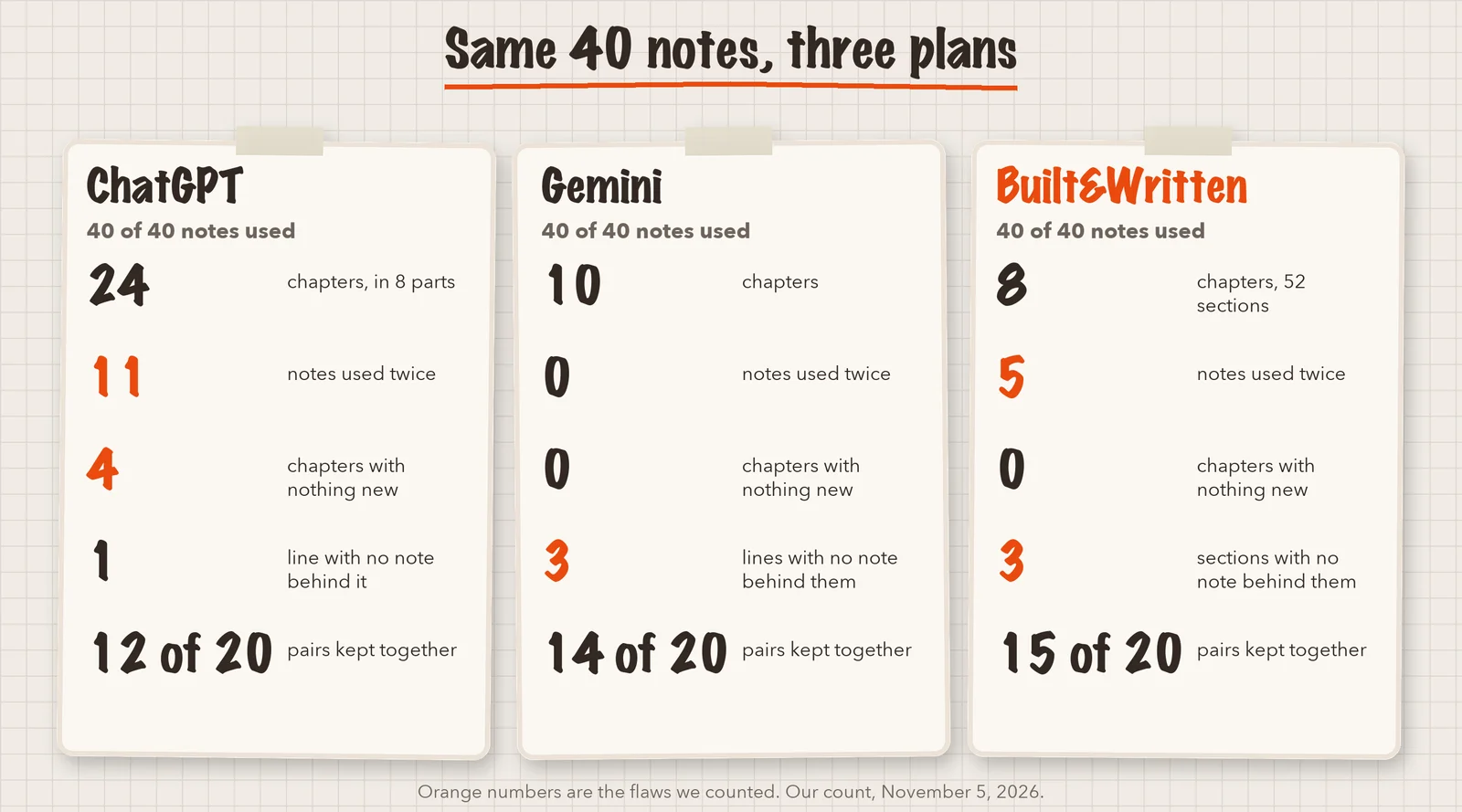
| What we counted | ChatGPT | Gemini | Built&Written |
|---|---|---|---|
| Chapters | 24 in 8 parts | 10 | 8 |
| Notes used | 40 of 40 | 40 of 40 | 40 of 40 |
| Notes used in two chapters | 11 | 0 | 5 |
| Chapters with no new note | 4 | 0 | 0 |
| Lines with no note behind them | 1 | 3 | 3 |
| Barnum's pairs kept together | 12 of 20 | 14 of 20 | 15 of 20 |
Text in the image:
Same 40 notes, three plans. ChatGPT: 24 chapters, 11 notes used twice, 4 chapters with nothing new, 12 of 20 pairs together. Gemini: 10 chapters, 0 notes used twice, 0 chapters with nothing new, 14 of 20 pairs together. Built&Written: 8 chapters, 5 notes used twice, 0 chapters with nothing new, 15 of 20 pairs together.
ChatGPT gave 8 parts and 24 chapters, with the notes listed under each chapter.
Gemini gave 10 chapters, each with a "Focus" line, and a title for the whole book. It merged some close notes into one bullet.
Built&Written returned 8 chapters and 52 sections about 30 seconds after we pressed "Create my book". Many section titles reuse the words of the notes.
No tool matched Barnum's 20 chapters, and we did not expect it to. But none kept even three quarters of the pairs together.
Which notes ended up in the wrong place?
Three pairs were split by all three tools.
- "Whatever is worth doing" and "don't sit and wait". Barnum puts both under one rule about effort. The tools filed one under execution and the other under taking action.
- "A child needs a trade" and "fortunes change fast". Barnum links them, because a trade protects you when luck turns.
- "Visionary people jump around" and "every project looks like a sure thing". These are two sides of one habit.
Some of these splits are fine. The point is that the tool decides, and it does not tell you it decided.
Why do some outline generators repeat notes or invent chapters?
A tool wants the plan to look like a book. Forty one-line notes do not make 24 chapters, so the tool has to stretch.
Text in the image:
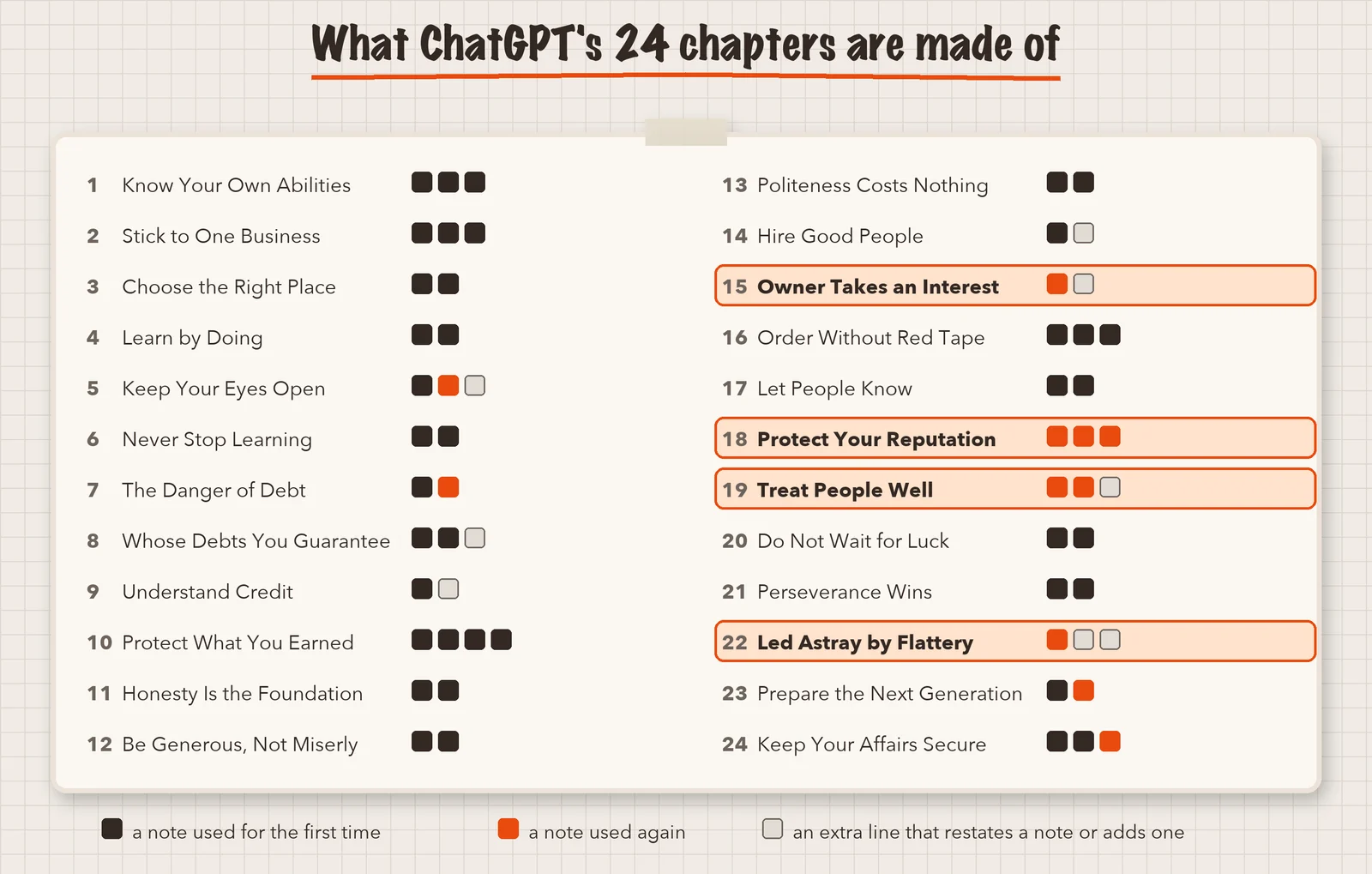
What each of ChatGPT's 24 chapters is made of. Dark square: a note used for the first time. Orange square: a note used again. Grey square: an extra line that restates a note or adds one. Chapters 15, 18, 19 and 22 have no new note.
Four of ChatGPT's chapters hold only notes that had appeared earlier. They are "The Owner Must Take an Interest", "Protect Your Reputation", "Treat People Well" and "Do Not Be Led Astray by Flattery". If you wrote from this plan, you would write the same chapter twice.
Gemini squeezed the notes into 10 chapters, so no note appeared twice. But it added lines such as "Enduring independence: the ultimate measure of business success is autonomy, self-respect, and lasting security for your family". None of our notes says that.
Our own tool did both, in a smaller way. It used five notes in two chapters and added three sections with no note behind them. We counted them against ourselves.
The results show why you should check an AI-generated outline before writing. A tool can organize your notes, but it may also repeat ideas or add sections that were not in your source material.
How does Built&Written take you from notes to a book?
An outline is only the first step. Built&Written is made for people who want a book at the end. Here is what you can do with it.
- Start from your own material. Paste or upload notes, articles, transcripts or other documents, up to 50,000 words.
- Build the structure. The platform reads your material and builds a chapter plan. For our 40 notes it took about 30 seconds.
- Edit the structure. Rename, move or remove chapters and sections, and set how long each chapter should be. You can also build the plan again.
- Write a draft. After you edit the plan, the platform writes a draft from your material. You can edit every line.
- Prepare the files. The platform builds a print-ready PDF and the package of files that Amazon KDP asks for. You still check the layout and Amazon's rules, and you upload the files yourself.
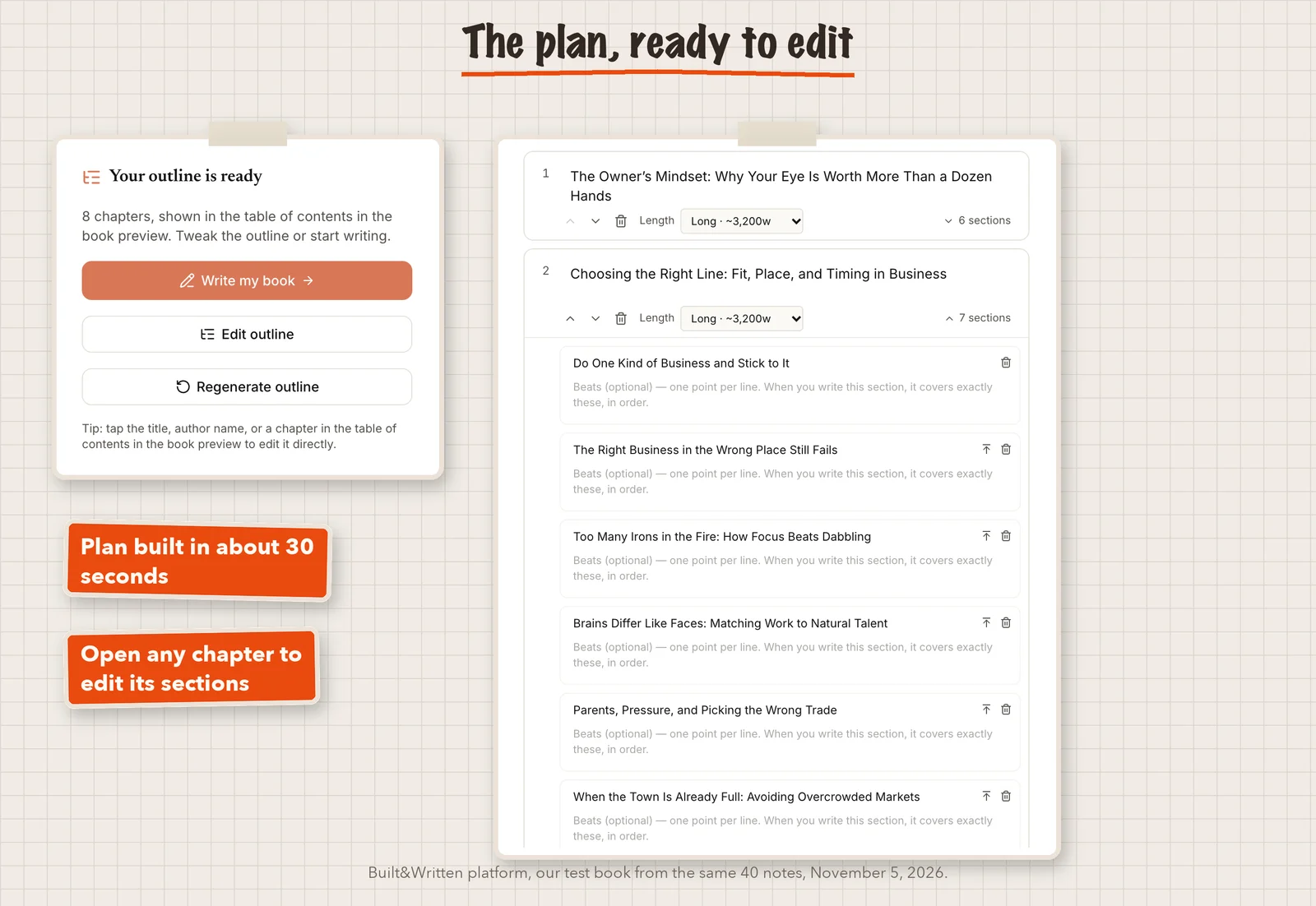
The platform does not promise a perfect book. It gives you a structure and a draft that you control and can change. Each new plan uses one of your monthly books.
If you already have a finished book, the path is different. Upload it, Word works best. The platform does not rewrite it and writes nothing with AI. It splits the book into chapters the way you wrote them, using your heading styles, and builds the layout around your words.
How do you check a chapter plan against your notes?
You can do this with any tool. It takes about ten minutes.
- Put a number in front of each note before you paste it.
- Ask the tool to list the note numbers under each chapter.
- Tick every number once. No tick means a lost note. Two ticks mean a repeat.
- Merge any chapter that holds only ticked numbers.
- Keep lines without a number only if you agree with them.
For a longer, manual way to plan a book, see our 7-step nonfiction outline. To name the chapters afterwards, see our guide to chapter titles with AI.
Which AI outline generator should you use for your notes?
| Option | Good when | In our test |
|---|---|---|
| Built&Written | You have notes or a manuscript and want to go on to write a draft and prepare files | Reused five notes and added three sections. Each new plan uses one of your monthly books |
| ChatGPT | You want a quick first look and want to chat about changes | Used 11 notes twice and made four chapters with nothing new. The plan lives in a chat |
| Gemini | You want a short plan | Merged notes and added closing lines. Had the fewest repeats |
| A tool that only takes a title | You have no notes yet and need ideas | Your notes cannot go in |
ChatGPT and Gemini have real strengths. They were fast, ChatGPT ran on its free plan, and Gemini's plan had the fewest repeats. For a first look at the shape of a book, they are enough. If you want to go from the plan to a draft and the files for publishing, the platform is the better fit.
Final thoughts
These results come from one test on November 5, 2026, and tools change. But the lesson holds: check a plan against your notes before you write.
If you already have notes, articles or a manuscript, Built&Written can turn them into a book. It builds the chapter plan, lets you edit it, writes a draft from your material and prepares the files for Amazon KDP. See how it works.
Frequently asked questions
In our test, ChatGPT on its free plan gave us a chapter plan from our notes, and so did Gemini with its Flash model. All three dedicated generators we tried asked us to sign in first. Free access can change.
Some can. ChatGPT, Gemini and Built&Written took our pasted notes. HyperWrite's generator has a box for a title or theme only.
There is no fixed number. Barnum's 1880 book has 20 short chapters, and our three plans had 24, 10 and 8. Let your notes decide, and check that no chapter is empty or repeats another.
It is a good way to get a first draft of the structure. But read it against your notes, because each tool in our test repeated notes, merged them or added lines of its own.
Chat tools give you a plan and stop. In Built&Written, the plan is the step before writing: after you edit it, you can write a draft from your material.
Sources & References
About the author

Khrystyna Balushka
More in AI Book Tools
Ready to write your book?
Turn your expertise into a professional book with Built&Written.