

Is Your Manuscript Safe When You Upload It to an AI Tool?
You spent months, maybe years, on your book. Now you want AI to help you edit it or fix its structure. Before you upload anything, three questions come up. Who can see your text? Can the company use it to train its AI? Can you delete it later?
This guide answers them for ChatGPT, Claude, Gemini, Grammarly and our own platform, Built&Written. We read their privacy pages on November 8, 2026. We also opened seven files from our own tests to see what a file tells a stranger about you.
A quick word about us. Built&Written is a platform for writing and publishing nonfiction books. Many authors come with material they already have: notes, old articles, talk recordings, blog posts or an unfinished book. The platform helps turn that material into one book. It plans the chapters with you, helps write them and prepares the files for Amazon KDP (Kindle Direct Publishing, Amazon's self-publishing service). You hand us your most valuable text, so privacy matters to us.
Key takeaways
- Plan matters. A free personal account and a business account follow different rules.
- One setting matters most. Each tool has a training switch. Find it before you upload.
- Opting out has limits. Feedback buttons, human review and storage time still apply.
- Your file carries your name. Three of our seven test files had an author name inside.
Is it safe to upload my manuscript to an AI tool?
"Training" means the company uses your text to teach its next AI model. If a company uses your text for training, you may have less control over how that information is used.
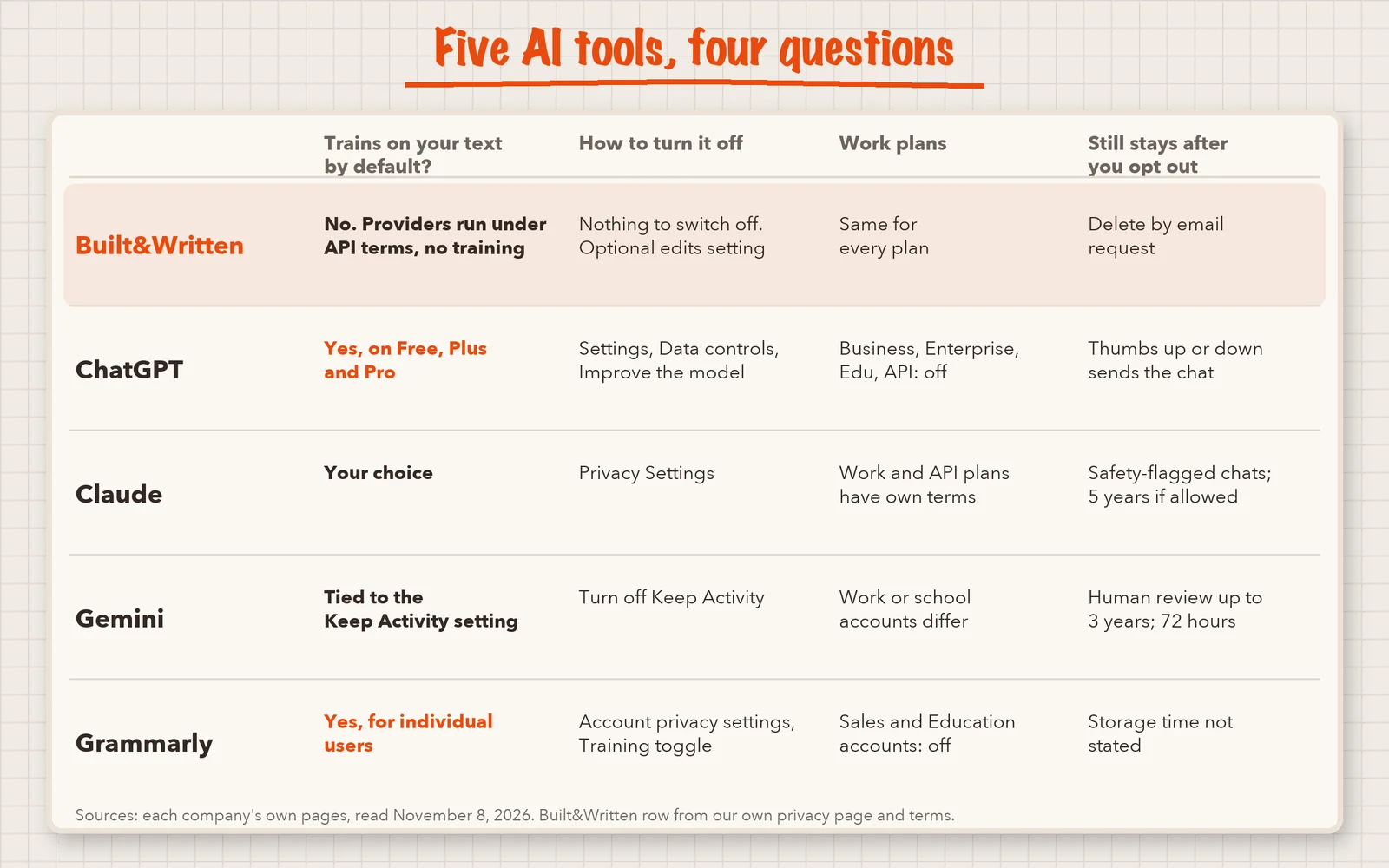
The table shows what each tool's own pages say. We list Built&Written first because it is our platform. Read that row knowing we wrote it. All other rows come from the companies' own pages.
| Tool | Trains on your text by default? | Work or business plans |
|---|---|---|
| Built&Written | No. Our privacy page says the AI providers (OpenAI, Anthropic, Google) run under business terms with no training on customer data | Same for every plan |
| ChatGPT (Free, Plus, Pro) | Yes, OpenAI says it may use your content | ChatGPT Business, Enterprise, Edu and the API are not used by default |
| Claude (Free, Pro, Max) | You choose. Sign-up and Privacy Settings ask you | Work and API plans have separate terms |
| Gemini | Tied to the Keep Activity setting. We did not find the default stated in the text we read | Work or school accounts have different terms |
| Grammarly (Free, Premium, single-user Pro) | Yes, on for individual users | Accounts bought through Sales and Education accounts are off automatically |
The Authors Guild agrees. Its May 2026 guide for authors says text you type into almost all public chatbots can be used for training.
How we checked
We read these pages in full. For ChatGPT, OpenAI's help article on data and model training. For Claude, Anthropic's privacy center and its August 2025 terms update. For Gemini, Google's Privacy Hub (updated October 26, 2026). For Grammarly, its training control page. And our own privacy page and terms.
We did not test what a company does behind the scenes. A page says what a company promises. It cannot prove what happens inside. We also opened the hidden information inside seven files from our own tests. Six were PDFs and one was a Word file. They came from Built&Written, ChatGPT, Canva and Inkfluence AI.
How do I stop ChatGPT, Claude or Gemini from training on my book?
Switch the setting off before you upload. These are the paths on the pages we read.
ChatGPT
Open Settings, then Data controls, and turn off "Improve the model for everyone". You can also choose "Do not train on my content" in OpenAI's privacy portal. One of the two is enough. Temporary chats are not used for training while they stay temporary.
Claude
Open Privacy Settings and keep the option to use your chats for model improvement off. Anthropic says incognito chats are not used for improvement either.
Gemini
Turn off Keep Activity in Gemini Apps Activity. Google says future chats then will not be used to train its models, unless you send feedback.
Grammarly
Open your account privacy settings and turn off "Product Improvement and Training". On Free and Premium it is on by default.
What does turning training off not cover?
Opting out helps. It also has gaps, and the companies write them down.
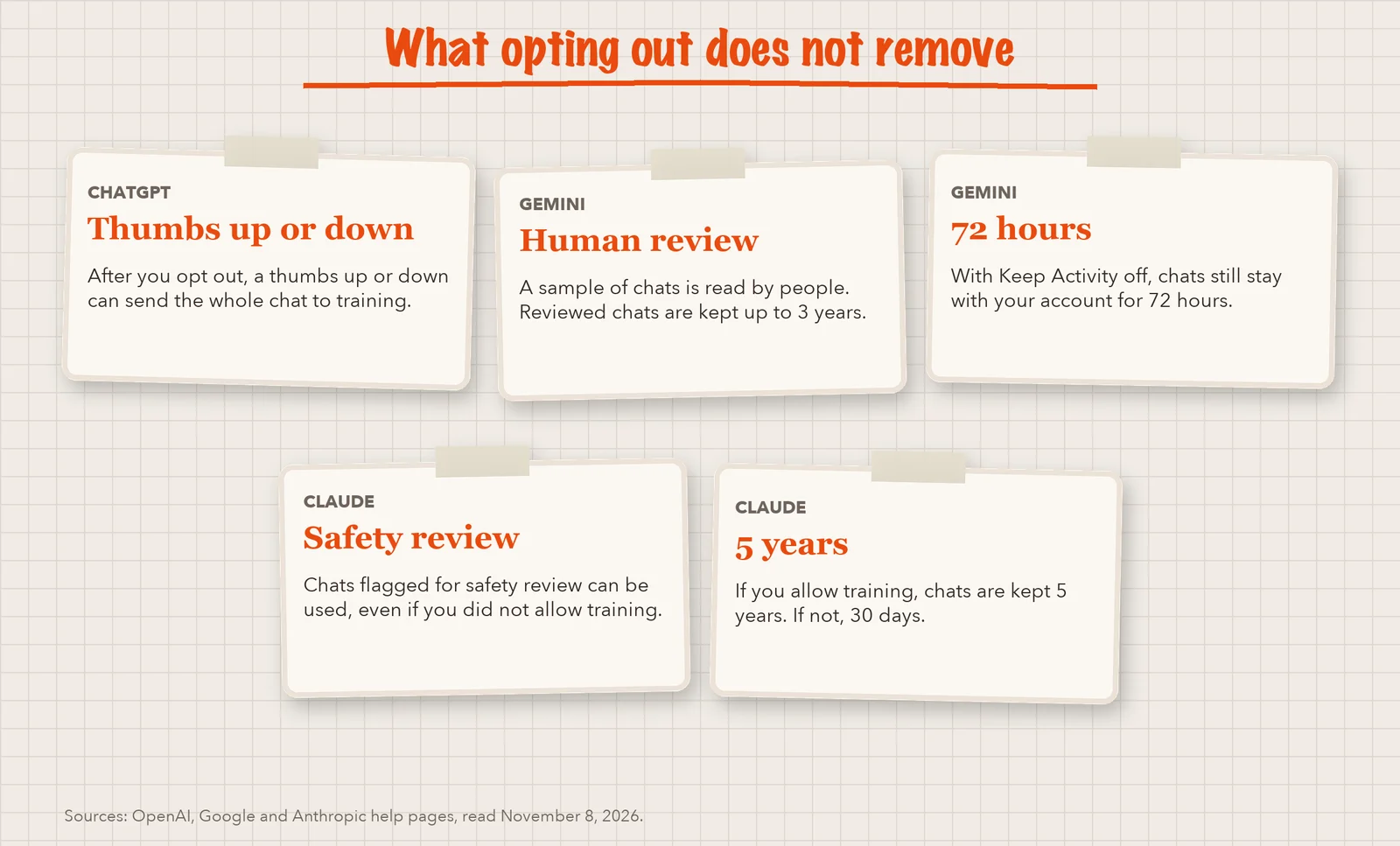
- Feedback buttons. At OpenAI, a thumbs up or down can send the whole chat to training, even after you opt out.
- Human review. Google says a sample of Gemini chats is read by human reviewers. Reviewed chats are kept up to three years. Even with Keep Activity off, chats stay with your account for 72 hours.
- Safety review. Anthropic may use chats flagged for safety review, even if you did not allow training.
- Long storage. Anthropic keeps chats five years if you allow training. If you do not, it keeps them 30 days.
- Past uploads. Opt-outs apply to new chats. Ask the company about what you uploaded earlier.
Does my manuscript file show my name?
A PDF or Word file can carry an author name, the program that made it and the date. This hidden part is called metadata. You do not see it on the page, but anyone with the file can read it.
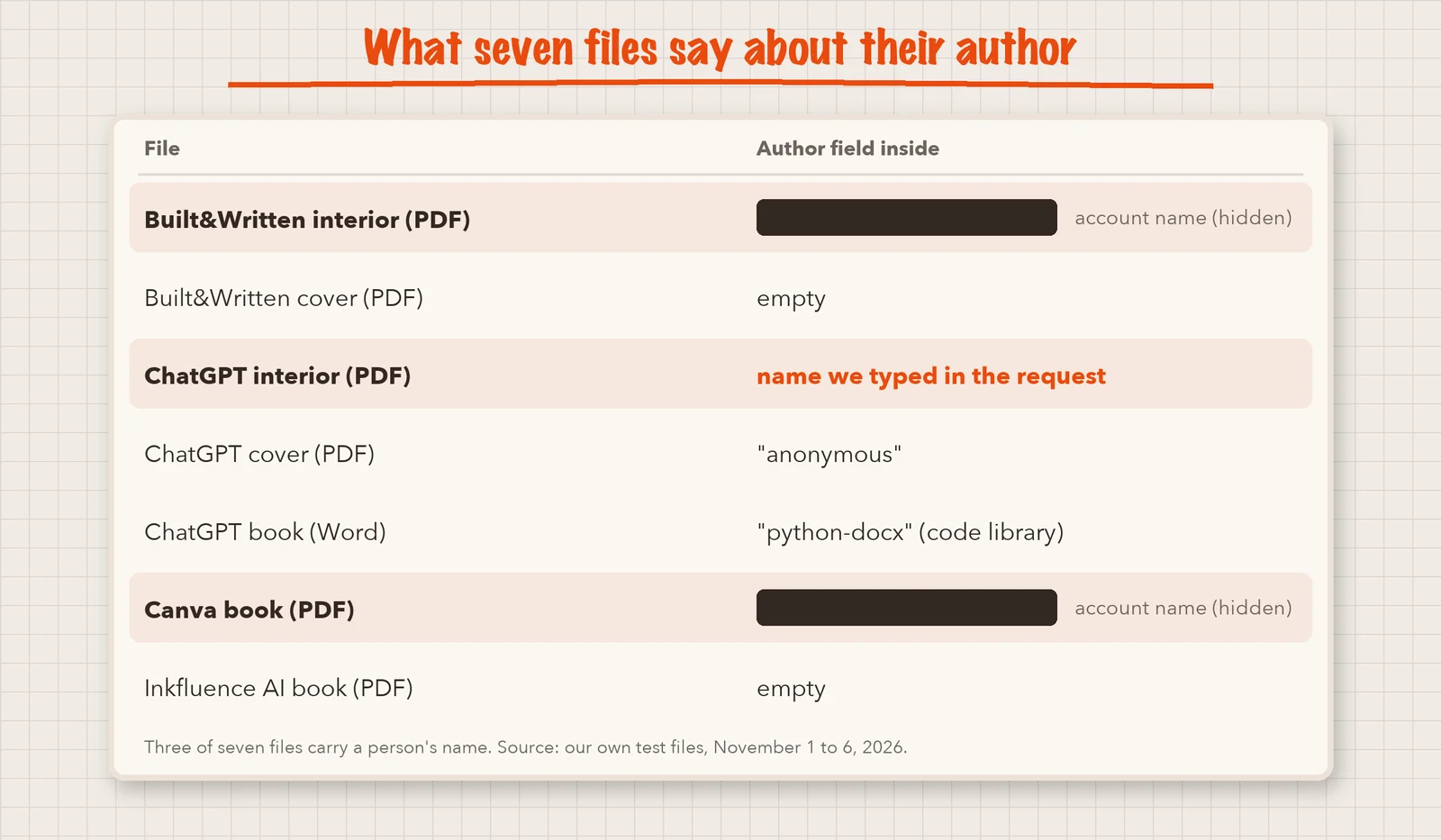
We opened the metadata of our seven test files. Three held a person's name.
| File | Author field inside |
|---|---|
| Built&Written book interior (PDF) | The name on the test account |
| Built&Written cover (PDF) | Empty |
| ChatGPT book interior (PDF) | The author name we typed in the request |
| ChatGPT cover (PDF) | "anonymous" |
| ChatGPT book (Word) | "python-docx", the name of the code library that built it |
| Canva book (PDF) | The name on the Canva account |
| Inkfluence AI book (PDF) | Empty |
For a book you publish under your name, this is fine, because your name goes on the cover. It matters for a draft you share with clients, or a book you write under another person's name. In Word, choose File, Info, Check for Issues, Inspect Document. In a PDF viewer, open the document properties.
Does uploading my manuscript hurt my copyright or publishing contract?
Uploading is not publishing. Your copyright stays with you. Each AI tool has its own rules about how it can use your text. In our terms, you keep all rights to what you upload and create. You give us a limited license to process it only to run the service. We did not check the ownership clauses of the other tools. Read them before you use them.
A contract can matter more than copyright. In April 2026 the Authors Guild said publishers should not put an author's manuscript into consumer AI tools without written consent. If you signed with a publisher, read your contract before you upload.
What does ethical AI publishing mean for data privacy?
It comes down to two habits. First, protect other people's words. Do not upload a client's story or an interview recording without their permission. Second, tell the truth about AI. Amazon KDP asks you to report text and images that AI generated. We wrote about that rule in our AI book creator test.
How do I protect my manuscript when I upload it?
- Pick what you upload. Remove client names, private stories and numbers you do not want shared. Start with one chapter.
- Find the privacy page of the tool. Look for three things: training, how long data is kept and how to delete it. At OpenAI, business plans are not used for training by default. For other tools, read the work-plan terms.
- Switch training off first, with the steps above.
- Use a temporary or incognito chat for test uploads, and skip the thumbs up and down buttons.
- Clean the file. Check the document properties and remove names you do not want to share.
- Keep a dated copy on your own drive. It helps you show what you wrote and when.
If your book is under contract, step 1 may end at "do not upload".
Is my manuscript safe in Built&Written?
An AI chat answers one question or one piece of text at a time. A book needs more: material, a structure, chapters and one manuscript that holds together. Built&Written works on your book as one project. You can start with notes, old articles, recordings, posts or an unfinished book, or upload a finished manuscript and keep every word.
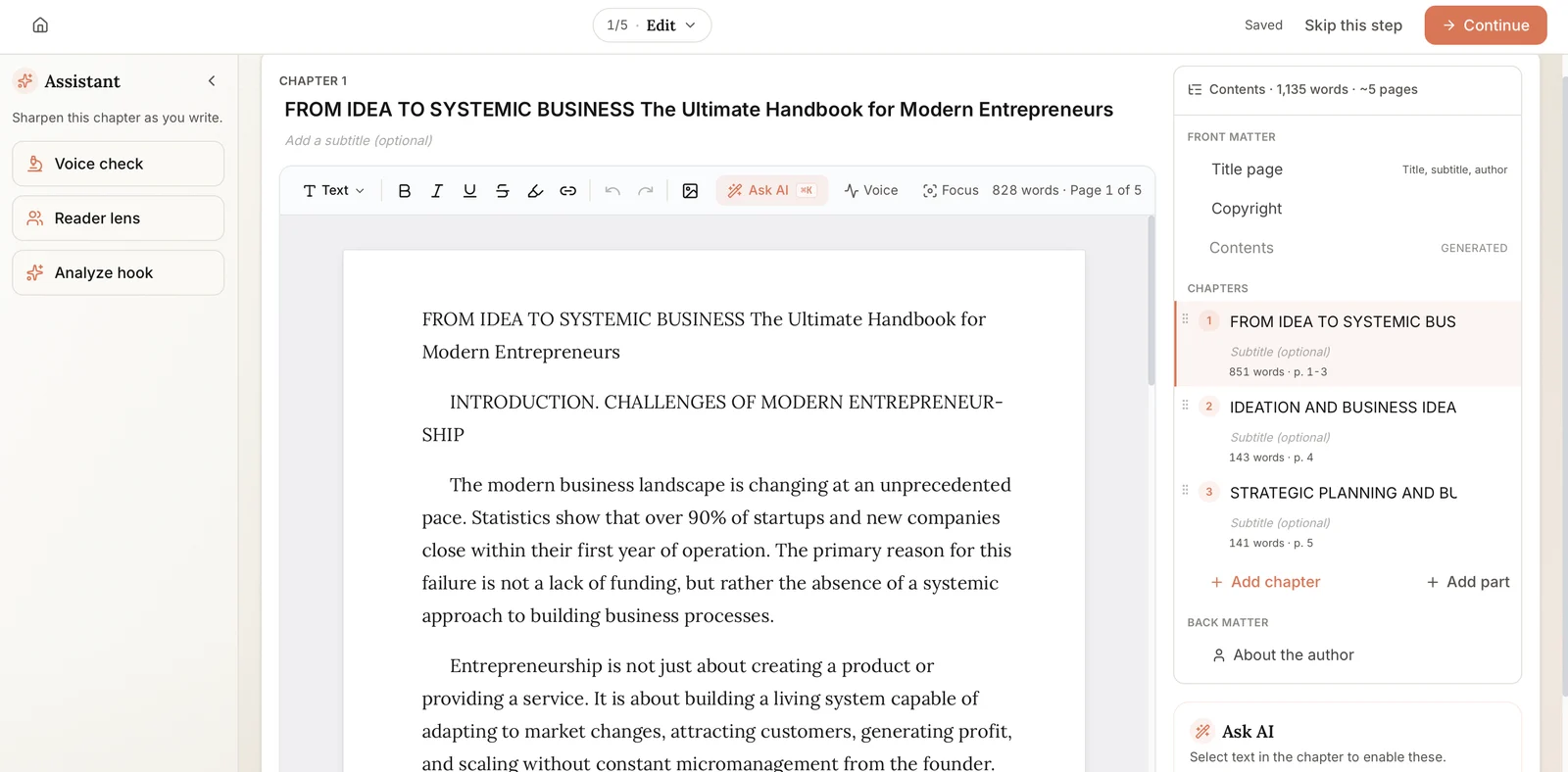
A common route to a self-published book uses several tools: a chat to draft, a grammar checker, a design tool for the cover and a tool to format the pages. Your text lands in each one, and each one has its own privacy rules. In Built&Written, writing, editing, layout, cover and KDP files happen in one platform. That leaves one set of rules to read.
Here is what our policies say, as of November 2026. The full policy is linked in the footer of the Built&Written site.
- No training by our AI providers. The platform uses OpenAI, Anthropic and Google under their business or API terms, with no training on customer data. Your text goes to these providers to be processed.
- Your rights stay yours. The text you upload and the book you create remain yours. Learning from your edits is a separate setting that applies only if you turn it on.
- Deletion. Email support@builtwritten.com to delete your account and its data.
- Public only when you publish. Books in the Built&Written book store, with their samples, are public.
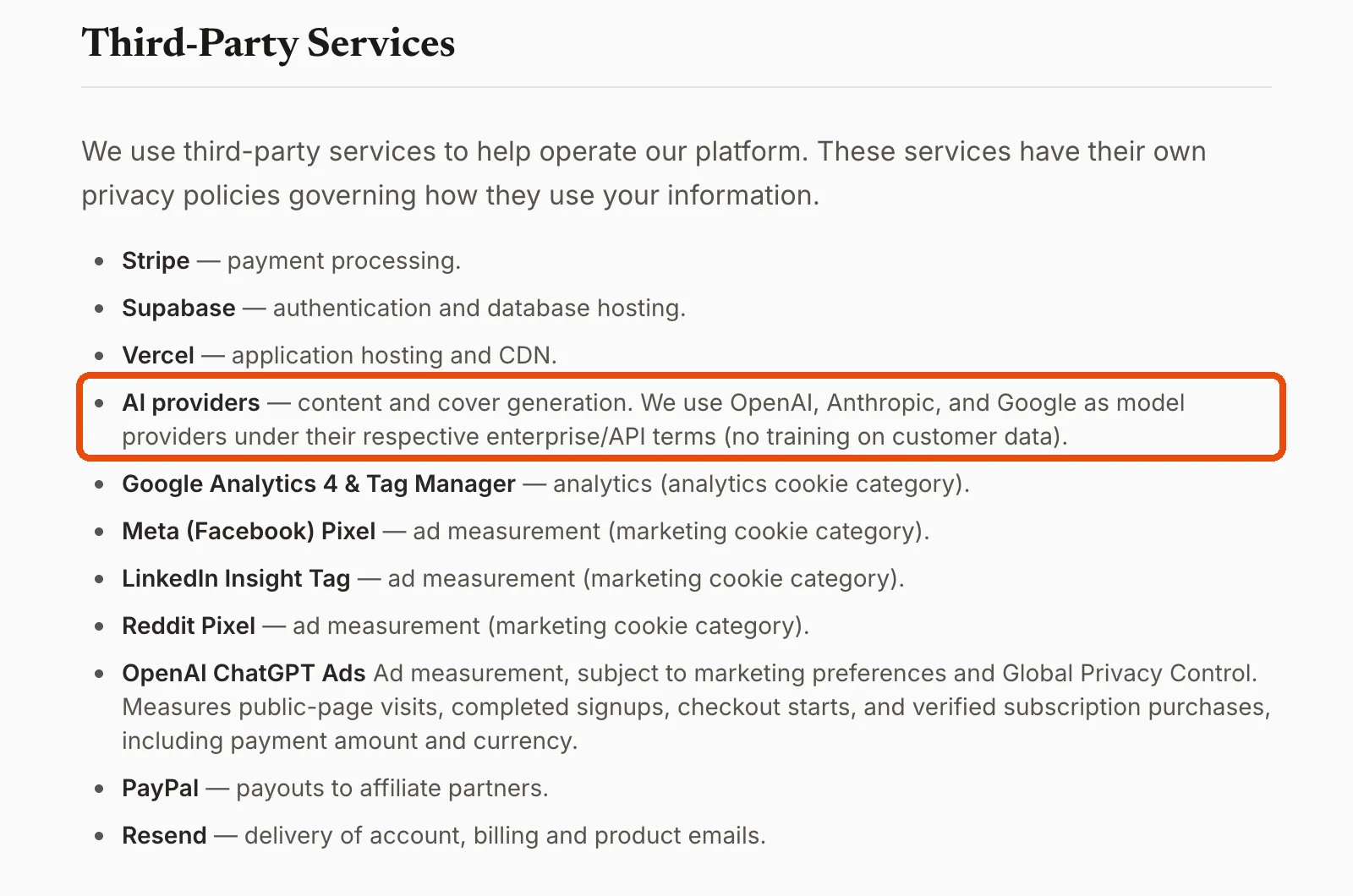
We cannot promise perfect safety. Our privacy page describes general security measures and does not list security certificates. If you connect the platform to an AI assistant such as Claude, that assistant's provider handles the chapter text you send. Its own privacy policy applies.
Final thoughts
Check three things before you upload: your plan, the training setting and the file. No setting makes an upload perfectly safe, and a page only tells you what a company promises.
You may not need to start from zero. If you have notes, old articles, recordings or an unfinished manuscript, Built&Written can turn them into a book. At the end you have a finished, formatted book and the files KDP asks for.
Frequently asked questions
The pages we read do not say your text is shown to other users. They say it may be used to train models, and some chats are read by human reviewers. What a trained model can repeat is not answered on those pages. Keep passages you cannot risk out of any upload.
It depends on the tool. Anthropic says a deleted conversation will not be used for future training. Google says human-reviewed Gemini chats are retained for up to three years. At Built&Written, you email support to delete your account data.
If AI wrote the text or made the images, yes. KDP calls this AI-generated, and editing it afterwards does not change that. If you wrote the content and used AI only to improve it, you do not need to report it. We checked this rule on November 5, 2026.
It is safer once you turn off "Improve the model for everyone". Business, Enterprise and Edu plans are not used for training by default. The steps are in the section above.
Sources & References
- OpenAI Help Center: How your data is used to improve model performance
- Anthropic Privacy Center: Is my data used for model training?
- Anthropic: Updates to Consumer Terms and Privacy Policy (August 28, 2025)
- Gemini Apps Privacy Hub (updated October 26, 2026)
- Grammarly Support: Product Improvement and Training Control
- Authors Guild: AI Best Practices for Authors (May 11, 2026)
- Authors Guild: Use of AI in publishing and new model contract clause (April 2026)
About the author

Khrystyna Balushka
More in AI Book Tools
Ready to write your book?
Turn your expertise into a professional book with Built&Written.