
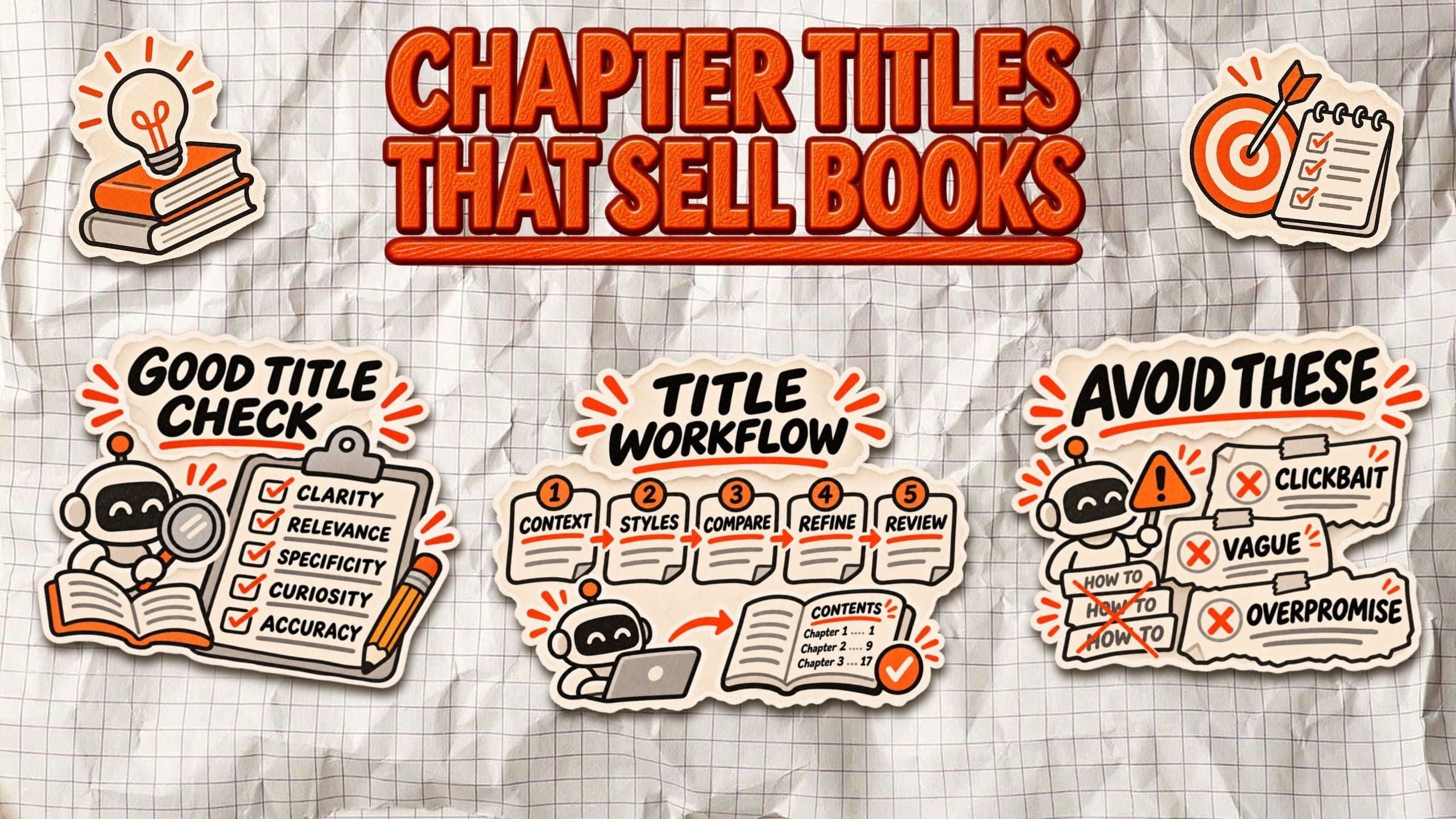

How to Use AI to Write Chapter Titles That Sell Your Book
Some tables of contents read like a training manual: Introduction to Marketing, Customer Research, Pricing Strategies. Others make you curious enough to turn the page. The difference often comes down to how the chapters are titled.
How do you use AI to write better chapter titles? Start by giving an AI assistant your book's audience, central argument, and chapter summaries. Ask it to generate descriptive, benefit-driven, question-based, and curiosity-driven options. Then compare those suggestions for clarity, specificity, and accuracy before refining the final table of contents. AI provides alternatives, but the author decides which titles match the manuscript.
Why chapter titles matter for nonfiction books
A chapter title has three jobs: tell readers what they're about to learn, show why it matters, and give them a reason to keep reading.
That matters particularly in nonfiction, where readers often look for solutions to specific problems. A founder browsing a business book might skip Chapter 4: Pricing Strategies but stop at Chapter 4: Why Customers Won't Pay What You're Worth. Both could cover pricing, but the second connects the subject to a recognizable frustration.
Most nonfiction chapter titles fall into three categories:
- Descriptive titles explain the topic directly, such as Understanding Customer Retention. They work well for technical or instructional content.
- Benefit-driven titles emphasize what readers stand to gain, such as How to Keep Customers Coming Back.
- Curiosity-driven titles introduce a question or unexpected angle, such as Why Your Best Customers Leave.
A strong table of contents works like a preview of the book's value. Descriptive titles make information easy to find, benefit-driven titles communicate useful outcomes, and curiosity-driven titles give readers a reason to explore an unfamiliar idea.
For nonfiction authors, the objective isn't to make every heading sound like a sales pitch. It's to help prospective readers understand what the book will teach them. Better chapter titles may make a book more appealing during the preview process, but there's no guarantee they'll increase sales. The chapter must still deliver on its promise.
What makes a good chapter title?
A good chapter title doesn't need to be clever. It needs to give readers a clear reason to care about what's inside.
Before accepting an AI-generated suggestion, evaluate it against five criteria:
- Clarity: Can someone understand the chapter's subject without reading the summary? Avoid titles that sound interesting but reveal nothing.
- Relevance: Does the title address a problem, question, or goal your target reader recognizes?
- Specificity: Does it communicate something concrete? Building a Better Business says less than Why Your First Ten Customers Matter.
- Curiosity: Does it create interest without hiding essential information or resorting to exaggerated claims?
- Accuracy: Does the chapter actually deliver what the title promises? A compelling heading becomes misleading when the content doesn't support it.
Here's how those principles work in practice:
| Weak title | Improved title |
|---|---|
| Marketing | How to Find Your First 100 Customers |
| Leadership | Why Good Teams Stop Trusting Their Leaders |
| Financial Planning | How Much Cash Does Your Business Really Need? |
| Productivity | Where Your Working Week Disappears |
Not every chapter needs a provocative title. In technical, instructional, or research-based nonfiction, How to Calculate Customer Acquisition Cost may serve readers better than a clever alternative.
The goal isn't maximum curiosity. It's choosing the clearest, most compelling promise your chapter can honestly fulfill. The same principle applies when publishing educational content online: your headings should help people understand what the material covers. Google's guidance on creating helpful, people-first content emphasizes usefulness, originality, and reliability over content designed primarily to attract search traffic.
How to use AI to generate chapter titles step by step
AI works best when you treat chapter titles as an editing task, not a brainstorming contest. Instead of asking for 50 catchy headings, give it enough context to suggest titles that actually fit your book.
Step 1. Give AI context about your book
Start with your target reader, central argument, and the main promise your book makes. Include a short summary of each chapter or of the book in general and describe your preferred tone.
These same details shape the broader process of writing a book with AI, from developing your outline to refining the completed manuscript.
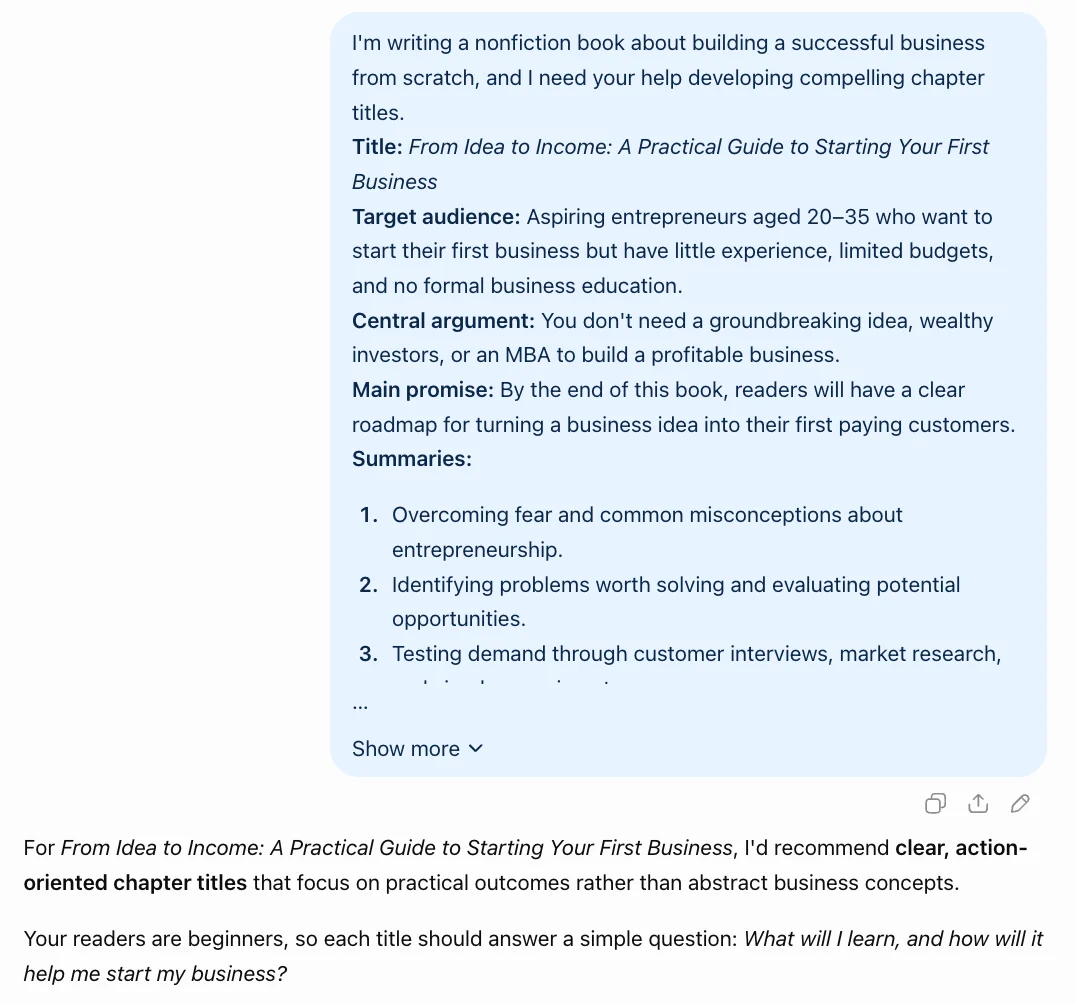
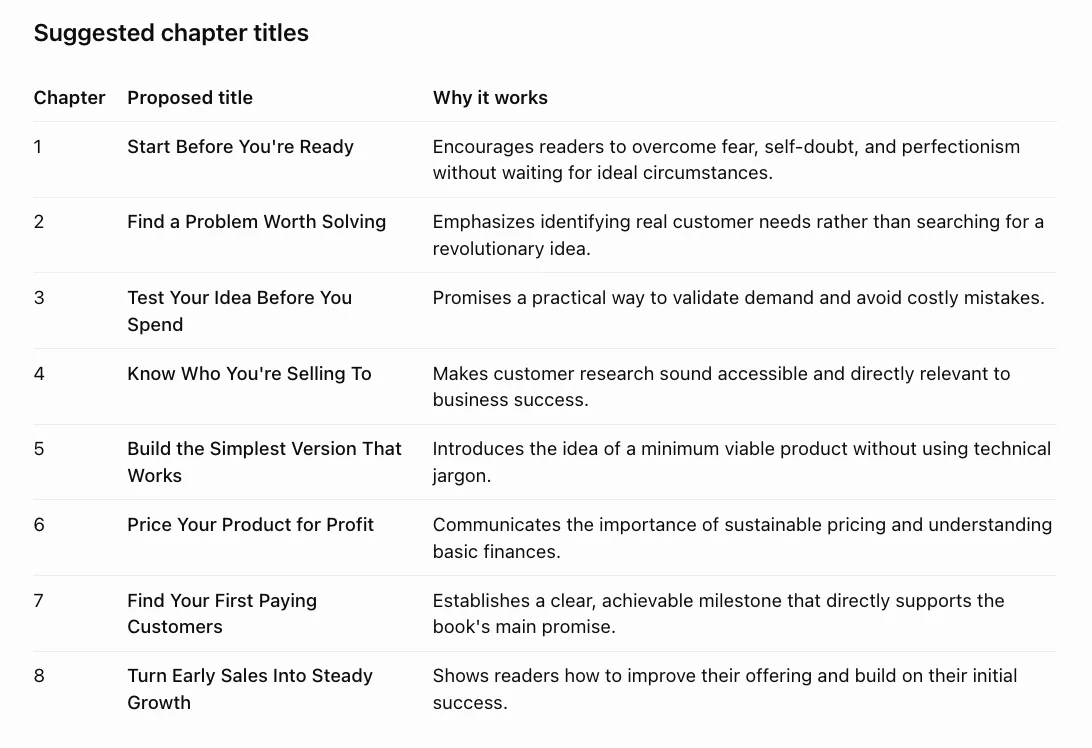
For example, a book for first-time founders might need direct, practical titles rather than dramatic or academic ones.
Step 2. Generate titles in different styles
Ask AI for four approaches: descriptive, benefit-focused, question-based, and curiosity-driven.
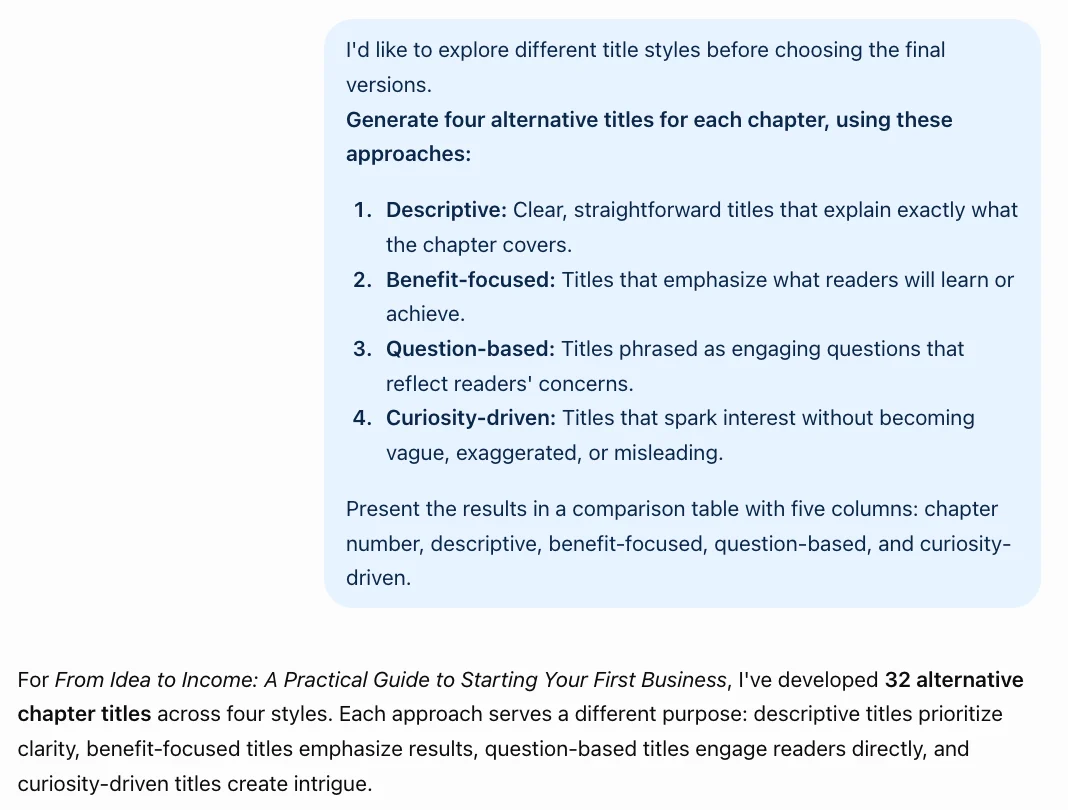
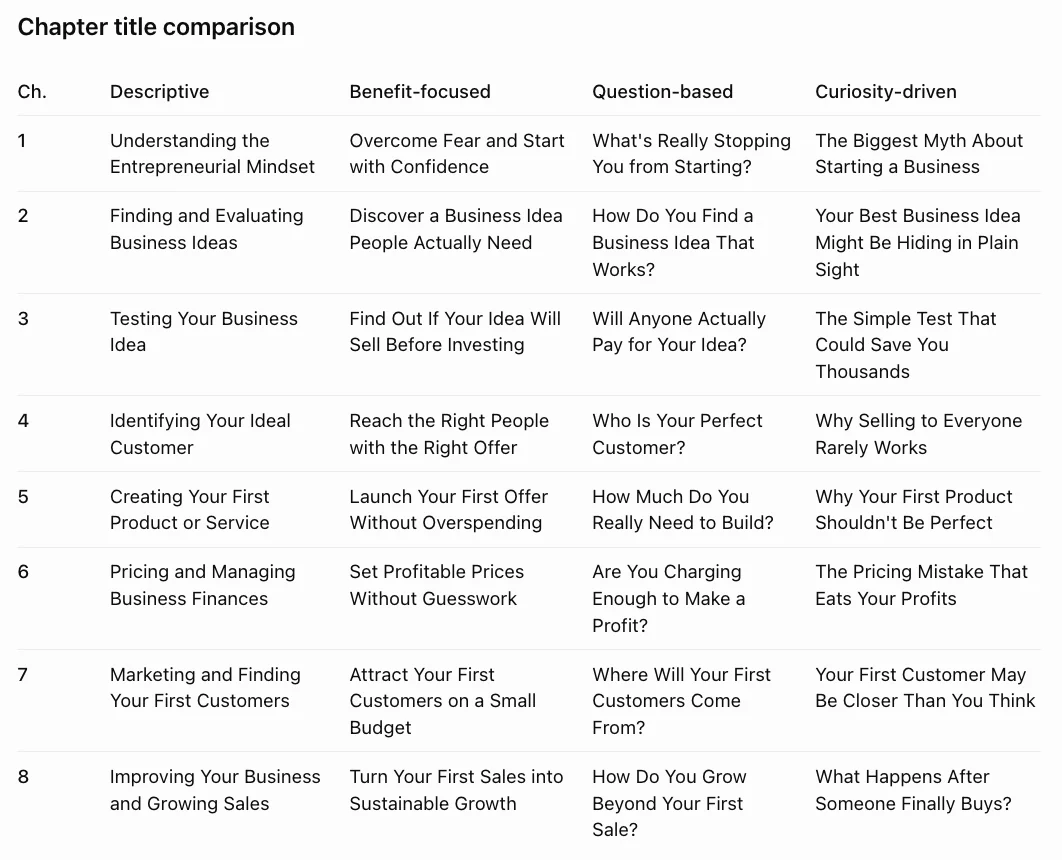
This gives you different ways to present the same material without committing to one style too early.
Step 3. Compare the strongest options
Review each suggestion for clarity, relevance, specificity, curiosity, and accuracy. Reject titles that exaggerate results, repeat generic phrases, or introduce topics the chapter doesn't cover.
Step 4. Refine the language
Ask AI to shorten your favorites, remove unnecessary words, and use terminology consistent with your manuscript.
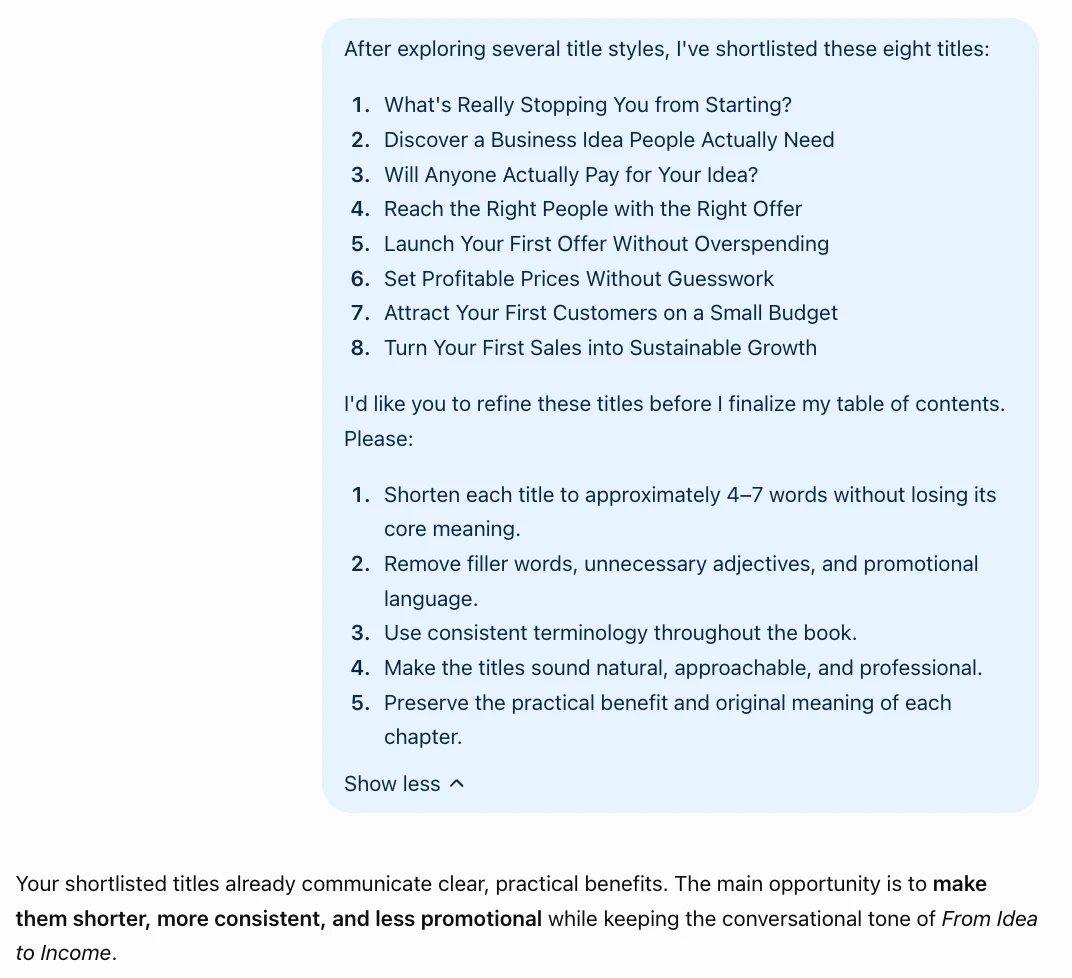
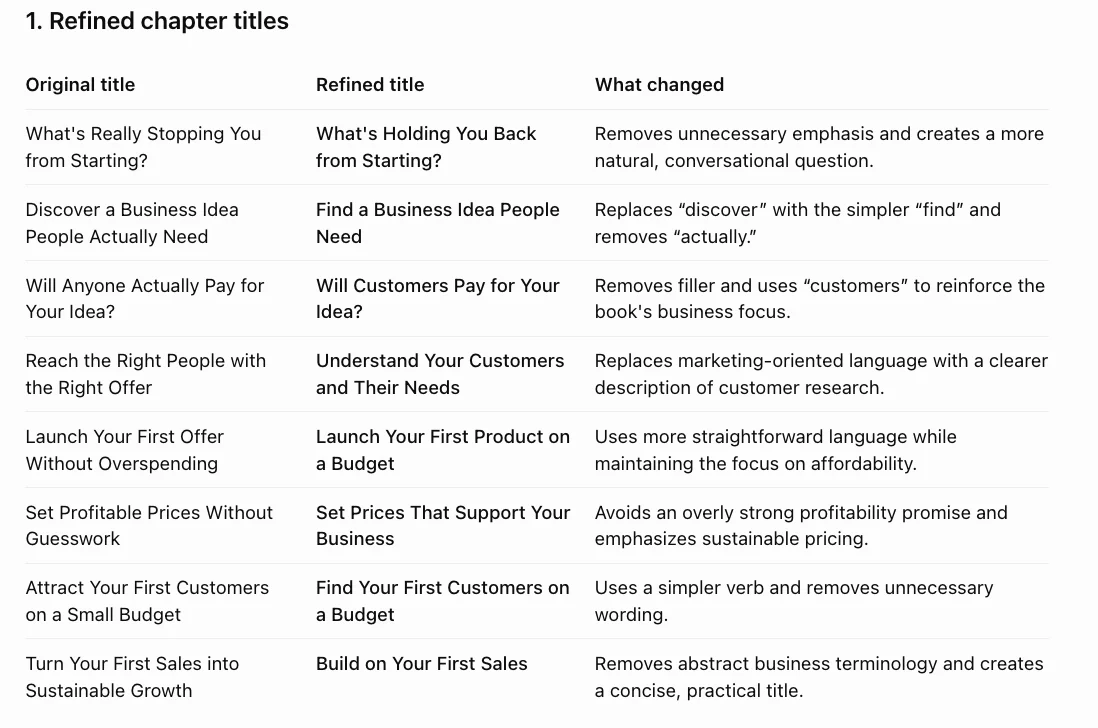
Keep the version that sounds like your book, not like an advertisement.
Step 5. Review the complete table of contents
Read every title in sequence. Check whether the progression makes sense, important topics are easy to find, and multiple chapters don't sound identical. Once your chapter titles are finalized, make sure they also work as navigation points in your ebook. Amazon KDP's table of contents instructions explain how to create linked chapter navigation for Kindle readers.
Your table of contents and book index serve different navigation purposes, so clear chapter titles are particularly important for helping readers understand the book's structure.
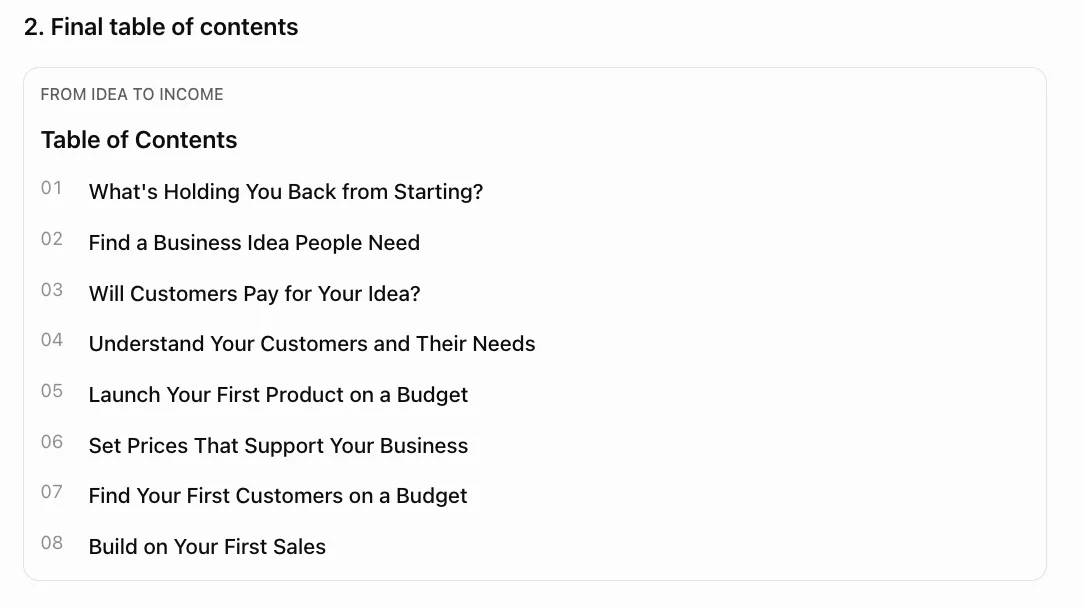
A strong individual title can still feel out of place in the complete book.
Before finalizing your chapter titles, give AI the completed table of contents and ask it to identify overlapping topics, inconsistent terminology, exaggerated promises, and chapters whose titles appear too similar. Review its observations against the actual manuscript. If a title promises a result that the chapter doesn't teach, either change the title or revise the chapter.
The final test is simple: Can a reader understand what each chapter offers, and does the content deliver it?
Copyable AI prompt for nonfiction chapter titles
Use this prompt with your preferred AI tool:
I'm writing a nonfiction book for [target audience] about [subject].

The book's central argument is [argument], and its main promise is [reader outcome].

My preferred tone is [tone].

Here are my chapter summaries: [paste summaries].

For each chapter, generate four title options:

1. Descriptive
2. Benefit-focused
3. Question-based
4. Curiosity-driven

Keep titles specific, concise, and faithful to the chapter summaries. Avoid exaggerated promises, vague language, and repetitive wording. Present the suggestions in a table and explain which option best fits each chapter.
Chapter title examples: Before and after AI refinement
Imagine you're writing a nonfiction book about building a profitable business without repeating common mistakes. Your first outline covers the right subjects, but the chapter titles sound more like course modules than reasons to keep reading.
Here's how AI-assisted refinement could make them more engaging:
| Generic title | Stronger alternative | Why it works |
|---|---|---|
| Understanding Your Customers | Why Your Best Customers Choose You | Focuses on customer decisions |
| Pricing Strategies | What Should You Actually Charge? | Turns a broad topic into a practical question |
| Time Management | Where Your Working Week Disappears | Addresses a familiar frustration |
| Building a Team | Your First Five Hires Matter Most | Introduces a specific, testable argument |
| Business Growth | What Breaks When Your Business Grows | Makes the costs of growth more concrete |
Notice what changes.
Why Your Best Customers Choose You shifts the focus from researching customers to understanding their decisions. What Should You Actually Charge? turns a broad subject into a practical question readers may already be asking.
Where Your Working Week Disappears highlights a familiar frustration, while Your First Five Hires Matter Most introduces a specific argument the chapter must support. The final example creates curiosity about the problems that accompany growth.
But stronger doesn't always mean more provocative. If a chapter provides a technical overview of pricing methods, Pricing Strategies might be more accurate.
These are illustrative examples, not evidence that certain headings increase book sales. The best choice depends on what each chapter actually contains.
Common mistakes when using AI for chapter titles
AI can generate convincing chapter titles that look great in isolation but fall apart when you compare them with the actual manuscript. Here are six mistakes worth catching before you finalize your table of contents.
1. Making every title sound like clickbait
Titles like The Shocking Secret to Business Success might create curiosity, but they rarely communicate useful information. Ask AI to make titles interesting without relying on sensational language or artificial suspense.
2. Using vague promises
Unlocking Your Potential or Achieving Greater Success could describe almost any business book. Replace broad promises with recognizable problems, specific decisions, or concrete outcomes your chapter addresses.
3. Choosing titles that overpromise
If a chapter explains basic customer research, calling it The Proven Formula for Doubling Your Revenue creates expectations the content cannot justify. Compare each AI-generated title against the chapter summary and remove unsupported claims.
4. Repeating the same title structure
Ten consecutive chapters beginning with How to can make your table of contents predictable. Ask AI to vary sentence structures while keeping the overall tone consistent. Some chapters benefit from questions, others from direct statements.
5. Ignoring your own voice
AI often introduces phrases that sound polished but don't match your manuscript. If your book uses straightforward business language, dramatic metaphors or trendy expressions may feel out of place. Rewrite suggestions using terminology you've already established.
6. Finalizing titles too early
A chapter might start as a discussion of marketing strategy but eventually focus on customer referrals. Its original title may no longer fit.
Revisit your headings after drafting, using the completed chapters rather than outdated outlines as your reference.
The final step is an editorial review. Read your entire table of contents alongside the manuscript. Check every title for accuracy, clarity, consistency, and relevance. AI can suggest alternatives, but the author must decide what each chapter can honestly promise.
How to refine chapter titles with AI in Built&Written
Chapter titles shouldn't be developed separately from the manuscript. An engaging heading created during outlining can become inaccurate as the argument, examples, and structure evolve.
Built&Written helps nonfiction authors organize source material, develop chapter structures, and work on individual chapters in an integrated editor. Its AI-assisted structure proposal can generate descriptive chapter titles and a table of contents that authors can review, rename, reorder, or expand.
That gives authors a practical starting point rather than a finished editorial decision. As chapters develop, they can revisit the headings, compare them against the manuscript, and refine the language. Voice DNA helps generated writing follow the author's existing vocabulary, sentence rhythm, and explanation style.
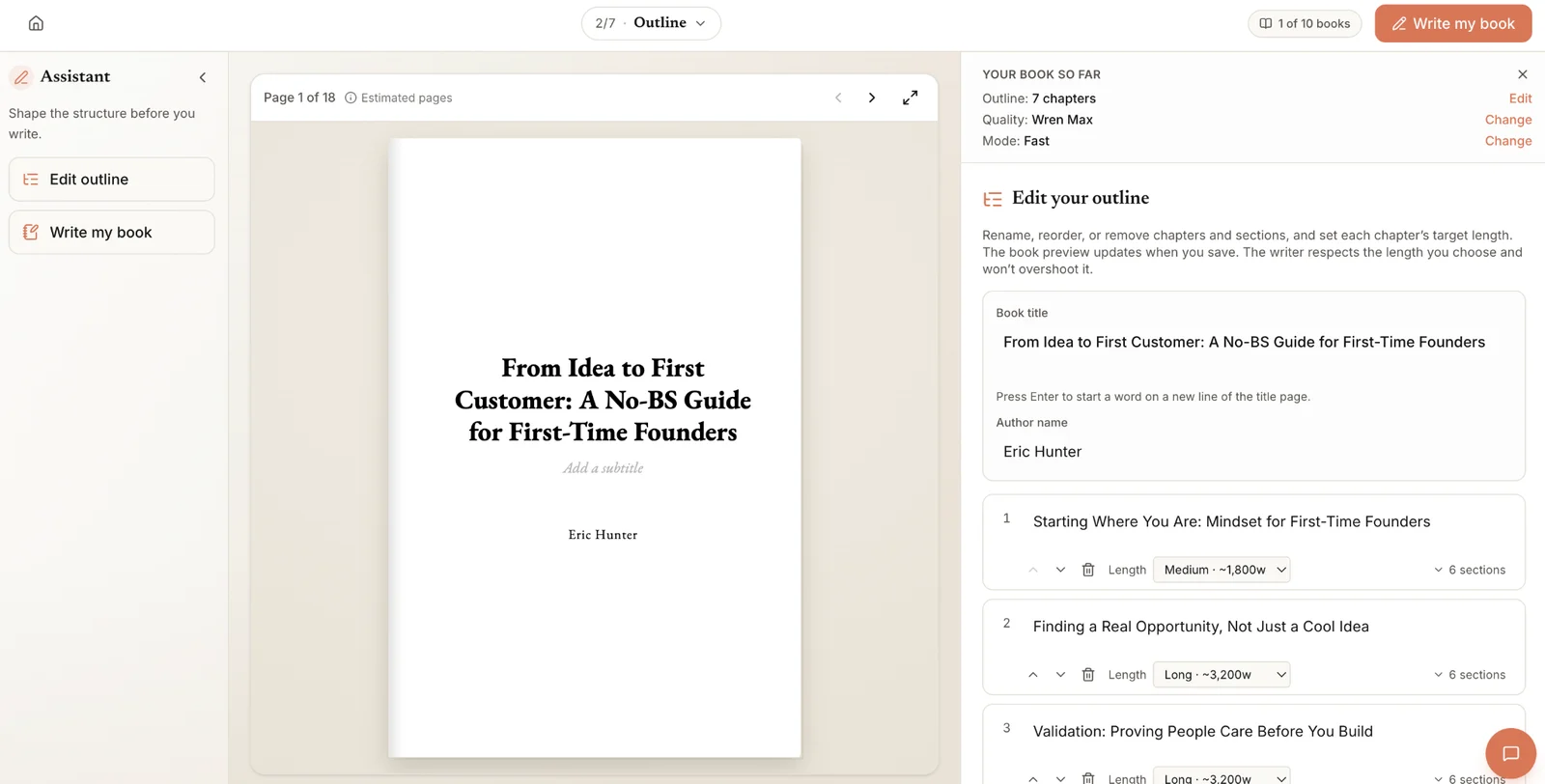
A practical title-refinement workflow looks like this:
- Start with your outline. Review each chapter's purpose and identify the question or problem it addresses.
- Generate alternatives. Use an AI assistant to suggest titles based on your chapter summaries, audience, and central argument.
- Check the manuscript. Compare each option against the actual chapter content, removing anything misleading or too broad.
- Make the final edits. Choose titles that work together and reflect your terminology and voice.
Built&Written's Voice DNA helps maintain your writing style across the manuscript. But choosing chapter titles still requires editorial judgment. The goal is a coherent book, not simply catchier headings.
Final checklist: Are your chapter titles ready?
Before publishing, review your table of contents as if you're seeing the book for the first time. Use this checklist to catch weak headings:
- Clarity: Can readers understand what each chapter covers?
- Specificity: Does each title communicate something more useful than a broad topic?
- Promises: Does the heading offer a clear reason to read the chapter?
- Accuracy: Does the content support every claim or expectation the title creates?
- Consistency: Do the titles share a recognizable tone and style?
- Variety: Have you avoided repetitive wording and identical sentence structures?
- Audience fit: Would your intended readers recognize the problems and outcomes described?
If you're publishing an ebook, check that readers can navigate between chapters using the table of contents. Amazon's Kindle navigation guidelines explain the navigation requirements for Kindle books.
AI is useful for exploring more title options and refining your language. But choosing the right headings remains an editorial decision, one that requires understanding your readers and your book.
Frequently asked questions
Yes. AI can generate title variations, identify repetitive wording, and suggest more specific alternatives. However, it cannot reliably judge which headings will appeal to your audience or accurately represent your expertise without sufficient context. Treat its suggestions as drafts that need editorial review.
Keep titles short enough to scan easily in a table of contents. There's no universal word limit. A three-word heading might work perfectly for a technical chapter, while a longer question could better communicate a practical problem. Clarity matters more than length.
It depends on the content. Instructional chapters often benefit from straightforward titles that help readers find information quickly. Chapters exploring surprising insights or challenging assumptions may benefit from curiosity-driven headings. Choose the approach that matches your reader's expectations.
Not necessarily. Consistent tone helps the book feel cohesive, but identical structures can become monotonous. Repeated formats work well for step-by-step frameworks or numbered processes. Otherwise, a mix of questions, statements, and descriptive titles often feels more natural.
Yes, and completed chapters provide better context than preliminary outlines. Give AI a summary of each finished chapter and ask for alternatives that reflect its actual argument. Review the suggestions against the manuscript before updating your table of contents.
Sources & References
About the author

Polina Karlashchuk
More in Writing
Ready to write your book?
Turn your expertise into a professional book with Built&Written.