

How to Tell an AI Book Creator From a Plain Text Generator
Many tools now call themselves an AI book creator. Some are a chat box that writes text. Others are built to take you from your material to a book you can publish. How do you tell them apart?
We asked ChatGPT to make a paperback for Amazon KDP, Amazon's self-publishing platform, from 40 short notes. Then we compared its files with a book made in Built&Written, our own platform. ChatGPT did make files for a book. But when we checked them, we found problems with the contents, the fonts and the cover. You can run the same check yourself.
Key takeaways
- A PDF alone doesn't tell you much. ChatGPT can create one, too.
- The real difference is in the details: page numbers in the contents, embedded fonts, a real cover and checks before you download.
- Built&Written wasn't perfect either. We'll show you what still needed work.
- Here are five things to check before choosing a tool. KDP's free previewer helps.
What is the difference between an AI book creator and a text generator?
A text generator writes text and, as we saw, can even build a PDF. After that, you organize the other steps yourself. An AI book creator helps you create the book, format it, design the cover and prepare the print files in one place. A cover has to match the page count, and a contents page has to match the final page numbers, so it helps when one tool handles both.
How we tested them
On November 6, 2026, we gave ChatGPT (free plan, new chat) a file with 40 notes from P. T. Barnum's 1880 book The Art of Money Getting, which is in the public domain. We asked: "Using these notes, make me a finished paperback I can publish on Amazon KDP: the book text, the cover and the print files."
We compared its files with the test book we made in Built&Written the day before, "Maximum Prosperity", from other public domain notes. The two books have different material, so we did not compare the writing. We compared the files and how ready they are for publishing. For how the tools write, see our tests of Claude and ChatGPT and of AI chapter generators.
What did each tool give us?
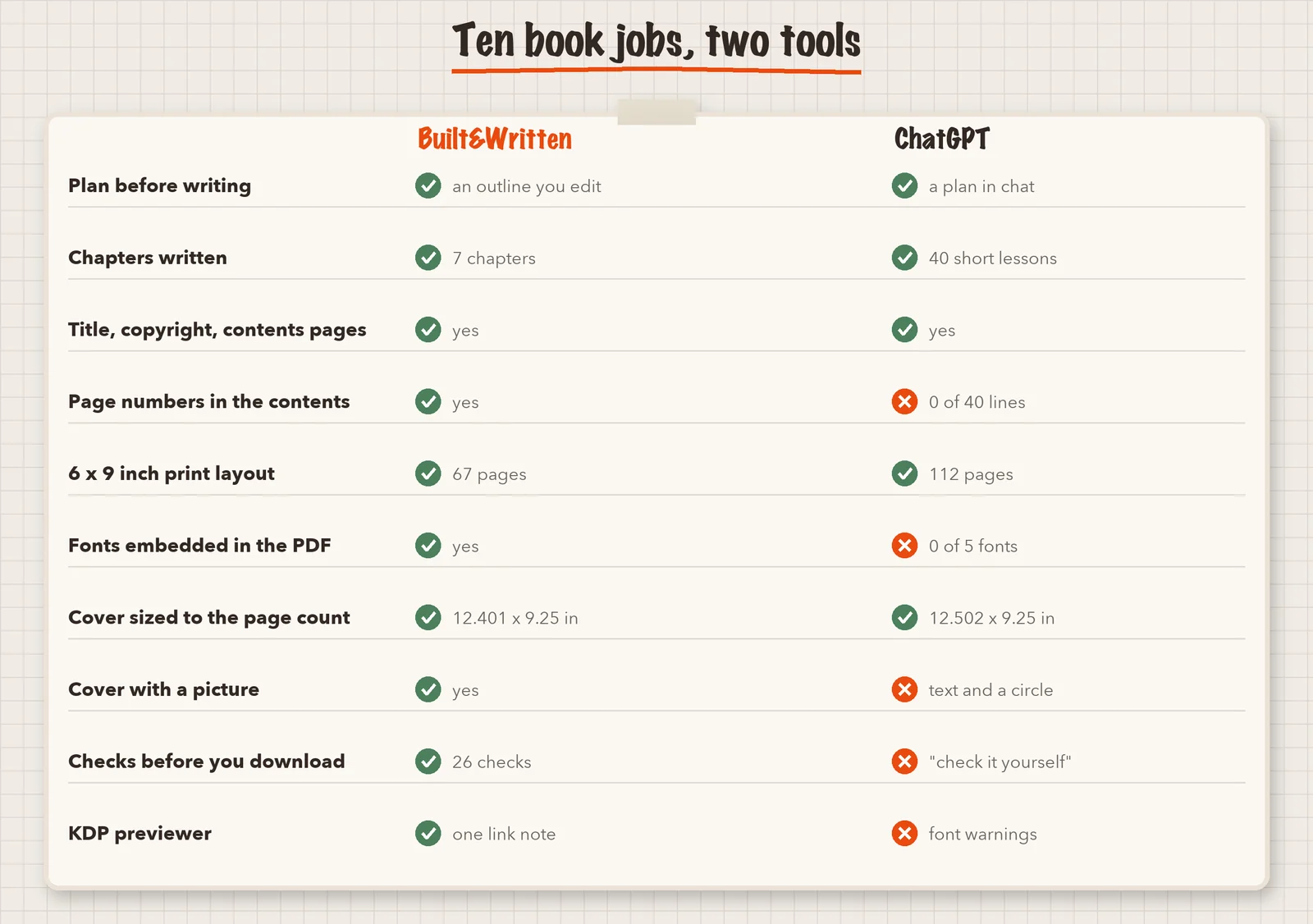
Built&Written gave us a ZIP package with a 67-page interior PDF, a cover PDF, an ebook cover and an upload guide. Its own report said 26 checks passed, 2 gave warnings and none failed. KDP let us upload both PDFs, and its Print Previewer showed one note about links in the contents page. Uploading is not approval, and we did not approve or publish the book. Our earlier article has the full test.
ChatGPT first sent a plan and three questions. After one more request, it gave us a ZIP with a Word file, a 112-page interior PDF at 6 × 9 inches, a full-wrap cover PDF, a text file for KDP and a read-me. It did two things well. It worked out the cover size exactly: 12.502 by 9.250 inches is what KDP's formula gives for 112 pages on white paper. And it told us the files were "not a guarantee of KDP acceptance" and to check them in KDP's previewer. That is honest advice.
What was wrong with the ChatGPT files?
We opened every file and counted. This is the strongest part of the test, because KDP's own previewer confirms it.
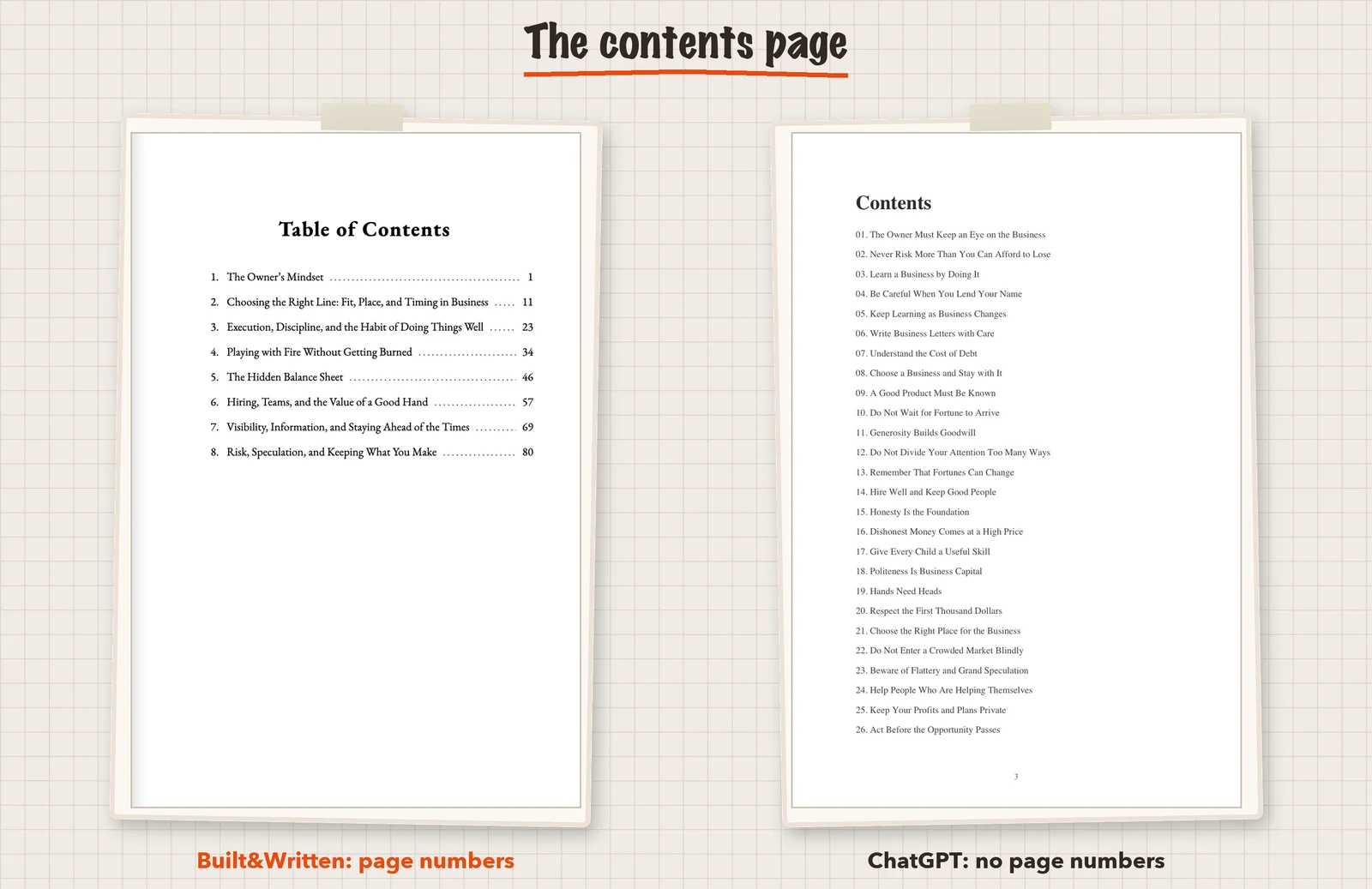
The contents page had no page numbers. It listed 40 lesson titles, and none of the 40 lines had a page number. A reader could not find a lesson.
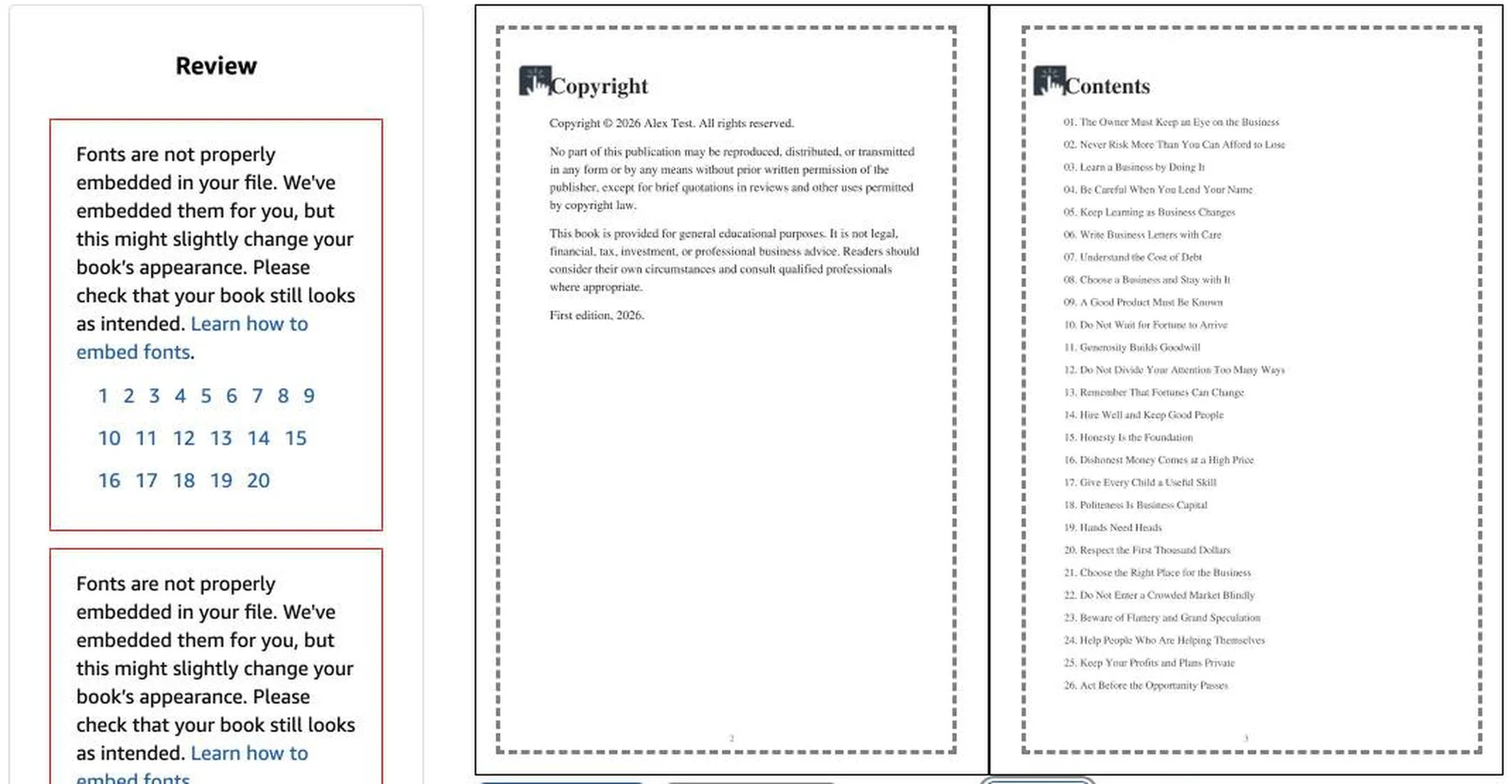
The fonts were not embedded. The PDF used standard Times and Helvetica fonts and carried none of them inside the file. KDP asks for embedded fonts so the book prints the way you see it. When we uploaded the files to a draft in our own KDP account, the previewer flagged this twice: "Fonts are not properly embedded in your file. We've embedded them for you, but this might slightly change your book's appearance." One note listed pages 1 to 20. The other was for the cover. KDP fixed it, but the book might look a little different from what you saw.
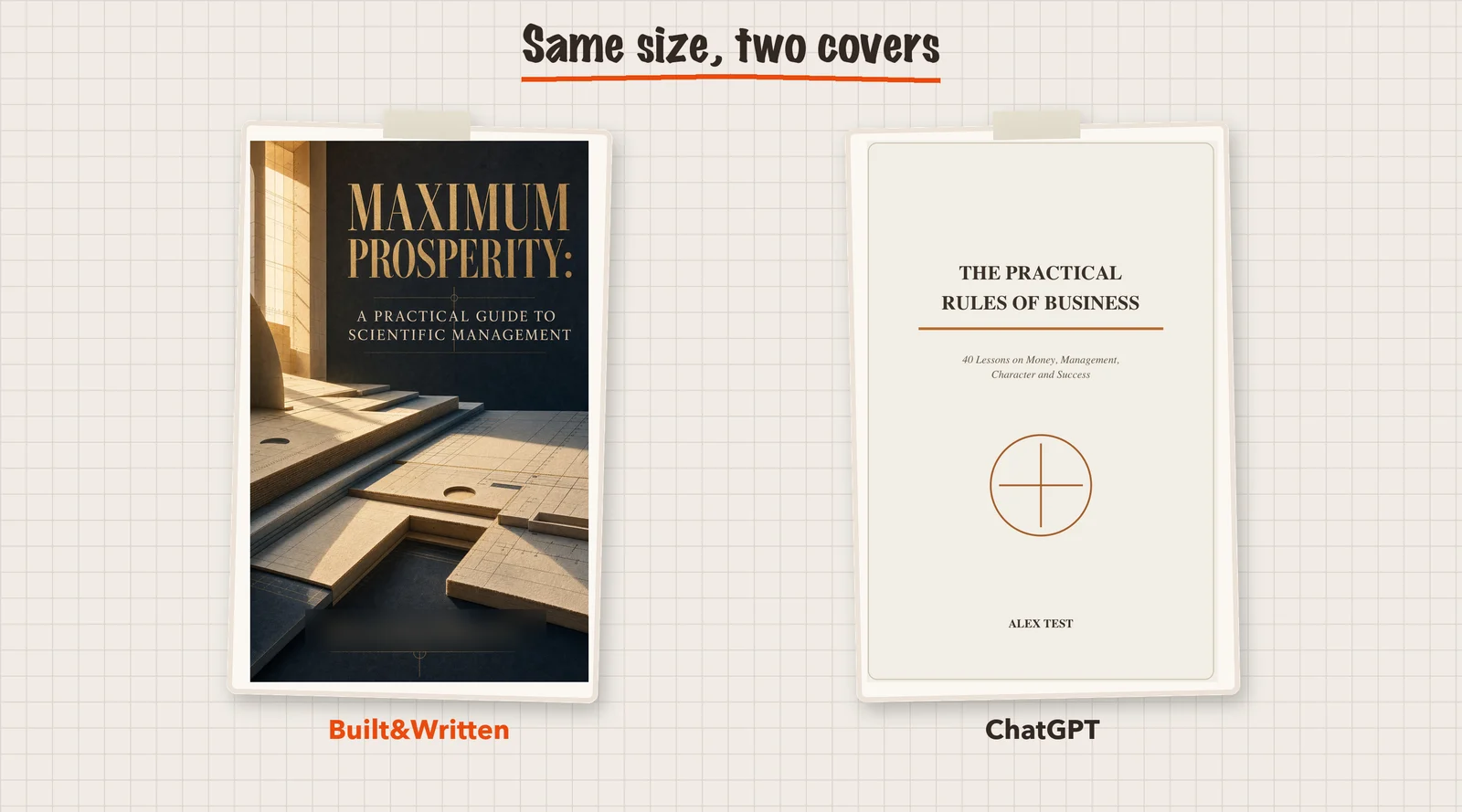
The cover had no picture. It was 3 KB: a title, a line and a small drawn circle on a cream background. The size was right, but the design was bare.
Many pages were filler. The book had 40 lesson pages of about 146 words each. After every lesson came a page of questions and ruled lines, 58 pages with ruled lines out of 112. We had asked for 100 to 120 pages, and the tool reached that number this way. Some readers like worksheets, but only about a third of the pages held lesson text.
Built&Written was not perfect either. We still made the KDP draft, chose the print options, answered KDP's AI question and uploaded the files ourselves. Our cover PDF was 12.7 MB, and we had to shrink it to pass a 10 MB limit in our test setup.
How do you check an AI book creator before choosing one?
Here are five things to look at. They work with any tool.
- Is the whole book in one place? You can edit the plan, a chapter and the cover without starting over.
- Does the contents page have page numbers?
- Are the fonts embedded? In Adobe Acrobat, open File, Properties, Fonts. Embedded fonts say "Embedded Subset".
- Is the cover a real design with the right size and a spine that matches the page count?
- Are the files checked before you download them?
Then upload the files to a KDP draft and read what the Print Previewer says. Our guide on AI book formatting covers the inside pages in more detail.
Which AI book creator should you use?
| Option | Good when | In our test |
|---|---|---|
| Built&Written | You have material or a finished manuscript and want the book, cover and KDP files in one place | Embedded fonts, contents with page numbers, a cover with a picture, one previewer note about links |
| ChatGPT | You want a quick first version and are happy to fix files yourself | Right sizes. No page numbers in the contents, no embedded fonts, no cover picture |
Final thoughts
ChatGPT can be a good way to get a first version of a book, if you are ready to work with the files yourself. If you would rather go from your own material to a finished book and KDP files in one place, an AI book creator is built for that.
That is what Built&Written does. Whether you have notes, articles, an old book or a finished manuscript, it helps you turn it into a book and prepare the files for Amazon KDP.
Frequently asked questions
It made us a 112-page PDF and a cover file, and KDP let us upload both. But the contents page had no page numbers and the fonts were not embedded. You would need to fix those first.
A tool that helps you make the whole book in one place: the chapter plan, the draft, the layout, the cover and the print files.
Not always. If you are happy to edit Word and PDF files yourself, ChatGPT can give you a first version. A book creator suits people who want layout, cover and checks in one place.
No. It prepares the files and a guide. You upload them in your own KDP account and press Publish yourself.
Sources & References
About the author

Khrystyna Balushka
More in AI Book Tools
Ready to write your book?
Turn your expertise into a professional book with Built&Written.