

We Gave Four AI Ebook Generators the Same Notes
Key takeaways
- What did we test? We gave the same 2,131 words of notes to ChatGPT, Inkfluence AI, Canva and Built&Written. ChatGPT wrote a clean four-chapter ebook text, then said it could not give us a PDF or EPUB file. Inkfluence AI and Built&Written both made a full book with a cover, but far longer than we asked: 7,183 and 17,612 words. Canva AI came closest to the brief: a 1,925-word guide in four chapters, but no EPUB.
- What matters most? Where the tool starts (your notes or a one-line idea) and what it hands you at the end (text, a PDF or an EPUB).
- Cheapest with an EPUB? Inkfluence AI, from $9.99 a month, but it adds a lot of its own material to your notes.
- Canva? Its AI came closest to our request, a 1,925-word guide built from our notes, but it downloads PDF and Word, not EPUB.
What does an AI ebook generator actually do?
An AI ebook generator is a tool that writes, lays out or exports an ebook for you. Most tools do only one or two of those three jobs, and that gap is where people get stuck.
There are two kinds:
- Idea-first tools. You type a title or a one-line idea, and the AI writes the whole book. Fast, but the ideas and examples come from the AI, not from you.
- Material-first tools. You bring what you already have: notes, blog posts, talk transcripts. The AI shapes it into chapters. The book sounds like you because the content is yours.
The end file matters too. An EPUB is the standard ebook file: Kindle, Apple Books and Kobo all read it, and the text adjusts to any screen. A PDF is a fixed page. It is fine for a free guide you email to clients, but Amazon's Kindle store works best with an EPUB. Our guide to EPUB, PDF and MOBI explains the difference in more detail.
How we tested the four tools
We picked four names that come up most when people search for an AI ebook generator and that you can try without paying first: ChatGPT, Inkfluence AI, Canva and Built&Written.
The same notes and the same request for every tool. On October 30, 2026 we gave each tool 2,131 words of notes. The notes were the first chapter of Frederick Taylor's The Principles of Scientific Management (1911, free to reuse), standing in for a consultant's own material. We asked for a short ebook to give clients: a title, an introduction and 3 to 5 chapters, about 2,000 words, using only our material. Then we asked for the ebook as an EPUB or PDF file. We used ChatGPT without logging in, Inkfluence AI and Canva on their free plans, and Built&Written on a paid plan, because writing with AI there needs one.
Prices and plans come from each company's own pricing and help pages, checked on October 30, 2026. Built&Written is our own product, and we ran it the same way as the others. Under each screenshot you also get the text from the image.
The four AI ebook generators compared
| Tool | Starts from | Writes the text | Ebook file you get | Price (checked October 30, 2026) |
|---|---|---|---|---|
| ChatGPT | Your notes, pasted in | Yes | None in our test; you copy the text out | Free plan; paid plans on chatgpt.com/pricing |
| Inkfluence AI | A one-line idea; long notes can be imported as they are | Yes, the whole book, and much longer than asked | PDF free; PDF, EPUB and Word from Creator | Free; $9.99 or $19.99 a month |
| Canva | Your notes, pasted or as a file (Canva AI) | Yes, a short guide close to your notes | PDF, images, slides, video, Word for Canva Docs; no EPUB | Free; Pro €110 a year (price shown to us in Europe) |
| Built&Written | Your notes, posts, transcripts or a file | Yes, a full book from your material (shortest option 50 to 80 pages) | EPUB, Word, print PDF and Amazon KDP files | See plans |
Built&Written gets its own section below, so you can see how the same job looks there.
ChatGPT: good text from your notes, but no ebook file
ChatGPT did the writing part well. From our 2,131 words of notes it made a title, an introduction and four chapters, about 2,400 words in all. It cut repetition, kept the argument and even added a note that it had stayed inside our material instead of inventing new ideas.
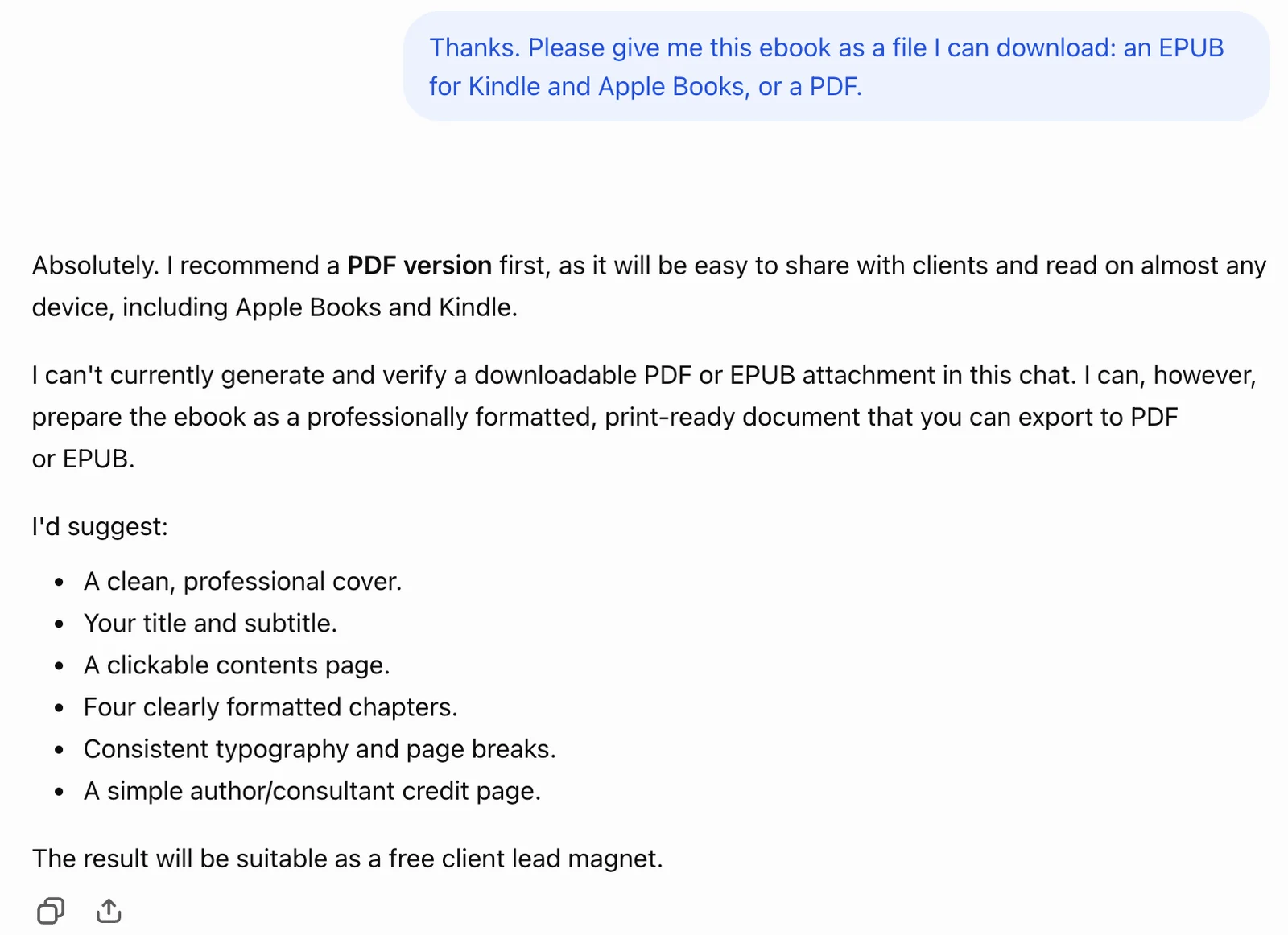
Then we asked for the file. ChatGPT answered that it could not generate and verify a downloadable PDF or EPUB in the chat, and offered to prepare a "print-ready document" instead.
Text in the image:
Our request: "Thanks. Please give me this ebook as a file I can download: an EPUB for Kindle and Apple Books, or a PDF."
ChatGPT: "Absolutely. I recommend a PDF version first, as it will be easy to share with clients and read on almost any device, including Apple Books and Kindle. I can't currently generate and verify a downloadable PDF or EPUB attachment in this chat. I can, however, prepare the ebook as a professionally formatted, print-ready document that you can export to PDF or EPUB."
It then lists: a clean, professional cover; your title and subtitle; a clickable contents page; four clearly formatted chapters; consistent typography and page breaks; a simple author or consultant credit page. "The result will be suitable as a free client lead magnet."
So with ChatGPT, the last part of the job is yours: paste the text into a document, add a cover, build a contents page, export a PDF, then convert it to EPUB if you want it on Kindle. Our guide on how to create an ebook walks through those steps.
Pick ChatGPT if you only need clean text from your notes and you are happy to do the layout yourself.
Inkfluence AI: a whole book from one idea, for little money
Inkfluence AI writes the entire book for you. Its own page describes the start as "a title, a one-line idea, or a short brief", then the AI writes the chapters, designs a cover and exports the files.
Our test. We signed up for the free plan and pasted the same notes and request. Inkfluence noticed the long text and offered two choices: import it as a book word for word, or use it as a prompt for a new book. We chose the prompt, because that is the AI ebook generator part.
It was fast. About a minute later we had an outline, five chapters and a cover. But it did not follow the brief:
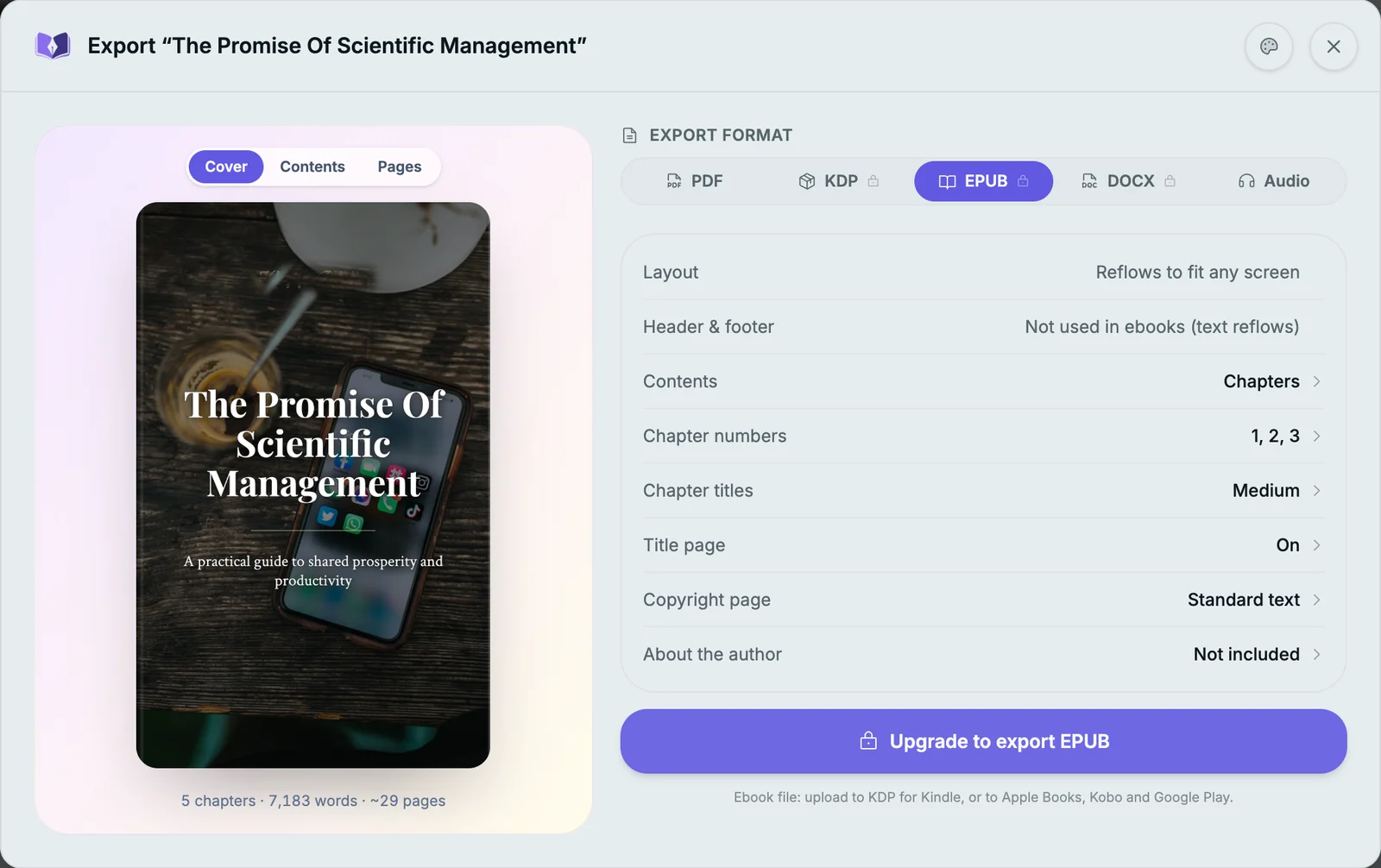
- Far too long. We asked for about 2,000 words. We got 7,183 words, about 29 pages.
- Things we never wrote. It kept our main ideas, then added a named "method" to every chapter (such as "The Shared Prosperity Principle"), a worksheet, and a line telling readers to "book a call".
- No EPUB on the free plan. The free plan downloads a PDF with an Inkfluence footer. The EPUB button says "Upgrade to export EPUB".
Text in the image:
Window title: "Export: The Promise Of Scientific Management". Cover text: "The Promise Of Scientific Management. A practical guide to shared prosperity and productivity." Under it: "5 chapters, 7,183 words, about 29 pages".
Export format tabs: PDF, KDP, EPUB, DOCX, Audio. EPUB settings: layout "Reflows to fit any screen", contents "Chapters", chapter numbers "1, 2, 3", title page "On", copyright page "Standard text", about the author "Not included".
Button: "Upgrade to export EPUB". Below it: "Ebook file: upload to KDP for Kindle, or to Apple Books, Kobo and Google Play."
It is still the cheapest way to an EPUB in this list. Creator, at $9.99 a month, adds PDF, EPUB and Word files and about 4 books a month. Premium, at $19.99 a month, has unlimited chapters and audiobook narration.
The trade-off: much of the book comes from the AI, not from you. For a consultant whose value is their own method, that is the part you most want to keep.
Pick Inkfluence AI if you want a cheap, fast ebook on a general topic and you do not have your own material yet.
Canva: a tidy client guide from your notes, but no EPUB
Canva is a design tool, and its Canva AI assistant can now write as well as design.
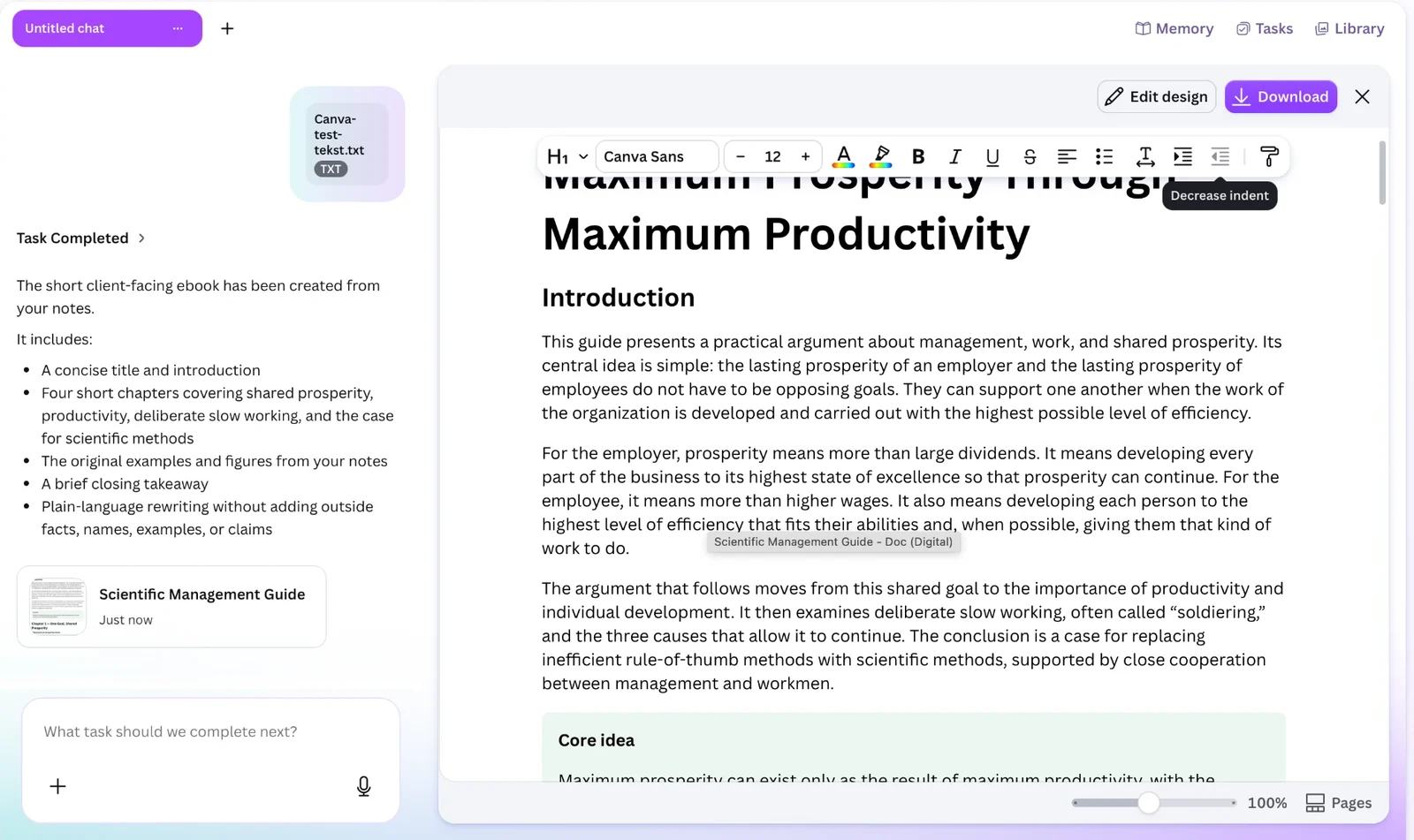
Our test. On the free account, we gave Canva AI the same notes and request as a text file. It built a Canva Doc with a title, an introduction, four short chapters, highlighted "Core idea" boxes and a closing takeaway: 1,925 words, almost exactly the 2,000 we asked for. It said it kept "the original examples and figures from your notes" and added no outside facts, and the introduction follows our notes closely.
Text in the image:
Left: "Task Completed. The short client-facing ebook has been created from your notes. It includes: a concise title and introduction; four short chapters covering shared prosperity, productivity, deliberate slow working, and the case for scientific methods; the original examples and figures from your notes; a brief closing takeaway; plain-language rewriting without adding outside facts, names, examples, or claims." File card: "Scientific Management Guide".
Right: buttons "Edit design" and "Download". The document starts: "Maximum Prosperity Through Maximum Productivity. Introduction. This guide presents a practical argument about management, work, and shared prosperity."
The catch is the file. Canva's help page on download file types lists PDF, image, slide, video and, for Canva Docs, Word downloads, but no EPUB. We downloaded our guide as a 7-page PDF. So you get a good PDF guide, not a Kindle ebook.
Pick Canva if you want a short, tidy PDF guide for clients and do not need Kindle.
Turning your notes into an ebook with Built&Written
Built&Written starts where most experts already are: with material. You paste notes, posts or talk transcripts, or drop in a PDF, Word, TXT or Markdown file.
| Step | With ChatGPT | With Built&Written |
|---|---|---|
| Start | Paste notes into the chat | Paste notes or drop in a file |
| Plan | Ask for an outline | An outline you approve before any chapter is written |
| Write | Text in the chat, in ChatGPT's voice | Chapters in your voice, learned from 5 to 50 pages of your writing (Voice DNA) |
| Cover | Make one elsewhere | Designed in the app |
| File | Copy and paste, export, convert | EPUB, Word and print PDF to download |
| Kindle | Check the file yourself | Files made to Amazon KDP's rules; you upload them in your own account |
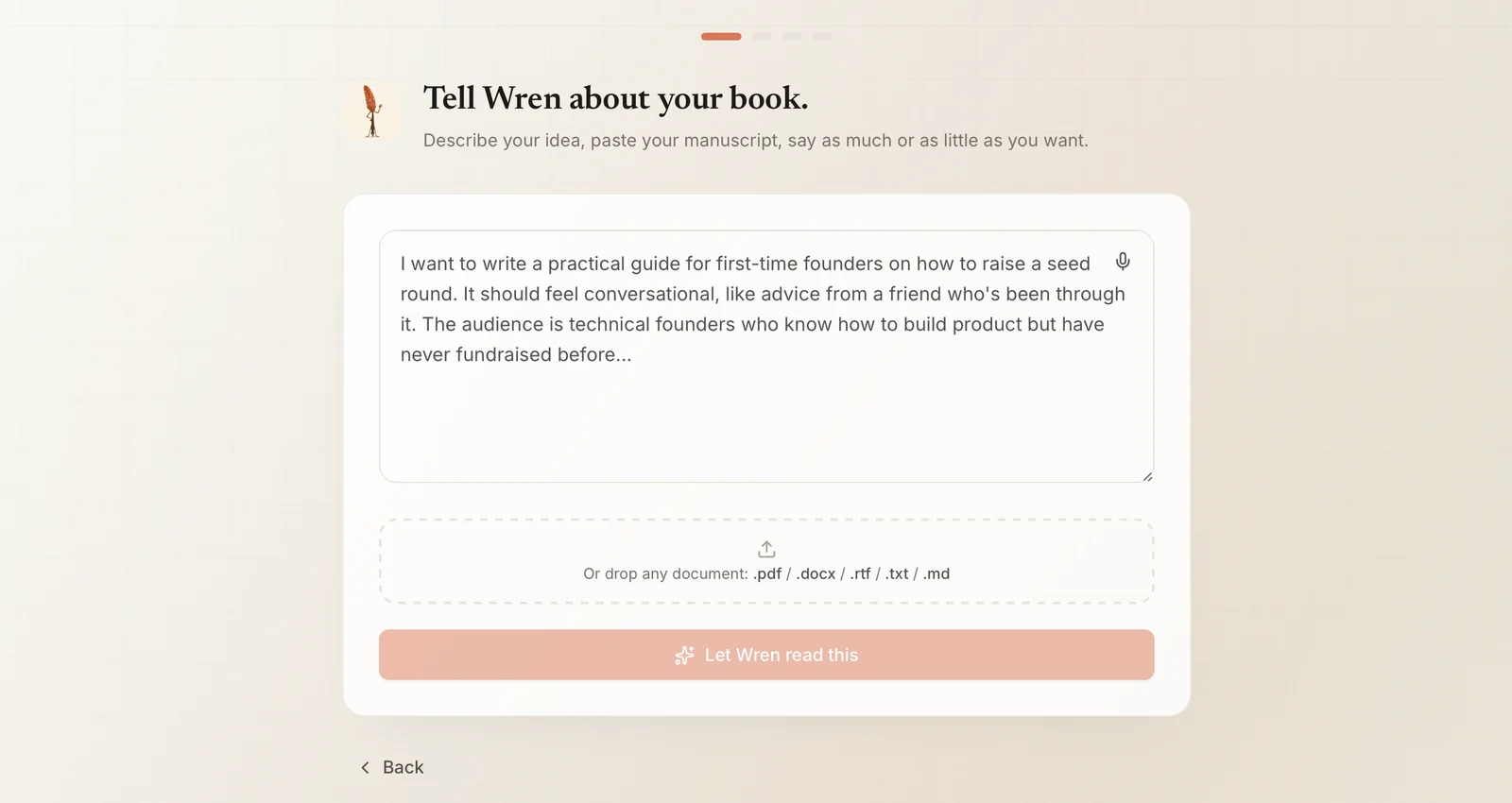
Text in the image:
"Tell Wren about your book. Describe your idea, paste your manuscript, say as much or as little as you want." Below the text box: "Or drop any document: .pdf / .docx / .rtf / .txt / .md".
Our test. We pasted the same notes and request. Built&Written read them and showed what it understood: the book's main idea, the type of book, the tone and the audience, all taken from our notes. We picked the shortest length it offers, "Short, about 50 to 80 pages", and the fast writing mode.
- An outline first. Seven chapters, ready in 40 seconds, shown before any writing started.
- Our material, not new ideas. The first chapter kept closely to the arguments and wording of our notes, with no invented methods, worksheets or calls to action.
- Longer than we asked. Built&Written makes books, not 2,000-word guides. Even the shortest option gave us 17,612 words over 67 pages, written in about 9 minutes.
- The files. A print PDF, the KDP package and an EPUB, with checks for title, author, page count, trim size, margins and cover.
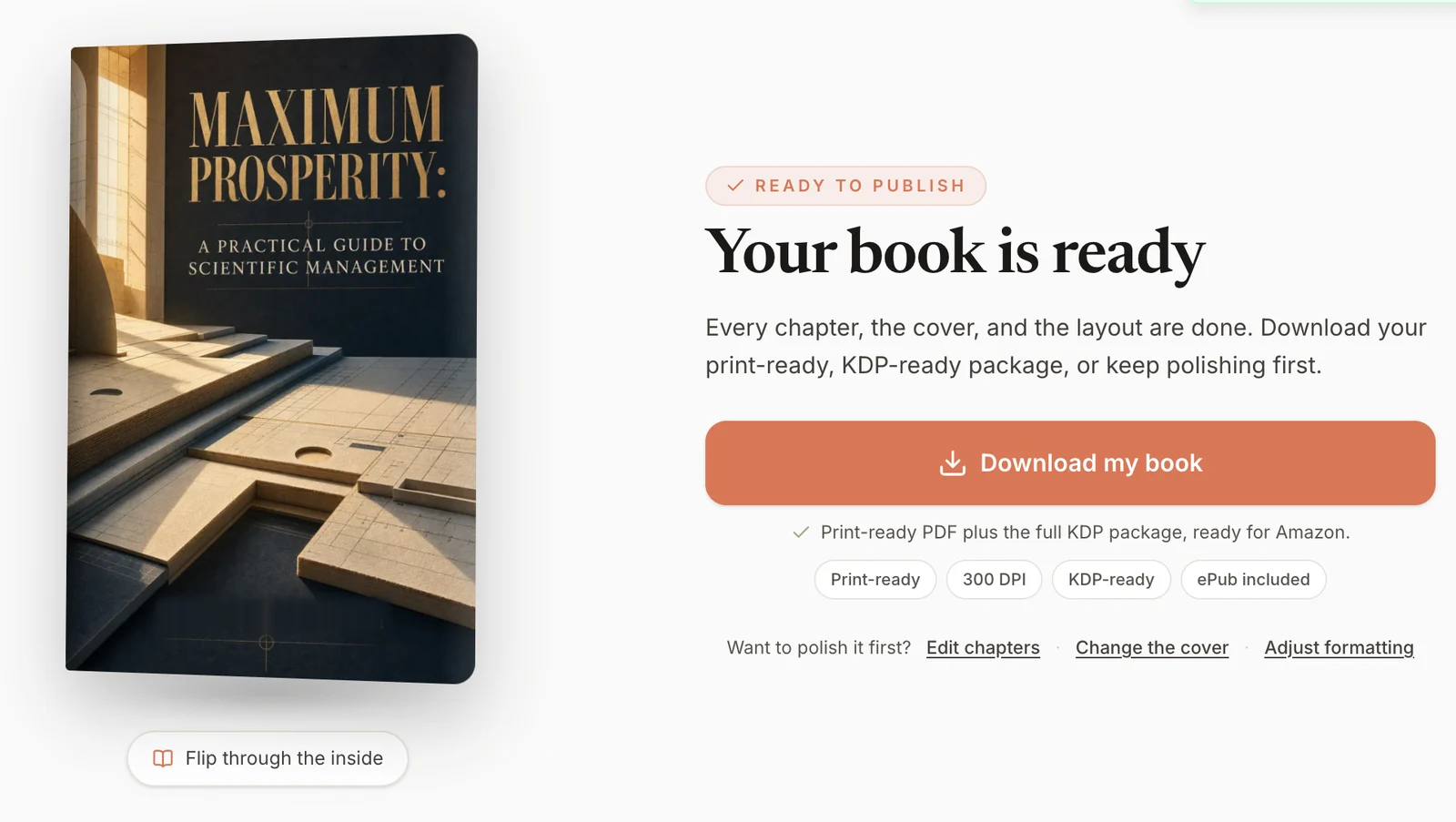
Text in the image:
Cover: "Maximum Prosperity: A Practical Guide to Scientific Management". Button under it: "Flip through the inside".
Right: "Ready to publish. Your book is ready. Every chapter, the cover, and the layout are done. Download your print-ready, KDP-ready package, or keep polishing first." Button: "Download my book". Below: "Print-ready PDF plus the full KDP package, ready for Amazon." Labels: "Print-ready", "300 DPI", "KDP-ready", "ePub included".
Links: "Want to polish it first? Edit chapters, Change the cover, Adjust formatting". Notice: "PDF generated successfully".
So Built&Written is the right pick for a real book from your material, and more than you need for a 10-page client handout.
One honest note on plans: writing with AI and the EPUB and Word downloads need the Entrepreneur plan or higher. The pricing page shows what each plan includes.
Which AI ebook generator should you pick?
- You have notes and only need text: ChatGPT, then do the layout yourself.
- You have no material and want the cheapest EPUB: Inkfluence AI.
- You want a short, tidy PDF guide from your notes: Canva.
- You have notes, posts or transcripts and want a finished ebook in your voice, ready for Kindle: Built&Written.
Final thoughts
Every tool here can produce words. The difference is where the words come from and what you hold at the end. If the ebook should carry your method and your examples, start with a tool that starts with your material, and check that it gives you an EPUB, not just text.
That is the job Built&Written was built for. Bring what you already have, and get back a finished ebook:
- Your material, not the AI's ideas. Notes, posts and transcripts become the chapters.
- Your voice. Voice DNA learns how you write from 5 to 50 pages of your own text.
- An outline you approve. Nothing gets written until the plan looks right to you.
- A cover in the same place. Designed in the app, sized for the ebook.
- The files Kindle needs. An EPUB plus print files that follow Amazon KDP's rules, which you upload in your own account (step-by-step guide).
- Change anything later. Edit chapters, the cover or formatting with one click.
See how it works, or compare the plans.
Frequently asked questions
It depends on what you start with. For your own notes and a Kindle-ready EPUB, use a material-first tool such as Built&Written. For a fast ebook from a one-line idea, Inkfluence AI is the cheapest with EPUB export. For text only, ChatGPT works.
ChatGPT can write the text of an ebook from your notes. In our test on October 30, 2026 it could not give us a downloadable PDF or EPUB file, so you still need to lay out and export the book yourself.
Yes. Amazon KDP accepts books made with AI. If the text, images or translations were created by an AI tool, KDP asks you to say so when you publish; using AI only to edit or improve your own writing does not need to be disclosed. Read Amazon's content guidelines before you upload, and check the facts in the book yourself.
Inkfluence AI has a free plan with 5 chapters plus 5 a month and PDF export. ChatGPT and Canva have free plans too, but neither gives you an EPUB.
About the author

Khrystyna Balushka
More in AI Book Tools
Ready to write your book?
Turn your expertise into a professional book with Built&Written.