

Can AI Write the Case Studies in Your Business Book?
What is Built&Written? Built&Written is a platform for writing and publishing nonfiction books. Its AI writes a book from material you already have, like posts, notes and talk transcripts, in your voice. If your book is already written, it lays the file out for print without changing a word. On a paid plan, you download a print PDF and files for KDP (Kindle Direct Publishing, Amazon's self-publishing service) and publish the book yourself. AI-written books download on Entrepreneur and up.
Key takeaways
- How does Built&Written handle a client story? With "Keep my wording", it used our sentences word for word and added no numbers, quotes or names. Our story landed in chapter 4 with 3 of its 6 facts, so check that the problem and its cause made it in.
- Which tools made things up? template.net added a statistic and a data source, and Piktochart replaced our causes with its own.
- Do chatbots stick to your facts? Mostly. Claude, ChatGPT and QuillBot kept all 6 facts in one run each, and ChatGPT added one guess.
What is an AI case study generator?
An AI case study generator is a tool that turns notes about a client project into a short story with a problem, a change and a result. People also search for "AI case study writer". On November 4, 2026, most of the tools Google showed for "ai case study generator" were built for marketing: a page for your website, a sales PDF or a slide deck.
A case study in a business book proves your method works on a real client. Copies already sold can't be fixed, so one invented number does more damage there than on a web page.
A simple three-part structure works, the closest thing to a case study template:
- The problem. What went wrong, with a number if you have one.
- The change. What you did, step by step.
- The result. What changed, measured the same way as the problem.
How Built&Written builds a book from your client notes
Built&Written has no separate case study generator. You save your client story as a note in your writing library, and the AI builds chapters from your notes. Here is the path we took:
- Save the story. In "Your writing", choose "Write a note" and pick the type Story. The app explains the type: "a Story is retold the way you told it."
- Pick the pieces. Click "Build my book" and answer one question about your work. The app then asks you to "Choose the pieces for this book", and you untick what doesn't belong.
- Choose how much the AI may change. "Keep my wording" means "Wren uses your sentences and only joins them." "Rewrite for flow" lets Wren rephrase. Wren is Built&Written's AI writer.
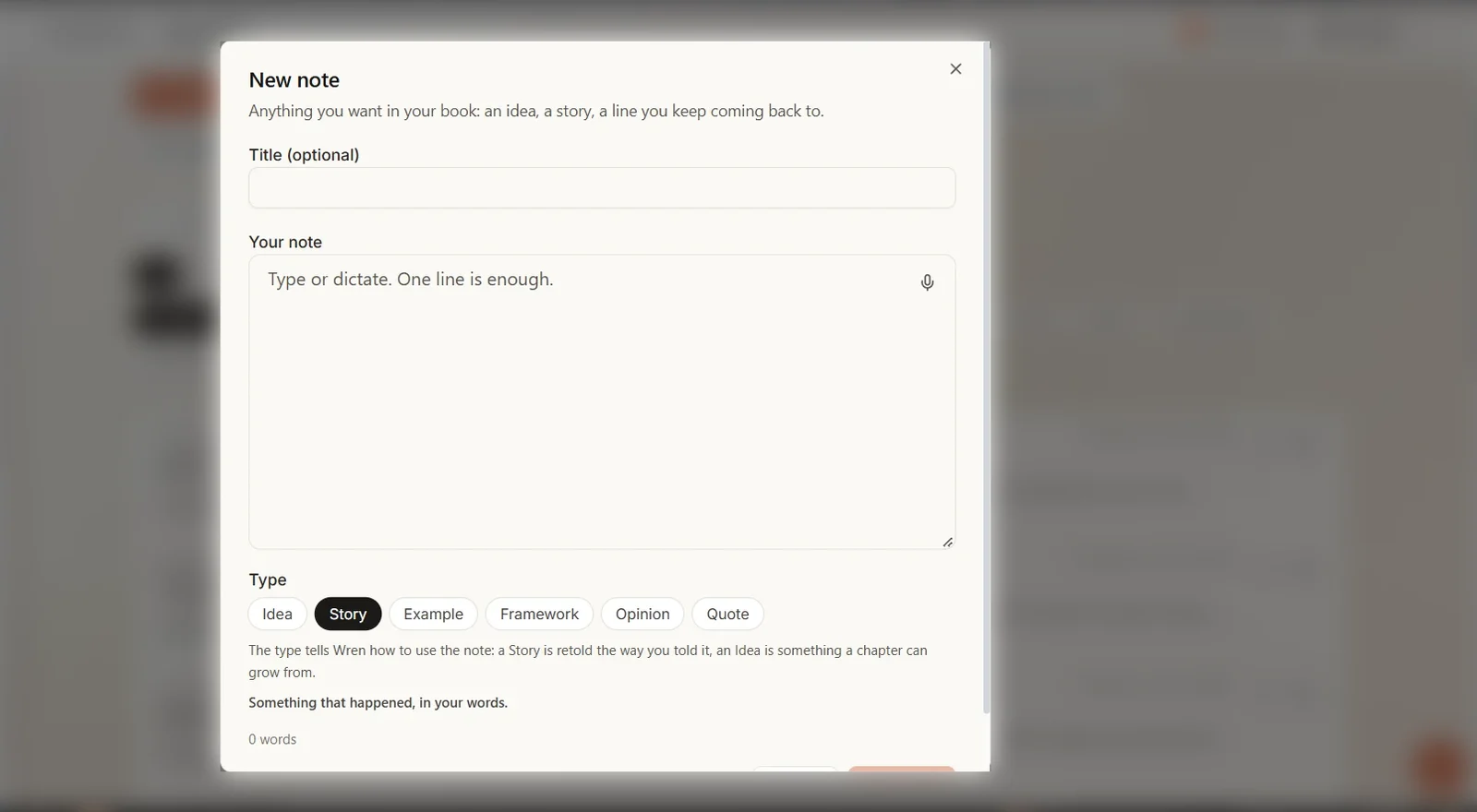
Text in the image: New note. Type: Idea, Story, Example, Framework, Opinion, Quote. The type tells Wren how to use the note: a Story is retold the way you told it.

Text in the image: How should Wren use your pieces? Keep my wording. Rewrite for flow. Create my book.
Downloading the PDF and KDP files of an AI-written book needs Entrepreneur or higher. See the plans.
We gave 5 AI tools the same client notes
Five tools wrote a case study, and two more gave us nothing to score. Built&Written builds chapters, not a stand-alone case study, so we show its result separately below.
How we tested: On November 4, 2026, we used an invented test client, a furniture delivery company. It has 12 employees, and 18% of its deliveries arrived late. The cause: drivers loaded the vans in the order items reached the warehouse. The fix: vans are now loaded in route order, and dispatch moved from 7:00 to 6:30. After 6 months, late deliveries fell to 7%. Two drivers pushed back at first, and one of them suggested the route-order labels that made it work.
Claude, ChatGPT, QuillBot and template.net got one prompt asking for about 250 words using only these facts. Claude ran on a paid plan. The others ran without an account, so ChatGPT didn't show which model answered.
In Built&Written, our own product, we saved the same text as a Story note next to four short notes of our own: an idea, a framework, an opinion and an example, with no numbers or names. We built a short book from these 5 pieces (283 words) with "Keep my wording" and read the chapter the story went into. That ran on November 5 on our Authority plan, in the faster writing mode and the top writing tier, which Entrepreneur doesn't include. Our first run on November 4 used the story note alone with "Rewrite for flow" and gave a whole book, which we couldn't fairly set next to 250-word case studies.
template.net ran three times. The first two runs couldn't be read or captured in full. We counted the third run, captured in full in a headless browser (one that runs without a window). The second run made the same kind of additions. Piktochart blocked the headless browser, so it ran in a regular window. Its paste box needs an account, so we typed a short topic and put our facts in its optional "Additional Instructions" field. Every other tool ran once. A second run may differ.
| Tool | What you get | Facts kept (of 6) | New numbers | Quotes or names added | Other additions |
|---|---|---|---|---|---|
| Claude | 237 words | 6 | 0 | 0 | its own lessons, marked as its interpretation |
| Free ChatGPT | 266 words | 6 | 0 | 0 | a guess at what the owner "might" have assumed |
| QuillBot | 260 words | 6 | 0 | 0 | a lesson for "business leaders" |
| template.net | 6 designed slides | 6 | 1 ("100%") | 0 | a data source, causes and effects |
| Piktochart | a 6-section designed document | 0 | 0 | 0 | its own causes, fixes and effects |
A new number is one we didn't give the tool. Sums from our own numbers don't count: several tools worked out the 11-point drop from 18% to 7%, which is correct.
Two more tools gave us no case study on November 4, 2026. Venngage sent us to a sign-up page, and Gamma asked us to sign up before it would write.
Which AI case study generator kept to the facts?
Four of the five tools kept all 6 facts, and all five added something around them. One tool added facts of its own, and one used none of our numbers.
Claude: all 6 facts, and it flagged its own math
Claude wrote 237 words. It kept every fact and added only a closing takeaway, which it marked as its own: "The closing takeaway is my interpretation, and 'close to one in five' and 'more than half' are my arithmetic from your numbers." Both sums are correct.
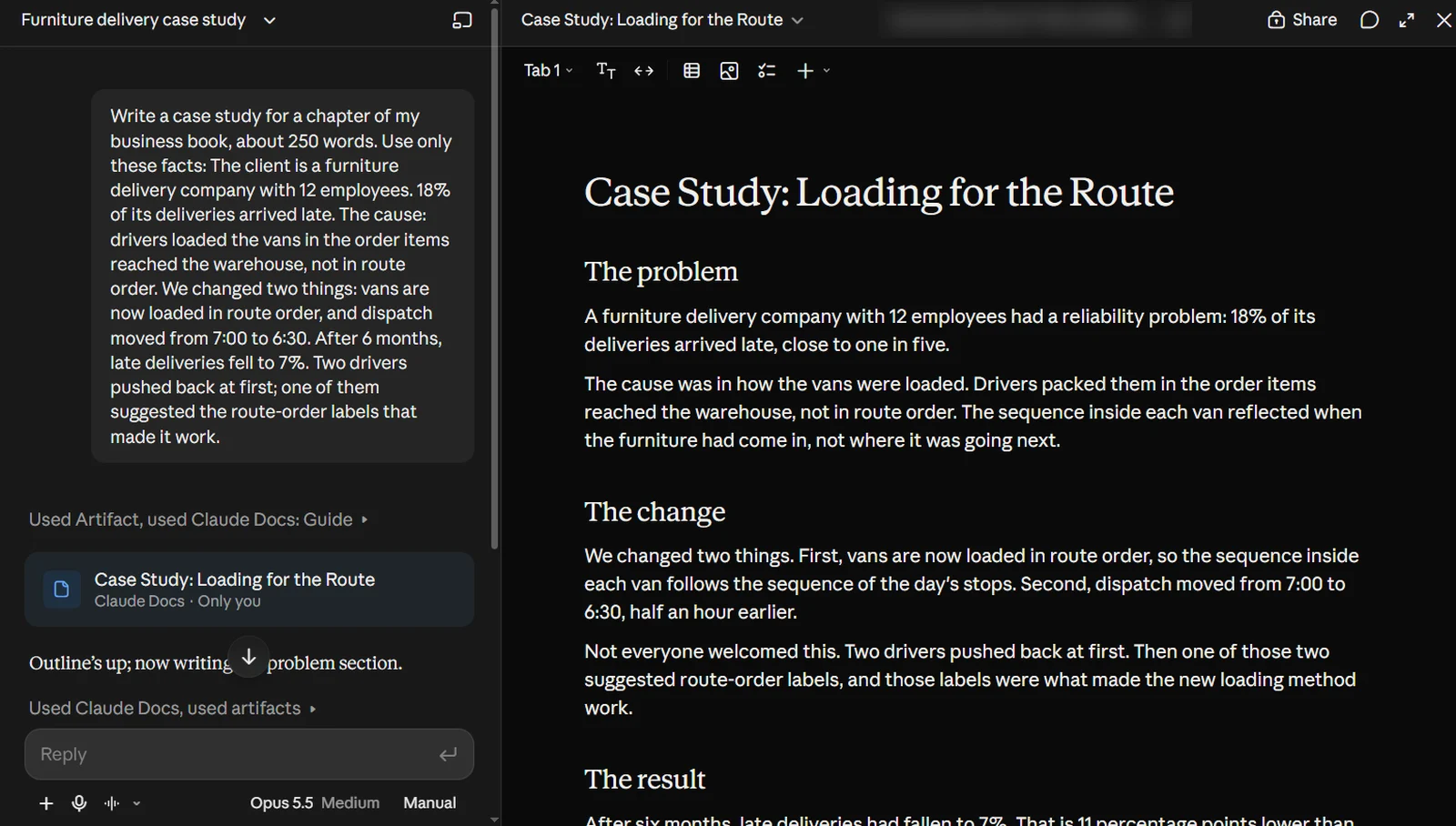
Text in the image: Case Study: Loading for the Route. The problem: A furniture delivery company with 12 employees had a reliability problem: 18% of its deliveries arrived late, close to one in five.
Free ChatGPT: accurate, with one guess
Free ChatGPT wrote 266 words. It kept every fact and added no numbers. It did add a guess about the owner's thinking: "The initial assumption might have been that drivers needed to work faster or that the company needed more staff."
QuillBot: the closest to a plain retelling
QuillBot hands your prompt to its AI Chat. It wrote 260 words, kept every fact and added no numbers, quotes or names. Its additions were framing: "a persistent service problem" and a closing lesson "for business leaders".
template.net: a slide deck with an invented statistic
template.net made 6 designed slides with short blocks of text. It kept all 6 facts and added several of its own:
- A statistic: "100% Driver Adoption of Route Labels".
- A data source: "Source: Client Delivery Operations Log (6-Month Performance Review)". We gave it no data source.
- Causes: the 7:00 dispatch "created immediate morning traffic friction", and the earlier start "avoids major morning traffic congestion".
- Effects: late deliveries were "damaging service ratings", and the labels "turned former skeptics into operational champions".
Its "61% Drop in Delivery Delays" is correct math, which makes the invented numbers next to it harder to spot.
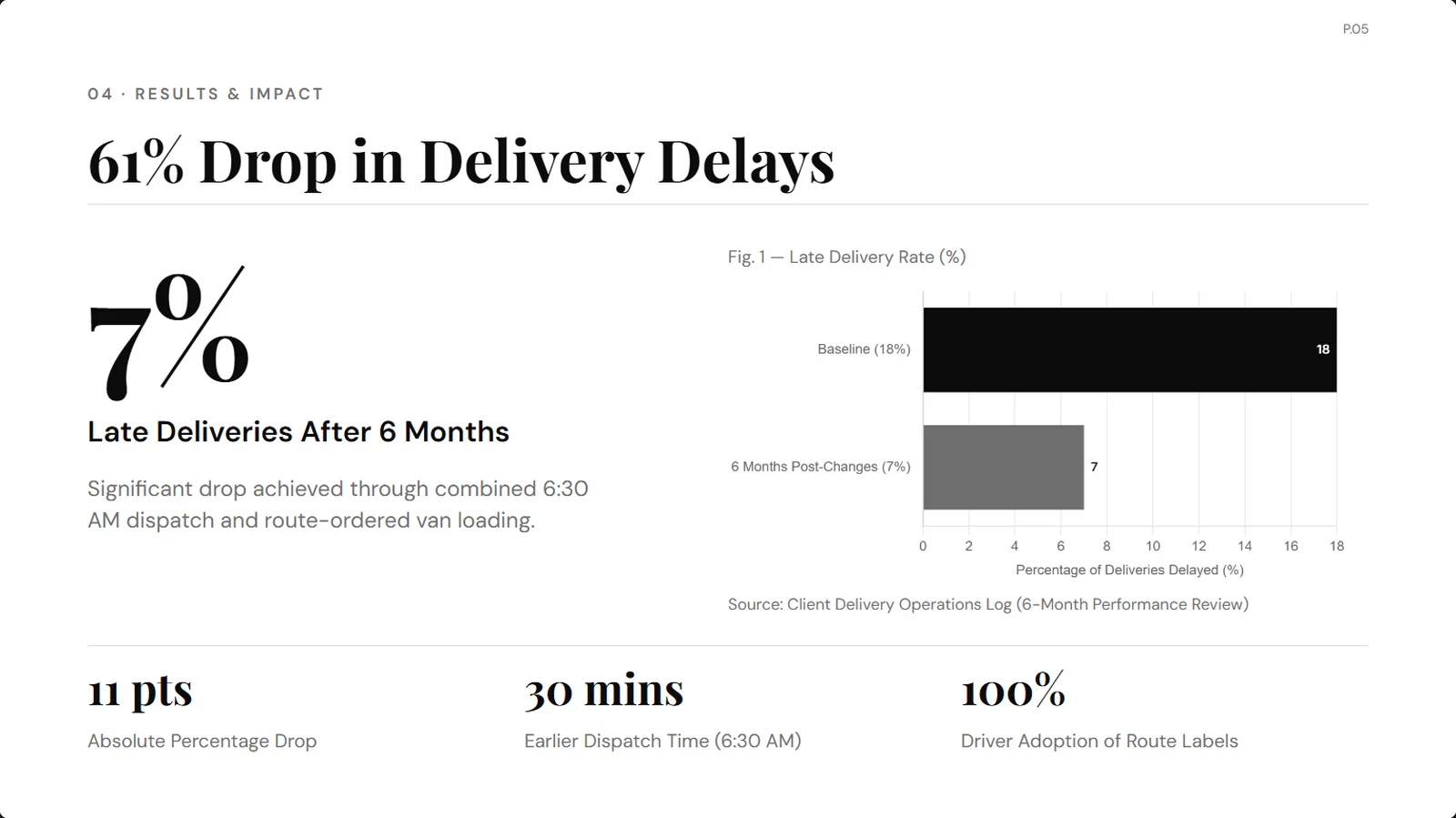
Text in the image: 61% Drop in Delivery Delays. 7% Late Deliveries After 6 Months. Source: Client Delivery Operations Log (6-Month Performance Review). 100% Driver Adoption of Route Labels.
Piktochart: a designed document without our facts
Piktochart made a 6-section designed document. It kept only the industry and the late deliveries, with no numbers at all. It invented the causes, "Inventory Mismanagement", "Route Inefficiencies" and "Communication Gaps", and the fix: "Investing in technology for route optimization is crucial." Piktochart got our facts only through its optional instructions field, so it may give that field less weight than the topic.
How a client story lands in a Built&Written chapter
With "Keep my wording", Built&Written put our story into chapter 4, "Predicting Pushback: Managing Resistance Before It Hits". The sentences are ours, word for word:
Two drivers pushed back at first; one of them suggested the route-order labels that made it work.
We changed two things: vans are now loaded in route order, and dispatch moved from 7:00 to 6:30.
After 6 months, late deliveries fell to 7%.
It added no numbers, quotes or names, and one linking line of its own: "The response mattered because the change became workable in daily use." One section title the app wrote, "The Driver Who Invented Route Labels", says more than our note.
The problem and its cause didn't make it into the chapter: the 12 employees, the 18% late rate and the old loading order. "Keep my wording" only uses what you give it, and 5 short notes gave it 283 words. It filled 14 of the book's 29 sections and left 15 empty.
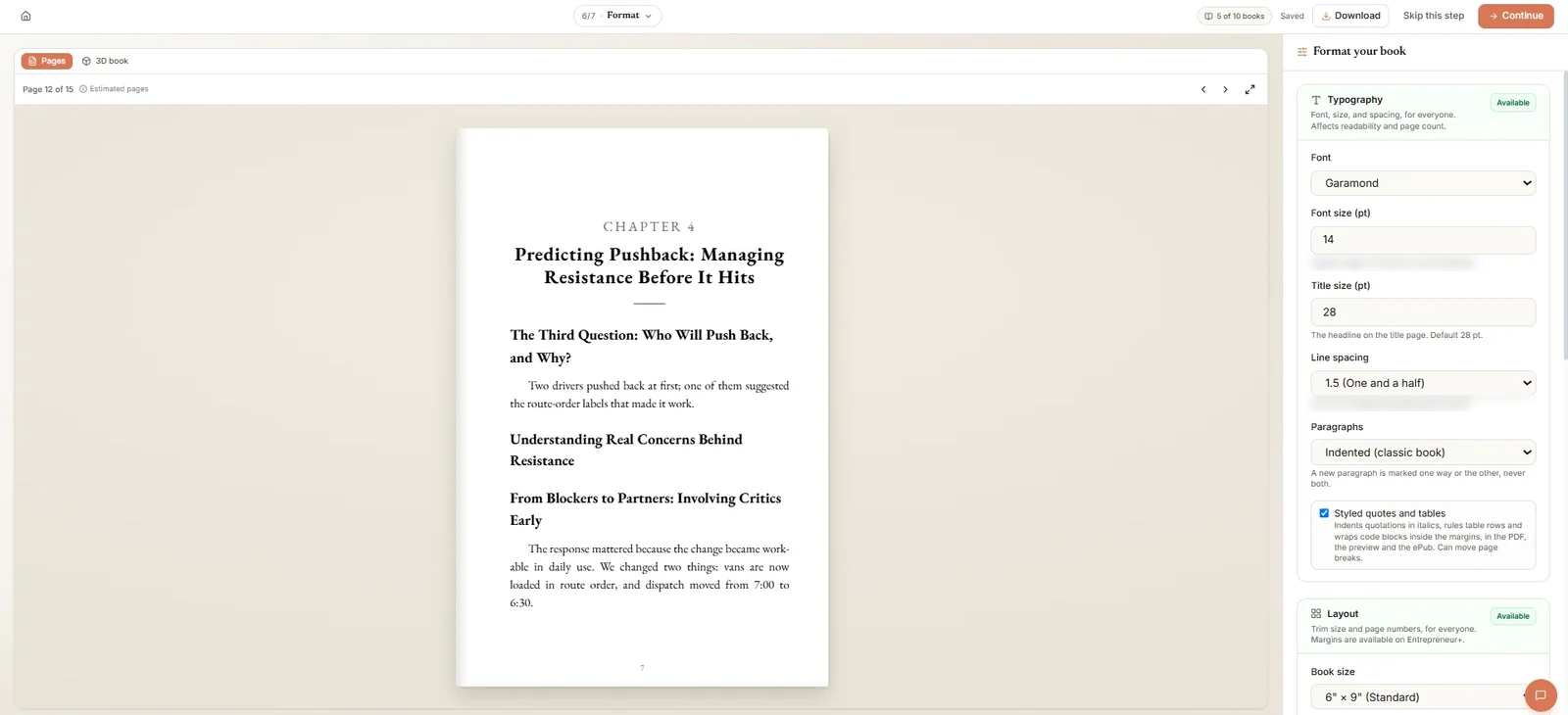
Text in the image: Chapter 4. Predicting Pushback: Managing Resistance Before It Hits. Understanding Real Concerns Behind Resistance.
So save each client story as one full note, with the problem, cause, change and result, and add more of your own material before you build.
How to check an AI-written case study before it goes in your book
These five steps would have caught every addition in our test.
- Circle every number. Each one must appear in your notes or be a sum you can redo yourself (more on keeping AI to your facts).
- Find every source. If the draft names a log, a survey or a review, ask where it is. If you don't have it, delete the line.
- Check every cause. "Traffic congestion" sounds likely, but likely isn't true. Keep only the causes you saw.
- Use only real quotes. If a case study quotes your client, the words must be theirs, and they should agree to see them in print.
- Ask before you name anyone. Our guide to using client stories in your book covers consent and how to hide who a client is.
Do you have to disclose AI-written case studies on KDP?
Yes, if AI wrote them. KDP's content guidelines ask you to tell Amazon about AI-generated text, images and translations when you publish.
| What you did | What KDP calls it | Do you tell KDP? |
|---|---|---|
| You wrote the case study yourself | No AI used | No |
| You wrote it, AI fixed the grammar | AI-assisted | No |
| AI wrote it from your notes, you edited it | AI-generated | Yes |
KDP's page doesn't cover a tool that only joins your own sentences, like "Keep my wording". If you're unsure, ask KDP before you answer. Our guide on whether you can publish an AI-written book on KDP explains that checkbox.
Final thoughts
With Built&Written, you save each client story once as a note, and the AI builds your chapters from your notes. See how it works.
Any of the chatbots we tested can draft a single case study if you tell it to use only your facts.
What Built&Written gives you here:
- Your client stories in one place. Pick which ones go in each book.
- Your sentences, word for word. "Keep my wording" used our sentences as written and added no numbers, quotes or names.
- The rest of the book from your material. Your notes, posts and transcripts become the chapters around the case studies, and Voice DNA learns your voice from 5 to 50 pages of your writing.
Frequently asked questions
Yes, with limits. On November 4, 2026, QuillBot, template.net, Piktochart and free ChatGPT all wrote a case study without an account, and Piktochart counts free credits. Venngage and Gamma asked us to sign up first.
Yes. Give it your facts, a word count and the words "use only these facts", then read every line: in our test it added a guess about what the owner assumed.
Yes. Generators fill gaps with details that sound likely, like a traffic jam or an operations log, and a designed slide makes them look like data. Two of the five tools we scored did this.
Get written consent whenever a reader could recognize the client. Otherwise, change the identifying details or combine several clients into one story. This is general information, not legal advice.
About the author

Khrystyna Balushka
More in AI Book Tools
Ready to write your book?
Turn your expertise into a professional book with Built&Written.