

Can AI Format Your Book for Print, or Do You Still Need Software?
What is Built&Written? Built&Written is a platform for writing and publishing nonfiction books. If your book is already written, you upload the file and Built&Written lays it out for print without changing a word. No AI touches your text. You check the chapters, pick a trim size and download a print PDF and KDP files.
Key takeaways
- Can AI format a book for KDP? Yes, for a simple book. Claude turned our Word file into a 26-page 6x9 PDF that met KDP's margin rules.
- Which tool kept every word? Built&Written and Claude. Reedsy dropped a table, and Inkfluence dropped the author name and the dedication.
- Can free ChatGPT do it? No. Without an account it made no file and asked us to log in.
- What does Built&Written do that Claude doesn't? It checks KDP's rules for you and gives you the KDP files with the cover. With Claude, you check the PDF against KDP's rules yourself.
- What did almost every tool miss? Front matter. Only Claude put the dedication on its own page.
What does AI book formatting actually do?
AI book formatting is software that turns a manuscript into a print-ready file: the page size, margins, chapter openings, page numbers and fonts a printer needs. A print-ready file is a PDF that a printer can use as it is, with nothing left to fix.
Three kinds of tools do this job today:
- Chatbots like ChatGPT and Claude. You attach the file and ask for a PDF.
- AI formatters like Bookalope and Inkfluence AI. They read your file, guess its structure and apply a template.
- Template formatters like Built&Written and Reedsy Studio. They find chapters from your headings and lay the book out with a fixed design.
Whatever the tool, the file has to pass the same checks at KDP (Kindle Direct Publishing, Amazon's service for publishing your own book). For a 6x9 paperback with no bleed (nothing printed to the page edge), KDP's paperback guidelines ask for:
| KDP rule | What it means |
|---|---|
| Minimum 24 pages | A shorter paperback can't be published |
| Inside margin 0.375" for 24 to 150 pages | The gutter, the margin at the spine, grows with page count |
| Outside, top and bottom margins at least 0.25" | No text near the trim edge |
| Fonts embedded | The printer can't swap your font |
6x9 inches is the most common US trim size, according to KDP's trim size page (checked November 4, 2026). Our KDP formatting questions post explains each rule in plain words.
How Built&Written formats a finished manuscript
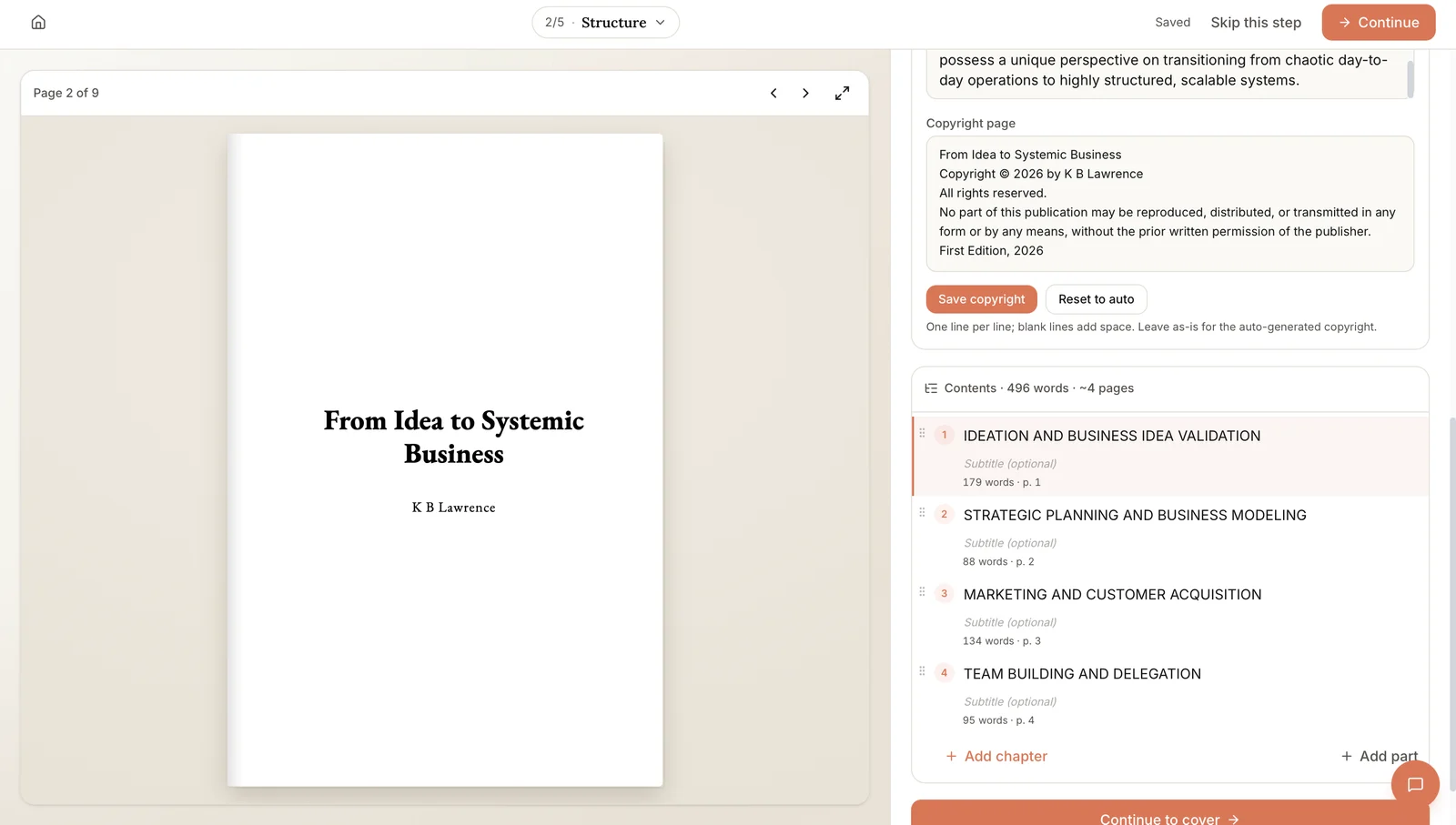
Built&Written has an option called "Format a book you've written" for authors who already have the text. There's no AI in it, so it never rewrites a sentence. You upload a Word file, check the chapters and download the print files.
| Step | With Built&Written | With a chatbot |
|---|---|---|
| Upload | Upload .docx, .epub, .txt, .md, .rtf or .pdf | Attach the file, write a prompt |
| Your words | Kept exactly; only the layout is rebuilt | You trust the chatbot's report |
| Chapters | Found from Word's Heading 1 style; you fix the rest on the Structure step | The chatbot guesses |
| Page size | Pick one of 10 KDP trim sizes | You ask for 6x9 |
| KDP checks | Checked before download: page count, trim size, margins | You check the PDF yourself |
| Files | Print PDF and a KDP ZIP with the cover files | One PDF |
Text in the image: "Structure." "Copyright page: From Idea to Systemic Business. Copyright © 2026 by K B Lawrence. All rights reserved." [...] "Save copyright." "Reset to auto." "Contents · 496 words · ~4 pages." "Ideation and business idea validation." "Strategic planning and business modeling." "Marketing and customer acquisition." "Team building and delegation." "Add chapter." "Add part." "Continue to cover."
In our test, the import found 4 of our 5 chapters. Chapter 5's title was bold text without Word's Heading 1 style, and it stayed inside chapter 4 even though it starts with "Chapter 5." You split it on the Structure step before anything is typeset.
Text in the image: "Format your book." "Typography: Font, size, and spacing, for everyone. Affects readability and page count." "Font: Garamond." "Font size (pt): 11." "Line spacing: 1.5 (One and a half)." "Layout: Trim size and page numbers, for everyone. Margins are available on Entrepreneur+." "Book size: 6" × 9" (Standard)." "Include page numbers."
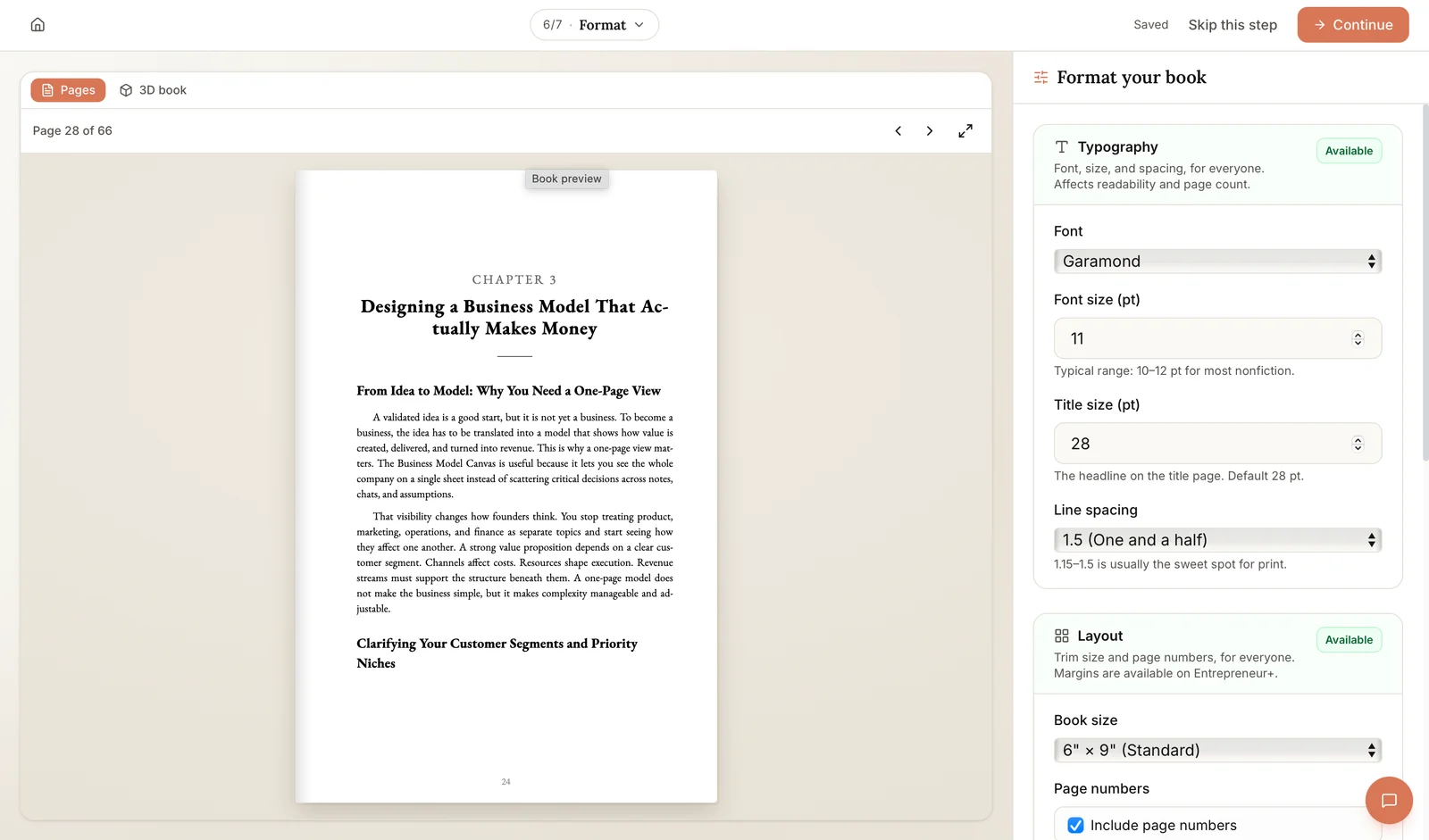
Built&Written won't export a paperback under KDP's 24-page minimum. At the default type size our book showed 22 pages, so we raised the type on the Format step. Before you download, the app checks the file against KDP's rules for page count, trim size and margins.
Know the limits. The layout comes from Built&Written's print templates, so your Word fonts and margins don't carry over. Editing the margins and the one-click KDP-safe margin fix need Entrepreneur or higher, as the Format step says. The print PDF and KDP files for an uploaded manuscript download on any paid plan; see the plans.
AI book formatting tested: one manuscript, six tools
How we tested (November 3 and 4, 2026). We wrote a 2,988-word nonfiction manuscript in Word, "Work That Comes Back," with 5 chapters and 5 traps a real draft often has: chapter 5's heading typed as bold text without a Heading 1 style, a dedication and acknowledgments typed as plain text, a table and a chart, a bulleted list and a quote, and stray manual line breaks. Every tool got the same Word file, except logged-out ChatGPT, which takes only images, so we pasted the text. The chatbots got the same request: a print-ready 6x9 KDP paperback PDF, no bleed, words unchanged, each chapter on a new page. In the other tools we picked 6x9 with no bleed and kept the rest at their defaults. Each tool ran once. Built&Written is our own product, tested on a paid plan the same way. It won't export a paperback under 24 pages, so we raised its type to 14 pt; Claude chose 12 pt on its own. We measured every PDF with a script for page size and margins and compared its words with the manuscript, which Bookalope's scrambled test copy made impossible.
| Tool | Words kept | Chapters found (of 5) | 6x9 and KDP margins | Warned about 24 pages | Cost of the file | |
|---|---|---|---|---|---|---|
| Built&Written | Yes | Yes | 4 | Yes | Won't export under 24 | See plans |
| Claude (paid) | Yes | Yes | 5 | Yes | Yes, raised the type | Paid plan |
| ChatGPT (free, no login) | No | No file | No file | No file | No file | Needs an account |
| Reedsy Studio | Yes | No, table lost | 4 | Yes | No, 18 pages | Free |
| Bookalope | Test copy only | Can't check | 5 | Yes | No | $49 per conversion |
| Inkfluence AI | Yes, with ads | No, dedication lost | 4 | Yes | No, 12 pages | Free with branding |
Prices checked on each tool's own site, November 4, 2026.
Claude: the cleanest file
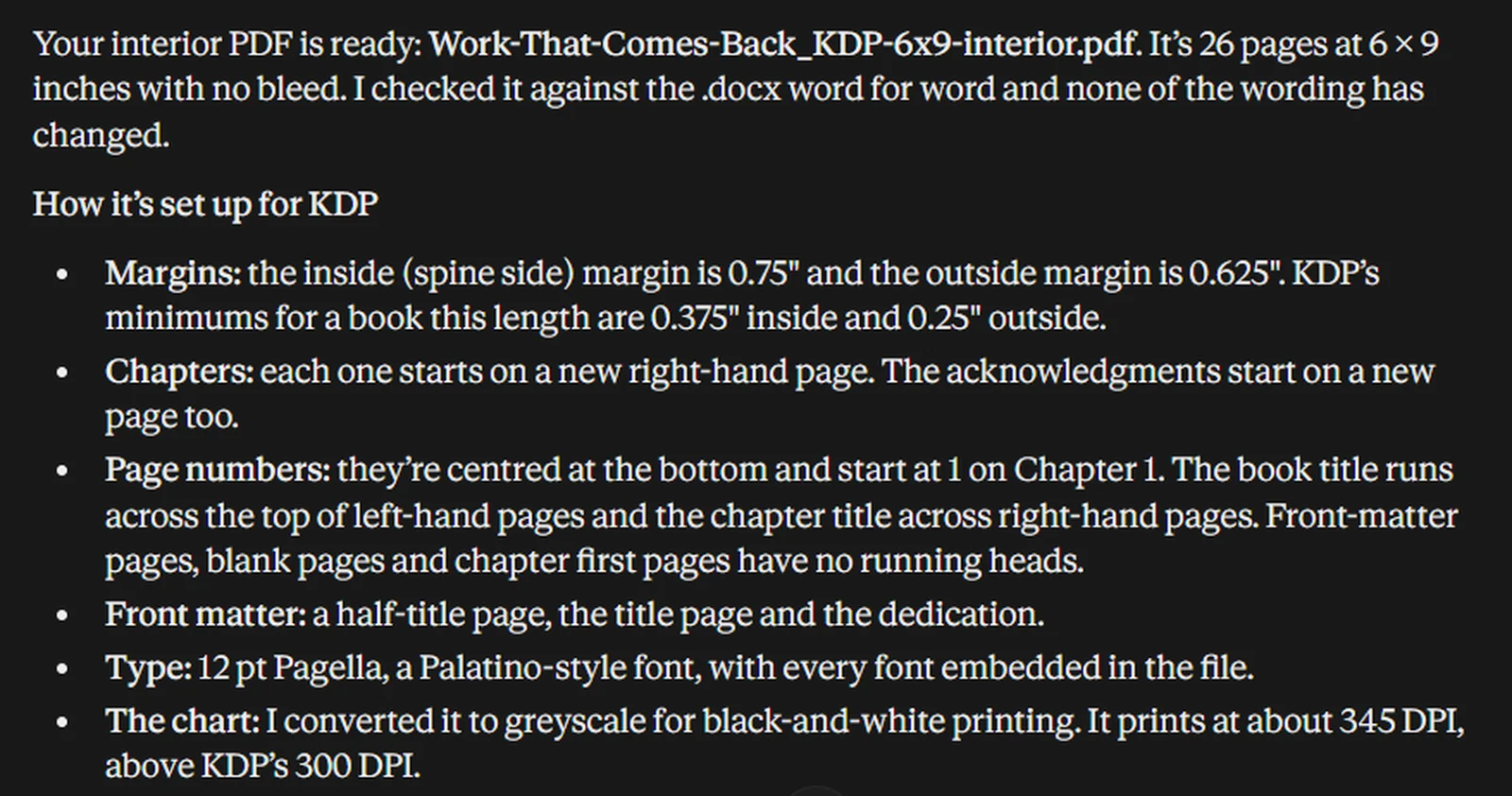
Claude on a paid plan read the Word file and returned a 26-page PDF. It caught the unstyled chapter 5 heading on its own. In its words, "it was just bold text rather than a heading, so I styled it to match the other chapters." It also removed the three stray line breaks and put the dedication and the acknowledgments on their own pages.
Text in the image: "Your interior PDF is ready: Work-That-Comes-Back_KDP-6x9-interior.pdf. It's 26 pages at 6 × 9 inches with no bleed. I checked it against the .docx word for word and none of the wording has changed." "Margins: the inside (spine side) margin is 0.75" and the outside margin is 0.625"." [...] "Front matter: a half-title page, the title page and the dedication." "Type: 12 pt Pagella [...] with every font embedded in the file."
It knew KDP's rule too. At 11 pt the book came to 17 pages, so it set the type at 12 pt to pass 24. Its own report rounded up slightly: it said 0.75" inside, and we measured 0.72". That's still far above KDP's 0.375".
Claude also turned straight quote marks into curly ones. The words stay the same, but it means "don't change any words" isn't taken fully literally.
Free ChatGPT: no file without an account
Without signing in, ChatGPT accepts only images as attachments, so we pasted the text. It answered with a sensible layout plan, including mirrored margins and every chapter on a new page. Then it said it "can't attach a verified PDF file" and showed a banner: "Log in to create and download files for free."
Reedsy Studio: free, but the table disappeared
Reedsy Studio is free and isn't AI. It imports Word files and typesets them with ready-made designs. Our file lost its whole table: right after "The table below shows how a few rows might look," the next paragraph starts. Reedsy also turned the title and dedication into an extra "Chapter 1," so the real chapter 1 became chapter 2.
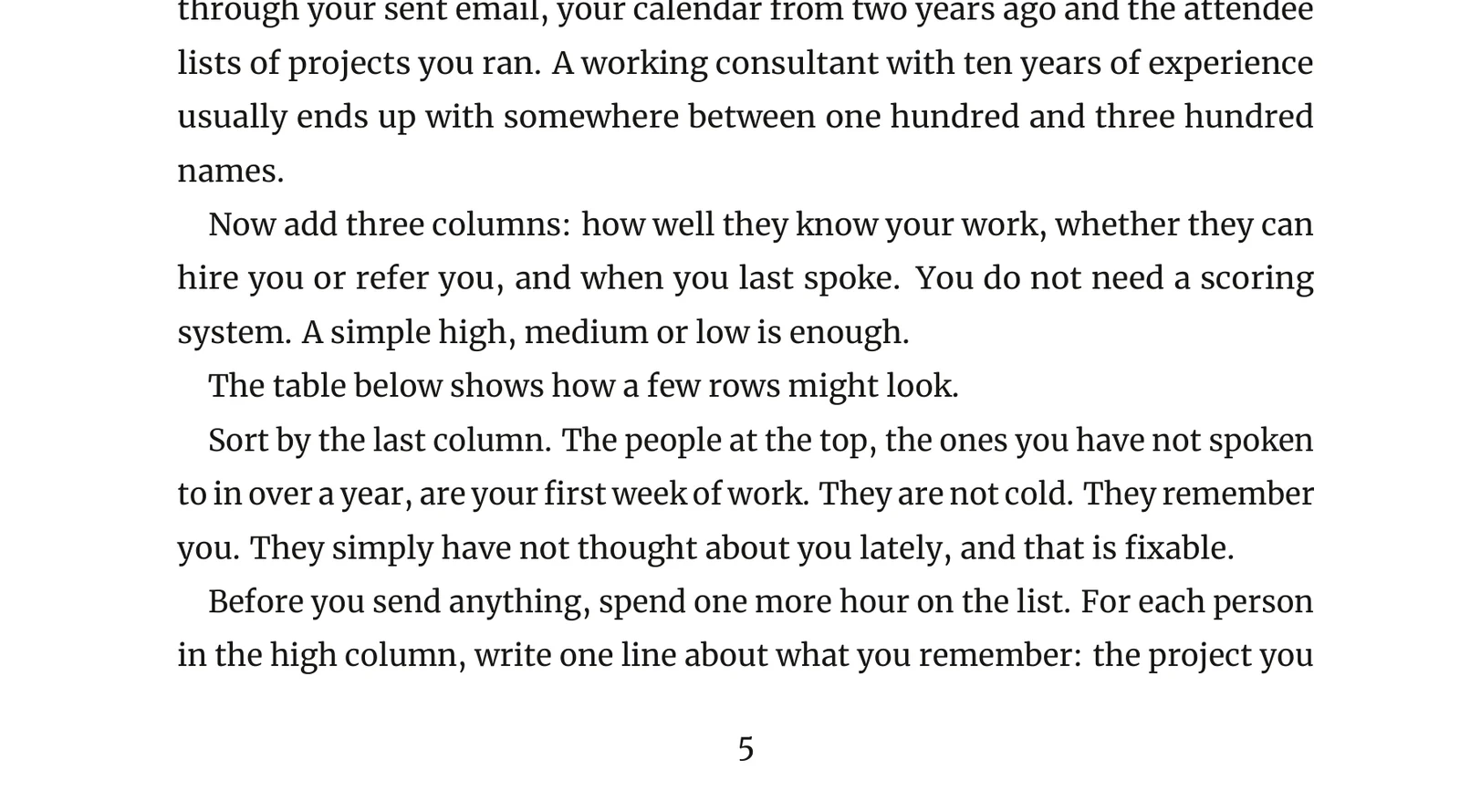
Text in the image: "The table below shows how a few rows might look." "Sort by the last column. The people at the top, the ones you have not spoken to in over a year, are your first week of work."
The PDF was 18 pages, and Reedsy exported it without a warning. That's under KDP's 24-page minimum, so KDP won't publish it as a paperback.
Bookalope: smart structure, scrambled test copy
Bookalope did the best job of reading the structure. Before converting, it showed each paragraph's label, and it marked all 5 chapters correctly, chapter 5 included.
A free account gets a test copy, and the convert screen warns that "text in these books is randomly scrambled." Our PDF read "hTe Problem With Chasing." That made the word check impossible. A clean file costs $49 per conversion on the Basic plan (Bookalope pricing, checked November 4, 2026).
Inkfluence AI: a free PDF with ads and missing lines
Inkfluence AI found 4 chapters and gave us a free 6x9 PDF. It dropped the subtitle, the author's name and the dedication without saying so. Every page carries a "Made with Inkfluence AI" footer, and the last page is an ad with a QR code.
The free plan gives a PDF only. The KDP package with the cover and EPUB (the ebook file) needs a paid plan, from $9.99 a month, according to its own page (checked November 4, 2026). The PDF came to 12 pages, with no page-count warning.
What did the formatting tools get wrong?
The same few problems showed up in tool after tool:
- Front matter. Only Claude gave the dedication its own page. Built&Written, Reedsy and Bookalope put it on the title page, and Inkfluence dropped it.
- Missing text, no warning. Reedsy lost a table, and Inkfluence lost the subtitle, the author's name and the dedication. Neither said a word.
- Manual line breaks. Every tool except Claude kept the break in the middle of our paragraphs.
- Unstyled headings. A chapter title typed as plain bold text without the Heading 1 style slipped past 3 of 5 tools.
- Page count. Only Built&Written and Claude dealt with KDP's 24-page minimum.
- The wrong name. Built&Written, Reedsy and Inkfluence put the account name or the file name on the title page instead of the author in the manuscript. Check it before you upload.
The cheapest fix is in Word, before any tool sees the file. Style every chapter title as Heading 1, and remove manual line breaks with Find and Replace. Our post on what typesetting means covers the rest of what a good interior gets right.
Do you still need book formatting software?
Yes, unless your book is simple and you check the PDF yourself. A chatbot can make a good file, as Claude did, but you're the only one who checks that every word and table made it through.
- Pick Built&Written if you want your words kept exactly and a checklist of KDP's rules before you download.
- Pick Claude if your book is short and plain, and you'll read every page of the PDF.
- Pick Reedsy Studio if you need a free file and your book has no tables.
- Pick a formatting program if you want full control of the design. Our book formatting software comparison covers Atticus, Vellum and the free options.
- Hire a formatter for complex layouts, like many images or footnotes. Here's what book formatting services cost.
Final thoughts
Built&Written formats a finished manuscript without changing a word. It checks your file against KDP's rules for page count, trim size and margins, and it won't export a paperback KDP would refuse as too short. You fix the chapters before anything is typeset and download files ready for KDP.
AI book formatting is real, but uneven. Claude made the cleanest file of the six. Free formatters lost text without a warning, and free ChatGPT made no file at all.
What Built&Written gives you when the manuscript is done:
- Your words, untouched. No AI touches an uploaded book, so the text in the PDF is the text you uploaded.
- Chapters you can fix. Rename, merge or split chapters on the Structure step before anything is typeset.
- KDP's rules as a checklist. Page count, trim size and inside margin are checked before you download.
- 10 KDP trim sizes. 6x9 is the default, and the spine width follows your page count and paper.
- Files ready for upload. The print PDF and a KDP ZIP with the cover, on any paid plan for an uploaded manuscript. You upload them to Amazon yourself.
See how it works, or compare the plans.
Frequently asked questions
Yes, for a simple book. In our test Claude turned a Word manuscript into a 6x9 PDF that met KDP's margins and page minimum. Read every page before uploading, because free formatters in the same test lost a table and a dedication.
Not on the free version without an account. It described a good layout but made no PDF and asked us to log in. With an account it may create files, which we didn't test.
Partly. Free AI book formatting exists, and Reedsy Studio and Inkfluence AI gave us free 6x9 PDFs, but Reedsy dropped a table and Inkfluence added its own footer and dropped lines. Bookalope's free copy scrambles the text until you pay.
It can. Claude kept every word but changed straight quotes to curly ones. Inkfluence dropped the author's name and dedication. Built&Written formats uploaded books without AI and kept every word in our test. Reedsy, which also has no AI, still lost a table, so check every page.
About the author

Khrystyna Balushka
More to read
Ready to write your book?
Turn your expertise into a professional book with Built&Written.