

Reedsy Studio Is Free. The Question Is What You Give Up
Key takeaways
- Is Reedsy Studio free? Yes. Writing, importing, and exporting to print PDF and EPUB are all on the free Basic plan. The paid add-ons ($4.99 and $7.99 a month) change nothing about formatting.
- What we tested: a 518-word nonfiction DOCX with two chapters, two subheads, a bulleted list, a 3-row table, and a chart, imported and exported on September 28, 2026.
- What broke: the table vanished on import, subheads were promoted to chapter-level headings, and the text before the first chapter became an extra untitled chapter in the table of contents.
- Who it suits: a finished, text-only manuscript. If your book still lives in posts, notes, and transcripts, Built&Written gets you from that material to KDP-ready files in one place.
1. How We Tested Reedsy Studio
On September 28, 2026, we opened a new Reedsy account and imported one Word file. The account came with a 30-day trial of Reedsy's paid add-ons. We used only what the free Basic plan includes: import, the editor, and export.
The test file was built to look like a real business book chapter. It used 518 words from Frederick Winslow Taylor's The Principles of Scientific Management (1911, public domain), plus the elements nonfiction authors actually use:
- Two chapters set as Heading 1, and two subheads set as Heading 2
- One bulleted list with three items
- One table with three rows (Taylor's before-and-after output and wage numbers)
- One bar chart with a caption underneath
We then exported a print-ready PDF and an EPUB, opened both files, and checked every element against the original. Every number in this review comes from that run.
2. What Is Reedsy Studio Now?
Reedsy Studio is the browser-based writing and formatting app that used to be called the Reedsy Book Editor. It runs at editor.reedsy.com, saves to the cloud, and works on any computer with a browser. Reedsy also runs a marketplace of freelance editors and designers, and Studio links to it from the top bar.
The free Basic plan covers the manuscript editor, import of existing manuscripts, typesetting to PDF and EPUB, one manuscript goal, 30 days of version history, and unlimited books. Two paid add-ons sit on top, prices checked in the app on September 28, 2026:
- Craft, $4.99 a month: unlimited history, advanced stats, custom goals, daily check-ins, dark mode.
- Outline, $7.99 a month: unlimited planning Boards, notes with attributes, pinned notes, list view.
- Annual billing takes 10% off either one.
Neither add-on touches templates, trim sizes, or export. For formatting, the free plan is the whole product. That is Reedsy's real strength, and it is a generous one.
3. What Happened When We Imported a Nonfiction Manuscript?
Reedsy accepts DOCX and ODT files up to 250 MB. The import split the file into chapters at every Heading 1. Paragraph text and the chart came through cleanly, and Reedsy turned our straight quotes into curly ones on its own. Four other things did not.
| Element in our Word file | What Reedsy Studio did |
|---|---|
| Chapter headings (Heading 1) | Split into chapters, but kept our "Chapter 1:" prefix on top of Reedsy's own chapter number |
| Text above the first chapter | Became a separate chapter titled just "Chapter 1" |
| Subheads (Heading 2) | Promoted to Heading 1; we reset both to H2 by hand |
| Bulleted list | Kept |
| Table (3 rows, 3 columns) | Dropped completely, with an empty line left in its place |
| Chart with caption | Image kept; caption imported as a normal paragraph, not a figure caption |
Import results, Reedsy Studio free plan, September 28, 2026.
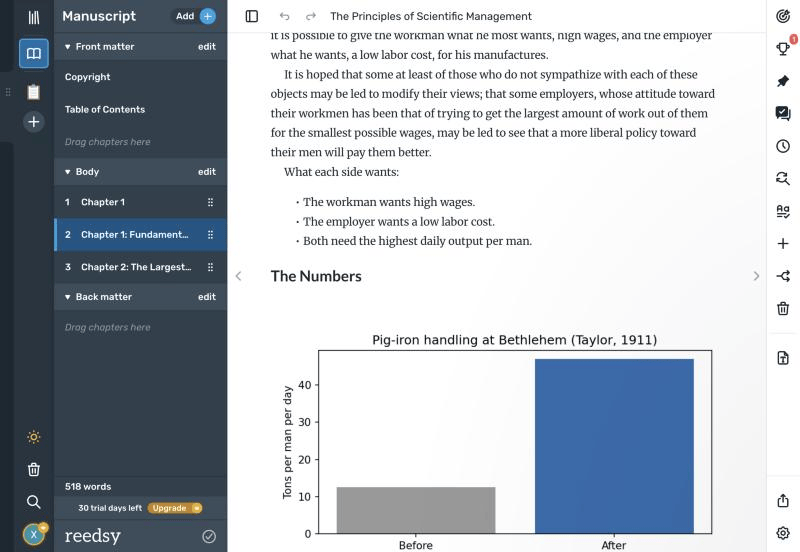
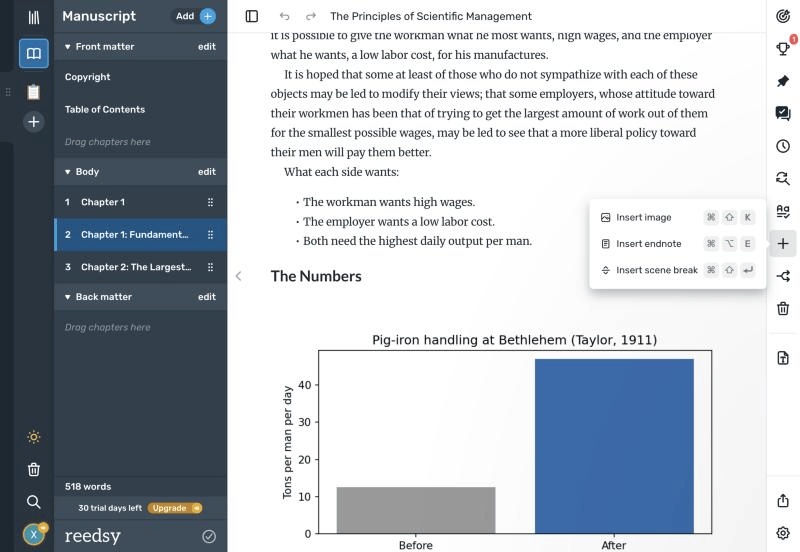
The table is the loss that matters. Reedsy's insert menu offers three things: an image, an endnote, and a scene break. There is no way to add a table in the editor either, so a pricing grid, a framework matrix, or a before-and-after comparison has to become a picture or a list. For a business book, that is often the page readers remember.
4. Which Templates and Trim Sizes Does Reedsy Studio Offer?
The export screen is short, which is the point. You choose a format, a template, a trim size, and three options. That is the full list:
- Formats: print-ready PDF (PDF/X-1a) or EPUB.
- Templates: Reedsy (Merriweather and Lato), Classic (Crimson), and Romance (Crimson with ornaments). For nonfiction, Reedsy is the sensible choice.
- Trim sizes: Trade 6 x 9 in, Digest 5.5 x 8.5 in, Reedsy Standard 5 x 8 in, and Pocket 4.25 x 6.87 in.
- Options: hide chapter numbers, drop caps at the start of each chapter, and endnotes at the end of the page or the end of the book.
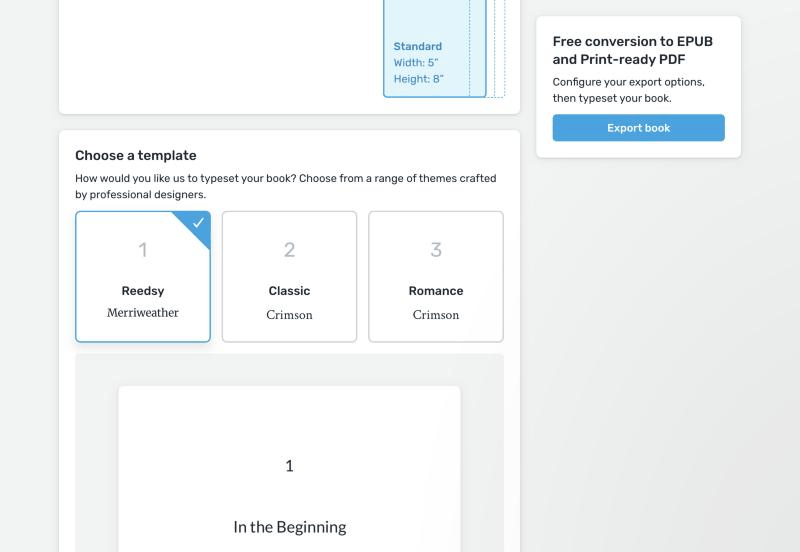
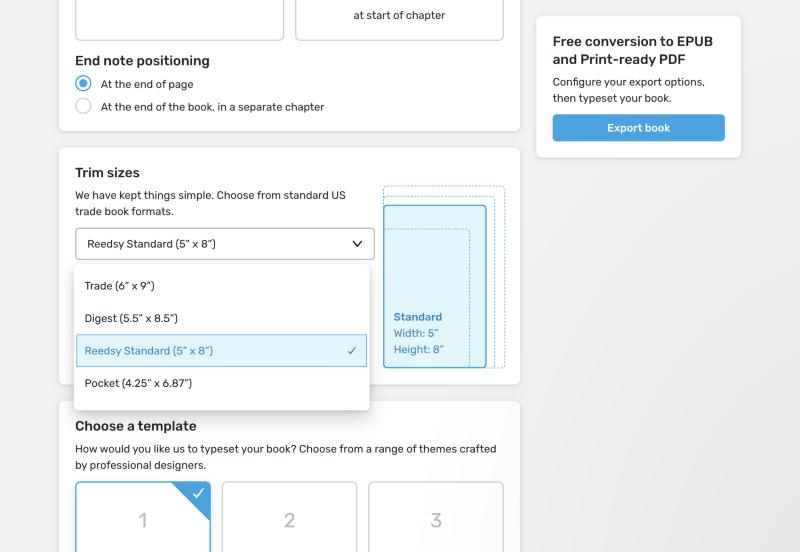
Margins, fonts, heading styles, and image sizes are fixed by the template. Reedsy's help center says images are all sized the same way and cannot be adjusted. Most business books ship at 6 x 9 or 5.5 x 8.5, and both are here. Check the dropdown before every export, though. Ours reset to the 5 x 8 default between visits, so our PDF came out at 5 x 8.
5. What Did the Exported PDF and EPUB Look Like?
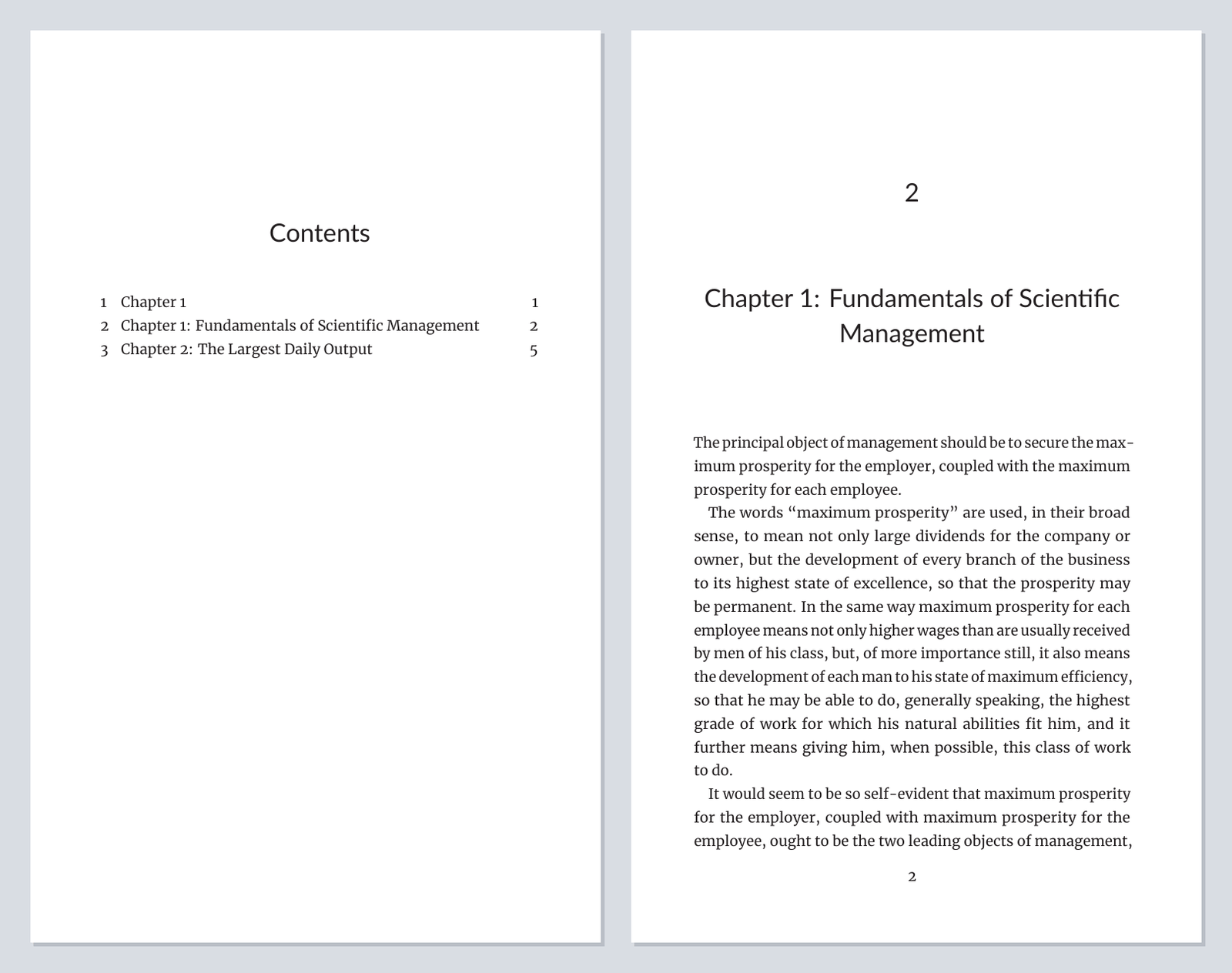
Both exports were ready in about a minute, as ZIP downloads. The PDF download held two files, a standard PDF and a PDF/X print-ready version, each 10 pages, with Merriweather and Lato fully embedded. The body text is well set: even spacing, sensible hyphenation, running heads, and page numbers in the right places. For plain prose, it looks professional.
The problems from import followed the book into print. The table of contents lists the stray untitled chapter first, then "2 Chapter 1: Fundamentals of Scientific Management", so the reader sees two numbers for one chapter. Two of the three chapters opened on a right-hand page; the Fundamentals chapter opened on a left-hand page. The table appears nowhere in either file.
Reedsy also writes your copyright page for you from a short form: pen name, edition, ISBNs by format, publisher, and a set of legal clauses. Our export added one more line to that page: "This book was professionally typeset on Reedsy. Find out more at reedsy.com." The copyright form has no option to remove it.
The EPUB is 1.3 MB for 518 words, because it embeds ten font files. KDP accepts EPUB for Kindle ebooks, and our Kindle Create review explains why file weight matters for delivery costs on the 70% royalty option.
6. Where Does Reedsy Studio Stop?
Reedsy Studio is honest about being simple. The limits below come from the test and from Reedsy's own help pages.
- No tables, and little layout control. Three templates, fixed margins, and one image size. Tables, callout boxes, worksheets, and side-by-side comparisons do not survive.
- No cover or spine tool. You upload a finished cover image (Reedsy asks for a 1:1.6 ratio and at least 2,500 px on the long side). There is no cover design, no full print wrap, and no spine width calculation.
- Cleanup is your job. Heading levels, stray chapters, and double numbering have to be fixed by hand after import, and the table of contents only looks right once they are.
- The next step is a sale. Hire a professional sits in the top bar, the exports page promotes printing through Blurb, and the paid add-ons appear on every screen. None of it is pushy, but the free formatter feeds the marketplace.
There is a bigger point behind the list. Reedsy Studio assumes the manuscript already exists. Most founders and consultants reading a formatter review are one stage earlier: the ideas live in LinkedIn posts, client notes, and podcast transcripts, and the formatting question comes months later, if the book gets finished at all.
7. Reedsy Studio vs Atticus, Vellum, Kindle Create, and Built&Written
We score book tools on the KDP-Ready Stack Test: Planning, Production, Packaging, and Publishing. Competitor prices were checked on their own sites on September 28, 2026. For the full two-way comparison, see Reedsy vs Atticus.
| Reedsy Studio | Atticus | Vellum | Kindle Create | Built&Written | |
|---|---|---|---|---|---|
| Planning | 1 Board free, more on Outline add-on | Basic, in the editor | No | No | Outline built from your material |
| Production | You write every word | You write every word | No writing tools | No writing tools | Drafts the book from posts, notes, transcripts in your Voice DNA |
| Packaging | 3 templates, 4 trims, no tables | Custom themes, full-page images | Polished templates, strong print output | 4 themes, fixed print margins | KDP-safe margins, chapters on right-hand pages, widow and orphan control, covers |
| Publishing | Print PDF, EPUB | Print PDF, EPUB | Print PDF, EPUB | .kpf for Amazon only | KDP-ready PDF, ePub, DOCX |
| Runs on | Any browser | Windows, Mac, Linux, Chromebook | Mac only (macOS 13+) | Windows, Mac | Any browser |
| Price | Free (add-ons $4.99 and $7.99/mo) | $147 one-time | $199.99 ebook, $249.99 print, one-time | Free | See pricing |
Reedsy Studio rows from our September 28, 2026 test. Other rows from each company's own site and our reviews.
Against its paid rivals, Reedsy wins on price and convenience. Atticus gives you far more control over themes and images for a one-time $147, and Vellum still produces the most polished interiors if you own a Mac. Kindle Create is free too, but it only outputs files for Amazon. Our book formatting software guide covers all five in more depth.
8. Who Should Use Reedsy Studio, and Who Should Not?
Reedsy Studio is better than Built&Written at one thing: typesetting a finished, text-only manuscript for nothing. If that is your situation, use it. Here is how the choice breaks down:
- Pick Reedsy Studio if your manuscript is finished, it is prose without tables or worksheets, and you want a clean PDF and EPUB at no cost.
- Pick Atticus if you need more layout control, work on Windows, and would rather pay once than subscribe.
- Pick Vellum if you own a Mac and interior polish matters more than price.
- Pick Kindle Create if the book is Kindle-only and you will never sell it anywhere else.
- Pick Built&Written if your book still lives in posts, notes, or transcripts. It turns that material into a structured nonfiction draft that sounds like you, then exports the KDP-ready PDF, ePub, and DOCX from the same project.
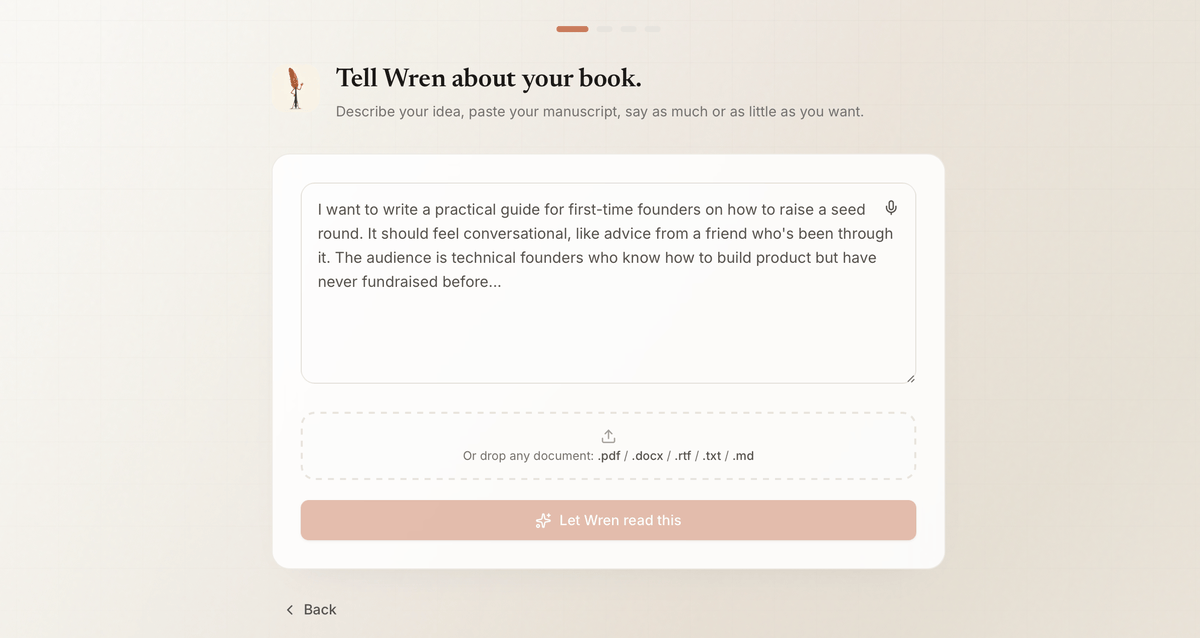
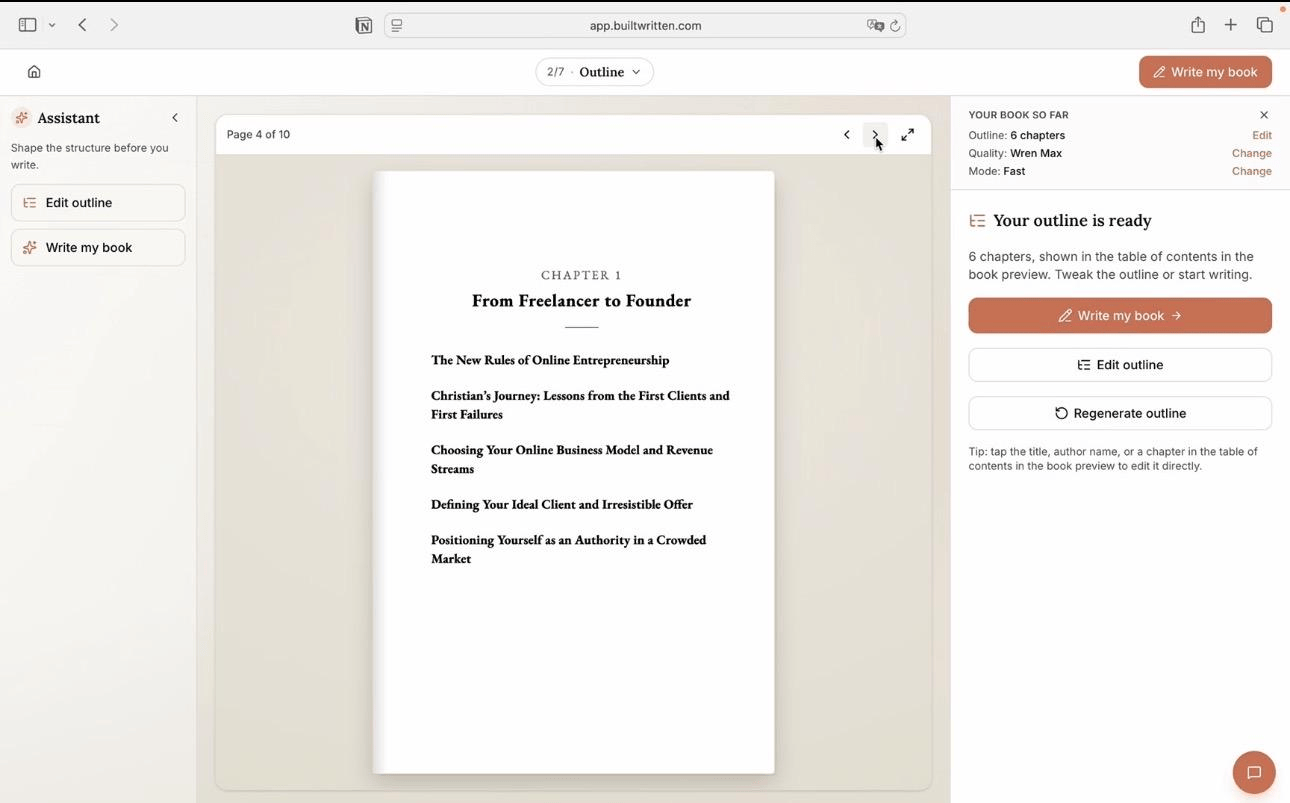
The path looks like this: upload your material, review the chapter outline Built&Written builds from it, edit the draft, and download the finished files. Before upload, check your cover with the free KDP cover validator and get your spine width from the spine width calculator, two steps Reedsy Studio leaves to you.
Final thoughts
Reedsy Studio is free, and for a finished manuscript of plain prose, the free version is enough. You give up tables, layout control, a cover tool, and an hour of cleanup after import. Know that before you commit a nonfiction book to it.
If the harder part is getting from scattered material to a finished manuscript, start there. See how Built&Written works, or read what Voice DNA does to keep the draft in your own voice.
Frequently asked questions
Yes. The free Basic plan includes the editor, manuscript import, and export to print-ready PDF and EPUB. The paid add-ons, Craft at $4.99 a month and Outline at $7.99 a month, add writing stats and planning tools, not formatting features.
For a finished, text-only manuscript, yes: the typesetting is clean and costs nothing. For nonfiction with tables, worksheets, or complex layouts, it falls short. In our test the table was dropped on import and could not be recreated in the editor.
It is the same product under a new name. Reedsy renamed the Reedsy Book Editor to Reedsy Studio and added planning Boards, writing goals, and paid add-ons on top of the free formatter.
Reedsy Studio is free and runs in a browser with three templates. Atticus costs $147 once and gives you custom themes and more control over images. Choose Reedsy for a simple prose book, Atticus for a book that needs its own look. Our Reedsy vs Atticus comparison goes deeper.
Yes. It exports a print-ready PDF (PDF/X-1a) for KDP paperbacks and an EPUB for Kindle ebooks, in four standard trim sizes. You still need a cover and spine from elsewhere, and you should check the trim size before each export.
No. In our test a table in the Word file was removed on import, and the editor's insert menu offers only images, endnotes, and scene breaks. Tables have to be rebuilt as images or lists.
Sources & References
About the author

Khrystyna Balushka
More in Book Formatting
Ready to write your book?
Turn your expertise into a professional book with Built&Written.