

Kindle's New AI Features and What They Mean for Your Book
What is Built&Written? Built&Written is a platform for writing nonfiction books and preparing them for publishing. Its AI writes a book from material you already have, like notes, posts and talk transcripts, in your voice. It also formats a book you've already written without changing a word. You get a print PDF and files for KDP (Kindle Direct Publishing, Amazon's self-publishing service) and publish the book yourself.
Key takeaways
- Does Kindle have AI? Yes, five features. Ask this Book, Recaps and Story So Far explain books to readers. Kindle Translate and virtual voice audiobooks make new editions of it. Built&Written gives you the book and the files they start from.
- Where does Ask this Book work? In the Kindle app for iPhone in the US, and since November 2026 on some new Kindle e-readers.
- Which ones do you choose? Translation and AI narration. Since October 22, 2026, virtual voice audiobooks join Kindle+, Amazon's reading subscription. That happens when the ebook is in KDP Select, Amazon's 90-day exclusive program.
- What does Built&Written add? An EPUB for Kindle on Entrepreneur and up, and an Amazon description you edit before you upload.
Which Kindle AI features are live now?
Kindle AI is now five features. Three help readers understand a book. Two help authors make new versions of it. Most of them work in the US first.
| Feature | What it does | Where it works | Who decides |
|---|---|---|---|
| Ask this Book | Answers a reader's questions about the book, without spoilers past the reader's page | Kindle app for iPhone and iPad in the US; some 2026 Kindle e-readers since November 2026 | Amazon |
| Recaps | Summarizes the last book a reader finished in a series | Kindle devices, the iPhone app and some series pages on Amazon.com, US | Amazon |
| Story So Far | Summarizes the current book up to where the reader stopped | Kindle devices and the iPhone app, US, for popular fiction | Amazon |
| Kindle Translate | Translates your ebook with AI | KDP, invite-only beta | You |
| Audiobooks with virtual voice | Turns your ebook into an audiobook read by a computer voice | KDP, beta, US | You |
Amazon's own feature page lists the first three. KDP's help pages cover Kindle Translate and virtual voice. Our test of Amazon's own AI tools for authors covers the writing assistant as well.
The reader features answer from your text. Ask this Book works on best-selling English-language ebooks the reader bought or borrowed. The reader can also ask about the whole book, past the page they're on. So whatever your chapters say is what Kindle's AI repeats.
Amazon's page, last updated July 2, 2026, still lists only the Kindle app for iPhone. On November 2, 2026, TechRadar reported Ask this Book arriving on the Kindle Paperwhite and Kindle Colorsoft 2026 models through a software update. Amazon hasn't confirmed which devices get it.
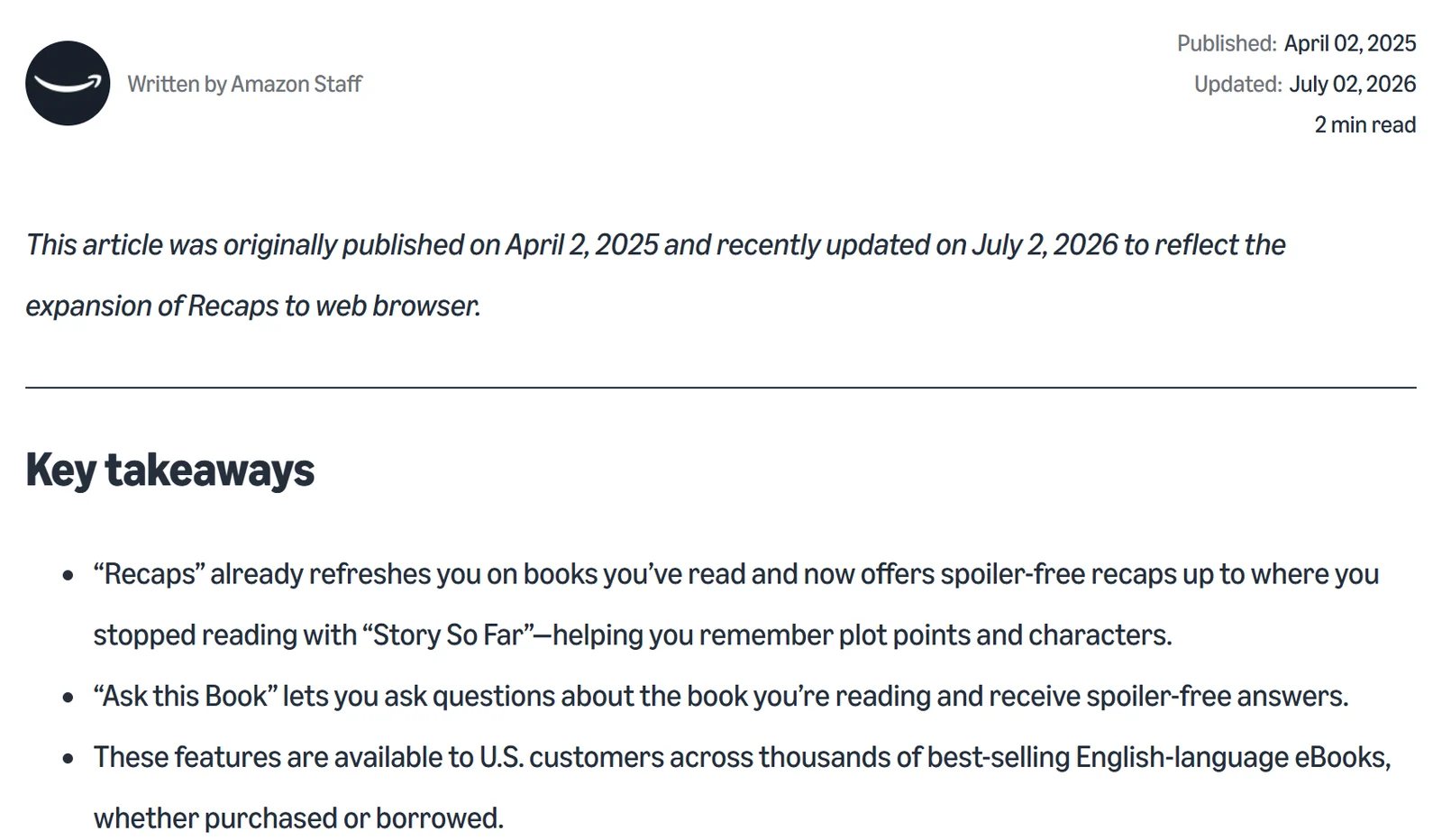
Text in the image: Written by Amazon Staff. Published: April 02, 2025. Updated: July 02, 2026. 2 min read. This article was originally published on April 2, 2025 and recently updated on July 2, 2026 to reflect the expansion of Recaps to web browser. Key takeaways. "Recaps" already refreshes you on books you've read and now offers spoiler-free recaps up to where you stopped reading with "Story So Far", helping you remember plot points and characters. "Ask this Book" lets you ask questions about the book you're reading and receive spoiler-free answers. These features are available to U.S. customers across thousands of best-selling English-language eBooks, whether purchased or borrowed.
Can authors opt out of Ask this Book?
No. An Amazon spokesperson told the trade newsletter Publishers Lunch in December 2025: "To ensure a consistent reading experience, the feature is always on, and there is no option for authors or publishers to opt titles out." Slashdot carried the statement on December 12, 2025.
Recaps work the same way. KDP's Recaps help page says there is "no option to enroll or unenroll". You can't write or edit your own recap either.
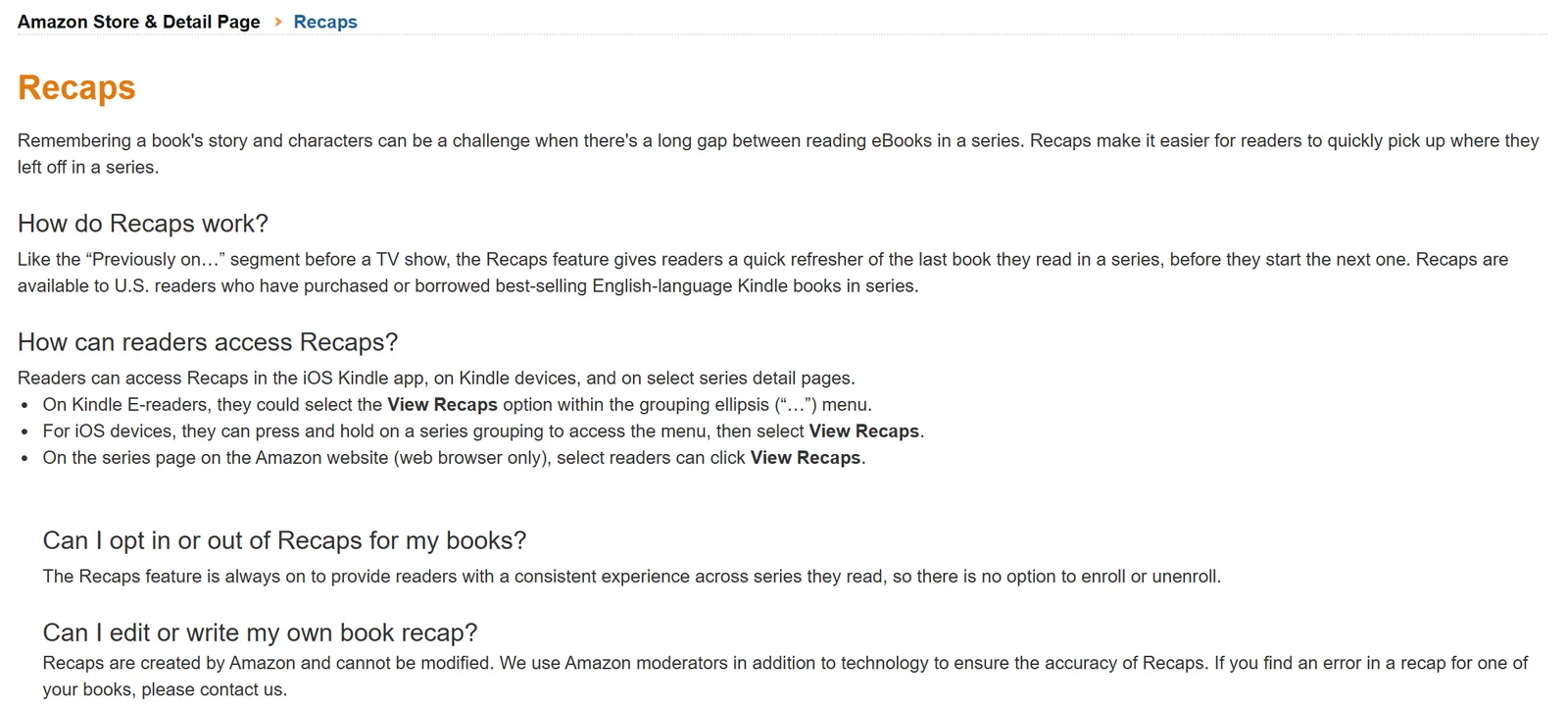
Text in the image: Amazon Store & Detail Page. Recaps. How do Recaps work? Recaps are available to U.S. readers who have purchased or borrowed best-selling English-language Kindle books in series. How can readers access Recaps? In the iOS Kindle app, on Kindle devices, and on select series detail pages. Can I opt in or out of Recaps for my books? The Recaps feature is always on to provide readers with a consistent experience across series they read, so there is no option to enroll or unenroll. Can I edit or write my own book recap? Recaps are created by Amazon and cannot be modified. We use Amazon moderators in addition to technology to ensure the accuracy of Recaps. If you find an error in a recap for one of your books, please contact us.
What Amazon says in its defense:
- Answers are only for readers who bought or borrowed the book.
- Answers can't be shared or copied.
- The book's text is used as a prompt and isn't kept or used for training. That is Amazon's position as reported in the Authors Guild statement of December 23, 2025.
The Authors Guild disagrees. It says features like this should be licensed and paid for, and it is examining whether Ask this Book infringes authors' rights.
What you can do today is small. If a recap gets your book wrong, KDP asks you to contact them, and it uses human moderators to check recaps. Your only real exit from Ask this Book is not selling the ebook on Kindle at all, which means giving up Kindle sales.
How Built&Written gets your book ready for Kindle
Kindle's AI answers from your text. So the best help you can give a reader is a book that says exactly what you mean. Built&Written writes from your own notes and posts. You read and edit every chapter before you download the files.
| Kindle step | With Built&Written | By hand |
|---|---|---|
| The text Kindle's AI reads | Written from your material in your voice, learned by Voice DNA from a few pages of your writing; you edit any chapter by hand | Drafted and checked chapter by chapter |
| The Kindle file | EPUB on Entrepreneur and up, plus a print PDF and a KDP ZIP | Formatting software or a paid formatter |
| The Amazon page | Description, 7 keywords and 2 categories drafted on Author and up | Description and keywords written by hand |
| A second language | Any of 30 languages for a new book written from your material | A translator, or Kindle Translate if you're invited |
| KDP Select, translation, narration | You upload the files and pick the programs | Your call |
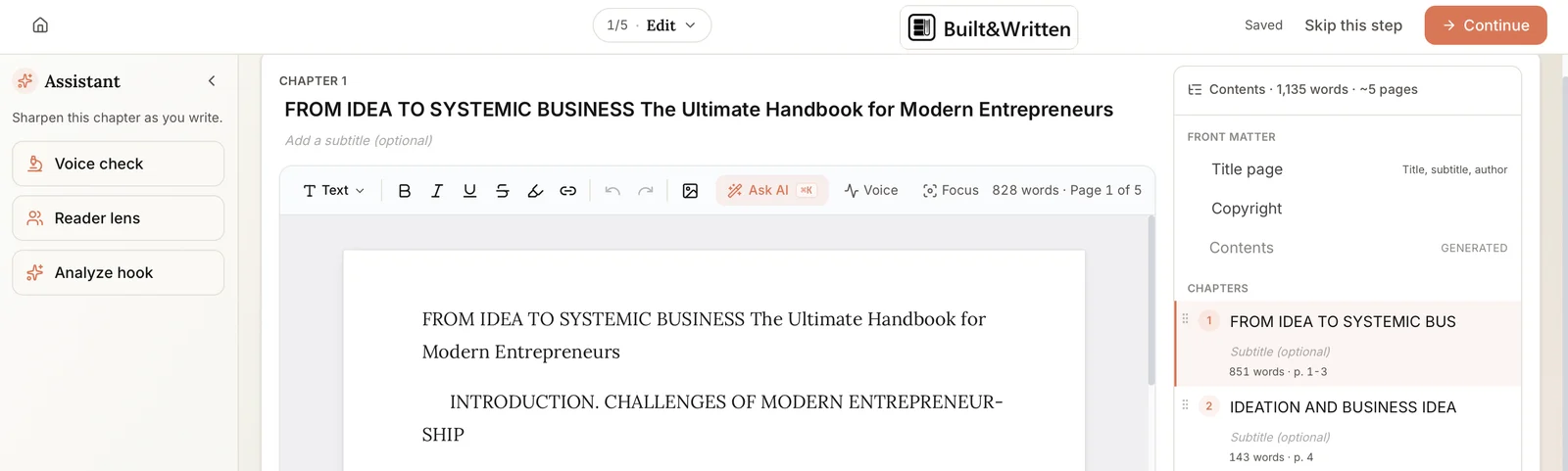
Text in the image: Edit. Built&Written. Saved. Skip this step. Continue. Assistant. Voice check. Reader lens. Analyze hook. Chapter 1. From Idea to Systemic Business: The Ultimate Handbook for Modern Entrepreneurs. Ask AI. Voice. Focus. 828 words. Page 1 of 5. Contents. 1,135 words. About 5 pages. Front matter: Title page, Copyright, Contents (generated). Chapters: 1, From Idea to Systemic Business, 851 words. 2, Ideation and Business Idea, 143 words.
EPUB is the standard ebook file format. KDP turns it into your Kindle ebook, so every Kindle AI feature starts from it. Check it in Kindle Previewer before you upload. Built&Written doesn't translate a finished book or make audiobooks, so those two choices happen on your KDP Bookshelf after the ebook is live.
Do Kindle AI recaps work for nonfiction books?
Mostly not yet. Both features are built for stories.
- Kindle Recaps cover "best-selling English-language Kindle books in series", according to KDP. A nonfiction series can qualify, but only once its books sell well.
- Kindle Story So Far covers "thousands of popular fiction titles", in Amazon's words. Nonfiction isn't on that list.
- Ask this Book has no genre limit, but it covers best-selling English-language titles. A business book that sells well can get questions in the US Kindle app for iPhone.
So for most nonfiction authors, Ask this Book is the reader feature that matters. A reader stuck on your framework in chapter 4 can ask Kindle what it means. The answer comes from your own words, so clear definitions in the chapter give the AI less room to guess.
What Kindle Translate and Kindle+ mean for your book
These two features are the ones you choose. Both start from your live ebook.
Kindle Translate
Kindle Translate is a free AI translation service inside KDP. It translates between English and Spanish, German, French, Italian and Portuguese. It's still an invite-only beta: if your ebook is eligible, a "Translate your eBook" option appears on your Bookshelf. You can preview a translation, but you can't edit its text directly. Our post on Kindle Translate covers the setup.
Kindle+ and KDP virtual voice audiobooks
On October 22, 2026, KDP renamed Kindle Unlimited to Kindle+ and added audiobooks to it. Kindle+ is Amazon's reading subscription. KDP Select is the 90-day program that puts your ebook in it.
The change for you:
- Made an audiobook with virtual voice? If its ebook is in KDP Select, the audiobook is now in Kindle+ and the Audible Plus catalog. KDP says "no action is required from you".
- Listening is paid by page from the KDP Select Global Fund, the same way reading is. A page counts once, whether the subscriber reads it or hears it.
- Audiobooks in Kindle+ reach US listeners only for now. Authors in any country can enroll.
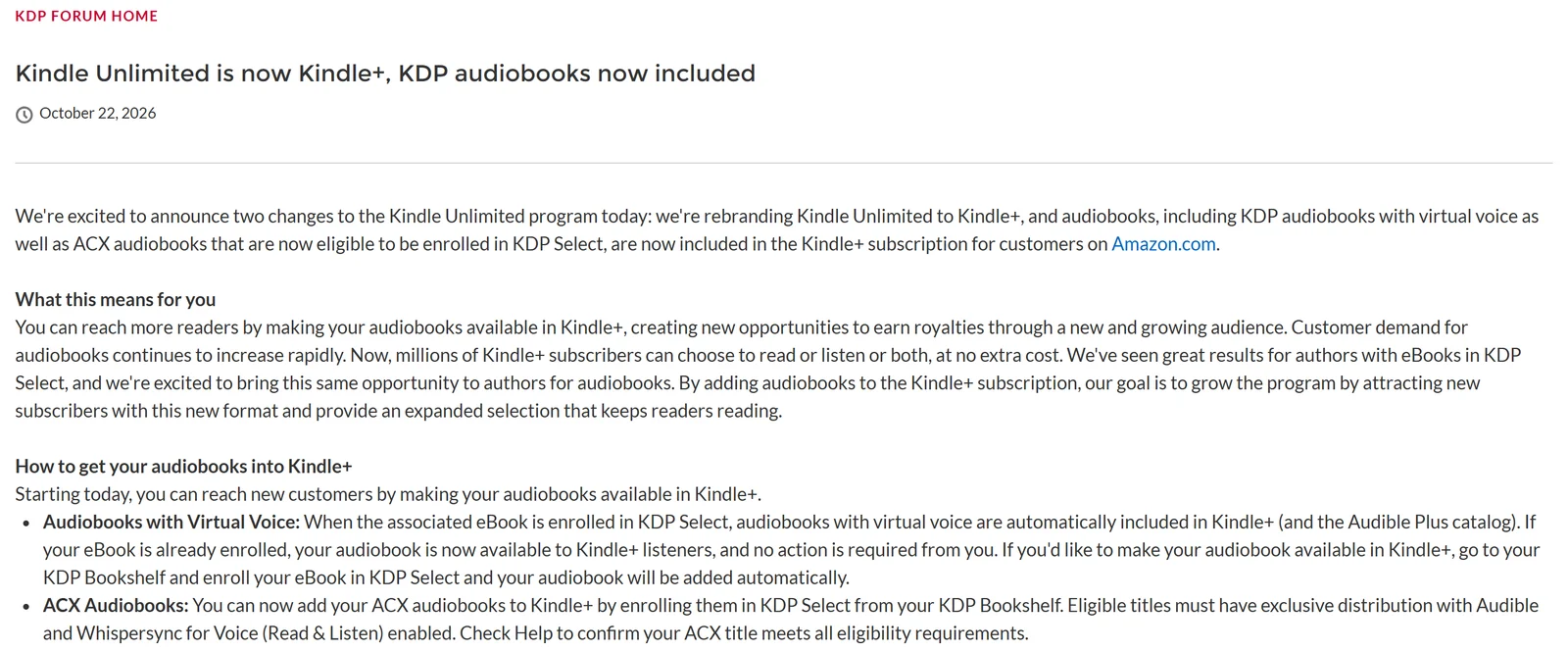
Text in the image: Kindle Unlimited is now Kindle+, KDP audiobooks now included. October 22, 2026. We're rebranding Kindle Unlimited to Kindle+, and audiobooks, including KDP audiobooks with virtual voice as well as ACX audiobooks that are now eligible to be enrolled in KDP Select, are now included in the Kindle+ subscription for customers on Amazon.com. How to get your audiobooks into Kindle+. Audiobooks with Virtual Voice: When the associated eBook is enrolled in KDP Select, audiobooks with virtual voice are automatically included in Kindle+ (and the Audible Plus catalog). If your eBook is already enrolled, your audiobook is now available to Kindle+ listeners, and no action is required from you.
Virtual voice itself is a KDP beta for the US marketplace. According to KDP's help page, you pick from 80 voices, preview and edit the narration, and set a price between $3.99 and $14.99. Single audiobook sales pay a 40% royalty, the share of each sale that goes to you. KDP also says only 5% of all books on Amazon come out as audiobooks.
For other audio routes, see our guide to Spotify audiobooks.
What should you check before you publish on Kindle?
Five checks, in the order you'll meet them:
- Every fact and name in the book. Ask this Book explains your chapters to readers. A wrong number in the text becomes a wrong answer on Kindle.
- The AI question on KDP. KDP asks whether your book contains AI-generated content. Our post on disclosing AI on KDP explains what counts.
- The KDP Select decision. It keeps the ebook exclusive to Amazon for each 90-day term, in return for Kindle+ readers and listeners.
- Translation. Look for "Translate your eBook" on your Bookshelf after the ebook is live. If it isn't there, you're not in the beta yet, or the ebook isn't eligible.
- The Kindle file itself. Send the EPUB through Kindle Previewer. If you're unsure about the file type, read our note on whether Kindle can read EPUB.
For the wider rules on AI books, see our guide to AI book publishing.
Final thoughts
Built&Written gives you a book written from your own material and the files to publish it. The text Kindle's AI explains is text you've checked. Get the facts right before upload, then decide on KDP Select, translation and narration one at a time. See how it works.
- Your own words in every chapter. Built&Written writes from your notes, posts and transcripts, so the answers Kindle gives come from your ideas.
- A Kindle file you can check. The EPUB comes on Entrepreneur and up, ready for Kindle Previewer before you upload.
- An Amazon page drafted for you. The listing co-pilot writes your description, 7 keywords and 2 categories on Author and up.
- Every program choice stays yours. You upload the files, so KDP Select, translation and narration are your decisions. Plans are on the pricing page.
Frequently asked questions
Yes. Kindle AI includes Ask this Book, Recaps and Story So Far for readers, plus Kindle Translate and virtual voice audiobooks for authors on KDP. Most of them work only in the US for now.
No. Ask this Book and Recaps are always on, and authors can't opt titles out. The only way to keep your ebook out of them is not to sell it on Kindle.
Yes, if it's a best-seller. Amazon doesn't limit it by genre, but it covers best-selling English-language ebooks in the Kindle app for iPhone in the US. Story So Far is the feature limited to fiction.
Only if you create one. KDP doesn't narrate your ebook on its own, and the narration stays your choice.
Sources & References
- Amazon: How to make reading easier and more enjoyable with these Kindle features (updated July 2, 2026)
- KDP Help: Recaps
- Slashdot: New Kindle Feature Uses AI To Answer Questions About Books, and Authors Can't Opt Out (December 12, 2025)
- Authors Guild: Concerns About Kindle's New Ask This Book AI Feature (December 23, 2025)
- KDP Help: Beta: Kindle Translate
- KDP Community: Kindle Unlimited is now Kindle+, KDP audiobooks now included (October 22, 2026)
- KDP Help: Learn more about audiobooks with virtual voice
- KDP Help: KDP Select
- Amazon: Kindle+ subscription
- Amazon Kindle: Reading App, App Store
About the author

Michael Pavlovskyi
More in KDP Publishing
Ready to write your book?
Turn your expertise into a professional book with Built&Written.