
In November 2024, Anthropic released the Model Context Protocol, an open standard for connecting AI apps to tools and data. On May 1, 2025, it took the next step. Claude could now connect to apps and tools on the web, not just to programs running on your own computer.
For anyone writing a book in Claude, that changed the job. Claude no longer has to hold your whole manuscript in one chat. It can work on a book that lives somewhere else, and come back to it tomorrow.
So if you already talk to Claude every day and you want a whole nonfiction book out of it, this is the setup guide. It takes about two minutes, it works on the Claude Free plan, and you never open a terminal.
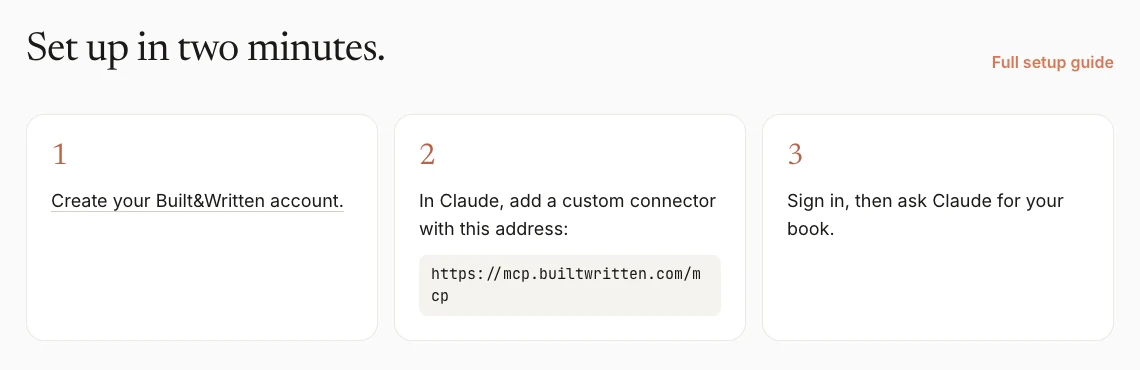
Skip to the first prompts to try
What is the Built&Written connector for Claude?
A connector is a link between Claude and another service, so Claude can read from it and act in it. The Built&Written connector lets Claude plan, write, edit and package a book that is saved in your Built&Written account.
Anthropic calls these custom connectors using remote MCP. MCP stands for Model Context Protocol. A remote MCP server is a service on the internet that tells Claude which actions it may take. Ours lives at one address: https://mcp.builtwritten.com/mcp.
The split of work is simple. You talk to Claude the way you already do. Claude calls Built&Written to do the book work. Wren, our writing AI, writes the chapters in your voice.
| Where it happens | What happens there |
|---|---|
| Your Claude chat | You describe the book, answer questions, ask for changes |
| Built&Written | The outline, chapters, cover, checks and files are built and saved |
| Our website editor | You read every page, fix any line by hand, download the files |
This guide is for people who already write in Claude. If you would rather keep everything inside Claude with no connector, our guide to Claude Projects for writing a book shows that route step by step.
What you need before you start
You need three things: a Claude account, a Built&Written account, and a Claude plan that allows a custom connector.
Every Claude plan allows one. Anthropic's help center lists custom connectors on Free, Pro, Max, Ultra, Team and Enterprise plans. Free users are limited to one custom connector (Get started with custom connectors using remote MCP). So on Free, Built&Written can be your one.
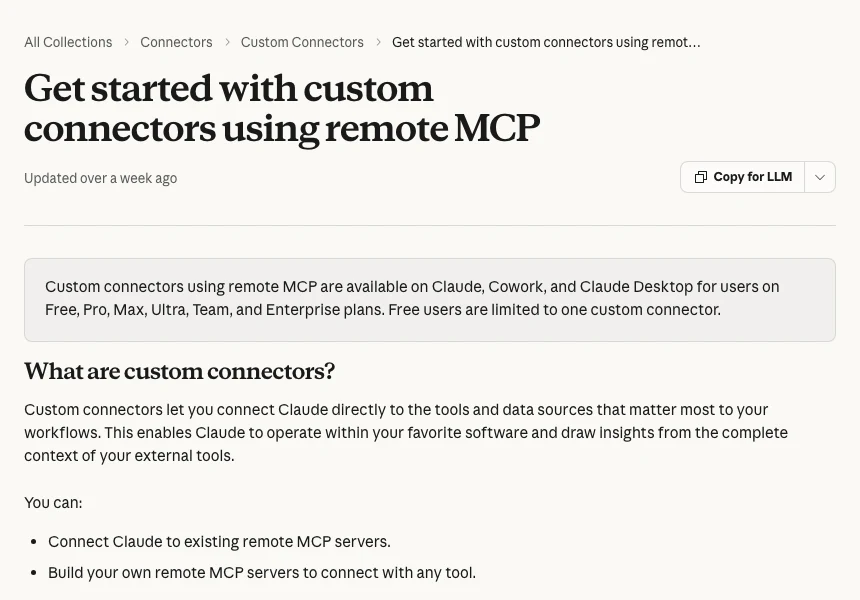
The connector works on claude.ai, in Claude Desktop and in Cowork. Anthropic adds that Claude connects to the server from its own cloud, not from your device. That is true on every Claude app, the mobile apps included. It is also why there is nothing to install.
On a Team or Enterprise plan there is one extra step. An Owner adds the connector for the whole organization first. Then each member connects to it from their own Connectors page.
How to add Built&Written to Claude in five steps
Create your Built&Written account first, if you do not have one yet. Then do the rest inside Claude.
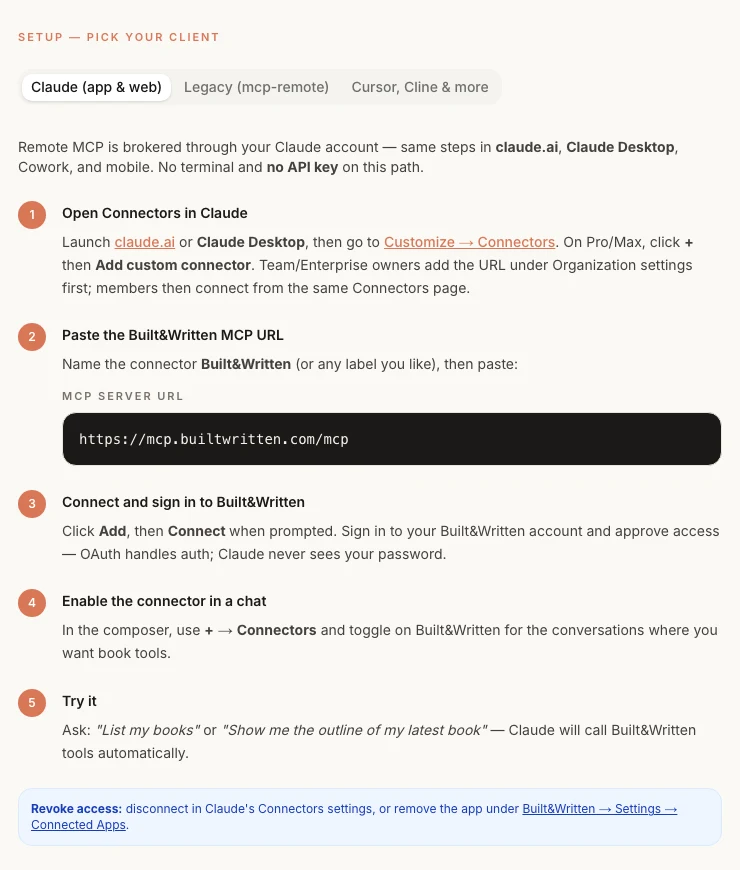
Step 1. Open Connectors in Claude
Open claude.ai or Claude Desktop and go to Customize, then Connectors. Click "+ Add," then "Add custom connector." Those are the labels in Anthropic's help article.
Step 2. Paste the Built&Written address
Name the connector "Built&Written," or any label you will recognize. Paste the server address https://mcp.builtwritten.com/mcp and click "Continue." Copy it exactly as written.
Step 3. Connect and sign in
Click "Add," then "Connect" when Claude asks. A Built&Written sign-in page opens. Sign in and approve access. The sign-in happens on our side, so Claude never sees your password, and you need no API key on this path.
Step 4. Turn the connector on in a chat
Connectors are switched on chat by chat. In the message box, click the "+" button, then "Connectors," and turn on Built&Written for the chat where you work on your book.
Step 5. Ask for something small first
Type "List my books." If Claude answers with your books, or tells you there are none yet, the connection works. Now you can ask for the real thing.
What can you ask Claude to do with your book?
Once connected, you ask in plain words and Claude picks the right Built&Written action. Our MCP page lists every action by name, and each one is either a read or a write.
Voice DNA is our name for the profile of how you write: your sentence length, your words, your rhythm. Put your strongest pieces first, because the profile is built from the first pages you give it. Our explainer on what Voice DNA is covers it in more detail.
Here are prompts that work as a first session. Each one is an example written for this guide.
The last prompt matters most. AI can add details you never gave it. Our guide to writing nonfiction with AI without making up facts shows how to catch them.
Why the book lives in your account, not in the chat
A Claude chat is a conversation. When it gets long, or when you start a new one, the earlier pages fall out of view. That is how chapter 7 ends up contradicting chapter 1.
With the connector, the book is not in the chat at all. It is saved in your Built&Written account, with its outline, chapters, cover and voice profile. Every chat reads from the same saved book.
So you can start a fresh chat for each chapter and lose nothing. Ask "Show me the outline of my latest book," and Claude reads it from your account, not from memory.
It also means the book opens outside Claude. Every book Claude writes this way opens in the editor on our website. You can read it page by page, change any sentence yourself, and download the files there.
Our page comparing a plain Claude chat with Built&Written goes through the gaps a chat leaves: no saved manuscript, no cover file, no print interior.
What each Built&Written plan unlocks in Claude
The connector uses the same plans as our website. Your Claude plan decides whether you can add the connector. Your Built&Written plan decides what Claude may do once it is added.
Our MCP page splits every action into read and write. Reading your books works on every Built&Written plan, Free included. Changing a book from Claude needs a paid plan.
| Built&Written plan | What Claude can do with it |
|---|---|
| Free | Read your books, outlines and chapters. Writing and changes need a paid plan. |
| Author | Work on a book you already wrote: import, KDP formatting, a print-ready PDF and an AI cover. Wren does not write the book on this plan. |
| Entrepreneur | Claude writes your book with Wren Pro in your voice. PDF, EPUB and Word files. Rewrite any chapter. |
| Authority | Everything in Entrepreneur, written with Wren Max, our best prose. |
In dollars, that is $49/month for AI-written books ($19/month for your own manuscript). Every plan comes with monthly credits for the AI, and you see what a book will cost before Wren writes it.
Approve only what you trust. Anthropic warns that custom connectors are not verified by Anthropic, so only connect to servers you trust and read each permission request. To cut the link later, disconnect in Claude's Connectors settings, or remove the app under Settings, then Connected Apps, in your Built&Written account.
What to do when something goes wrong
Most problems come from the address or from a connector that was added but not switched on. These are the fixes from our MCP page.
Claude says it could not connect. Check that the address is exactly https://mcp.builtwritten.com/mcp. Remove the connector, add it again, and click Connect.
Claude says you do not have permission to change the book. Write actions need a paid Built&Written plan. The same plan limits apply when you connect through Claude.
It works in Claude Desktop but not on claude.ai. Use the same address in both, update both apps, and reconnect.
Claude does not use Built&Written at all. Open the "+" menu in that chat and check that the connector is turned on. It is off in chats where you have not switched it on.
Where this setup stops
The connector gets you a finished book file. It does not publish the book for you. Built&Written makes the files; you upload them to Amazon KDP yourself.
Before you upload, read KDP's rules on disclosing AI, because a book Wren wrote counts as AI-generated text under KDP's definition. Then check which files an AI book creator should give you at the end, so you know what to expect in the download.
If you prefer to write every chapter yourself and use AI only to tidy it, you can skip the writing actions entirely. Bring the finished manuscript to our book formatter instead, and use Claude for the cover and the listing.
If you want Claude to write the book, the setup above is the whole job. Connect once on our Claude page, then open a chat and tell Claude what your book is about.
Sources & References
- Claude blog, Integrations announcement (May 1, 2025): https://claude.com/blog/integrations
- Claude Help Center, Get started with custom connectors using remote MCP: https://support.claude.com/en/articles/11175166-get-started-with-custom-connectors-using-remote-mcp
- Built&Written, Write a book with Claude: https://www.builtwritten.com/claude
- Built&Written, MCP setup for Claude, Cursor and Cline: https://www.builtwritten.com/mcp
- Amazon KDP, Content Guidelines: https://kdp.amazon.com/en_US/help/topic/G200672390
Frequently asked questions
Claude writes long, clear prose, but a plain chat keeps no manuscript, cover or print files, and long chats lose earlier pages from view. Connected to Built&Written, Claude works on a book saved in your account, so every chat reads the same outline and chapters. You still read and check every page yourself before you publish.
Yes. Anthropic's help center lists custom connectors on Free, Pro, Max, Ultra, Team and Enterprise plans, and limits Free users to one custom connector. On Claude Free, Built&Written can be that one. What Claude may do with your book then depends on your Built&Written plan, not your Claude plan.
No. When you click Connect, a Built&Written sign-in page opens and you approve access there. Our MCP page says sign-in is handled on our side, so Claude never sees your password, and you need no API key on the Claude path. You can revoke access later from Claude's Connectors settings or from Connected Apps in your account.
No. The Claude path needs no terminal and no API key. You paste one address into Customize, then Connectors, sign in, and switch the connector on in a chat. Developer tools such as Cursor and Cline use the same address with a token instead, and our MCP page covers that setup separately.
No. Built&Written makes the print PDF, ebook files, cover and the listing text, and you upload them to Amazon KDP yourself. KDP asks you to disclose AI-generated text, images or translations when you publish, and a book Wren wrote counts as AI-generated under KDP's definition.
Sources & References
About the author