
At Google I/O in May 2023, Google showed an experiment called Project Tailwind. It was an AI notebook that answered questions from your own documents instead of the open web. That experiment became NotebookLM.
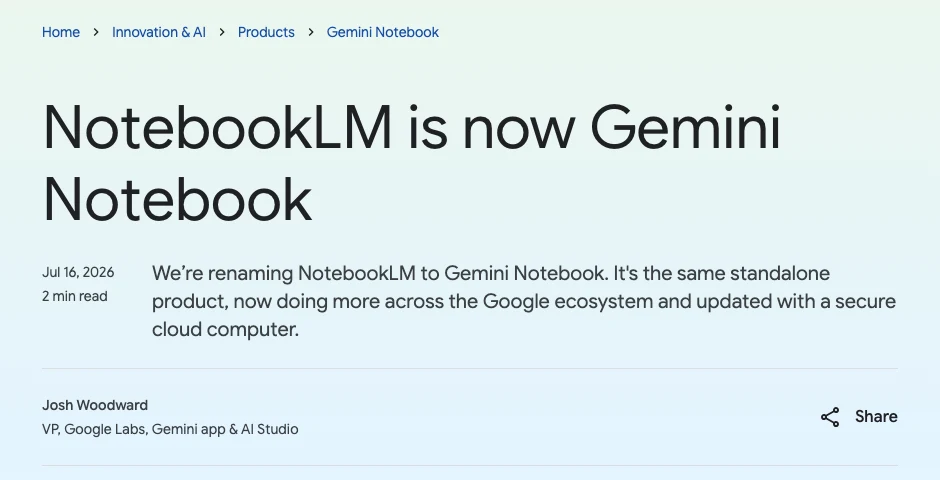
On July 16, 2026, Google renamed it. The announcement is one line long: "We're renaming NotebookLM to Gemini Notebook." Same product, new name, and Google says more than 30 million people have used it.
So if you searched "NotebookLM for writing" and landed on a page called Gemini Notebook, you are in the right place. This guide covers what it does well for a nonfiction author, where it stops, and how to use it without losing your book in a pile of AI summaries. Every feature and limit below was checked on Google's own pages on November 23, 2026.
Skip to the research-to-chapter workflow
What is NotebookLM, and what is it called now?
NotebookLM, now called Gemini Notebook, is Google's AI research notebook that answers questions only from the sources you add to it. You upload your files, and it reads them, summarizes them and cites them.
That last part is the point. Google's chat help page says chat responses "only use data from your sources." Each answer comes with citations, and those citations are direct quotes from your own files. You hover over a number and see the exact sentence it came from.
For a nonfiction author, that is a different tool from ChatGPT or the Gemini app. A general chatbot answers from everything it learned. Gemini Notebook answers from your interview transcripts, your notes and your research PDFs, and shows you where.
Two more things changed with the rename. Notebooks now also open inside the Gemini app, and Google says they are coming to AI Mode in Search. The standalone app is still there.
What can you put into a notebook?
A source is any file or link you add to a notebook. Google's sources help page lists these types:
- Google Docs, Slides and Sheets
- Word, PDF, text, Markdown, CSV and PowerPoint files
- ePub files and eligible Google Play Books ebooks (text only)
- Web URLs and the URLs of public YouTube videos
- Audio files such as MP3 and WAV
- Images, pasted text and your own notes
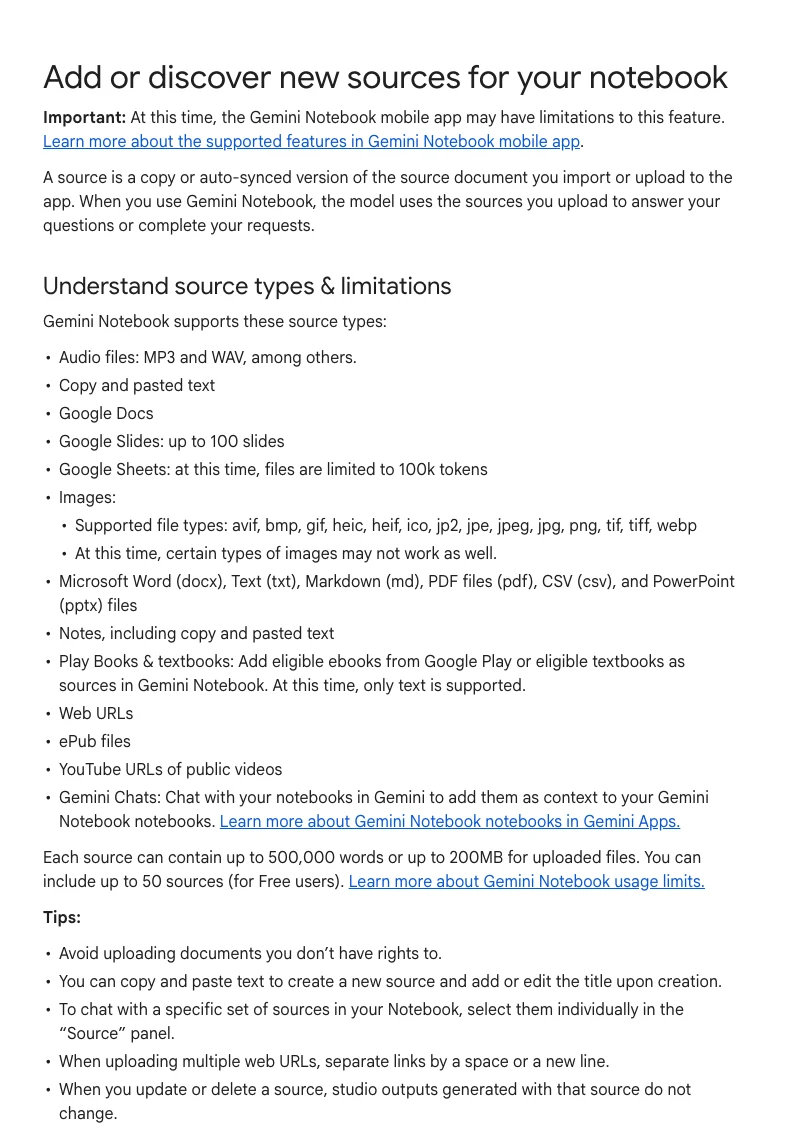
Each source can hold up to 500,000 words, or 200MB for an uploaded file. That is far more than a whole nonfiction manuscript, so size is rarely the problem.
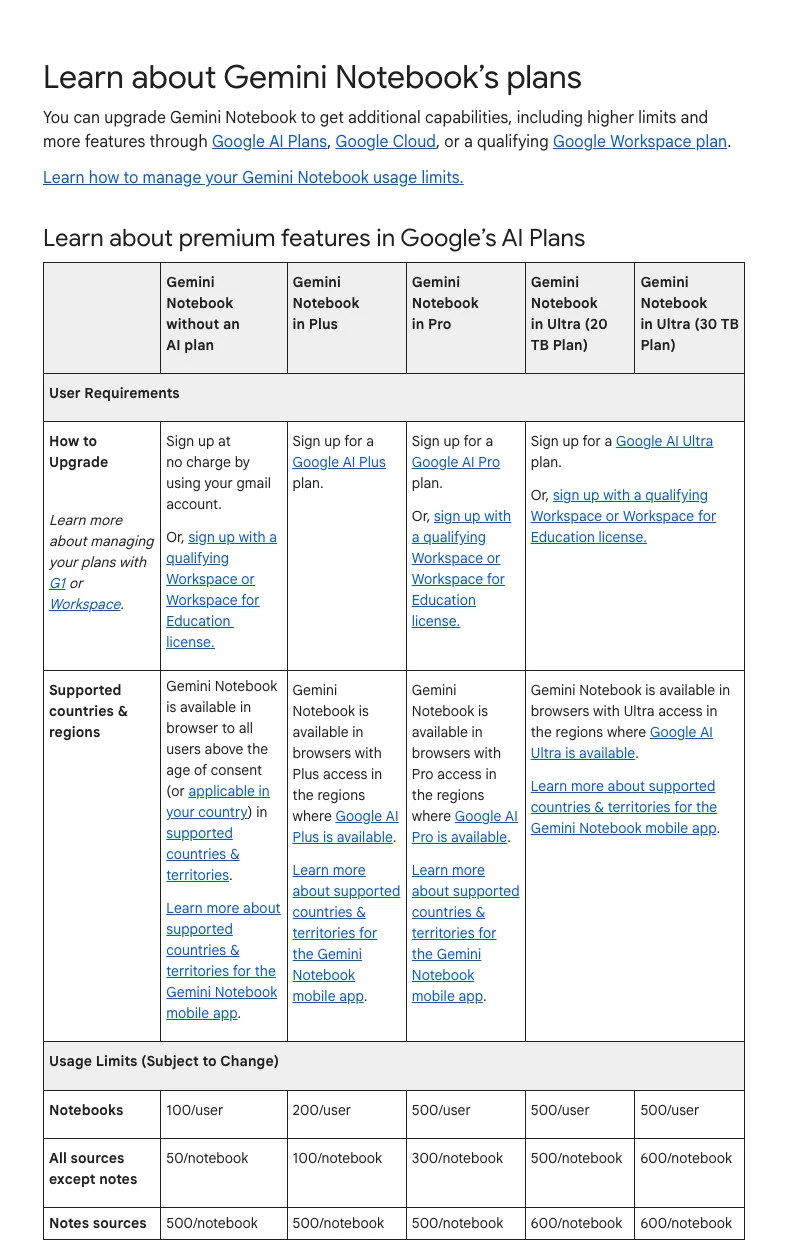
The number of sources depends on your plan. Google's plans page lists these limits, marked "subject to change":
| Plan | Notebooks | Sources per notebook (not counting notes) |
|---|---|---|
| No paid AI plan | 100 | 50 |
| Google AI Plus | 200 | 100 |
| Google AI Pro | 500 | 300 |
| Google AI Ultra | 500 | 500 or 600, by Ultra tier |
The free tier is a real working tier: 50 sources per notebook is enough for most book projects. On the Gemini subscriptions page, Google AI Plus is $4.99 a month and Google AI Pro is $19.99 a month (US prices, checked November 23, 2026).
Usage is not a fixed number of chats a day. Google's usage limits page says limits depend on how complex your requests are, refresh every 5 hours and stop at a weekly limit. Paid plans multiply them.
What is NotebookLM actually good at for a nonfiction author?
It is very good at the research half of a book. Here is where it earns its place.
Finding things in your own material. Say you have 40 interview transcripts for a book on running a family farm. Ask "Which farmers talked about selling direct to restaurants?" and you get an answer with quotes and the file each came from.
Keeping you honest about facts. Because the answers come only from your sources, it is a good check on a draft. Paste a paragraph and ask which claims your sources support. Anything without a citation is a line you still need to source. Our guide to writing a history book without invented facts explains why this matters so much in nonfiction.
Turning notes into structure. Ask it to group your sources by theme and you have the first shape of an outline. It also builds mind maps of a notebook's topics, which help you see what belongs in one chapter.
Hearing your research back. An Audio Overview is a spoken discussion of your sources. Google's Audio Overview help page lists four formats: Deep Dive, The Brief, The Critique and The Debate. You can give it a prompt to focus on one topic, and it works in more than 80 languages.
The Critique is the useful one for a writer. Google describes it as "for critical feedback" on material such as an essay. Add a draft chapter as a source and listen to two AI hosts discuss what works and what does not. Treat it as a first reader, not an editor: Google's page says Audio Overviews "may contain inaccuracies or audio glitches."
Where does NotebookLM stop?
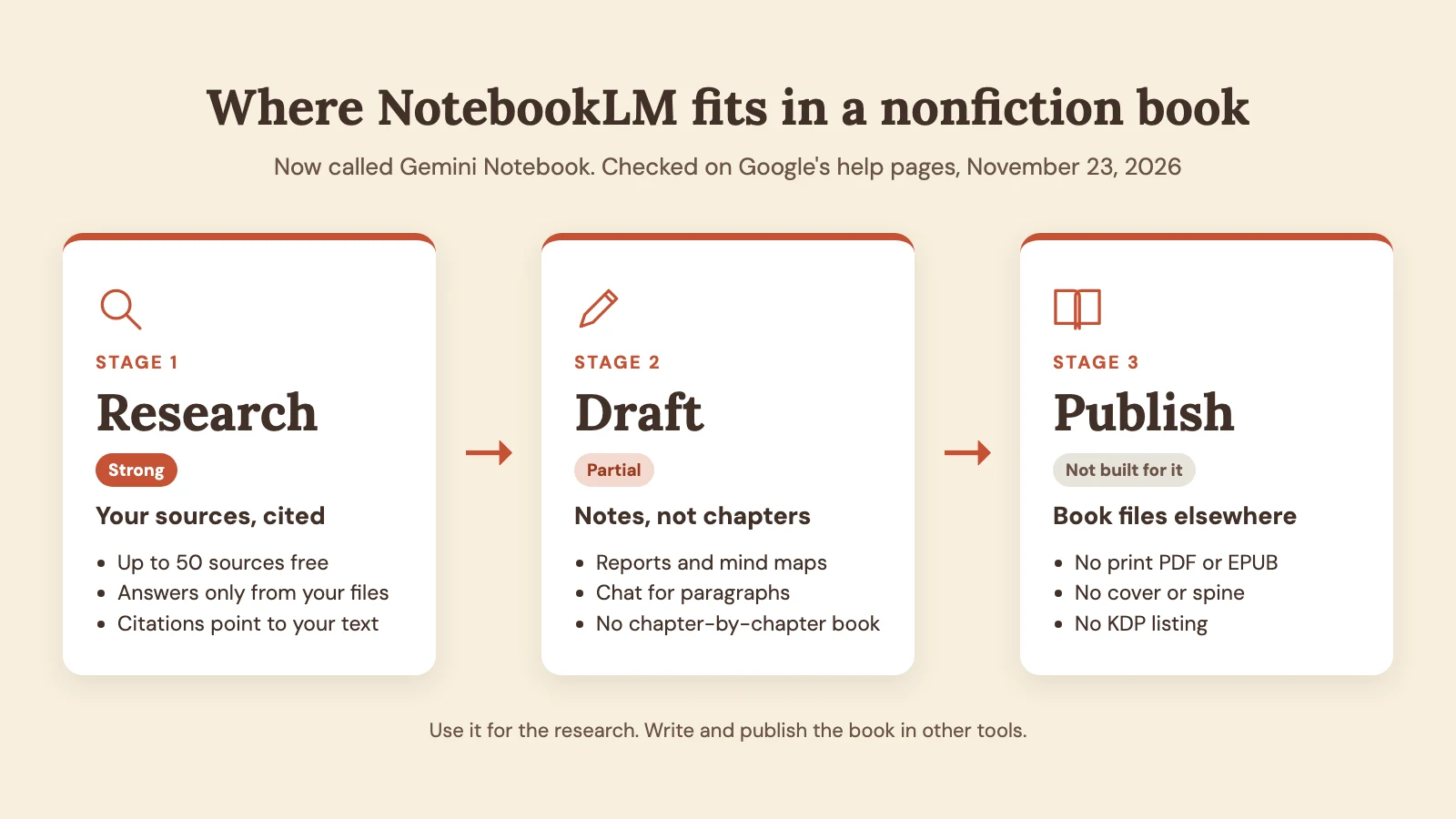
It stops at the book itself. That is not a flaw. It is a research tool, and Google calls it one: "your premier research tool," in the rename post.
It answers questions. It does not write chapters in order. Chat replies come in pieces. You can ask for a long answer, and the Studio panel turns sources into reports, slide decks and study material. None of that is a chapter-by-chapter manuscript that holds one argument from page 1 to page 200.
It says no to creative requests. The chat help page warns that creative requests may get a "can't answer" reply, because answers must come from your sources. A story told your way, an opening scene, a joke in chapter 4: those are not in your sources, so the tool resists them.
It does not know your voice. Gemini Notebook copies facts from your sources, not your sentence rhythm. Paste in your best writing and it will quote it accurately, but it will not keep writing like you. For that you need a tool built around voice, which our explainer on what Voice DNA is covers.
It makes no book files. There is no print PDF, no EPUB for Kindle, no cover with a spine sized to your page count, and no Amazon listing. Our guide on whether AI can format your book for print walks through what those files need.
Old outputs do not update. Google's sources page notes that when you update or delete a source, the studio outputs made from it do not change. If you swap in a new interview, regenerate anything that depended on the old one.
How to use NotebookLM to go from research to chapters
This workflow keeps Gemini Notebook in the job it does best and gets you to a draft you can actually write from.
Step 6 is the one most people skip, and the one that makes the notebook pay for itself. If you are still at the stage of sorting a pile of notes, our walkthrough of an AI outline generator shows the same theme-first approach.
One caution about what you upload. Only add material you have the right to use, which Google's own tips also ask. Interviews with real people, client notes and family papers deserve care. Our article on whether your manuscript is safe in an AI tool lists what to check before you upload.
NotebookLM, ChatGPT or Claude for a nonfiction book?
Each one does a different part of the job well. Here is the short version.
| Tool | Best at | Weak at |
|---|---|---|
| Gemini Notebook (NotebookLM) | Answers from your own sources, with quotes as citations | Writing long chapters in your voice |
| ChatGPT | Fast drafting and rewriting | Inventing details your notes never gave it |
| Claude Projects | Drafting chapters from files and project instructions | Formatting and publishing |
If you want to draft in Claude, our guide to Claude Projects for writing a book sets up the files and instructions that keep chapter 12 sounding like chapter 1. The common pattern for serious nonfiction: research in Gemini Notebook, draft somewhere built for drafting, check the draft back against your sources.
Turning your NotebookLM research into a finished book
Once your research is sorted, the next job is chapters, a cover and the files Amazon asks for. Gemini Notebook does not do that part.
In Built&Written, you paste your notes and fact sheets, or upload them as a .docx, .md or .txt file. Wren, our writing AI, proposes a chapter outline you can edit, then writes the chapters from your material. Our AI book generator page shows how notes become a full manuscript. Built&Written does not connect to Gemini Notebook, so you copy across the notes you keep.
Voice comes from your own writing. Paste a few pages, about 300 to 1,000 words, and Voice DNA keeps that voice across the book. Then the book formatter and cover designer produce a print PDF, an EPUB and the KDP package. You upload those to Amazon yourself.
Writing the book with AI is $49/month for AI-written books ($19/month for your own manuscript). Every plan comes with monthly credits for the AI, and you see what a book will cost before Wren writes it.
Keep the notebook, though. When the draft comes back, add it as a source and run step 6 again. A cited fact check from your own research is worth doing whichever tool wrote the words. And before you publish on Amazon, read KDP's rules on disclosing AI.
Sources & References
- Google, NotebookLM is now Gemini Notebook (July 16, 2026): https://blog.google/innovation-and-ai/products/gemini-notebook/notebooklm-gemini-notebook/
- Gemini Notebook Help, Use chat in Gemini Notebook: https://support.google.com/gemininotebook/answer/16179559?hl=en
- Gemini Notebook Help, Add or discover new sources for your notebook: https://support.google.com/gemininotebook/answer/16215270?hl=en
- Gemini Notebook Help, Learn about Gemini Notebook's plans: https://support.google.com/gemininotebook/answer/16213268?hl=en
- Gemini Notebook Help, Manage your Gemini Notebook usage limits: https://support.google.com/gemininotebook/answer/17670842?hl=en
- Gemini Notebook Help, Generate Audio Overview in Gemini Notebook: https://support.google.com/gemininotebook/answer/16212820?hl=en
- Google, Gemini subscriptions: https://gemini.google/subscriptions/
Frequently asked questions
Yes. Gemini Notebook, formerly NotebookLM, works with a regular Google account and no paid AI plan, with 100 notebooks and 50 sources per notebook. Google AI Plus ($4.99 a month) and Google AI Pro ($19.99 a month, US prices in November 2026) raise those limits and the usage allowance. Google marks all limits as subject to change.
Yes, under a new name. Google renamed NotebookLM to Gemini Notebook on July 16, 2026, and called it the same standalone product. Google's Workspace update said automatic redirects keep existing shared notebooks and links working, and that the new name and logo would roll out over several weeks.
Not reliably. Gemini Notebook is built to answer from your sources and cite them, and its chat help page warns that creative requests may get a can't-answer reply. It will quote your writing accurately, but it is not designed to keep writing new chapters that sound like you.
Google's help page offers three lengths, Shorter, Default and Longer, with Longer available only in English. The Brief format is a single speaker covering key takeaways in under two minutes. You can also add a prompt to focus the discussion on one topic or change the expertise level.
Yes. Google's rename announcement says you can already create and open notebooks in the Gemini app, synced with the standalone Gemini Notebook. Google's sources help page also lists Gemini chats as something you can add to a notebook as context.
Sources & References
- Google, NotebookLM is now Gemini Notebook
- Gemini Notebook Help, Use chat in Gemini Notebook
- Gemini Notebook Help, Add or discover new sources for your notebook
- Gemini Notebook Help, Learn about Gemini Notebook's plans
- Gemini Notebook Help, Manage your Gemini Notebook usage limits
- Gemini Notebook Help, Generate Audio Overview in Gemini Notebook
- Google, Gemini subscriptions
- Google Workspace Updates, NotebookLM is now Gemini Notebook
About the author